8 Best Apps for Truck Drivers in 2026
Looking for the best apps for truck drivers? We compare eight apps for truck routing, parking, fuel, weigh stations, logs and rewards on the road in 2026.

- Editor's choice
 Trucker Path
All in one truck stops
Starts atFreeVisit truckerpath.comFull review - Great alternative
 Trucker Guide
Weigh stations and parking
Starts atFreeVisit truckerguideapp.comFull review - Also consider
 GasBuddy
Fuel price comparison
Starts atFreeVisit gasbuddy.comFull review
TL;DR:
- Trucker Path is the most complete all in one app for stops, parking, weigh stations and fuel, with premium features behind a paid tier.
- Truck specific routing matters more than a general map app, because low bridges, weight limits and truck bans can turn a shortcut into a costly detour.
- GasBuddy, Mudflap and Fuelbook help in different ways: GasBuddy for price comparison, Mudflap for discounts, Fuelbook for truck stop prices and records.
- Motive Driver handles logs and inspections for drivers whose fleet uses Motive, while Weigh My Truck speeds up scale visits.
Quick comparison
| Tool | Best for | Starts at | Free plan? | |
|---|---|---|---|---|
| Trucker Path | All in one truck stops | Free | Yes | Visit |
| Trucker Guide | Weigh stations and parking | Free | Yes | Visit |
| GasBuddy | Fuel price comparison | Free | Yes | Visit |
 Mudflap | Fuel discounts | Free | Yes | Visit |
 Motive Driver | Logs and inspections | Free | Yes | Visit |
 Weigh My Truck | CAT Scale payments | Free | Yes | Visit |
 Hammer | Truck routing and alerts | Free | Yes | Visit |
 Pilot Flying J | Pilot and Flying J rewards | Free | Yes | Visit |
The best apps for truck drivers
Truck driving needs different tools from car driving: truck safe routes, parking that fits a rig, weigh station status, diesel prices and hours of service logs. These eight apps cover those jobs, and most drivers use three or four together.
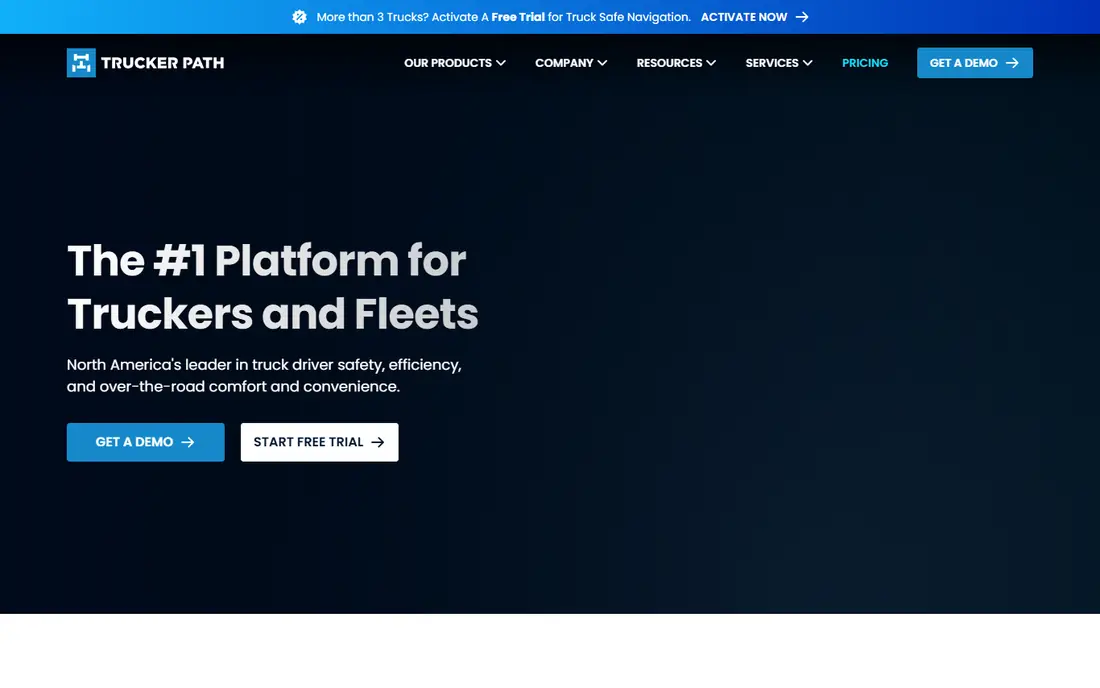
Trucker Path is the industry standard app for finding truck stops, rest areas, weigh stations, fuel and parking. Driver reports add live detail on parking availability, amenities and lot conditions that a static map cannot show. Reviews help you judge a stop before you commit to a detour.
Basic search is free, while truck GPS routing, parking status and weigh station status sit behind paid tiers in many listings, with an individual plan starting at $29.99 per month in some pricing pages. Check which tier your route needs before you rely on it for navigation. As an all in one stop finder, Trucker Path is still the first app most drivers install.
- Huge truck stop and parking database
- Weigh station status
- Driver reviews
- Premium routing and features need a paid tier
- Interface can feel busy
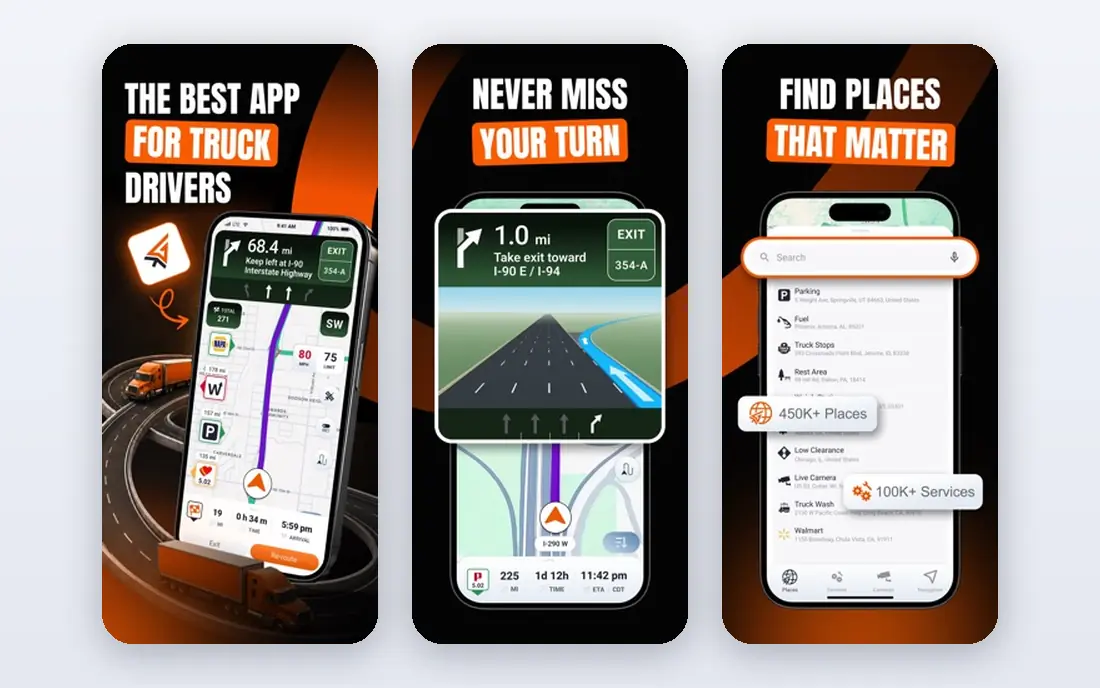
Trucker Guide combines truck stops, parking, fuel prices, weigh stations and truck navigation in one app. It lists many weigh station locations with open or closed status, plus CAT Scale locations, which helps drivers plan scale stops without extra searches. Traffic cameras and roadside service features add to its trip planning value.
As a newer rival to Trucker Path, its community data is still growing in some areas. Navigation depth and trial terms vary by plan, so test it on a familiar route first. For drivers who want a second source for weigh station and parking data, Trucker Guide is a useful companion app.
- Weigh station status
- Large parking database
- CAT Scale locations
- Navigation features vary by plan
- Newer than Trucker Path
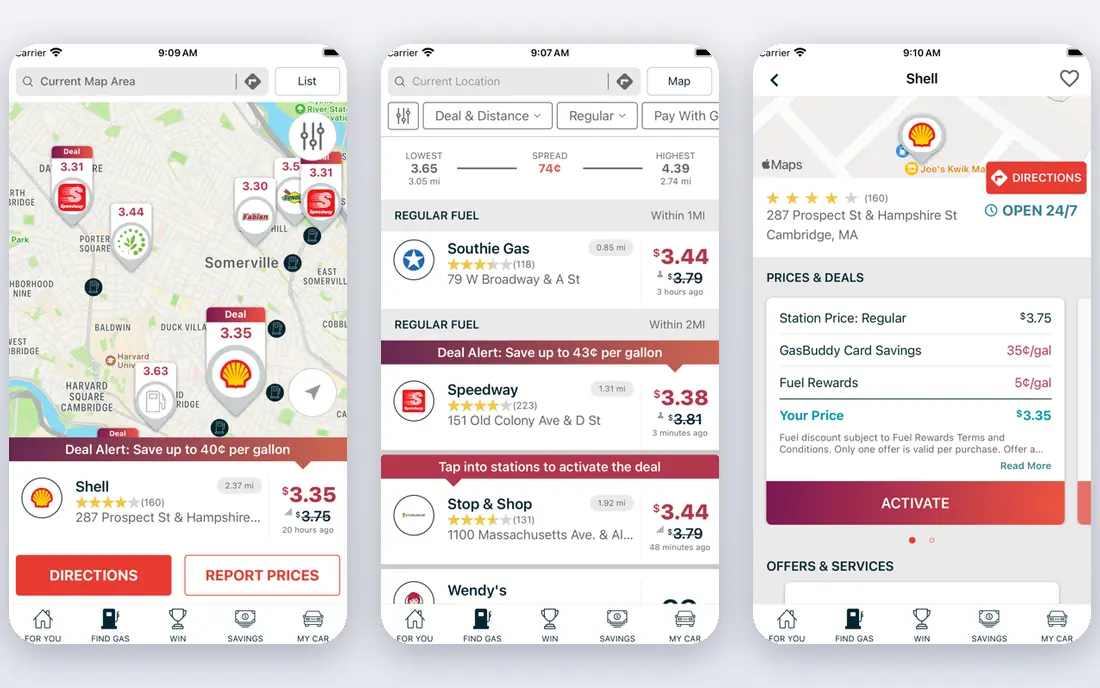
GasBuddy is the best known fuel price app, with crowdsourced prices from stations across North America. Drivers can search for diesel, compare nearby prices and set alerts for price changes. That comparison can save real money over a long haul, since diesel prices vary widely by station and state.
It is not built for trucks, so results mix truck stops with regular stations and do not filter for truck clearance by default. Use GasBuddy to compare prices, then confirm truck access in Trucker Path or Trucker Guide before you pull in. For price hunting, it remains a must have.
- Crowdsourced prices at many stations
- Diesel filters
- Price alerts
- Not truck specific
- Mixes truck stops with car stations
Mudflap offers direct fuel discounts at partner truck stops, rather than points that you redeem later. Drivers find a partner station in the app, pay through the app, and see the discount applied. That simple model appeals to owner operators and small fleets who buy a lot of diesel.
Savings depend on where partner stations sit on your route, so Mudflap works best alongside a price comparison app. In areas with strong partner coverage, discounts of tens of cents per gallon are common in driver reports. For regular diesel buyers, Mudflap is worth checking on every fuel stop.
- Direct discounts at partner stations
- Simple payment flow
- No loyalty points hassle
- Discounts depend on partner coverage
- Savings vary by station
Motive Driver, formerly KeepTruckin, pairs with a Motive electronic logging device to handle hours of service logs, pre trip and post trip inspections, and document capture. Drivers get alerts before hours violations, can message dispatch, and can scan bills of lading and receipts from the phone. It is one of the most widely used ELD apps among fleets and owner operators.
The app only reaches its full value with Motive hardware and a fleet account. Solo drivers using a different ELD will need that provider app instead. If your fleet uses Motive, this app is essential, not optional.
- Hours of service logs
- Inspection reports
- Document scanning
- Needs a Motive ELD
- Fleet features depend on fleet plan
Weigh My Truck, from CAT Scale, lets drivers pay for a scale visit and receive a digital weight ticket without leaving the cab or queuing at a counter in many locations. That saves time at busy scales and keeps tickets organised for records and reimbursements. The app shows nearby CAT Scale locations and handles payment in a few taps.
It only works at CAT Scale locations, so it will not help at other scales. For drivers who weigh often, it is a small app with a large time saving. Pair it with Trucker Guide, which lists CAT Scale locations, to plan scale stops on a route.
- Pay for CAT Scales from the cab
- Faster scale visits
- Digital weight tickets
- CAT Scale network only
- App is single purpose
Hammer offers truck specific routing with vehicle dimensions, plus points of interest with diesel prices, hours and amenities. Weigh station alerts warn drivers as they approach a station, which helps with planning and compliance. The app suits drivers who want routing and alerts in one free starting app.
Premium tiers and feature limits vary, so check the current plan page for offline maps and advanced routing. Community reports are smaller than Trucker Path, so cross check parking claims on a new route. For a free truck routing start, Hammer is a strong option.
- Truck specific routing
- Weigh station alerts
- Detailed points of interest
- Premium features vary
- Community data smaller than Trucker Path
The Pilot Flying J app is the official app for Pilot and Flying J travel centres. It shows fuel prices, amenities, parking and services at their locations, lets drivers pay for fuel from the phone, reserve showers and earn loyalty rewards. For drivers loyal to that network, the accuracy and rewards are hard to beat.
The limit is obvious: it only shows Pilot and Flying J stops, not Love, TA or independent stops. Use it alongside Trucker Path for full coverage, and use it first when you plan to stop at Pilot or Flying J. Rewards and mobile payment alone make it worth installing for regular network users.
- Accurate Pilot and Flying J info
- Mobile fuel payment
- Shower reservations
- Only covers Pilot and Flying J locations
How we picked these
We compared official app pages, store listings and public trucker guides for apps that work for US commercial drivers in October 2026. We kept apps with a clear truck specific job, such as truck routing, parking, weigh stations, fuel, logs or scale payments, and we favoured apps with live driver data where available. We weighed coverage, accuracy, price, offline use and ease of use in a cab, because an app that distracts a driver is a safety risk, not a help.
How to build a truck app kit
Start with routing, stops and fuel. Pick one truck routing app, one stop and parking app, and one fuel app, and learn them on familiar routes before a long haul. Add a logs app if your fleet requires one, and a scale app if you weigh often. More apps do not help if you cannot check them safely while parked.
Use apps only when parked or through hands free voice where the app supports it. Never type, read long lists or adjust a route while driving. Set your route, fuel stops and parking plan before you roll, and pull over safely to change plans. Safety rules and hours of service limits always outrank an app suggestion.
Check data before you trust it
Parking counts, weigh station status and fuel prices rely on driver reports and station data that can go stale. Cross check a critical stop in two apps, call ahead for an unusual load, and keep a paper backup for permits and key contacts. A second source takes a minute and can prevent a wasted detour to a full lot or a closed scale.
Keep costs and records tidy
Log fuel purchases, scale tickets, tolls and maintenance receipts as you go, using your logs app, a receipts app or a simple folder. Fuelbook and similar tools can help with IFTA records for owner operators, while Motive captures documents for fleet drivers. Clean records save hours at tax time and make disputes with shippers far easier to resolve.
FAQ
What is the best app for truck drivers overall?
Trucker Path is the best all in one starting app for stops, parking, weigh stations and fuel, though premium routing costs extra. Most drivers pair it with a truck routing app, a fuel app and a logs app. The best kit depends on your fleet, vehicle and routes.
Is there a free truck GPS app?
Yes. Trucker Path, Trucker Guide and Hammer all offer free tiers with truck related features, though advanced routing, offline maps and parking status may need paid tiers. Test free routing on a familiar route, and check low bridge and weight limit handling before you rely on any app for a new route.
Which app finds truck parking?
Trucker Path and Trucker Guide both list truck parking with driver reported availability in many areas, while TruckMap lists many parking spots as locations. Availability data is crowdsourced, so it can change fast. Plan a backup stop, especially for evening parking near cities.
How do truck drivers save on fuel?
Compare prices with GasBuddy, check discounts with Mudflap, and confirm truck access before you pull in. Fuelbook can help track truck stop prices and purchase records for owner operators. Small savings per gallon add up over thousands of miles, so check prices at every planned stop.
Do I need an ELD app as a truck driver?
Most commercial drivers in the US who fall under hours of service rules need an electronic logging device, and the matching driver app handles logs and inspections. Motive Driver is one common option, but your fleet or ELD provider decides which app you use. Check current FMCSA rules for your operation, since exemptions vary.