Best App for Counting Steps in 2026: 9 Apps Compared
Looking for the best app for counting steps? We compared 9 step counting apps, from Fitbit to Pacer, on accuracy, battery use and cost. Updated October 2026.

- Editor's choice
 Fitbit
Watch and tracker users
Starts atFreeVisit fitbit.comFull review - Great alternative
 Apple Health
iPhone users
Starts atFreeVisit apple.comFull review - Also consider
 Google Fit
Android users
Starts atFreeVisit fit.google.comFull review
TL;DR:
- Apple Health and Google Fit are the best free starts, since they already track steps on most phones without extra cost.
- Fitbit and Samsung Health are the strongest picks if you own their watches or trackers, with better all-day accuracy and sleep data.
- Pacer and StepsApp suit phone-only users who want goals, challenges and a clean daily count.
- Step counts vary by phone, pocket and watch placement, so judge an app by trends over weeks, not by a single day.
Quick comparison
| Tool | Best for | Starts at | Free plan? | |
|---|---|---|---|---|
| Fitbit | Watch and tracker users | Free | Yes | Visit |
| Apple Health | iPhone users | Free | Yes | Visit |
| Google Fit | Android users | Free | Yes | Visit |
 Samsung Health | Samsung phone and watch users | Free | Yes | Visit |
 Pacer | Phone-only step challenges | Free | Yes | Visit |
 StepsApp | Clean daily step counts | Free | Yes | Visit |
 Pedometer by Leap Fitness | Simple Android pedometer | Free | Yes | Visit |
 Accupedo | Detailed step history | Free | Yes | Visit |
 Step Counter by ITO Technologies | Simple widget and goals | Free | Yes | Visit |
The best app for counting steps
A step counting app should count reliably, use little battery, and show trends without pushing a paid plan at every turn. The apps below include built-in phone health apps, watch apps and standalone pedometers. We compared them on accuracy, battery use, goals and challenges, privacy and cost, using official feature pages and app store listings.
Fitbit is the best step counting app if you wear a Fitbit watch or tracker, because wrist tracking captures steps more consistently than a phone in a bag or on a desk. The app shows daily steps, hourly activity, distance, active minutes and sleep, with weekly trends that make progress easy to see. Challenges with friends add motivation without needing a gym.
The free app covers core step tracking, while Fitbit Premium adds deeper sleep, stress and health insights for a monthly fee. Without a Fitbit device, the phone-only step count is less useful, so Android and iPhone users without a wearable may prefer Google Fit or Apple Health. For Fitbit owners, this app is the clear pick.
- Strong all-day tracking with Fitbit devices
- Sleep and activity trends
- Challenges with friends
- Best features need a Fitbit device
- Premium plan adds cost for deeper insights
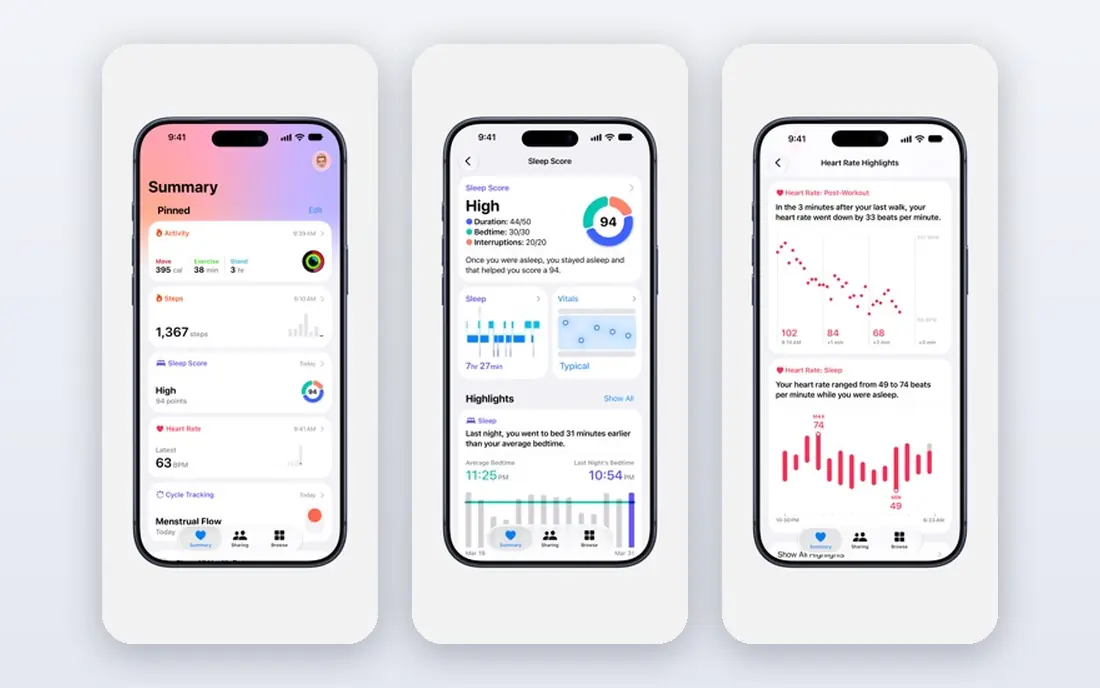
Apple Health comes built into every iPhone and tracks steps using the phone motion sensors, with Apple Watch data added when you wear one. It shows daily, weekly and monthly step trends, distance and flights climbed, and it shares data with many fitness apps when you allow it. There is no subscription, no ads and no extra setup for basic counting.
The limit is carry habit. If your phone sits on a desk for hours, steps during that time go uncounted, while an Apple Watch fills much of that gap. Apple Health is also iPhone only, so Android users should use Google Fit instead. For iPhone users who want a free, private step counter, Apple Health is the best start.
- Built into every iPhone
- No extra cost
- Works with Apple Watch and many apps
- IPhone only
- Step data depends on phone carry habits
Google Fit tracks steps, distance and activity on Android phones, using Move Minutes and Heart Points to show intensity as well as count. It works with Wear OS watches for better all-day tracking, and it syncs with many third-party fitness apps. The interface is clean, and there is no paid plan for core step counting.
Google Fit is simpler than Fitbit or Samsung Health, with fewer challenges and social features. That simplicity suits users who want a quiet daily count rather than a full fitness platform. For Android users without a dedicated tracker, Google Fit is our pick for a free step counting app.
- Free and built into many Android phones
- Heart Points and Move Minutes
- Works with Wear OS watches
- Simpler than Fitbit or Samsung Health
- Google account needed
Samsung Health tracks steps, distance, sleep, exercise and more, with the best results on Samsung phones and Galaxy Watches. The app shows daily goals, weekly trends and challenges with friends, in a polished interface. Step counting on a Samsung phone alone works well, and a Galaxy Watch improves all-day accuracy.
Some features vary by phone model and region, and non-Samsung Android users may find Google Fit simpler. For Samsung owners, however, Samsung Health is the natural choice, since it is already installed on many devices and pairs cleanly with Galaxy Watches. No subscription is needed for core step tracking.
- Strong tracking with Samsung watches
- Steps, sleep and exercise in one app
- Challenges
- Best experience on Samsung devices
- Some features vary by phone model
Pacer is a popular standalone pedometer that works on iPhone and Android without a wearable. It counts steps from your phone, shows daily and weekly trends, and offers groups, challenges and GPS route tracking for walks and runs. That social layer helps if you walk more when friends are involved.
The free plan includes ads and limits some features, with a paid plan adding full reports and extra tools. GPS tracking also uses more battery, so use it only for planned walks, not all day. For phone-only users who want challenges and a clear step goal, Pacer is our pick.
- Good phone-only tracking
- Groups and challenges
- GPS route tracking
- Ads and paid features on free plan
- Battery use rises with GPS tracking
StepsApp offers a clean, focused step counter for iPhone and Android, syncing with Apple Health or Google Fit where available. The design shows your daily count, goal progress and weekly history at a glance, with widgets for your home screen. It suits users who find larger fitness apps cluttered.
Advanced stats, themes and some history features sit behind a paid plan, but core counting and goals work free. StepsApp does not sell its own watch, so it relies on your phone or a connected health app for data. For a tidy, phone-first step counter, StepsApp is a strong choice.
- Clean design
- Apple Health and Google Fit sync
- Widgets and goals
- Advanced stats need a paid plan
- No wearable hardware of its own
Pedometer by Leap Fitness Group is a simple, phone-based pedometer for Android, with daily goals, history charts and calorie estimates. Setup takes a minute, and the app counts steps using phone sensors without needing an account for basic use. That simplicity suits users who want a count, not a fitness platform.
Ads appear on the free plan, and social features are limited compared with Pacer or Fitbit. Accuracy depends on phone placement, as with any phone pedometer. For Android users who want a free, no-fuss step counter, this app is a practical option.
- Simple step counting
- No wearable needed
- Goal and history views
- Android focus
- Ads on free plan
- Fewer social features
Accupedo has tracked steps on phones for many years, with detailed daily, weekly and monthly history, charts and widgets. Users can set step goals, view calorie estimates and check trends over long periods, which helps if you want to see progress across months rather than days.
The interface feels older than StepsApp or Pacer, and some features require a paid upgrade. Still, long history and reliable counting keep Accupedo relevant for users who value records over design. For detailed step history on a phone, Accupedo is a steady pick.
- Detailed daily and monthly history
- Widgets
- Goal settings
- Interface feels dated
- Some features need a paid plan
Step Counter by ITO Technologies is a basic pedometer with a home screen widget, daily goals and simple history. It counts steps from phone sensors, shows distance and calories, and lets you set a daily target. The widget makes it easy to glance at your count without opening the app.
Features are basic, and the free plan includes ads. There are no challenges, sleep tracking or wearable integrations to speak of. For users who want the simplest possible step counter with a widget, this app does the job without clutter.
- Simple widget
- Daily goals
- Works without a wearable
- Basic features only
- Ads on free plan
How we picked these
We compared official app pages, app store listings and health platform docs for step counting apps still active in 2026. We favoured apps with reliable phone or watch tracking, clear goals and history, low battery impact and honest free plans. We also mixed built-in health apps with standalone pedometers, because the best app for counting steps depends on whether you own a watch and which phone you use.
How to get a more accurate step count
Wear or carry your tracker consistently. A watch on your wrist counts more steps than a phone left on a desk, while a phone in a front pocket usually counts better than a phone in a bag. If you use a phone only, keep it on your body during walks and check that step permissions and battery settings allow background tracking.
Judge trends, not single days. A 500-step difference on one day matters less than a steady rise from 5,000 to 8,000 steps per day over a month. Set a realistic goal, such as adding 1,000 steps to your current average, and review weekly totals. If two apps disagree, pick one as your main tracker and use the other only for comparison.
FAQ
What is the best step counting app?
The best step counting app for most people is Apple Health on iPhone or Google Fit on Android, since both are free and built in. Fitbit is best for Fitbit device owners, and Samsung Health is best for Samsung device owners. Phone-only users who want challenges should try Pacer.
What is the best app for step counting on iPhone?
Apple Health is the best app for step counting on iPhone, because it is free, built in and works with Apple Watch. StepsApp is a good alternative if you want a cleaner interface and widgets, while Pacer adds groups and challenges for phone-only users.
What is the best app for tracking steps on Android?
Google Fit is the best app for tracking steps on Android for most users, since it is free and works on many phones and Wear OS watches. Samsung Health is best for Samsung owners, while Pacer and Pedometer by Leap Fitness suit phone-only users who want a standalone counter.
Are phone step counters accurate?
Phone step counters are reasonably accurate for walking with the phone on your body, but they miss steps when the phone sits on a desk or in a bag. Watches and trackers worn on the wrist tend to count more consistently all day. Use trends over weeks rather than exact daily counts to judge progress.
Do step counting apps use a lot of battery?
Most step counting apps use little battery, since they rely on low-power motion sensors. GPS route tracking uses more battery, so turn GPS on only for planned walks. If battery drain rises, check background permissions and turn off GPS tracking for everyday counting.
How many steps should I aim for each day?
A common goal is 10,000 steps per day, but health benefits rise well below that level too. A better target is your current average plus 1,000 to 2,000 steps, built up over a few weeks. Talk to a doctor before starting a new exercise plan if you have a health condition or have been inactive.