Best AIOps Platforms in 2026: 8 Tools Compared
Best AIOps platforms, compared. 8 tools with published prices, free plans and limits. Each profile ends with a plain caveat. Built for quick decisions.
- Editor's choice
 PagerDuty
On-call teams adding AIOps to incident response
Starts at$21 per user/month (Professional, billed yearly)Visit pagerduty.comFull review - Great alternative
 Datadog
Cloud-native teams consolidating tools
Starts at$15 per host/month (Pro, billed yearly)Visit datadoghq.comFull review - Also consider
 Dynatrace
Enterprises wanting deterministic root cause
Starts atSee websiteVisit dynatrace.comFull review
Direct answer
If you need on-call teams adding AIOps to incident response, PagerDuty is the first tool to look at here. Look at Datadog for cloud-native teams consolidating tools, and at Dynatrace for enterprises wanting deterministic root cause. The remaining 5 options are covered below with prices and limits.
TL;DR:
- Top of the list is PagerDuty, which targets on-call teams adding AIOps to incident response.
- BMC Helix AIOps fits BMC shops modernizing operations.
- Datadog is the lowest-priced starter here at $15 per host/month.
- Check the limits for Dynatrace before you commit: usage-based DPS pricing is hard to forecast without a trial.
Quick comparison
| Tool | Best for | Starts at | Free plan? | |
|---|---|---|---|---|
| PagerDuty | On-call teams adding AIOps to incident response | $21 per user/month (Professional, billed yearly) | Yes | Visit |
| Datadog | Cloud-native teams consolidating tools | $15 per host/month (Pro, billed yearly) | Yes | Visit |
| Dynatrace | Enterprises wanting deterministic root cause | See website | Free trial (15 days) | Visit |
 LogicMonitor | Hybrid infrastructure and MSPs | $16 per Hybrid Unit/month (LM Essentials) | Free trial (14 days) | Visit |
 ScienceLogic | Large enterprises standardizing on one system | See website | No | Visit |
 BigPanda | Multi-tool estates drowning in alert noise | See website | No | Visit |
 New Relic | Teams that prefer usage-based pricing | See website | Yes | Visit |
 BMC Helix AIOps | BMC shops modernizing operations | See website | No | Visit |
Every option for AIOps platforms explained
LinkVetted put together this guide to AIOps platforms for readers who want a clear shortlist without reading every vendor page. It compares 8 tools on starting price, free plans, who each one suits and where each one falls short.

PagerDuty is aimed squarely at on-call teams adding AIOps to incident response. PagerDuty approaches AIOps from the response side instead of the monitoring side. Its core job is still the best on-call scheduling and escalation engine in the business.
The AIOps add-on layers intelligent alert grouping and noise suppression on top of the 700-plus integrations feeding it. Professional begins at $21 per user a month on annual billing and the free plan includes five users. But the AIOps capabilities are a separate add-on priced by event volume, which can double the sticker price for a mid-sized team. That said, if your primary pain is paging instead of detection, PagerDuty's AIOps is the shortest path from alert storm to a quiet phone. In practice, the result: fewer pages, and the pages that do fire arrive with context. Price to start with PagerDuty: $21 per user/month. Free access exists with PagerDuty.
What to check first: Per-seat pricing punishes large responder groups.
- AIOps grouping cuts alert noise before paging
- 700+ integrations and mature automation
- AIOps is a premium add-on
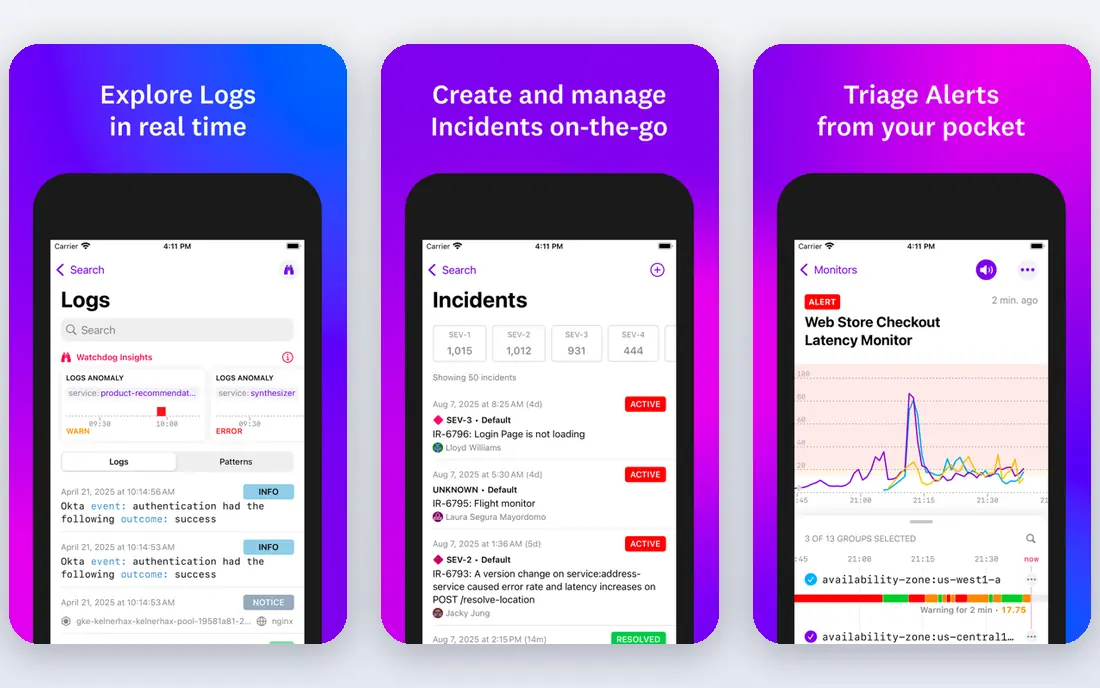
Where Datadog fits: cloud-native teams consolidating tools. Datadog is the gravitational center of the cloud-native monitoring world, and its AIOps story rides on that breadth. On top of that, if your team already lives in Datadog dashboards, these capabilities feel like a natural extension.
Worth adding: small teams get real value from the free level (up to five hosts). The bill is the recurring complaint, and it is a fair one. For everyday use, set up billing alerts early and treat observability spend like cloud spend: budgeted and reviewed. On cost, Datadog starts like this: $15 per host/month. Datadog has a free plan.
Drawbacks to consider: Log indexing costs force hard retention tradeoffs.
- Watchdog anomaly detection works from day one
- More than 800 integrations and one UI for metrics, logs, traces, RUM
- Per-product meters stack up quick at scale

Dynatrace is built with enterprises wanting deterministic root cause in mind. Its Davis AI engine works from a continuously updated map of your environment, so when something breaks it can trace the causal chain and name the actual root cause instead of handing you a probability ranking. Teams that instrument heavily without guardrails get surprised.
For large shops running hundreds of microservices, that determinism matters: responders trust the answer and act on it. Beyond that, run the 15-day trial with production-like traffic, watch the consumption dashboard daily, and you will know what the contract should look like. Check the vendor site for Dynatrace pricing; none is listed in this comparison. On free options: Free trial (15 days).
- Causal Davis AI provides one likely root cause rather than a ranked guess list
- Deep code-level analysis for microservices
- Usage-based DPS pricing is hard to forecast without a trial
LogicMonitor was built for hybrid infrastructure and MSPs. The pricing model changed recently to Hybrid Units, a normalized measure across resource types, with LM Essentials beginning at $16 per unit a month, Advanced at $27, and Signature with Edwin AI at $53.
Honest limits: APM and log analysis are extras to the core product.
Price to start with LogicMonitor: $16 per Hybrid Unit/month. On free options: Free trial (14 days).
- Agentless auto-discovery spans on-prem and cloud uniformly
- Edwin AI assists with troubleshooting and forecasting
- New Hybrid Unit pricing model takes effort to map to your estate
ScienceLogic is a good fit for large enterprises standardizing on one product. ScienceLogic's SL1 system targets the classic enterprise problem: a sprawling hybrid estate monitored by a dozen disconnected tools. It discovers everything via agent, agentless, SNMP, and API methods, builds a live operational data lake, and applies machine learning to cut through the noise.
This is unapologetically enterprise software. In return you get one of the most complete hybrid monitoring products available, with automation that keeps CMDBs current and triggers remediation workflows. Pricing for ScienceLogic is not stated here, so ask the vendor for current figures. ScienceLogic does not include a free plan.
Drawbacks to consider: Implementation is a project, not a signup.
Reasons to shortlist it: automation for hybrid IT.
- Hollywood AI gives plain-language root cause analysis
- Capable federal and service-provider pedigree
- Quote-only enterprise pricing
BigPanda was built for multi-tool estates drowning in alert noise. If you want a correlator that respects your existing stack rather than replacing it, that focus is a feature. More specifically, BigPanda does one thing and does it well: it takes alerts from every monitoring tool you own, enriches them with topology and change data, and uses machine learning to compress them into a small number of actionable incidents.
Honest limits: No free level and quote-only pricing.
It is deliberately not another monitoring tool; it is the layer above them, which is why enterprises with twenty-plus data sources keep choosing it. Worth adding: two honest limitations. First, there is no free level and no public pricing; the deal is sized on your event volume. Pricing for BigPanda is not stated here, so ask the vendor for current figures. BigPanda has no free tier.
- Customers report noise cuts of 80 percent or more
- Open Box ML adapts to your environment
- It correlates and recommends but does not execute remediation itself
New Relic was built for teams that prefer usage-based pricing. Every account gets 100 GB of monthly ingest free, one free full-platform user, and unlimited entry-level users, which makes it one of the easiest AIOps-adjacent products to trial on a real workload. Also, New Relic rebuilt its pricing around a straightforward idea: pay for data and people, not hosts.
If that matches your shape, New Relic is very good value; if you need fifty people in dashboards, model the user cost first. Full-platform users on premium tiers run into the hundreds of dollars per user a month on annual commitments. So a 40-person engineering org pays meaningfully more than the headline data rate recommends. New Relic shows no starting price here, so confirm the cost on the vendor site. New Relic includes a free tier.
Limits to weigh: Data overages beyond the free level add up for log-heavy shops.
- Genuine free level with 100 GB monthly ingest and a full-platform user
- Capable OpenTelemetry support
- Per-user pricing on premium levels gets costly as teams grow
BMC Helix AIOps makes the most sense for BMC shops modernizing operations. BMC Helix AIOps brings service modeling discipline to AI-driven operations.
Where it falls short: Quote-only pricing.
On top of that, pricing is entirely quote-based, so budget for a proper scoping conversation. Instead of correlating raw events, it builds dynamic service models from discovery data, then applies ML-based causal analysis to isolate root cause within the service topology. BMC Helix AIOps shows no starting price here, so confirm the cost on the vendor site. BMC Helix AIOps does not include a free plan.
- Service-centric event correlation with knowledge-graph root cause isolation
- Outage prediction from health indicators
- Full value needs the wider BMC Helix ecosystem
How we built this list
Pricing pages, product documentation and feature lists were the main sources, and every entry carries at least one honest drawback. Where a price is missing, the vendor does not list one publicly or ties it to a quote. Always confirm before budgeting. Position on the page reflects fit for a typical buyer first, with price clarity and free access breaking ties. Treat it as a guide, not a ruling.
Before you commit
- Ask Dynatrace, ScienceLogic, BigPanda and others for a written quote, since no starting price is shown.
- Look at free plan limits closely: PagerDuty, Datadog and New Relic have one, and the caps decide whether it is usable for real work.
- Run a trial of Dynatrace and LogicMonitor with real work before paying for a year; your own workflow is the best test.
- Before choosing PagerDuty, weigh its main limit: AIOps is a premium add-on, not included in base plans.
- Price BMC Helix AIOps for your actual team size; headline prices rarely include add-ons or overage.
- Run a one or two week pilot of Dynatrace with the people who will use it every day.
FAQ
Do these tools publish their prices?
Not all of them. Dynatrace, ScienceLogic, BigPanda and others publish no starting price, so expect a quote request for those. The rest, PagerDuty included, show a starting price, though seats and billing terms still change the final cost.
Is PagerDuty the right pick for everyone comparing AIOps platforms?
No single tool suits every team. PagerDuty comes first because it fits on-call teams adding AIOps to incident response, while Datadog suits cloud-native teams consolidating tools and Dynatrace suits enterprises wanting deterministic root cause. Match the tool to your own size, budget and workflow before deciding.
Can I try these options before paying?
Often, yes. PagerDuty, Datadog and New Relic have a free plan and Dynatrace and LogicMonitor offer a free trial. Use your own data and a real task during the test, and check what the free tier or trial limits before you rely on it.
How long does AIOps implementation take?
Full observability products need agent rollout and tuning, which runs weeks to months. Enterprise ITSM-native choices need service modeling and CMDB work first, which can extend the timeline to a quarter or more.
Which options for AIOps platforms have a free plan?
On this list, PagerDuty, Datadog and New Relic include a free plan. Caps on seats, usage or features are common, so test the free plan against your real workload. Several others offer a trial instead.