Best Workona Alternatives in 2026: 8 Tab Workspace Tools Compared
Looking for workona alternatives? We compare 8 tab managers and workspace tools for saving, grouping and restoring browser tabs in 2026, for solo users.

- Editor's choice
 Toby
Visual tab collections
Starts atSee websiteVisit gettoby.comFull review - Great alternative
 Session Buddy
Saving browser sessions
Starts atFreeVisit sessionbuddy.comFull review - Also consider
 OneTab
Clearing tab clutter fast
Starts atFreeVisit one-tab.comFull review
TL;DR:
- Workona organizes browser tabs into cloud workspaces, so the best replacement depends on whether you need shared workspaces, saved sessions, or simple tab cleanup.
- Toby and Session Buddy are the strongest free leaning replacements for saving and reopening tab sets.
- OneTab is the fastest fix for a crowded browser, while Raindrop.io suits people who also save articles and links long term.
- Built in browser features in Chrome and Edge now cover basic tab grouping at no cost, so try those before paying for an extension.
Quick comparison
| Tool | Best for | Starts at | Free plan? | |
|---|---|---|---|---|
| Toby | Visual tab collections | See website | Yes | Visit |
| Session Buddy | Saving browser sessions | Free | Yes | Visit |
| OneTab | Clearing tab clutter fast | Free | Yes | Visit |
 Raindrop.io | Saving links long term | See website | Yes | Visit |
 Tablerone | Workspace style tab lists | See website | Yes | Visit |
 Sift | Finding open tabs fast | See website | Yes | Visit |
 Microsoft Edge Workspaces | Built in workspaces | Free | Yes | Visit |
 Google Chrome Tab Groups | Built in tab grouping | Free | Yes | Visit |
The best workona alternatives
Workona groups tabs into named workspaces that sync across devices and can be shared with a team. The tools below approach the same problem from different angles, from visual collections to saved sessions to built in browser groups.

Toby is the closest visual match to Workona for people who think in boards rather than lists. You save tabs into named collections, arrange them on a visual board, and reopen a whole collection in one click. Sharing a collection with a teammate is simple, which helps small teams that pass research sets back and forth.
The free plan limits how many tabs you can save, so heavy researchers will hit the cap and need a paid plan. Toby also lacks automatic session saving, so you must remember to save tabs yourself. For curated collections that you reuse often, Toby is easy to learn and pleasant to use daily.
- Visual boards for tab collections
- Easy sharing with teammates
- Works in Chrome, Firefox, and Edge
- Free plan caps saved tabs
- No automatic saving of open windows

Session Buddy is our pick for people whose main fear is losing open tabs. It saves each window as a named session, so you can close a research project and restore it later exactly as you left it. Crash recovery is a real strength, since saved sessions survive browser restarts and accidental closes.
The trade off is sync. The free version stores sessions locally, so moving between computers needs a paid add on or manual export. It also runs only in Chrome and Edge. For a single computer workflow with many windows, Session Buddy is hard to beat at no cost.
- Saves whole windows and sessions
- Free core features
- Fast restore after a crash or restart
- Chrome and Edge only
- No cloud sync on the free version
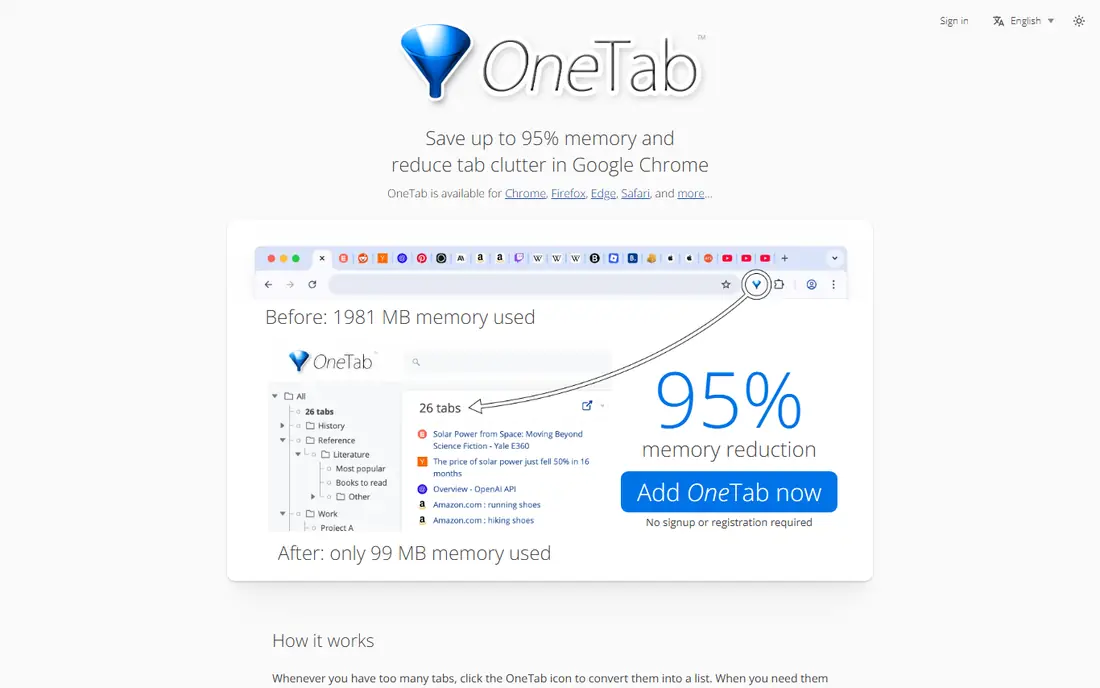
OneTab solves a narrower problem than Workona, but it solves it instantly. One click converts every open tab into a single list page, which clears the tab strip and frees memory. You can then restore tabs one by one or all at once, and group lists by date or topic.
It is not a workspace tool in the Workona sense, since lists are plain and lack sharing or document attachments. Sync across devices also needs a paid add on. For tab hoarders who just need breathing room, OneTab is the fastest free fix available.
- Turns all open tabs into one list in a click
- Cuts memory use
- Very simple to learn
- Plain list view, not visual workspaces
- Sync needs a paid add on
Raindrop.io suits people who save tabs because they want to read or reference them later, not because they want to restore a live window. You save links into collections, tag them, and search the full text of saved pages on paid plans. Sync across browsers and devices is solid, and the interface is clean.
The gap is live session handling. Raindrop.io does not suspend and restore open windows the way Workona or Session Buddy do, so it works best beside a session tool rather than instead of one. For long term research libraries, it is one of the best bookmark tools available.
- Full text search across saved pages
- Collections with tags
- Works across browsers and devices
- Built for bookmarks, not live tab sessions
- Paid plan needed for full text search and more storage
Tablerone aims at the workspace idea directly, letting you group tabs into named lists that act like project spaces. Search helps you find a saved tab without opening every list, and the layout feels closer to Workona than a plain bookmark list. For users who miss Workona workspaces, Tablerone is worth a trial.
Its smaller community means fewer guides and slower support answers than larger rivals. Feature depth also varies by browser, so check the version for your browser before you commit. Still, as a workspace style replacement, Tablerone deserves a place on the shortlist.
- Tab groups styled as workspaces
- Search across saved tabs
- Cross browser support in some versions
- Smaller user base than Toby or Session Buddy
- Advanced features vary by browser
Sift takes a search first approach. Instead of organizing tabs in advance, you press a shortcut, type a few letters, and jump to the tab you need across any window. Layout snapshots let you save and restore window arrangements, which helps people who keep hundreds of tabs alive.
Team sharing and document attachments are weaker than Workona, so teams that curate shared workspaces may miss those features. Sift is best for solo power users who value speed over curation. If finding a tab fast matters more than organizing it in advance, Sift is a strong pick.
- Keyboard first search across all open tabs and windows
- Local search without an account for core features
- Layout snapshots
- Newer and less proven than older tools
- Team sharing is thinner than Workona
Edge Workspaces is the closest free built in match to Workona. You create a workspace, add tabs, and share it with teammates, who see the same tab set. Sync through a Microsoft account keeps workspaces available across devices, and there is no extension to install.
The limit is browser lock in. Edge Workspaces works only in Edge, so Chrome, Firefox, or Safari users must switch browsers or choose another tool. It also lacks some of Workona document integrations. For Edge users, though, it covers the core workspace job at no cost.
- Workspaces built into Edge at no cost
- Shared workspaces for teams
- Sync with a Microsoft account
- Edge only
- Fewer integrations than Workona
Chrome Tab Groups are the simplest free starting point. You group related tabs under a color and name, collapse groups to clear the strip, and save groups to reopen later. Sync with a Google account keeps groups available on other Chrome devices.
What you lose is Workona structure. There are no team shared workspaces, no attached documents, and no workspace templates. For solo users who just need basic grouping, Chrome Tab Groups may be enough, and they cost nothing to try before buying a dedicated tool.
- Free and built into Chrome
- Color coded groups
- Groups can be saved and synced with a Google account
- No shared workspaces like Workona
- Grouping is manual and less structured
How we picked these
We compared official extension pages, vendor sites, and recent reviews for tab managers and workspace tools, and we focused on products that save, group, or restore tabs in a way that replaces Workona workspaces. We included visual collections, session savers, search first tools, and built in browser features, because Workona users split into those needs. Prices reflect vendor pages where available, and we list See website where pricing varies by plan or browser.
How to choose a Workona replacement
Start by naming your real problem. If you lose tabs to crashes, pick Session Buddy. If you curate research sets for reuse, pick Toby or Tablerone. If you keep hundreds of tabs open and just need to find one fast, pick Sift. If you share workspaces with a team, pick Edge Workspaces or Toby, depending on your browser.
Next, check your browser. Several tools in this list run only in Chrome and Edge, while Raindrop.io and Toby cover more browsers. Switching browsers for a tab tool rarely pays off unless the tool also solves a team workflow.
Finally, try the free tier for a week with a real project. Save a research set, close it, restore it, and share it if your work needs sharing. That test reveals sync gaps, caps, and interface friction that a feature list hides.
FAQ
What is Workona?
Workona is a browser workspace manager that groups tabs into named workspaces, syncs them across devices, and lets teams share workspaces with attached documents. It runs mainly in Chrome and Edge, with a free plan that caps workspaces and paid plans for unlimited workspaces.
Which Workona alternative is best for teams?
Toby and Microsoft Edge Workspaces are the strongest team picks in this list, since both support shared collections or workspaces. Toby works across Chrome, Firefox, and Edge, while Edge Workspaces is free but limited to Edge.
Is there a free Workona alternative?
Yes, Session Buddy, OneTab, Chrome Tab Groups, and Edge Workspaces all offer free core features. Free plans may cap sync or saved tabs, so check those limits if you work across several devices.
Can I move my Workona workspaces to another tool?
There is no universal export that moves Workona workspaces intact into every tool. The practical path is to open each workspace, save its tabs into the new tool as a collection or session, and check that links still work. Budget an hour for a large workspace set.
Do tab managers slow down my browser?
Well built tab managers usually reduce load by suspending or closing tabs, but any extension adds some overhead. OneTab and Session Buddy tend to help performance by clearing open tabs, while workspace tools that keep tabs live may use more memory.
Should I use a tab manager or built in browser groups?
Use built in groups if you work alone, use one browser, and only need basic grouping. Use a dedicated manager if you need saved sessions, shared collections, cross device sync, or search across many windows.