Best Writing Software for Authors in 2026: 9 Tools Compared
We compared the best writing software for authors on drafting, organisation, plotting, and formatting, so you can finish a book without fighting your tool.
- Editor's choice
 Scrivener
Complex novels and research-heavy books
Starts atSee websiteVisit literatureandlatte.comFull review - Great alternative
 Ulysses
Clean drafting across Apple devices
Starts atSee websiteVisit ulysses.appFull review - Also consider
 Dabble
Plotting and drafting in the cloud
Starts atSee websiteVisit dabblewriter.comFull review
TL;DR:
- Scrivener remains the best all-round choice for complex novels and research-heavy books.
- Ulysses and Dabble suit writers who want a cleaner, cloud-friendly drafting space.
- Atticus suits self-published authors who want formatting and publishing in one tool.
- Google Docs and FocusWriter are strong free starting points for a first draft.
Quick comparison
| Tool | Best for | Starts at | Free plan? | |
|---|---|---|---|---|
| Scrivener | Complex novels and research-heavy books | See website | Free trial | Visit |
| Ulysses | Clean drafting across Apple devices | See website | Free trial | Visit |
| Dabble | Plotting and drafting in the cloud | See website | Free trial | Visit |
 Atticus | Formatting for self-published authors | See website | No | Visit |
 Google Docs | Free drafting and collaboration | Free | Yes | Visit |
 Microsoft Word | Industry-standard manuscripts | See website | Free trial | Visit |
 FocusWriter | Free distraction-free drafting | Free | Yes | Visit |
 ProWritingAid | Editing and style checks for drafts | See website | Free trial | Visit |
 Plottr | Visual plotting and timelines | See website | Free trial | Visit |
The best writing software for authors
A book is a long project, and the right software should help you keep chapters, notes, and research together without getting in the way of drafting. We compared official feature pages, pricing pages, and export options, with a focus on long-form structure, distraction-free writing, and publishing formats.
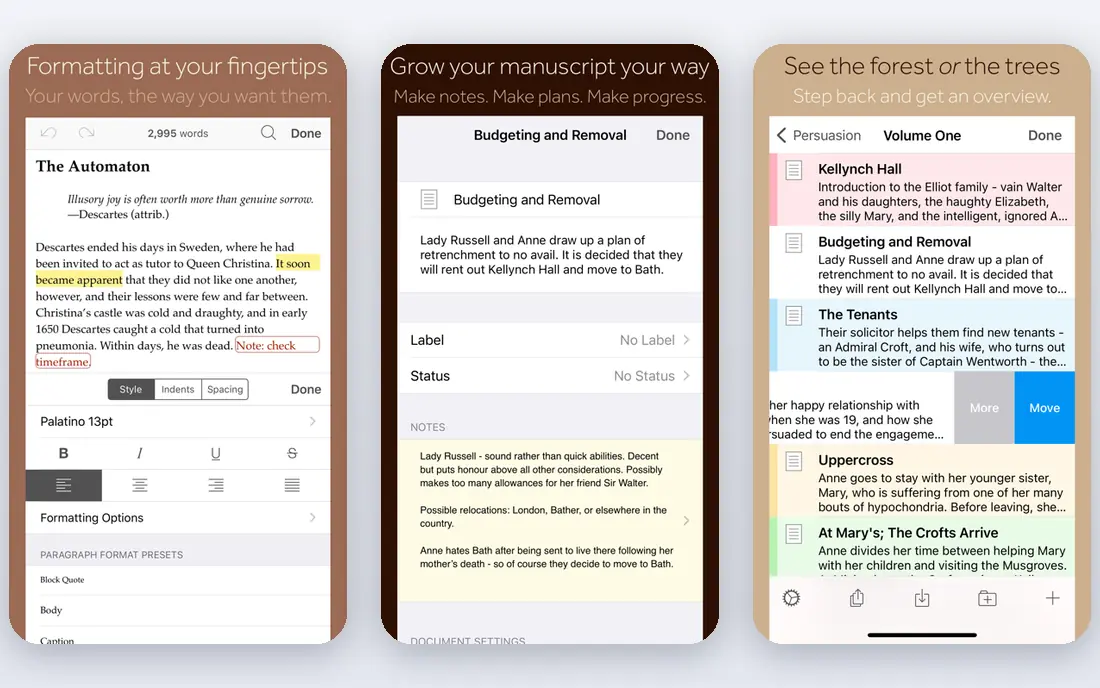
Scrivener has stayed the default for serious long-form writers for good reason. Its binder keeps chapters, scenes, character notes, and research in one project, the corkboard makes reordering scenes visual, and compile turns a draft into a clean manuscript or eBook. The honest catch is worth weighing. Learning curve is steep at first. Pick this one if complex novels and research-heavy books is your main need, and check the free plan first to see whether it covers your usual use.
- Binder and corkboard for chapters and scenes
- Research storage in the same project
- Flexible export to Word, PDF, and ePub
- Learning curve is steep at first
- Sync needs a cloud service such as Dropbox

Ulysses is for writers who want drafting to feel calm. Its plain-text style editor, library, and writing goals keep focus on words, and sync across Apple devices means a chapter started on a Mac can continue on an iPad without file juggling. The honest catch is worth weighing. Apple devices only. If you try it and miss a feature, compare the next option before paying, because strengths differ more than marketing suggests.
- Distraction-free Markdown editor
- Library and goals
- Sync across Mac, iPad, and iPhone
- Apple devices only
- Subscription only

Dabble brings plotting and drafting together without Scrivener complexity. Its plot grid helps you track scenes against story structure, notes sit beside the manuscript, and cloud sync keeps the book available on any browser, which suits writers who move between computers. The honest catch is worth weighing. No permanent free plan. It is worth a short trial with real work, not just a demo, so you can judge whether it fits your daily routine.
- Plot grid, notes, and manuscript in one place
- Cloud sync
- Word count and goals
- No permanent free plan
- Formatting options are basic
Atticus solves the part of publishing many authors dread: formatting. Once a manuscript is ready, it turns it into a professional print book and eBook with chapter themes and front matter, which saves hiring a formatter for many self-published books. The honest catch is worth weighing. One-time price is higher than drafting apps. Start with the free or trial version, and upgrade only when you hit a limit that actually slows you down.
- Print and eBook formatting in one tool
- Chapter themes
- Collaboration features
- One-time price is higher than drafting apps
- Not designed as a primary drafting tool
Google Docs is the best free starting point, especially for co-written work. It autosaves, tracks versions, and lets editors comment in real time, which is hard to beat for collaboration, though very long novels may need splitting into chapters. The honest catch is worth weighing. Long manuscripts can slow down. For most people, the deciding factor will be fit, not feature count, so weigh the catch above as carefully as the strengths.
- Free and easy collaboration
- Autosave and version history
- Works on almost any device
- Long manuscripts can slow down
- Organisation tools are basic for novels
Microsoft Word remains the safe choice for submissions and professional editing. Publishers and editors expect Word files, track changes is standard, and styles plus the navigation pane help manage long manuscripts, even if it lacks novel-specific planning tools. The honest catch is worth weighing. Subscription cost. Use it for a week with your normal tasks, then decide whether the trade-offs are acceptable for the price.
- Familiar editing and track changes
- Styles and navigation pane
- Widely accepted by publishers
- Subscription cost
- Long documents need careful style use
FocusWriter does one thing well: it gets out of the way. Its full-screen mode hides menus, themes let you set a calm writing space, and daily goals keep momentum, which makes it ideal for writers who only need a clean page. The honest catch is worth weighing. No plotting or research tools. If the catch above is a deal-breaker, the next pick may suit you better, even if it looks less polished at first glance.
- Free and simple full-screen writing
- Themes and typewriter sounds
- Daily goals
- No plotting or research tools
- Sync is manual
ProWritingAid is an editing companion, not a replacement for an editor. It flags repeated words, long sentences, and readability problems, and its reports help authors revise a draft systematically before sending it to beta readers or an editor. The honest catch is worth weighing. Suggestions need human judgment. Check current pricing before you commit, because plans and free tiers change, and promotions can distort the comparison.
- Grammar, style, and readability reports
- Integrations with Word, Docs, and Scrivener
- Summary reports
- Suggestions need human judgment
- Full features need a paid plan
Plottr is the planning board for writers who think visually. Its timeline shows plot lines side by side, templates help build characters and places, and export to Scrivener or Word means a plan can move into a draft without retyping everything. The honest catch is worth weighing. Drafting features are limited. A short, honest trial is the best test here, since daily use reveals friction that a feature list cannot show.
- Visual timeline and plot lines
- Character and place templates
- Export to Scrivener and Word
- Drafting features are limited
- Best used alongside a writing app
How we picked these
We compared official feature pages, pricing pages, app store listings, and public documentation for each product, rather than relying on a single review or ranking. We checked that each product exists, fits the topic, and is available in October 2026, and we used See website wherever a price depended on plan, region, or enrolled amount and could not be verified cleanly. We also weighed fit over feature count. A long list of features means little if the core job is awkward, and a cheaper plan means little if it blocks the feature you need most. That is why each pick above names a best use and an honest weakness, so you can match the tool to your situation instead of chasing the highest-rated name.
How to pick writing software for a book
Start with how you plan. Plotters who build outlines, character sheets, and timelines need structure tools such as Scrivener or Plottr. Discovery writers who draft straight through may prefer a clean editor such as Ulysses, Dabble, or FocusWriter, and add planning tools only if a draft gets tangled.
Next, check export and backup. Your manuscript should export cleanly to Word, PDF, or ePub, and sync should not depend on a single device. Test export early with a sample chapter, and keep a separate backup outside the app, because a book is too long to risk on one file.
Finally, separate drafting from editing and formatting. A great drafting app may not be the best editor or formatter. Many authors draft in one tool, edit with ProWritingAid or an editor, and format in Atticus or a similar tool, rather than forcing one app to do every job.
A final check is worth doing before you pay or commit. Read the current pricing page, confirm the free plan or trial terms, and check whether the features you need are included at the tier you plan to buy. Prices, free tiers, and platform support change over time, so a quick check on the vendor site on the day you sign up can prevent an unwelcome surprise, a missing feature, or a plan that costs more than you expected. If you are unsure, start with the free option and move only when you need more.
FAQ
What is the best book writing software overall?
Scrivener suits most authors with complex books, thanks to its binder, corkboard, and compile system. Ulysses or Dabble may suit writers who prefer a simpler interface and cloud sync.
What is the best app for writing a book on a budget?
Google Docs is free and works well for drafting and collaboration. FocusWriter is also free and offers a distraction-free space, though it has fewer planning features.
Is Scrivener worth it for a first novel?
Yes, if you want structure and research in one project. If you prefer to draft simply and worry about structure later, start free and move to Scrivener when the manuscript grows.
What software do authors use for formatting?
Atticus is popular with self-published authors for print and eBook formatting. Scrivener also exports to ePub and PDF, while Word remains common for traditional publishing submissions.
Can I write a novel on a phone or tablet?
Yes, but a larger screen helps for long sessions. Scrivener has an iOS app, Ulysses works across Apple devices, and Google Docs works on most phones and tablets.
Sources
- https://www.literatureandlatte.com/scrivener/overview
- https://ulysses.app/pricing
- https://www.dabblewriter.com/pricing
- https://www.atticus.io/pricing
- https://docs.google.com
- https://www.microsoft.com/microsoft-365/word
- https://gottcode.org/focuswriter
- https://prowritingaid.com/pricing
- https://plottr.com/pricing