Best Water Tracker Apps in 2026: 8 Apps Compared
Looking for the best water tracker app? We compared 8 water reminder apps on goals, reminders, widgets, and price to help you stay hydrated daily in 2026.

- Editor's choice
 WaterMinder
Fast logging and smart reminders
Starts atFreeVisit waterminder.comFull review - Great alternative
 Waterllama
Friendly visual tracking
Starts atFreeVisit waterllama.comFull review - Also consider
 Plant Nanny
Playful plant-growing motivation
Starts atFreeVisit plantnanny.appFull review
TL;DR:
- WaterMinder is our pick for most people, because it offers fast one-tap logging, smart reminders, and strong Apple Watch and widget support.
- Waterllama is the best choice for users who want a friendly, visual tracker with characters and challenges.
- Plant Nanny suits people who need a playful push, while Hydro Coach is a strong free option on Android and iPhone.
- A water goal from an app is an estimate, not medical advice. Follow any fluid limits from your clinician if you have a heart, kidney, or other health condition.
Quick comparison
| Tool | Best for | Starts at | Free plan? | |
|---|---|---|---|---|
| WaterMinder | Fast logging and smart reminders | Free | Yes | Visit |
| Waterllama | Friendly visual tracking | Free | Yes | Visit |
| Plant Nanny | Playful plant-growing motivation | Free | Yes | Visit |
 Hydro Coach | Simple tracking with stats | Free | Yes | Visit |
 HidrateSpark | Smart bottle tracking | Free | Yes | Visit |
 Drink Water Reminder | Simple Android reminders | Free | Yes | Visit |
 My Water | Clean daily drink tracking | Free | Yes | Visit |
 Water Reminder | Straightforward iPhone reminders | Free | Yes | Visit |
The best water tracker apps
Most people do not drink too little water because they lack willpower. They forget. A good water tracker app fixes the forgetting part: it sets a daily goal, reminds you at sensible times, and makes logging a drink take two seconds. We compared official feature pages, pricing, and app store listings for water reminder and tracking apps, with a focus on goal setting, reminder control, widgets, watch support, and cost.
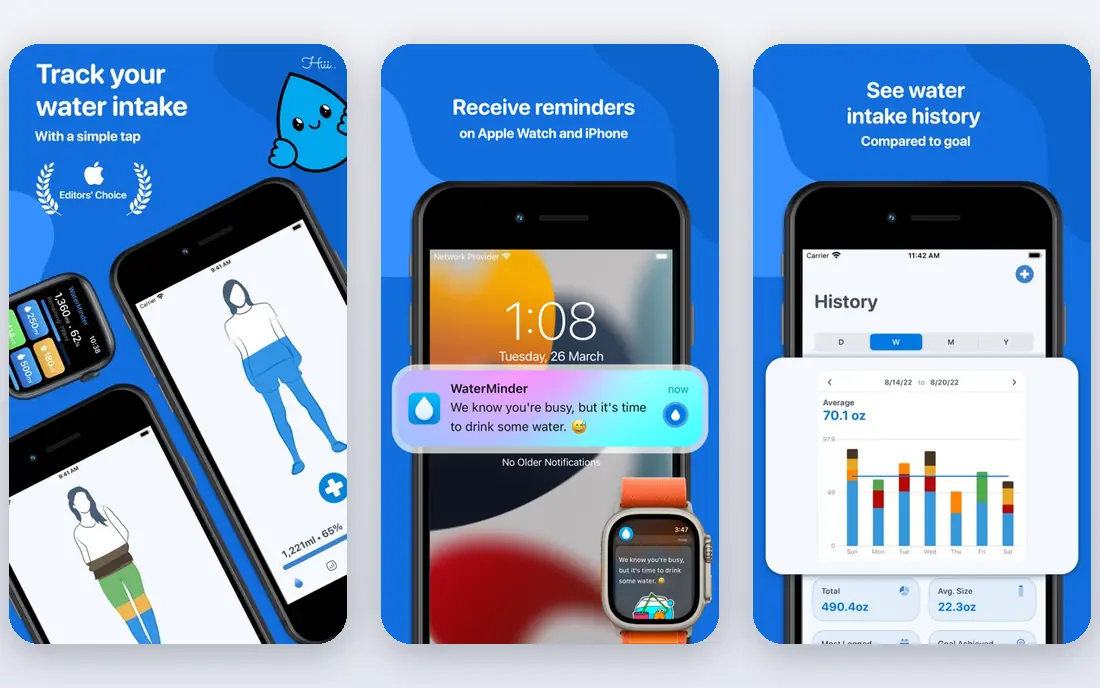
WaterMinder is the most reliable all-around water tracker app we found. Logging a glass takes one tap from a home screen widget, a lock screen widget, or an Apple Watch complication, and reminders adapt to progress through the day: behind on your goal, it nudges; on track, it stays quiet. Goals are based on weight and activity rather than a flat eight-glass rule, and any drink type can be logged with a different hydration value.
The free version covers core tracking well, while Premium at about $2.99 per month adds deeper statistics and finer reminder scheduling, with yearly and lifetime options listed in the app store. The main limit is platform polish: the app runs on Android too, but the Apple experience is the most complete. For most iPhone users, WaterMinder is the first app to try.
- One-tap logging from widgets and Apple Watch
- Personalized goals from weight and activity
- Syncs with Apple Health
- Deepest stats and reminder controls need Premium
- Most polished on Apple devices
Waterllama makes water tracking feel pleasant rather than clinical. Each drink fills up a llama character, challenges give short-term goals, and widgets show daily progress at a glance without opening the app. The goal calculator, reminders, streaks, and a calendar view cover the practical side, while the characters and challenges cover motivation.
The catch is platform. Waterllama is built for iPhone, iPad, and Apple Watch, so Android users need another pick. Premium adds more characters, beverages, reminder sounds, and history editing through a subscription or one-time purchase, with prices shown in the app store. For Apple users who have dropped plain trackers, Waterllama is a strong second try.
- Charming characters and challenges
- Smart reminders and goal calculator
- Apple Watch, widgets, and Apple Health sync
- Apple platforms only
- Premium characters and challenges need a paid upgrade

Plant Nanny turns drinking water into caring for a plant. Each logged glass waters the plant, which grows and changes over time, and reminders prompt you to drink at set times through the day. The plant theme sounds simple, but for many users it works: skipping a drink feels like neglecting something, which is a stronger prompt than a plain notification.
The free version includes ads, and some users report that ads interrupt quick logging. Custom daily goals and an ad-free experience sit behind the SPARKFUL subscription, with prices shown in the app store. Plant Nanny also lacks the deep stats of WaterMinder. For users who need a fun reason to open the app each day, it remains one of the best water drinking apps available.
- Each glass waters a virtual plant
- Reminders and daily goals built in
- Long track record on iOS and Android
- Free version shows ads
- Custom goals and some features need the SPARKFUL subscription
Hydro Coach is a practical, no-fuss water tracker. Set a daily goal, log drinks in a few taps, and check statistics and achievements to see patterns over time. Reminders can be customized by time and interval, and companion apps for Apple Watch and Wear OS let you log from your wrist. The app is available in many languages, which helps households that share devices.
Paid upgrades add extra tracking tools and customization, but the exact free and premium split differs between iPhone and Android, so check the upgrade screen in your version before paying. Ads in the free version are the other trade. For Android users who want a solid free tracker without a game layer, Hydro Coach is a sensible pick.
- Customizable reminders and drinking statistics
- Apple Watch and Wear OS companion apps
- Works on iPhone and Android
- Premium features vary between iPhone and Android
- Free version includes ads
HidrateSpark is different from the other apps here because it can pair with a smart bottle. When you drink from a compatible HidrateSpark bottle, the bottle records the amount and syncs it to the app, which removes the manual logging step that causes many trackers to fail. The app also supports manual logging for drinks taken from other cups or bottles, plus reminders, goals, and watch support.
The limit is cost and lock-in. Automatic tracking only works with a HidrateSpark bottle, which is bought separately, and the bottle needs charging and cleaning like any smart device. If you already own one, or you are willing to buy one, HidrateSpark solves the logging problem better than any manual app. If not, a manual tracker such as WaterMinder is cheaper and simpler.
- Compatible smart bottles can log intake automatically
- Manual logging also available
- Apple Watch and widget support
- Automatic tracking needs a HidrateSpark bottle, sold separately
- Bottle cost is extra
Drink Water Reminder, from Leap Fitness Group, is a straightforward option for Android users who want reminders without extra layers. Set a daily goal based on weight, choose reminder times, and log each drink with a tap. The interface stays focused on the day at hand, with a simple progress view and history, rather than characters, games, or social features.
That simplicity is also the limit. Analytics are basic, and the app does not offer the same widget and watch depth as WaterMinder or Waterllama. Ads appear in the free version, with paid upgrades to remove them and add features. For a user who only wants a water reminder app that pings at sensible times, this app does the job with little setup.
- Simple reminder schedule and daily goal
- Weight-based intake suggestion
- Easy one-tap logging
- Fewer analytics than WaterMinder
- Free version includes ads
My Water, listed as My Water: Daily Drink Tracker, offers a tidy daily view with a progress ring, custom cup sizes, and support for different drink types. Logging is quick, reminders can be set by schedule, and an Apple Watch app lets you log from your wrist. The design is calm and easy to read, which suits users who found other trackers busy.
The free tier covers basic daily tracking, while a Premium subscription adds fuller history, statistics, and customization, with prices shown in the app store. My Water does not have the character system of Waterllama or the plant theme of Plant Nanny, so motivation comes from the streak and progress view alone. For users who want a clean tracker without games, it is a good fit.
- Clean daily progress view
- Custom cup sizes and drink types
- Apple Watch support
- Premium subscription needed for full history and features
- Smaller community than larger rivals
Water Reminder, listed as Water Reminder: Daily Tracker from VGFIT, is a plain, dependable iPhone tracker. Set a goal, set reminder times, log drinks, and check a daily and weekly history. The setup takes a few minutes, and the app does not ask you to manage characters, plants, or challenges.
Premium adds Apple Watch support and fuller features through monthly or yearly plans, with prices shown in the app store, so check the current offer before upgrading. The plain design will not motivate users who need a game layer, but for a user who wants a water drinking reminder app that stays out of the way, Water Reminder is a solid, low-friction choice.
- Simple reminder and tracking setup
- Apple Watch support on Premium
- Daily goal and history views
- Watch support and some features need Premium
- Interface is plainer than Waterllama
How we picked these
We compared official feature pages, pricing pages, and app store listings for water tracker and reminder apps, and we favored apps that are actively maintained, support custom goals, and offer reminders that can be adjusted by time and progress. We looked for widget and watch support, drink type logging, history and streak views, and clear free tiers, and we checked privacy policies for how health data is handled. We did not claim hands-on testing that did not happen; the picks reflect published features and public reviews.
How to pick a water tracker that you will keep using
Start with logging speed. If logging a drink takes more than a few seconds, the habit will break on busy days, so favor widgets, watch apps, and one-tap entry. Next, check reminder control. Good reminders adapt to your schedule and progress, and they can be silenced at night or during meetings. A tracker that pings every hour regardless of progress will soon be muted.
Then check the goal. An app goal based on weight, activity, and climate is a better starting point than a fixed number, but it is still an estimate. Adjust it after a week based on how you feel, and talk with a clinician if you have a condition that affects fluid intake. Finally, pick a motivation style you enjoy: a plain progress ring, a character, a plant, or a smart bottle. The style that keeps you logging is the right one, even if it looks simple.
Do you need a smart bottle?
A smart bottle helps if manual logging is the reason past trackers failed. It records intake automatically and syncs to the app, which removes the main friction point. It does not help if reminders are the problem, or if you drink from many different cups through the day. Try a free manual app first for two weeks; if logging is the blocker, then consider a HidrateSpark bottle.
FAQ
What is the best water tracker app?
WaterMinder is our pick for most people, because it offers fast logging, smart reminders, and strong widget and watch support. Waterllama is better for Apple users who want a friendly visual tracker, while Hydro Coach is a strong free option on both iPhone and Android.
What is the best water reminder app free?
WaterMinder, Hydro Coach, and Drink Water Reminder all offer useful free tiers with reminders and daily goals. WaterMinder has the best widgets and watch support, Hydro Coach has strong statistics for a free app, and Drink Water Reminder is the simplest Android option.
What is the best water drinking app for Android?
Hydro Coach and Drink Water Reminder are strong Android picks, with reminders, goals, and history built in. Plant Nanny also runs well on Android and adds a playful plant theme. Waterllama and WaterMinder are available on Android too, though Waterllama is most polished on Apple devices.
How much water should I drink each day?
Fluid needs vary with body size, activity, climate, pregnancy, breastfeeding, and health conditions, so there is no single target for everyone. Many health guides suggest six to eight cups or glasses of fluid a day as a general starting point, including drinks other than plain water, with more needed during prolonged activity or hot weather. Follow any fluid advice from your clinician.
Do water tracker apps sync with Apple Health or Google Fit?
Many do. WaterMinder, Waterllama, and Hydro Coach sync with Apple Health, and several sync with Google Fit or similar health platforms on Android. Check the app store listing for your version, since sync support can differ between iPhone and Android.
Can a water tracker app help with weight loss?
A water tracker can support a weight loss plan by helping you drink regularly and notice patterns, but it does not cause weight loss on its own. Some users find that drinking water before meals helps them feel full, but results vary. Pair water tracking with food and activity tracking for a fuller picture, and talk with a clinician before starting a weight loss plan.