Best VTuber Software in 2026: 8 Tools Compared
The best vtuber software, compared for 2D and 3D avatars, tracking quality, and price, including free options for new streamers in 2026 before you buy.
- Editor's choice
 VTube Studio
2D Live2D streaming
Starts atFreeVisit denchisoft.comFull review - Great alternative
 Warudo
3D scenes and interaction
Starts atFreeVisit warudo.appFull review - Also consider
 VSeeFace
Simple free 3D streaming
Starts atFreeVisit vseeface.icuFull review
TL;DR:
- VTube Studio is the standard for 2D Live2D streamers, with strong tracking and a low one-time cost to remove the watermark.
- Warudo and VSeeFace lead for 3D streamers, with Warudo offering richer scenes and VSeeFace offering a simpler free start.
- VRoid Studio is the best free route to make a 3D avatar before buying a custom model.
- Live2D Cubism is the tool behind most 2D models, but it is a creation tool, not a streaming app.
- The best free vtuber software still needs a decent webcam or phone for smooth face tracking.
Quick comparison
| Tool | Best for | Starts at | Free plan? | |
|---|---|---|---|---|
| VTube Studio | 2D Live2D streaming | Free | Yes | Visit |
| Warudo | 3D scenes and interaction | Free | Yes | Visit |
| VSeeFace | Simple free 3D streaming | Free | Yes | Visit |
 Live2D Cubism | Making 2D models | See website | Yes | Visit |
 VRoid Studio | Making 3D avatars | Free | Yes | Visit |
 Animaze | 2D and 3D avatars | Free | Yes | Visit |
 VNyan | 3D streaming with effects | Free | Yes | Visit |
 PrprLive | Simple 2D streaming | Free | Yes | Visit |
The best vtuber software
VTuber software does three jobs at once. It reads a face, a voice, or a body, it moves an avatar to match, and it sends that avatar into streaming software like OBS. The tools below split by avatar type first, since a 2D Live2D model and a 3D VRM model need different apps, even when the streaming goal is the same.
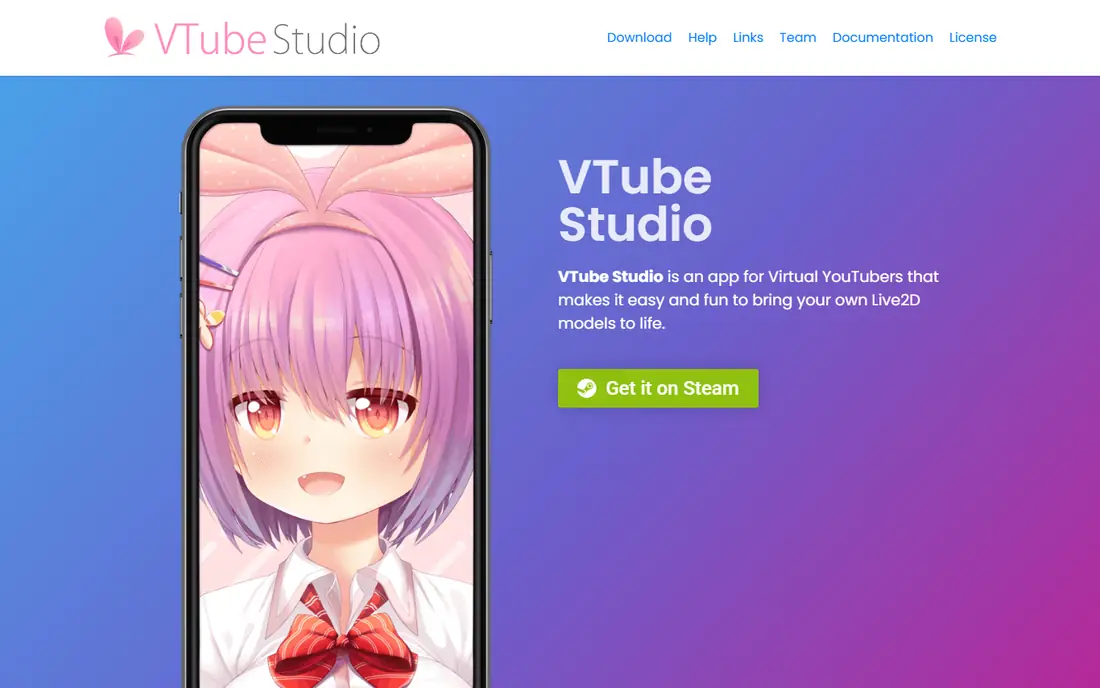
VTube Studio is the app most 2D VTubers open first. It loads a Live2D model, tracks a face through a webcam or a phone, and handles expressions, hotkeys, props, and scene changes during a stream. Phone tracking, using an iPhone or Android device as a camera, gives noticeably smoother eye and mouth movement than a basic webcam for many creators.
The limits are clear. It does not run 3D VRM avatars, and the free desktop version shows a watermark until a paid version is purchased. Commercial streamers should also check the current license terms, since paid use may be required for monetized channels. For 2D streaming, it remains the benchmark other apps are measured against.
- Precise Live2D tracking
- Phone tracking for better face capture
- Strong Twitch and OBS support
- 2D only, no 3D VRM support
- Watermark until a paid version is bought

Warudo is built for 3D VTubers who want more than a floating avatar. Creators can build a full scene, add props and effects, and set up blueprint rules so that a chat message, a donation, or a hotkey triggers an animation or an object on screen. Hand tracking, body tracking, and VRM model support make it suitable for larger productions and interactive streams.
That power brings complexity. Warudo runs on Windows, and a creator who wants custom scenes will need time to learn its blueprint system. Personal use is free, while agency and commercial terms differ, so signed creators should check the current terms. For ambitious 3D streams, it is the most flexible tool in this list.
- Rich 3D scenes, props, and effects
- Blueprint logic for chat and events
- Hand and body tracking support
- Windows only
- Learning curve for blueprints and custom scenes

VSeeFace is the simplest route into 3D VTubing. It is free, it loads VRM models, and it supports webcam face tracking plus hand tracking, with output to OBS through a virtual camera or capture. A new creator can go from downloading a free VRM avatar to streaming in an afternoon, without paying for software or learning a scene editor.
The trade-off is scope. VSeeFace does not offer Warudo-style scene building, blueprint logic, or deep effect controls. Creators who want interactive rooms and complex triggers will outgrow it. As a free starting point, and as a reliable backup app, it is excellent, and many creators keep it installed even after moving to a larger tool.
- Completely free, including commercial use
- Supports VRM models and hand tracking
- Simple setup
- Windows only
- Fewer scene and effect tools than Warudo
Live2D Cubism is where most 2D VTuber models are made, not where they are streamed. An artist draws a character in layers, rigs those layers to face and mouth movements, and exports a model that VTube Studio can then animate live. Its physics, deformers, and parameter controls give artists fine control over blinking, breathing, and hair movement.
New users should know the split. Cubism creates the model, VTube Studio performs it, and both steps take practice. The free version is enough to learn rigging, while professional and commercial work usually needs a paid plan. Commissioning an artist is a valid alternative, and many creators do that rather than learning rigging themselves.
- Industry standard for 2D VTuber models
- Precise rigging and physics controls
- Free version for learning
- Not a streaming app
- Paid plans needed for full commercial use
VRoid Studio lets anyone make a 3D avatar without 3D modeling skills. Sliders control face shape, eyes, hair, and clothing, and the finished model exports as a VRM file that works in VSeeFace, Warudo, and other 3D tools. That makes it the fastest free path from idea to a working 3D avatar.
The look is the limit. VRoid models share a recognizable anime style, and a creator who wants a fully custom design will still need a 3D artist or a different modeling tool. For a first avatar, a placeholder while a custom model is commissioned, or a low-budget channel, VRoid Studio is the obvious starting point.
- Free 3D avatar creation
- Easy sliders for face, hair, and clothes
- Exports VRM for major 3D apps
- Style is recognizably VRoid
- Limited for highly custom character designs
Animaze covers both sides of VTubing in one app. It supports Live2D and 3D avatars, offers a library of ready-made characters, and sends the result to OBS for streaming. That breadth suits creators who are unsure whether they want a 2D or 3D channel, or who want to test both without learning two apps.
The free plan includes a watermark, and streamers who earn above a set threshold need a paid plan, so creators should read the current terms before relying on it for a monetized channel. Avatar quality also varies across the library. For testing the format, Animaze is a low-friction way to start.
- Supports both 2D and 3D avatars
- Large avatar library
- Easy OBS output
- Free plan has a watermark
- Paid plans needed for higher earning streamers
VNyan is a 3D VTuber app with a pay-what-you-want model, including free use, and it can also add effects and props on top of VTube Studio output. That layering makes it popular with creators who like VTube Studio for tracking but want extra 3D flair, particles, and scene items during a stream. It supports VRM models and a range of tracking inputs.
Documentation and community size are smaller than for VTube Studio or Warudo, so new users may need to search harder for setup help. The interface also rewards patience. For creators who enjoy tweaking effects and already have a working avatar, VNyan offers a lot of creative room for very little money.
- Pay-what-you-want model
- 3D effects and props on top of other apps
- Flexible for advanced users
- Smaller community and docs
- Setup takes more effort than VSeeFace
PrprLive is a lightweight, free option for Live2D streaming. It tracks a face through a webcam, animates a 2D model, and outputs to OBS, with lower system demands than larger apps. That makes it useful on older PCs, or as a backup when a main app has a problem mid-stream.
Feature depth is thinner than VTube Studio, with fewer scene, prop, and integration options, and its support base is smaller. Most creators who grow a channel will move to VTube Studio for its wider toolset. For a first stream on a tight budget, PrprLive is a workable, honest starting point.
- Free and simple for Live2D streaming
- Low system demands
- Good for low-spec PCs
- Fewer features than VTube Studio
- Smaller update and support base
How we picked these
We compared official product pages, store listings, and creator guides for each tool, and we checked avatar type, tracking method, platform support, and price. We favored tools that are actively maintained and that clearly work with OBS or a similar streaming setup, rather than avatar makers with no live output. Where pricing was not clearly published, we used See website.
We also separated creation from performance. A model maker and a streaming app do different jobs, so we included both, but we marked that split clearly in each write-up so a new creator does not buy the wrong tool for the wrong step.
What to check before you go live
Match the app to the avatar type
A Live2D model needs VTube Studio, PrprLive, or a similar 2D app, while a VRM model needs VSeeFace, Warudo, VNyan, or another 3D app. Confirm the file type before buying a model, since a model made for one side will not load in the other without conversion work.
Test tracking in your real room
Webcam tracking depends on lighting, camera angle, and background clutter. Test in the room and lighting you will actually stream from, with the headset or glasses you normally wear. Phone tracking can help when a webcam struggles, and it is worth testing before a first live stream.
Check commercial terms early
Free does not always mean free for a monetized channel. Some apps require a paid version once a channel earns money or joins an agency, and model licenses may limit commercial use. Read the app terms and the model license before building an audience around a particular setup.
FAQ
What is the best vtuber software for beginners?
For 2D, VTube Studio is the best beginner pick once a Live2D model is ready, because its tracking and OBS support are well documented. For 3D, start with VSeeFace and a free VRoid Studio avatar, since both are free and the setup is short.
What is the best free vtuber software?
VSeeFace is the strongest fully free 3D option, while VTube Studio is free to start for 2D with a watermark until a paid version is bought. VRoid Studio is free for making a 3D avatar, and VNyan uses a pay-what-you-want model that includes free use.
Do I need a Live2D model or a 3D model?
A Live2D model suits 2D anime-style streaming with detailed facial expressions, while a 3D VRM model suits full-body movement, hand tracking, and 3D scenes. The choice should come first, because it decides which streaming app will work.
Can I stream as a VTuber on a low-spec PC?
Yes, with limits. PrprLive and VSeeFace are lighter than Warudo and Unreal-based tools, and a simple avatar with webcam tracking runs on modest hardware. Close other heavy apps, lower the output resolution, and test frame rates before going live.
How much does VTuber software cost in total?
The software itself can be free or under 20 dollars for a basic paid version, but a custom Live2D model often costs far more, and a good webcam or phone for tracking adds to the total. Budget for the model first, since it usually dominates the cost.
Is VTube Studio free?
VTube Studio is free on desktop with a watermark on the tracking preview, and a one-time paid version removes that watermark. Mobile versions are free with limits, and a paid mobile version removes those limits, so check the current store listing for the exact terms.