Best Utility Billing Software in 2026: 8 Tools Compared
We compared the best utility billing software for water, sewer, electric and waste utilities on meter-to-cash billing, payments and customer portals today.

- Editor's choice
 OpenGov
Mid-size and larger municipalities
Starts atSee websiteVisit opengov.comFull review - Great alternative
 Black Mountain Software
Local governments and special districts
Starts atSee websiteVisit blackmountainsoftware.comFull review - Also consider
 UtilAbility
Small utilities wanting a focused tool
Starts atSee websiteVisit utilability.comFull review
TL;DR:
- Small utilities should start with a focused billing tool, while larger cities may need a full government suite.
- Rate flexibility matters more than a long feature list, since tariffs, tiers and fees vary widely.
- Customer portals and online payments cut call volume, but check processing fees and setup costs.
- Most enterprise tools are quote-based, so budget from a written quote for your meter count, not a headline price.
Quick comparison
| Tool | Best for | Starts at | Free plan? | |
|---|---|---|---|---|
| OpenGov | Mid-size and larger municipalities | See website | No | Visit |
| Black Mountain Software | Local governments and special districts | See website | No | Visit |
| UtilAbility | Small utilities wanting a focused tool | See website | No | Visit |
 QuikWater | Small municipal water and sewer systems | See website | No | Visit |
 UtilityBilling | Water utilities wanting browser-based billing | $99 per month | No | Visit |
 Skybill | Utilities outgrowing spreadsheets | See website | No | Visit |
 Utilmate | Electric, water and gas providers at scale | See website | No | Visit |
 Cogsdale | Utilities needing CIS and billing together | See website | No | Visit |
The best utility billing software
Utility billing is a meter-to-cash job: read usage, apply the right rate, send a clear bill, collect payment and handle questions. The tools below serve cities, districts, cooperatives and private utilities in different sizes. We compared official feature pages and pricing, and we favored tools that handle rates, arrears and customer portals without heavy manual work.
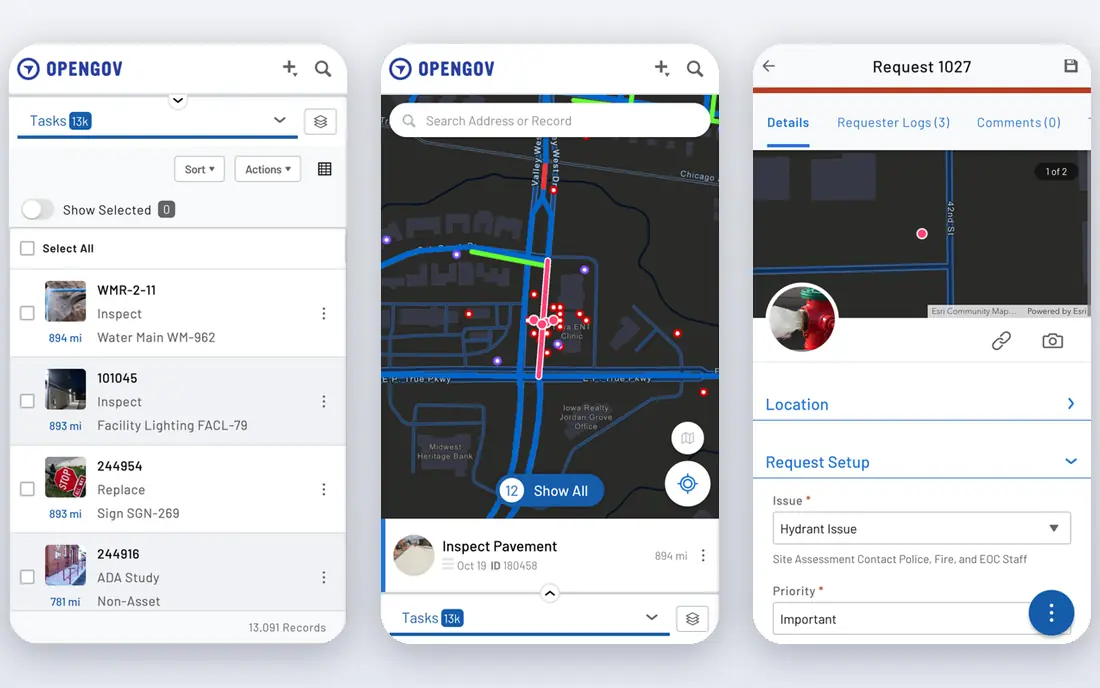
OpenGov puts utility billing inside a broader government platform that also covers finance, permitting and asset work. For a city that wants one system across departments, that link matters: a utility payment can feed the general ledger without rekeying. Its billing tools cover metered and flat services, consumption tracking and online payment.
The tradeoff is scale. Pricing is quoted by government size and scope, and smaller towns may find the platform and setup cost more than they need. If you only need billing, a focused tool will be simpler. If you need a full government suite, OpenGov is a serious contender.
On pricing, OpenGov starts at See website, with a free plan status of No. Check the vendor pricing page before you buy, since plans, user counts and add-ons change the total. If that price and scope fit your team, put it on a shortlist and test it with real data before you sign.
- Utility billing inside a wider government suite
- Fund accounting links
- Online payments
- Quote-based pricing
- Heavy for small utilities
- Longer setup
Black Mountain Software
Best for: Local governments and special districts

Black Mountain builds software for local governments, and its utility billing product fits that world well. It pairs with cash receipting and general ledger tools, so collections and accounting stay in step. The design suits water, sewer and garbage billing for towns and special districts that want control over rates and billing cycles.
Pricing is quoted rather than published, so budget from a written proposal. The product also feels more traditional than newer cloud tools, which some staff will like and others will not. For a local government that already uses Black Mountain products, the shared data is a clear plus.
On pricing, Black Mountain Software starts at See website, with a free plan status of No. Check the vendor pricing page before you buy, since plans, user counts and add-ons change the total. If that price and scope fit your team, put it on a shortlist and test it with real data before you sign.
- Utility billing tied to cash receipting and general ledger
- Strong local government focus
- Modular design
- Quote-based pricing
- On-premise feel
- May need modules for full function
UtilAbility is a focused utility billing tool built for smaller providers. It covers the core meter-to-cash path, from readings and rates to bills and payments, without the weight of a full government suite. That focus suits small water and sewer systems that want to replace spreadsheets quickly.
Public pricing is limited, so expect a quote. Larger cities with complex needs should test rate handling and reporting at their scale. For a small utility, though, the simpler scope can mean faster setup and lower total cost.
On pricing, UtilAbility starts at See website, with a free plan status of No. Check the vendor pricing page before you buy, since plans, user counts and add-ons change the total. If that price and scope fit your team, put it on a shortlist and test it with real data before you sign.
- Meter-to-cash billing for small utilities
- Rate and fee handling
- Customer records
- Smaller vendor
- Limited public pricing
- Check scale for large cities
QuikWater is a cloud billing tool aimed at small to medium municipal water and sewer providers. It handles bill calculation, customer records, notices and mailing support in a plain interface that small staff teams can learn fast. The low entry cost makes it a practical step up from spreadsheets.
Its scope is narrower than a full government suite, so check payment processing, online portals and reporting before you commit. If those pieces are add-ons, price them in. For a small system with straightforward rates, QuikWater covers the daily job well.
On pricing, QuikWater starts at See website, with a free plan status of No. Check the vendor pricing page before you buy, since plans, user counts and add-ons change the total. If that price and scope fit your team, put it on a shortlist and test it with real data before you sign.
- Simple water and sewer billing
- Bill calculation and notices
- Low entry cost
- Narrower scope than full suites
- Check payment and portal options
UtilityBilling is a browser-based tool built for water utilities. It covers billing, bulk invoicing, a customer portal, CRM records and automatic bill and collections notices. Because it runs in any browser, staff can work from the office or the field without installing software.
Starting pricing is published, but confirm what is included at that level and what payment processing adds. Larger utilities should also test reporting at their meter count. For a water utility that wants a straightforward cloud tool, it is a solid, affordable option.
On pricing, UtilityBilling starts at $99 per month, with a free plan status of No. Check the vendor pricing page before you buy, since plans, user counts and add-ons change the total. If that price and scope fit your team, put it on a shortlist and test it with real data before you sign.
- Bulk invoice generation
- Customer portal
- Bill and collections notices
- Works in any browser
- Per-month pricing can rise with scale
- Check payment fees separately
Skybill is a meter-to-cash platform built on Microsoft Dynamics 365 Business Central, which links billing to ERP and accounting. It suits utilities that have outgrown spreadsheets or custom systems and want tariff handling, customer records and billing in one place. Web access means staff can use it from any device.
Pricing is quoted, and the Dynamics base adds complexity for very small teams. If your office already uses Microsoft tools, the fit is easier. If you want the simplest possible billing tool, a lighter product may suit you better.
On pricing, Skybill starts at See website, with a free plan status of No. Check the vendor pricing page before you buy, since plans, user counts and add-ons change the total. If that price and scope fit your team, put it on a shortlist and test it with real data before you sign.
- Meter-to-cash on Microsoft Dynamics 365
- Tariff handling
- ERP links
- Quote-based pricing
- Dynamics complexity
- May be more than small utilities need
Utilmate is a cloud platform for electricity, water, gas and other utility services. It covers meter data, billing, payments, collections and customer communication in one system, which suits providers with several service types. Customer self-service and automation help larger providers handle volume without adding staff at the same rate.
Pricing is quoted, so small providers should compare total cost against simpler tools. The platform is built for scale, so a tiny system may not need all of it. For a multi-utility provider, though, the combined meter-to-cash path is a real strength.
On pricing, Utilmate starts at See website, with a free plan status of No. Check the vendor pricing page before you buy, since plans, user counts and add-ons change the total. If that price and scope fit your team, put it on a shortlist and test it with real data before you sign.
- Meter data management
- Billing and payments
- Customer self-service
- Multi-utility support
- Quote-based pricing
- Larger scope than small systems need
Cogsdale offers a customer information system with utility billing at its core, including a rate engine, payments and collections. It suits utilities that need a full customer record, not just a billing calculator, and that want billing, service orders and payments in one system. The rate engine handles varied tariff structures.
As with most CIS products, pricing is quoted and setup is a project. Small utilities may find it more than they need. For mid-size and larger providers that want a complete customer system, Cogsdale is worth a demo with your hardest rate cases.
On pricing, Cogsdale starts at See website, with a free plan status of No. Check the vendor pricing page before you buy, since plans, user counts and add-ons change the total. If that price and scope fit your team, put it on a shortlist and test it with real data before you sign.
- Customer information system with billing
- Rate engine
- Payment and collections tools
- Quote-based pricing
- Implementation project
- Best for mid-size and larger utilities
How we picked these
We compared official product pages, pricing pages and app store listings, and we checked that each product exists, works today and truly fits the topic. We favored tools with clear pricing or a clear quote path, honest limits, and a track record in the category. We did not claim hands-on testing that did not happen, and we left out tools that did not fit, even when they were well known in a nearby category.
How to pick utility billing software
Start with your meters and rates. List every service you bill, every rate structure, every fee and every discount. A tool that cannot model tiered water rates, seasonal charges or minimum bills will force workarounds that grow with each billing cycle. Ask the vendor to build one of your hardest bills during a demo.
Next, check the payment and collections path. Online payments, autopay, paperless billing and payment plans all affect cash flow and staff time. Also check how arrears, shutoff notices and late fees are handled, since those steps are often regulated and must follow a clear sequence.
Meters, readings and portals
Confirm how readings enter the system, whether by manual entry, file import or automated meter reading. A customer portal should show usage, bills and payment history, and let customers update contact details. If your customers are mostly on paper, check print and mailing options too.
Implementation and support
Ask how long setup takes, what data migration includes, and what training is provided. Small utilities should favor tools with plain setup and responsive support over large suites that need consultants. Get the full cost in writing, including users, meters and payment processing.
FAQ
What does utility billing software do?
It turns meter readings or flat charges into bills, applies rates and fees, sends statements, collects payments and tracks arrears. Most tools also include a customer record, a portal and reports on revenue and collections. The goal is fewer manual steps and fewer billing errors.
Can it handle water, sewer, electric and waste together?
Many tools can, but check each service type before you buy. Some are built mainly for water and sewer, while others cover electric, gas and waste as well. Confirm tiered rates, demand charges and service-specific fees for your exact mix.
How much does it cost?
Small tools start near 99 dollars a month, while government suites are quote-based and can cost far more. Some vendors charge per meter or per user, so total cost depends on your size. Always price for your meter count and user count.
Do customers get an online portal?
Most modern tools offer a portal for viewing bills, paying and checking usage. Check whether the portal is included or an add-on, and whether it supports autopay and paperless billing. A good portal reduces calls and speeds payment.
How hard is it to switch from spreadsheets?
Switching takes planning, since customer records, balances and rate tables must move cleanly. Ask the vendor about migration help and test a full billing cycle in parallel before going live. A careful parallel run catches rate errors early.