Best Translation App for Japan in 2026: 8 Apps Compared
Compare the best translation app for japan in 2026 for travel, menus, signs and work, with camera, voice, offline and formal Japanese support covered.

- Editor's choice
 Google Translate
Most travellers in Japan
Starts atFreeVisit translate.google.comFull review - Great alternative
 DeepL
Formal writing and work documents
Starts atFreeVisit deepl.comFull review - Also consider
 Papago
Everyday Japanese conversation
Starts atFreeVisit papago.naver.comFull review
TL;DR:
- Google Translate is the best free all-rounder for travel, with camera, voice and offline Japanese.
- DeepL is our pick for formal writing and work documents, where natural phrasing matters most.
- Papago handles everyday Japanese conversation and polite forms well, especially in short exchanges.
- Waygo and Yomiwa solve narrower problems well, namely printed Japanese and kanji learning.
- Download an offline Japanese pack before you travel, since stations and rural areas can have weak signal.
Quick comparison
| Tool | Best for | Starts at | Free plan? | |
|---|---|---|---|---|
| Google Translate | Most travellers in Japan | Free | Yes | Visit |
| DeepL | Formal writing and work documents | Free | Yes | Visit |
| Papago | Everyday Japanese conversation | Free | Yes | Visit |
 Microsoft Translator | Group conversations and offline use | Free | Yes | Visit |
 Waygo | Reading printed Japanese menus and signs | See website | Free trial | Visit |
 Yomiwa | Learning Japanese and reading kanji | See website | Free trial | Visit |
 iTranslate | Voice translation on the move | Free | Yes | Visit |
 Reverso | Learners who want real examples | Free | Yes | Visit |
The best translation apps for Japan
Japan rewards a translation app that can read signs, handle polite speech and work without a signal. We compared apps on Japanese accuracy, camera translation, voice conversation and offline packs.

Google Translate fits almost every traveller in Japan. It translates text, speech and camera images, and its offline Japanese pack covers the moments when Wi-Fi or mobile signal disappears in a station or rural town. The strength is coverage for no cost. One free app handles signs, menus, train announcements and short conversations, and it switches quickly between text and camera modes. That breadth is why it remains the default first install for Japan trips.
The catch is nuance. Casual translations are usually clear, but formal or polite Japanese can come out flat or blunt. For a work email or a sensitive message, run the result through DeepL or ask a native speaker to check it. Before you commit, test the free tier or demo where offered, check the current price on the official site, and confirm the features you need are on the plan you will actually buy.
- Camera, voice and offline Japanese
- Huge language range
- Free
- Nuance can be lost in formal Japanese
- Offline camera is limited

DeepL fits people writing emails, reports or longer Japanese text for work. Its translations tend to read like something a person would actually write, rather than a list of translated words, which matters when tone affects the reply you get. The strength is written Japanese. DeepL handles context and sentence flow better than most free tools, and document translation keeps formatting in many files. For business use, that quality saves editing time and avoids awkward phrasing.
The catch is that DeepL is not a travel camera app. It has no full equivalent of Google Translate camera mode, and advanced features sit behind paid plans. Use it for writing, and keep a camera app alongside it for signs and menus. Before you commit, test the free tier or demo where offered, check the current price on the official site, and confirm the features you need are on the plan you will actually buy.
- Natural-sounding Japanese text
- Document translation
- Careful tone
- Camera and voice tools are limited
- Some features need a paid plan
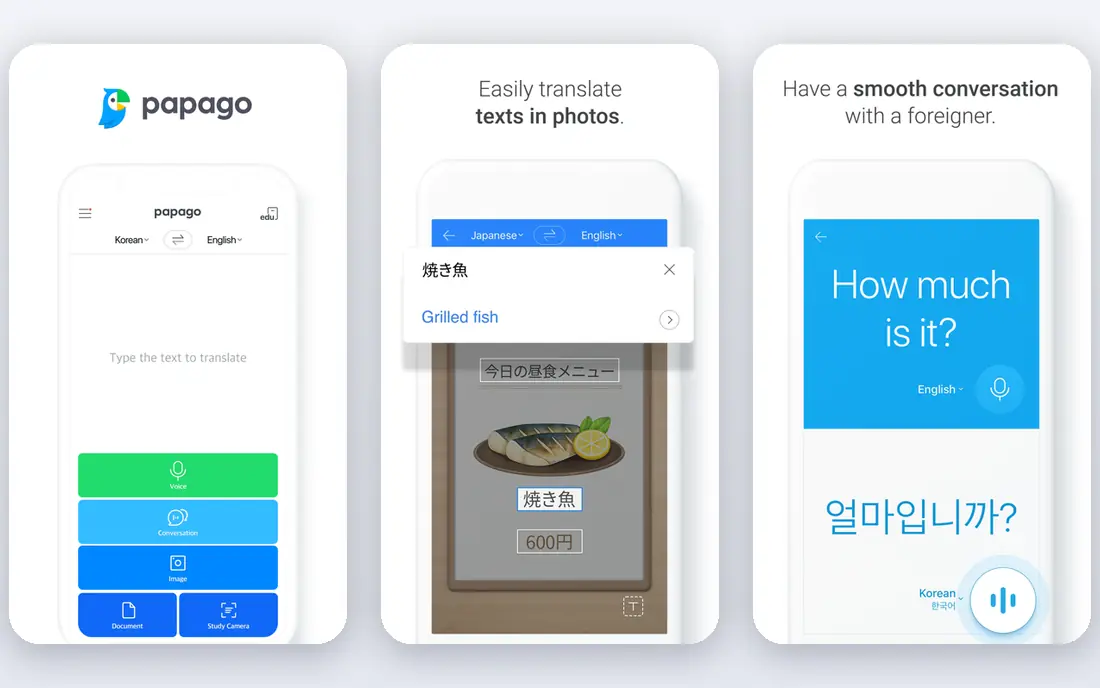
Papago fits travellers and learners who talk with people in Japan every day. Built by Naver with a focus on East Asian languages, it handles short, natural exchanges and polite forms better than a general translator often does. The strength is conversational Japanese. Phrases sound closer to how people actually speak, and the app includes dictionary detail that helps you understand why a phrase was chosen. That makes it a good second app for anyone staying in Japan for a while.
The catch is scope. Papago covers fewer languages than Google Translate, so it works best as a Japan-focused companion rather than a single app for many countries. Keep Google Translate installed for languages outside its core set. Before you commit, test the free tier or demo where offered, check the current price on the official site, and confirm the features you need are on the plan you will actually buy.
- Natural short conversations
- Polite forms
- Camera and voice
- Language range is narrower than Google
- Some features need a connection
Microsoft Translator fits travellers and teams who need offline Japanese or a group conversation with several languages at once. Its conversation mode lets people join with a code and follow translations on their own phones. The strength is practical group use. A tour group, class or meeting can share one conversation without passing a single phone around, and offline packs help when signal is weak. It is also free, with no subscription push for core translation.
The catch is camera-first travel. Microsoft Translator is strong on text and speech, but travellers who mainly read signs and menus will still prefer Google Translate or Waygo for that job. Treat it as a conversation and offline backup. Before you commit, test the free tier or demo where offered, check the current price on the official site, and confirm the features you need are on the plan you will actually buy.
- Offline packs
- Multi-person conversation mode
- Free
- Japanese camera support is less central
- Interface is plainer
Waygo fits travellers whose main problem is printed Japanese. Point the camera at a menu, sign or label and it translates the text in place, which is faster than typing characters you cannot read. The strength is its focus. Because Waygo is built around camera translation for a small set of Asian languages, its printed-text results are often cleaner than a general app on the same menu. Offline use also helps in restaurants and stations.
The catch is breadth. Waygo is not a full conversation or document translator, and its language set is narrow by design. Use it for reading, and keep Google Translate or Papago for speaking and writing. Before you commit, test the free tier or demo where offered, check the current price on the official site, and confirm the features you need are on the plan you will actually buy.
- Camera-first translation for printed Japanese
- Works offline
- Voice conversation is limited
- Language set is focused
Yomiwa fits learners and long-stay visitors who want to understand Japanese, not just translate it. Its camera kanji lookup, dictionary entries and study tools help you learn the characters you keep meeting on signs and packaging. The strength is depth on kanji. Instead of giving only a translation, Yomiwa shows readings, meanings and related words, which helps a learner build vocabulary from real life. That depth is why many students keep it long after a short trip ends.
The catch is that it is a learning tool first. For a quick conversation or a long document, Google Translate or DeepL will be faster. Use Yomiwa when understanding matters more than speed. Before you commit, test the free tier or demo where offered, check the current price on the official site, and confirm the features you need are on the plan you will actually buy.
- Kanji lookup by camera
- Dictionary detail
- Learning tools
- Not a general conversation app
- Some features are paid
iTranslate fits travellers who mainly speak rather than read. Its voice mode, phrasebook and clean design make short exchanges at hotels, shops and stations quick, without learning a complex interface. The strength is speed for spoken phrases. You can speak, hear the translation and show the screen to the other person in seconds, which lowers the awkwardness of a first conversation in Japan. The phrasebook also covers common travel situations.
The catch is cost for full use. Offline packs and some advanced features sit behind a paid plan, so check what is free before you travel. For formal Japanese, DeepL remains the better writing choice. Before you commit, test the free tier or demo where offered, check the current price on the official site, and confirm the features you need are on the plan you will actually buy.
- Voice and text translation
- Phrasebook
- Simple design
- Offline use and some features need a paid plan
- Japanese nuance varies
Reverso fits learners who want to see how a Japanese word or phrase is actually used. Its example sentences show context, which helps you avoid a technically correct translation that sounds odd in real life. The strength is context. A dictionary entry alone rarely explains politeness or usage, but examples from real text make the difference clearer. That is useful for students and for anyone writing messages to Japanese contacts.
The catch is travel use. Reverso is not built for camera translation of signs or for live conversation, so it works best as a study companion. Pair it with Google Translate for daily travel tasks. Before you commit, test the free tier or demo where offered, check the current price on the official site, and confirm the features you need are on the plan you will actually buy.
- Example sentences in context
- Dictionary detail
- Conjugation help
- Camera translation is limited
- Japanese coverage is narrower
How we picked these
We compared official feature pages, pricing pages, app store listings, privacy and support pages, and public reviews for each product. We favoured products that exist and work today, fit the topic closely, and publish clear pricing or a clear way to get a quote. Where a price was not published, we wrote See website rather than guessing.
We also weighed the honest trade-offs, not just the headline features. A large library, a strong marketplace or a deep platform only helps if the cost, limits and learning curve suit your situation, so each write-up names who the product fits and where it falls short.
How to choose a translation app for Japan
Match the app to the moment
Travel days need camera and voice tools, while work needs careful text translation. Most travellers do best with Google Translate for daily use plus DeepL or Papago as a second check for anything formal.
Download offline packs early
Offline Japanese packs take time and storage, so download them on Wi-Fi before you fly. Test camera translation on a photo of a menu at home, so you are not learning the app at a restaurant counter.
Treat polite Japanese with care
Japanese politeness levels change meaning, and a direct translation can sound blunt. Use Papago or DeepL for formal messages, and for contracts or legal text, use a human translator rather than any app.
FAQ
What is the best translation app for japan?
Google Translate is the best overall pick for most travellers because it is free, covers camera, voice and offline Japanese, and works across signs, menus and conversations.
What are the best translation apps for japan for travel?
Google Translate, Papago and Waygo make a strong travel set. Google Translate covers most situations, Papago helps with natural conversation, and Waygo is built for printed Japanese on menus and signs.
Is there a best translation app japan travellers can use offline?
Yes, Google Translate and Microsoft Translator both offer downloadable Japanese packs for offline text translation. Camera and voice features may still need a connection, so check each mode before you rely on it.
Which app is best for formal Japanese?
DeepL is the strongest choice for formal writing, emails and documents, because its Japanese output tends to read more naturally than a word-for-word translation. Still have a native speaker check anything high stakes.
Can a translation app read Japanese menus?
Yes, camera translation in Google Translate, Waygo and Papago can read printed Japanese, though handwritten menus and stylised signs are harder. Take a clear, well-lit photo and translate short sections at a time.