Best Stock App in 2026: 9 Apps Compared
Compare the best stock app in 2026 for trading, investing, and market news, covering fees, research, accounts, charts, and mobile tools for US investors.

- Editor's choice
 Robinhood
Simple mobile trading
Starts atFreeVisit robinhood.comFull review - Great alternative
 Fidelity
Long-term investing
Starts atFreeVisit fidelity.comFull review - Also consider
 Schwab
Research and support
Starts atFreeVisit schwab.comFull review
TL;DR:
- Fidelity, Schwab, and E*TRADE suit long-term investors who want research, retirement accounts, and support.
- Robinhood, Webull, and Moomoo suit active mobile traders who want fast orders and charts.
- SoFi Invest and Public suit beginners who want simple investing plus learning content.
- Fees, order types, and account types matter more than a flashy app, so check them before you fund an account.
Quick comparison
| Tool | Best for | Starts at | Free plan? | |
|---|---|---|---|---|
| Robinhood | Simple mobile trading | Free | Yes | Visit |
| Fidelity | Long-term investing | Free | Yes | Visit |
| Schwab | Research and support | Free | Yes | Visit |
 E*TRADE | Active traders and tools | Free | Yes | Visit |
 Webull | Advanced mobile charts | Free | Yes | Visit |
 SoFi Invest | Beginner investing | Free | Yes | Visit |
 Interactive Brokers | Global and pro trading | Free | Yes | Visit |
 Moomoo | Data-rich mobile trading | Free | Yes | Visit |
 Public | Social investing for beginners | Free | Yes | Visit |
The best stock app
We compared official feature pages, pricing pages, app store listings, and public reviews for these apps. This is not financial advice. Trading carries risk, including loss of capital, and past performance does not guarantee future results. Check fees, account terms, and tax rules before you invest, and consider advice from a licensed professional for large decisions.

Robinhood fits beginners who want to place a first stock trade without a complex platform. The app is clean, orders are quick, and fractional shares let you start with small amounts. It also offers options, crypto, and retirement accounts in the same app, though features vary by account and region. The limit is research depth. Robinhood offers news and basic data, but it does not match Fidelity or Schwab for analyst reports and planning tools. Active traders may also want deeper charting. For a new investor who wants simplicity, Robinhood is our pick for most beginners, provided you understand trading risk and start small.
- Very easy mobile app
- Commission-free stock trades
- Fractional shares
- Research is thinner
- Customer support can be slow at peak times

Fidelity suits long-term investors who want research, retirement accounts, and reliable support in one place. It offers brokerage, IRA, and other account types, fractional shares, and a wide range of funds and stocks. Research, screeners, and planning tools help investors who want to learn before they buy. The downside is density. The app packs in many features, so new users may need time to find what they need. It is less flashy than Robinhood for quick mobile trades. For an investor building wealth over years, Fidelity gives depth, account choice, and support that justify the learning curve.
- Strong research
- Many account types
- Fractional shares and support
- App can feel dense
- Active trader tools are less flashy
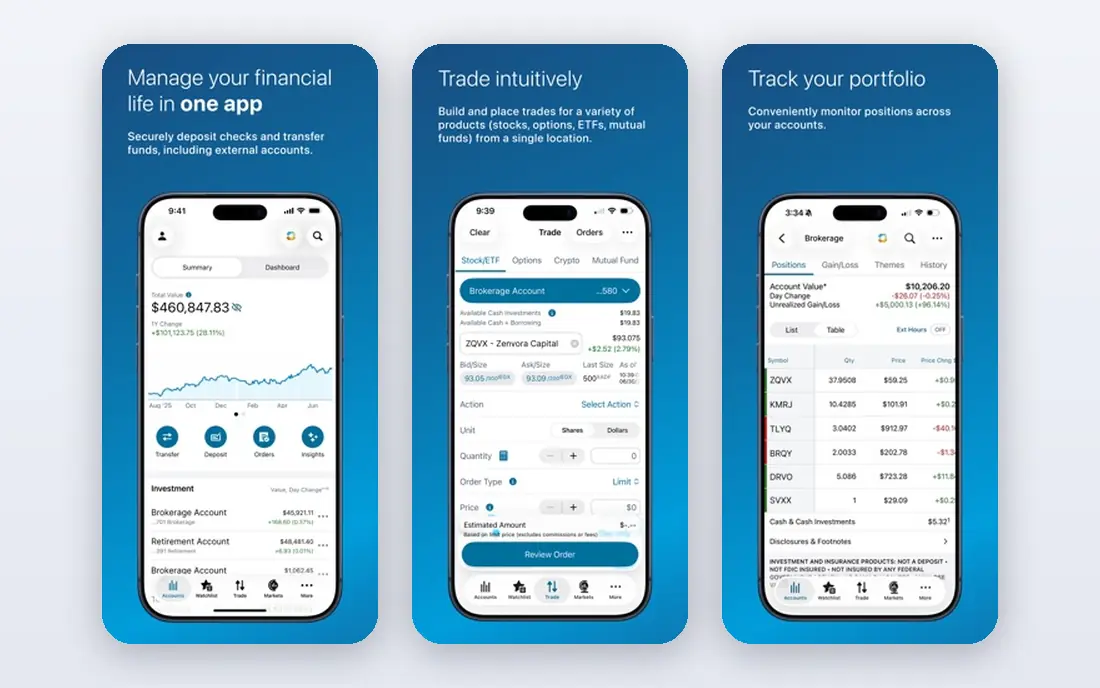
Schwab fits investors who want research, education, and human support alongside an app. It offers brokerage and retirement accounts, market research, and branch access in the US, which helps investors who sometimes want to talk to a person. Its education content suits beginners who want to learn steadily. The trade-off is style. The app feels more traditional than Robinhood or Moomoo, and some advanced tools work better on desktop. For investors who value support and research over a slick mobile-first design, Schwab is a strong, steady choice. Check account fees and fund costs for your exact holdings.
- Strong research and education
- Branch support
- Many account types
- App design feels traditional
- Some advanced tools need desktop
ETRADE suits investors who want a middle ground between simple apps and pro platforms. It offers a standard mobile app plus a more advanced app for active traders, with charting, screeners, and paper trading to practise strategies without real money. Retirement and brokerage accounts sit in the same system. The catch is choice. Two apps and many tools can confuse new users, and some advanced features suit active traders more than buy-and-hold investors. For a trader who wants to grow from simple orders to deeper analysis, ETRADE gives a clear path without switching brokers.
- Two app options for different levels
- Strong charting
- Paper trading
- Platform choice can confuse
- Some features need higher activity
Webull fits active mobile traders who want detailed charts and technical tools on a phone. It offers extended hours trading, paper trading, and a wide range of indicators, with commission-free stock trades on relevant accounts. That mobile depth is its main edge over simpler apps. The limit is research and support. Analyst reports and human support are thinner than Fidelity or Schwab, and support is mainly digital. For a self-directed trader who reads charts and manages risk carefully, Webull is a strong pick. For a beginner who wants guidance, a research-rich broker may fit better.
- Deep mobile charts
- Extended hours trading
- Paper trading
- Research reports are thinner
- Support is mainly digital
SoFi Invest suits beginners who want investing alongside other SoFi financial products. You can choose active investing or automated portfolios, with fractional shares and learning content to explain basics. The app is clean and easy to navigate for a first account. The weakness is depth for active traders. Charting, order types, and research are more basic than Webull, Fidelity, or Schwab. For a new investor who wants to start, automate, and learn, SoFi Invest is a friendly choice. For an active trader, it will feel limited within a few months.
- Simple active and automated investing
- Learning content
- Fractional shares
- Advanced trading tools are limited
- Research is basic
Interactive Brokers suits experienced traders and investors who want global markets, many order types, and professional tools. It offers access to stocks, options, futures, and foreign markets, with pricing that can suit high-volume traders. Its research and data tools are deep. The catch is complexity. The platform can overwhelm beginners, and account setup needs care with permissions and risk settings. For a pro or global investor, Interactive Brokers is hard to beat on breadth. For a first-time investor, start with a simpler broker and move here only when you need its scope.
- Global markets access
- Low margin rates on some accounts
- Pro tools
- Complex for beginners
- Interface can overwhelm
Moomoo fits mobile traders who want lots of market data in the app. It offers detailed quotes, charts, screeners, and paper trading, with community discussion alongside market news. That data depth helps traders who check many stocks each day. The limit is traditional research. Moomoo offers less analyst report depth than Fidelity or Schwab, and its brand is newer in some markets, so check local regulation and account protection for your region. For a data-focused mobile trader, Moomoo is a strong pick. For a long-term planner, a research-rich broker may suit better.
- Rich market data and charts
- Paper trading
- Community features
- Research reports are limited
- Brand is newer in some markets
Public suits beginners who want to learn by seeing what others discuss, with context around trades. It offers fractional shares, stocks, ETFs, and other assets by account type, with learning content and community posts. The app is friendly and avoids the game-like feel of some rivals. The weakness is trading depth. Advanced charting, order types, and research are more basic than Webull or Fidelity. For a beginner who wants to start small and learn in public, Public is a good first app. For an active trader, you will likely need a second, deeper platform within a year.
- Fractional shares
- Learning content
- Social discussion with context
- Trading tools are basic
- Options and advanced orders are limited
How we picked these
We compared official feature pages, pricing pages, app store listings, and public reviews for each app. We favoured apps that are still actively offered in October 2026, that fit a clear investor type, and that publish fees and account terms clearly enough to judge. We did not claim hands-on testing, and we did not invent fees, returns, or account protections.
What to check before you open an account
Check commission, spread, and other fees for the trades you will actually make, not just the headline stock commission. Options, foreign stocks, margin, and account transfers can carry separate costs. Also check fractional share rules, dividend reinvestment, and tax reporting for your country.
Account types and protection
Choose the right account type for your goal, such as a general brokerage account or a retirement account, and check how assets are protected in your region. In the US, SIPC protection covers certain brokerage failures up to limits, but it does not protect against market loss. Read the broker disclosure before you fund an account.
Risk, diversification, and learning
Start with an amount you can afford to lose, diversify across holdings rather than betting on one stock, and use paper trading to learn order types. Market news apps help you follow companies, but news alone is not a strategy. If a trade feels like a gamble, reduce size or step back and review your plan.
FAQ
What is the best stock app for beginners?
Robinhood, SoFi Invest, and Public suit beginners because all three offer simple apps, fractional shares, and learning content. Fidelity also suits beginners who want research and support from the start. Start small, learn order types, and avoid margin until you understand its risks.
What is the best app for stock trading on mobile?
Webull and Moomoo suit active mobile traders with deep charts and data, while Robinhood suits simple mobile orders. E*TRADE suits traders who want both a simple app and an advanced app. Pick based on charting needs, not app colour or social features.
What is the best stock market news app?
Fidelity, Schwab, and Moomoo offer strong news and market data inside their trading apps, while Public adds community context. For news alone, a dedicated market news app may suit you, but trading apps give news tied to your holdings and watchlists, which is more useful for decisions.
What is the best investment app in the UK?
Availability, fees, and tax wrappers differ by country, so check which of these apps operate in the UK and offer ISA or pension accounts where relevant. Fidelity and Interactive Brokers operate in multiple markets, but terms differ by region. Always check local regulation before opening an account.
Are stock apps free to use?
Many stock apps offer commission-free stock trades, but options, margin, foreign trades, and data add-ons can cost extra. Free does not mean risk-free, and trading still carries loss risk. Read the full fee schedule for your account type before you trade.
Is investing through an app safe?
Reputable brokers use encryption, login controls, and account protections, but no app removes market risk. Use strong passwords, two-factor authentication, and a device lock. This is not financial advice, and you should never invest money you need for essential bills or short-term debts.