Best Sports Card Scanner Apps in 2026: 9 Apps Compared
We tested the best sports card scanner apps for baseball, football, and basketball cards, comparing scan accuracy, values, and collection tools for collectors.
- Editor's choice
 CollX
Free scanning and collection tracking for most collectors
Starts at$9.99 per monthVisit collx.comFull review - Great alternative
 Ludex
Parallels and modern inserts
Starts at$24.99 per monthVisit ludex.comFull review - Also consider
 Sports Cards Pro
Simple value lookup and collection lists
Starts atSee websiteVisit sportscardspro.comFull review
TL;DR:
- CollX is our pick for most collectors because scanning and collection tracking are free to start and easy to use.
- Ludex is stronger on parallels and modern inserts where other scanners struggle to match the exact card.
- Card Ladder is the serious portfolio tool, built on actual sold sales rather than asking prices.
- No scanner value is exact, so always check recent sold listings before you buy or sell a valuable card.
- eBay and 130point are useful free checks even if you do not use them as your main collection app.
Quick comparison
| Tool | Best for | Starts at | Free plan? | |
|---|---|---|---|---|
| CollX | Free scanning and collection tracking for most collectors | $9.99 per month | Yes | Visit |
| Ludex | Parallels and modern inserts | $24.99 per month | Yes | Visit |
| Sports Cards Pro | Simple value lookup and collection lists | See website | Yes | Visit |
 Card Ladder | Portfolio tracking based on sold sales | $19.99 per month | Free trial | Visit |
 Beckett | Long-running price guide data | See website | Yes | Visit |
 PSA | Graded card verification and values | Free | Yes | Visit |
 eBay | Free scanning inside the selling flow | Free | Yes | Visit |
 130point | Checking real sold prices | $9.99 per month | Yes | Visit |
 PreGrade | AI grading estimates before you submit | Free | Yes | Visit |
The best sports card scanner apps
A card scanner should do three things well: identify the card from a photo, show a realistic value based on recent sales, and save it to a collection you can track. We compared the apps below on scan accuracy, price data, collection tools, and cost, with a focus on baseball, football, and basketball cards.
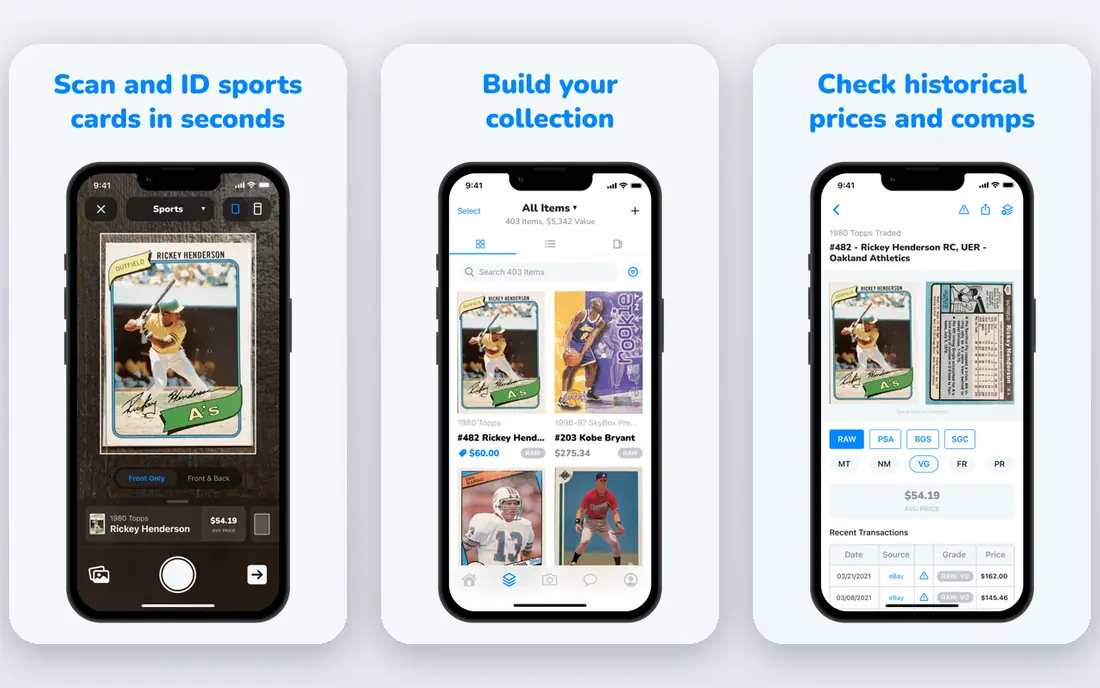
CollX is the app we would suggest first to a collector starting a digital collection. You point your phone at a card, confirm the match, and add it to a collection that shows an estimated total value.
The built-in marketplace is a practical plus, since you can list cards without exporting them elsewhere. The app covers major sports and keeps the scanning flow simple enough for kids and returning collectors alike.
The honest catch is valuation. CollX values can sit above recent sold prices when asking prices feed the average, so use the figure as a starting point. For a sale, compare recent completed sales before you set a price.
- Camera scanning for sports cards
- Built-in marketplace
- Collection tracking with values
- Values can lean high when they include asking prices
- Paid tiers needed for unlimited features
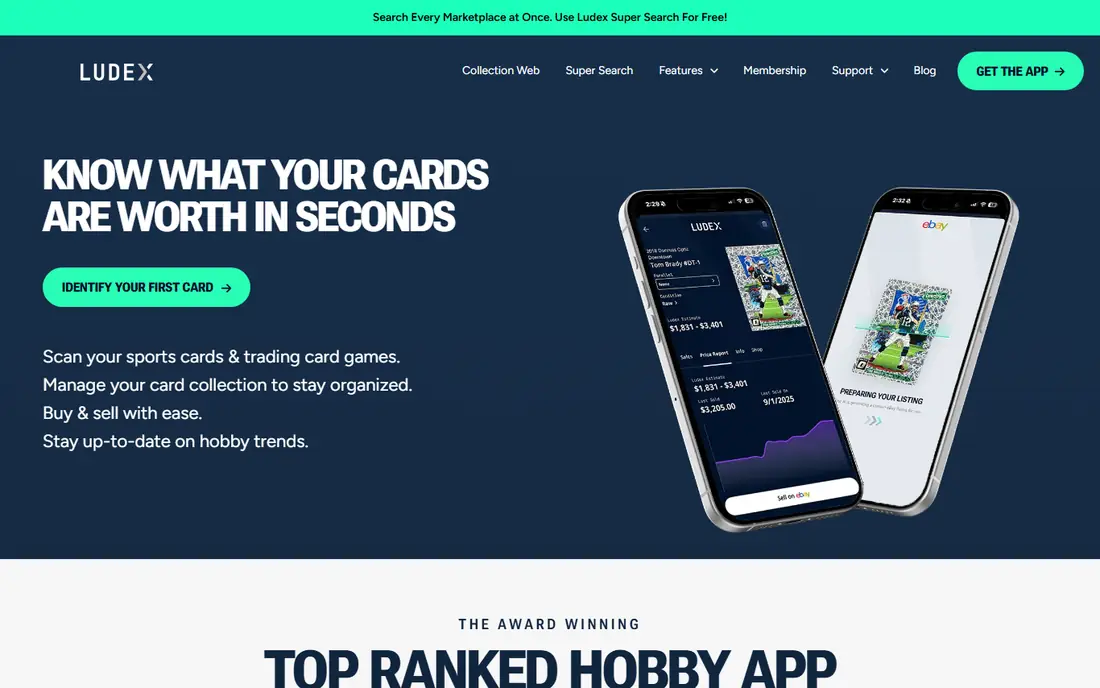
Ludex is the scanner to try when other apps keep matching the base card instead of the parallel you actually hold. It handles modern inserts, short prints, and variants with more care than most free scanners.
The app covers sports cards and trading card games, which helps collectors who hold both. Export to eBay also speeds up listing, since you can move a scanned card toward a sale without retyping set and card details.
Cost is the drawback. The premium tier is priced well above CollX Pro, so casual collectors may not see the value. Try the free tier on your hardest cards first and upgrade only if the matching is clearly better.
- Strong matching on parallels and short prints
- Sports and trading card games
- EBay export
- Premium price is high compared with rivals
- Full features sit behind a paid plan
Sports Cards Pro suits collectors who want a quick value check and a simple list, not a full marketplace. You search or scan, save the card, and keep a running view of your collection without extra steps.
Simplicity is the point here. The interface stays focused on identification and values, which helps when you are sorting a box of cards and want to move fast. It is a useful second check alongside a main scanner.
The limit is depth. Portfolio charts, grading tools, and selling features are thinner than on larger apps, so serious sellers will likely pair it with eBay or Card Ladder for final pricing.
- Quick card lookup and collection lists
- Covers major sports
- Straightforward interface
- Fewer marketplace and portfolio tools than CollX or Card Ladder
- Pricing details are limited online
Card Ladder is built for collectors who treat cards as a portfolio and want to watch values over time. It builds price history from actual eBay and auction sales, then charts how a collection moves.
That sold-data focus is what sets it apart. Instead of a single estimate, you can see price history, compare grades, and judge whether a card is rising, flat, or cooling before you buy or sell.
The price will put off casual collectors, since the Pro plan costs about twenty dollars a month. It makes sense if you hold valuable cards or trade often, but a free scanner covers most hobby collections.
- Price history from actual sales
- Portfolio charts
- Covers graded and raw cards
- Subscription cost is high for casual collectors
- Best value requires regular use
Beckett brings decades of price guide history to card scanning and lookup. Collectors who grew up with Beckett guides will find familiar coverage across baseball, football, basketball, and other sports.
The brand strength is depth of catalog data and grading connections. Beckett grading is well known in the hobby, and the site links price data, checklists, and marketplace listings in one place.
Access is the catch. Some of the most useful price guide detail sits behind paid tiers, so free users may see less than they expect. Check what your plan includes before you rely on Beckett as your only value source.
- Established price guide brand
- Covers sports and trading cards
- Grading and marketplace links
- Some price guide features sit behind paid access
- App experience varies by card type
PSA is the app to use when your collection includes graded cards. You can verify a card by its certification number, check population data, and see price context for that grade.
Trust is the reason to keep PSA on your phone. Graded card buyers often check PSA data before a purchase, so having verification in hand helps both buyers and sellers close deals with confidence.
PSA is not a general scanner for raw cards. If most of your collection is ungraded, you still need CollX or Ludex for identification, and PSA becomes a companion tool for the graded part of your collection.
- Verify graded cards by cert number
- Population and price data
- Trusted grading brand
- No general raw-card scanner for ungraded cards
- Best for graded collections
eBay is worth including because its scanner is free and it sits where cards actually sell. Inside the selling flow, the scanner identifies a card and pre-fills title, set, year, and card number.
For bulk sellers, that shortcut saves real time. You can move from a shoebox to live listings faster than with a separate scanner, and sold listings give you the most direct check on what buyers paid.
The limit is purpose. eBay does not track a collection or assess condition, and it does not give a standalone valuation. Use it as a listing tool and a price check, not as your collection manager.
- Built-in card scanner pre-fills listings
- Huge sold-listing data
- Free with a normal account
- No collection tracking or condition grading
- Scanner is built for listing, not valuation
130point is the reality check every scanner user needs. It focuses on sold prices, so you can see what a card actually sold for rather than what sellers asked for it.
That focus makes it ideal for verifying a scanner estimate before you buy, sell, or trade. You can filter by card, grade, and sale type, which helps when a scanner lumps different versions together.
It is less of a collection app and more of a research tool. If you want scanning, tracking, and selling in one place, pair 130point with CollX or Ludex rather than using it alone.
- Sold-price lookup across eBay sales
- Useful for verifying scanner values
- Covers sports cards
- Interface is more research tool than collection app
- Paid plan needed for full history
PreGrade answers a different question from most scanners: should you send this card for grading, and what grade might it get. It scans the card and gives an AI grade report with sub-scores and sold comps.
That report helps collectors avoid grading fees on cards that are unlikely to grade well. If the centering, corners, or surface look weak in the report, you can keep the card raw and save the submission cost.
Treat the result as an estimate, not a promise. An official grader can still differ, especially on borderline cards, so use PreGrade to screen cards rather than to price a card as if it were already graded.
- AI grade reports for sports and trading cards
- Live sold comps
- Listing help for eBay
- Grading estimates are not official grades
- Some scans cost after the free allowance
How we picked these
We compared official app listings, vendor pricing pages, and public reviews for each app, focusing on sports cards rather than trading card games alone. We looked for camera scanning, database size, price source, collection tracking, marketplace links, and grading help. We also noted where a value comes from asking prices versus completed sales, since that difference can change a card value by a wide margin.
How to choose a sports card scanner app
Start with what you collect. If you collect base cards and common inserts, a free scanner with a large database will cover most needs. If you collect parallels, short prints, and graded cards, you need a scanner that handles variants well and shows sold prices by grade. Scan the same five cards in two apps before you pay, and compare the matches, not just the headline values.
Read values with care
A scanner value is an estimate, not a sale price. Ask whether the price uses recent sold listings, an average of asking prices, or a mix of both. Check the condition and grade behind the price, since a mint card and a played card can sit far apart in value. For cards worth real money, cross-check on eBay sold listings and 130point before you list or trade.
Think about collection size and selling
If you own a few hundred cards, a free tier may be enough. If you own thousands, unlimited scanning, bulk import, and export matter more than a pretty dashboard. If you plan to sell, a built-in marketplace or easy eBay export saves time. Also check whether your data exports if you switch apps, so your collection does not get locked into one service.
FAQ
What is the best app to scan sports cards for value?
CollX is a good starting point for most collectors because it scans sports cards, tracks a collection, and offers a marketplace in one app. Ludex is a strong alternative for parallels and modern inserts. For portfolio tracking, Card Ladder gives deeper sold-price history.
Are sports card scanner apps accurate?
Scanners are usually good on standard base cards and weaker on rare parallels, misprints, and cards with similar designs. Values are estimates based on recent sales or asking prices, so treat them as a guide. Always verify a valuable card by checking recent sold listings for the same card, year, set, and grade.
Is there a free sports card scanner app?
Yes. CollX, Ludex, and several other apps offer free scanning with limits, and eBay offers a free scanner inside its selling flow. Free tiers often cap the number of cards or scans, so heavy collectors may need a paid plan for unlimited use.
What is the best app for baseball card values?
CollX and Ludex both cover baseball cards well, and Beckett adds long-running price guide data for baseball and other sports. For recent market prices, check sold listings on eBay and 130point alongside any scanner value.
Do I need a paid plan to track my collection?
Not always. Free plans cover small collections for many collectors, but paid plans add unlimited scanning, deeper price history, and portfolio tools. Start free, and upgrade only when you hit a cap or need sold-price history for selling decisions.