Best Software for Marketing Agencies in 2026: 8 Tools Compared
Compare the best software for marketing agencies, from client reporting and SEO to social, email, and design tools that help agencies deliver and scale.
- Editor's choice
 HubSpot
CRM and marketing in one system
Starts atSee websiteVisit hubspot.comFull review - Great alternative
 Semrush
SEO and competitor research
Starts atSee websiteVisit semrush.comFull review - Also consider
 Ahrefs
Backlinks and keyword research
Starts atSee websiteVisit ahrefs.comFull review
TL;DR:
- Agencies need a stack, not a single tool: client reporting, SEO, social, email, project work, and design each play a different role.
- HubSpot suits agencies that want CRM, marketing, and sales in one system, while Semrush and Ahrefs suit agencies that lead with SEO.
- Client reporting tools save the most time when they pull data automatically and let clients see results without a manual monthly report.
- Price by client count and seats together, because some tools charge per client, per seat, or per report, and those models scale very differently.
- Test tools with one real client account before you move your whole book of clients.
Quick comparison
| Tool | Best for | Starts at | Free plan? | |
|---|---|---|---|---|
| HubSpot | CRM and marketing in one system | See website | Yes | Visit |
| Semrush | SEO and competitor research | See website | Free trial | Visit |
| Ahrefs | Backlinks and keyword research | See website | Free trial | Visit |
 Sprout Social | Social scheduling and reporting | See website | Free trial | Visit |
 AgencyAnalytics | Automated client reporting | See website | Free trial | Visit |
 Vendasta | White-label agency platform | See website | Free trial | Visit |
 Mailchimp | Email marketing for clients | See website | Yes | Visit |
 Canva | Fast client design and templates | See website | Yes | Visit |
The best software for marketing agencies
We compared agency features such as client seats, white-label reporting, multi-account management, and integrations. The best software for marketing agencies depends on your main service: SEO, paid media, social, email, or full-service work.

HubSpot suits agencies that want client contacts, deals, email, landing pages, and reporting in one place. The free CRM lets a small agency start without cost, while Marketing Hub adds email, automation, and campaign tools, and Sales Hub adds pipelines and quotes. Agencies can manage multiple client accounts, track leads from first touch to sale, and show clients where results came from. That single system reduces the need to stitch together separate CRM, email, and reporting tools.
The catch is cost and complexity. HubSpot pricing rises with contacts, hubs, and add-ons, so an agency with many clients needs to model the full stack, not only the entry price. Setup also takes time: pipelines, lifecycle stages, and reporting dashboards need a clear design. HubSpot is best for agencies that sell inbound, content, or full-funnel services and want one system of record for clients.
- CRM, email, landing pages, and reporting together
- Free CRM starter
- Strong integrations
- Costs rise quickly with hubs and contacts
- Setup needs planning for agencies
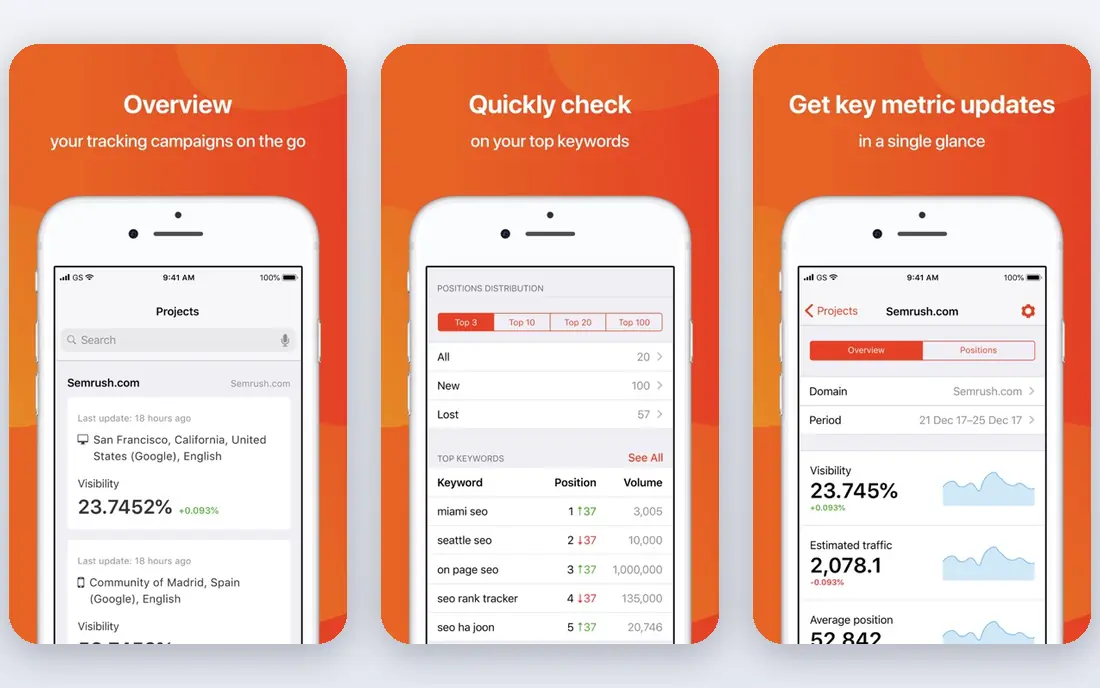
Semrush is a core tool for agencies that lead with SEO and content. Keyword research, competitor analysis, site audits, backlink checks, and rank tracking sit in one platform, and local SEO tools help multi-location clients. Agencies can build projects per client, track keywords over time, and export reports for monthly reviews. Content tools also help plan topics, check readability, and spot gaps against competitors.
The limit is depth and cost. Semrush covers many SEO jobs, but new staff need training to use it well, and larger client portfolios need higher plans with more projects and limits. Agencies that only need basic rank tracking may find a simpler tool cheaper. For SEO-led agencies that need research, audits, and reporting in one place, Semrush is a strong foundation.
- Keyword, competitor, and site audit tools
- Content and local SEO features
- Agency reporting
- Learning curve for new SEO staff
- Higher plans needed for large client portfolios

Ahrefs suits agencies that focus on link building, technical SEO, and content gaps. Its backlink data helps agencies see who links to a client, who links to competitors, and where new link opportunities may exist. Keyword Explorer, Content Gap, and Site Audit tools help plan content and fix technical issues, while rank tracking shows progress over time. Many SEO agencies use Ahrefs alongside Semrush, because each tool has strengths in different areas.
The trade-off is cost structure. Ahrefs pricing depends on plan, users, and usage limits, so an agency with many staff and clients should check seat and project limits carefully. It is also less of an all-in-one marketing suite than HubSpot, so agencies still need separate tools for email, social, and reporting. For link and keyword work, Ahrefs remains one of the most trusted tools in the field.
- Strong backlink database
- Keyword and content gap tools
- Site audit and rank tracking
- Pricing is per workspace and user
- Some features need higher plans
Sprout Social helps agencies manage social media for many clients without juggling separate logins. Scheduling, a unified inbox for comments and messages, approval workflows, and reporting sit in one dashboard. Agencies can assign tasks, approve posts before they publish, and show clients reach, engagement, and follower growth in a clear report. That approval step matters when a client wants to review content before it goes live.
The catch is price. Sprout Social charges by user and profile count, so an agency with many clients and staff can see costs rise quickly. Small agencies with only a few social clients may find a simpler scheduler cheaper. For agencies that run social as a core service, Sprout Social saves enough time on scheduling, inbox work, and reporting to justify the cost.
- Multi-account scheduling
- Unified inbox
- Client-ready social reports
- Price rises with profiles and users
- Smaller agencies may find it costly
AgencyAnalytics solves one of the most time-consuming agency jobs: monthly client reporting. It pulls data from SEO, paid ads, social, email, and analytics tools into dashboards that clients can view live, rather than waiting for a manual PDF each month. White-label options let agencies use their own logo and domain, which helps smaller agencies look polished. Clients can log in to see progress, which can reduce status calls and emails.
The limit is data quality. A dashboard is only as good as the accounts connected to it, and setup takes time for each client. Pricing also scales with the number of client campaigns, so agencies should count active clients before they compare plans. For agencies that spend hours each month building reports in spreadsheets, AgencyAnalytics can pay for itself in saved time alone.
- Automated dashboards from many sources
- White-label reports
- Client logins
- Report quality depends on connected data
- Pricing scales with client count
Vendasta suits agencies that want to offer many services under their own brand without building each service in-house. Its platform includes a marketplace of marketing products, client management tools, and white-label options for reporting and billing. Agencies can resell services such as listings, reputation management, and advertising, while clients see the agency brand rather than the underlying vendor. That model helps small agencies expand their offer quickly.
The trade-off is scope. Vendasta covers many services, so agencies need to choose which products fit their clients and which to leave out. Pricing and product terms often require a conversation with sales, which makes a quick price comparison harder. For agencies that want to scale a white-label offer, Vendasta is worth a demo with a clear list of services you plan to sell.
- White-label marketplace of services
- Client management
- Reselling options
- Platform scope is broad
- Pricing and product mix need a sales conversation
Mailchimp remains a practical email tool for agencies that manage newsletters, promotions, and automated welcome series for clients. The drag-and-drop builder, templates, audience segments, and automation workflows let a small team launch campaigns quickly. A free plan covers small audiences, which helps agencies test a client account before committing. Reporting shows opens, clicks, and unsubscribes, so clients can see email results in plain terms.
The catch is contact-based pricing. As a client list grows, costs rise, and advanced segmentation, testing, and automation features sit on higher plans. Agencies with large lists or complex automation may prefer HubSpot or a dedicated email platform. For straightforward client email work, Mailchimp is easy to learn, easy to hand over, and easy to report on.
- Easy email builder
- Audience and automation tools
- Free plan for small lists
- Costs rise with contacts
- Advanced segmentation needs higher plans
Canva helps agencies produce social posts, ads, presentations, and client documents quickly, without a designer for every task. Templates, brand kits, and shared folders let teams keep client colors, fonts, and logos consistent. Staff can create a set of approved templates, and clients can review designs in the same workspace. That speed matters when an agency needs many social graphics each week for several clients.
The limit is depth. Canva is not a replacement for professional design software for complex print work, detailed illustration, or advanced photo editing. Agencies that need those skills still need a designer and a full design suite. For everyday marketing design, social content, and client-ready templates, Canva is one of the most useful agency tools on this list.
- Easy design templates
- Brand kits
- Team and client collaboration
- Not a full professional design suite
- Print and advanced design limits apply
How we picked these
We compared official product pages, agency features, pricing models, and public agency guidance. We favored tools with multi-client support, reporting or collaboration features, and a clear trial or free option. We did not claim hands-on agency testing, and we treated pricing as variable, because agency costs depend on clients, seats, contacts, and usage. We also built a stack rather than a list of similar tools, so each pick covers a different agency job.
How to build an agency stack that scales
Start with your core service and your biggest time drain. If reporting takes hours each month, start with AgencyAnalytics. If SEO is your core service, start with Semrush or Ahrefs. If social is your core service, start with Sprout Social. Add HubSpot when you need a CRM and marketing system across clients, and add Mailchimp or Canva when email and design work grows. Do not buy the full stack on day one; add tools when a clear job justifies the cost.
Next, standardize before you scale. Create templates for reports, social calendars, email campaigns, and design files, and name one owner for each tool. Check how tools connect: does your reporting tool pull from your SEO, ads, and social tools without manual exports? Does your CRM pass leads to your email tool cleanly? Finally, price the stack per client. Work out the tool cost for ten clients, twenty clients, and fifty clients, and check whether your fees still leave a margin. A stack that works for five clients can fail at fifty if pricing scales per client or per contact.
Questions to ask before you buy agency software
Ask how many clients, seats, and projects are included, and what happens when you exceed them. Ask whether clients can log in, and whether reports can carry your logo. Ask about data ownership if you leave, and how long it takes to export client data. Ask about support hours and onboarding help, because agency deadlines do not wait for a slow support reply.
FAQ
What is the best software for marketing agencies?
There is no single best tool, because agencies need a stack. HubSpot suits full-service and inbound agencies, Semrush and Ahrefs suit SEO agencies, Sprout Social suits social agencies, and AgencyAnalytics suits agencies that need client reporting. Pick the tool that solves your core service first, then add supporting tools.
What tools do digital marketing agencies use?
Most agencies use a mix of CRM, SEO, social scheduling, email, reporting, and design tools. Common combinations include HubSpot for CRM and marketing, Semrush or Ahrefs for SEO, Sprout Social for social, Mailchimp for email, AgencyAnalytics for reporting, and Canva for design. The exact mix depends on services and client count.
How much does agency software cost?
Costs vary widely by model. Some tools charge per seat, some per client, some per contact, and some per report. A small agency stack may cost a few hundred dollars a month, while a larger agency stack can cost far more. Count clients, seats, and contacts, and ask for a quote for your actual scale before you compare.
Can small agencies use white-label software?
Yes. AgencyAnalytics and Vendasta both offer white-label options that let a small agency present reports and services under its own brand. White-label tools help small agencies look larger and more polished, but check the cost per client and the limits of the white-label plan before you commit.
Should an agency use one all-in-one tool or many tools?
An all-in-one tool such as HubSpot can simplify CRM and marketing, but most agencies still need specialist tools for SEO, social, and reporting. A small stack of well-connected tools often beats a single tool that does many jobs poorly. Choose tools that integrate cleanly and that your team will actually use every day.