8 Best Security Guard Scheduling Software in 2026
Find the best security guard scheduling software solutions for shifts, patrols and payroll, with 8 tools compared for small firms and large operations.
- Editor's choice
 TrackTik
Large security firms that need scheduling, patrols and client portals at scale
Starts atSee websiteVisit tracktik.comFull review - Great alternative
 Belfry
Firms that want scheduling tied closely to payroll and billing
Starts atSee websiteVisit belfry.comFull review - Also consider
 Silvertrac
Firms that need guard tours, checkpoints and clean client reports
Starts atSee websiteVisit silvertracsoftware.comFull review
TL;DR:
- Guard scheduling is more than a calendar, since it must handle licenses, site requirements, overtime and last-minute call-offs.
- The best tools combine scheduling with patrol verification, incident reports and client reporting, so office work does not live in separate systems.
- Small firms should favor simple mobile scheduling and clear pricing, while large firms need payroll, invoicing and multi-site control.
- Confirm pricing with a demo, since many guard platforms price by guards, sites or devices rather than a flat monthly fee.
Quick comparison
| Tool | Best for | Starts at | Free plan? | |
|---|---|---|---|---|
| TrackTik | Large security firms that need scheduling, patrols and client portals at scale | See website | No, free trial | Visit |
| Belfry | Firms that want scheduling tied closely to payroll and billing | See website | No | Visit |
| Silvertrac | Firms that need guard tours, checkpoints and clean client reports | See website | No, free trial | Visit |
 Connecteam | Small guard teams that need simple scheduling, communication and time tracking | $29 per month | Yes | Visit |
 Deputy | Teams that need shift scheduling, availability and time tracking across sites | See website | No, free trial | Visit |
 GuardMetrics | Firms that want basic guard tour tracking with scheduling included | See website | No, free trial | Visit |
 Novagems | Mid-size security firms that need scheduling, patrols and reports | See website | No, free trial | Visit |
 WinTeam | Large firms that need scheduling plus payroll, invoicing and job costing | See website | No | Visit |
The best security guard scheduling software solutions
TrackTik
Best for: Large security firms that need scheduling, patrols and client portals at scale
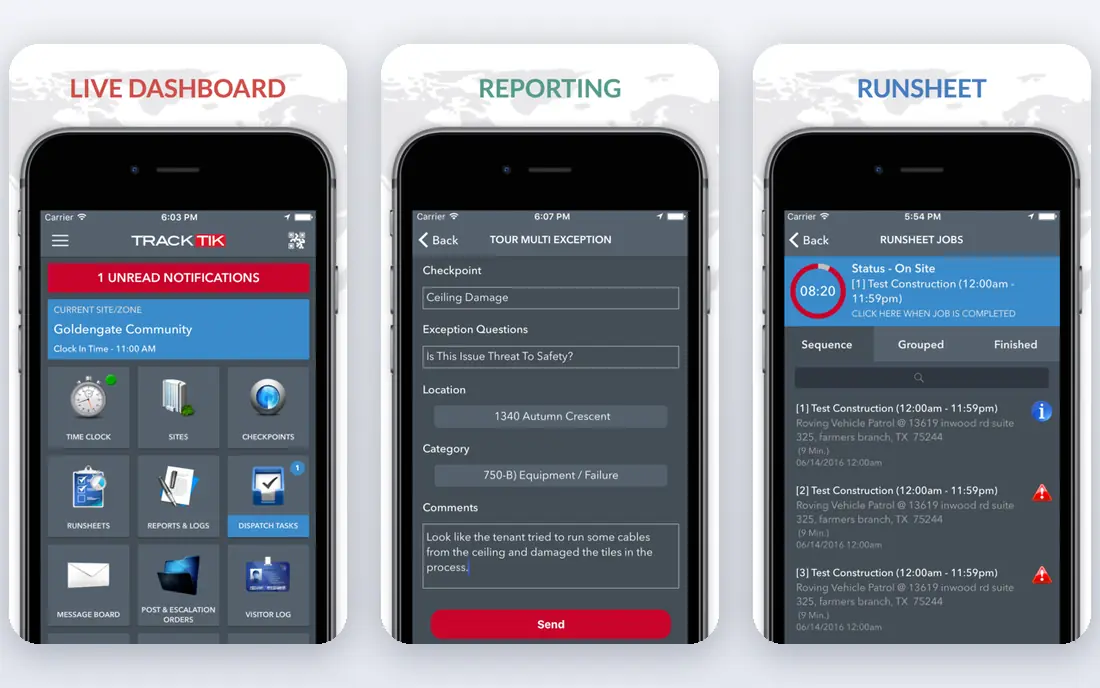
TrackTik is built for operations with many guards, sites and clients. Scheduling, shift offers, patrol verification, incident reports and client portals live in one system, so supervisors can fill a shift, check tour progress and share reports without juggling tools. That breadth suits firms where proof of service is part of the contract. The cost is complexity and price. TrackTik is quote-based and aimed at larger operations, so a small firm may pay for depth it does not use. For companies managing dozens of sites, though, that depth is the point, and the client portal alone can save hours of manual reporting.
- Strong scheduling, guard tour verification, incident reporting and client portals
- Quote-based pricing and a fuller setup than small firms need
Belfry stands out when the back office is the bottleneck. Scheduling connects to payroll, invoicing and compliance, so verified hours flow into pay and client bills with fewer manual steps. Guard availability, overtime alerts and site requirements help schedulers avoid costly mistakes. Pricing is custom, and the platform is best suited to firms ready to centralize operations. Small teams that only need a calendar may find simpler tools faster to adopt. For growing firms tired of reconciling hours in spreadsheets, Belfry closes a real gap.
- Scheduling, payroll processing, invoicing and guard management in one platform
- Quote-based pricing, and smaller firms may find it more than they need
Silvertrac
Best for: Firms that need guard tours, checkpoints and clean client reports
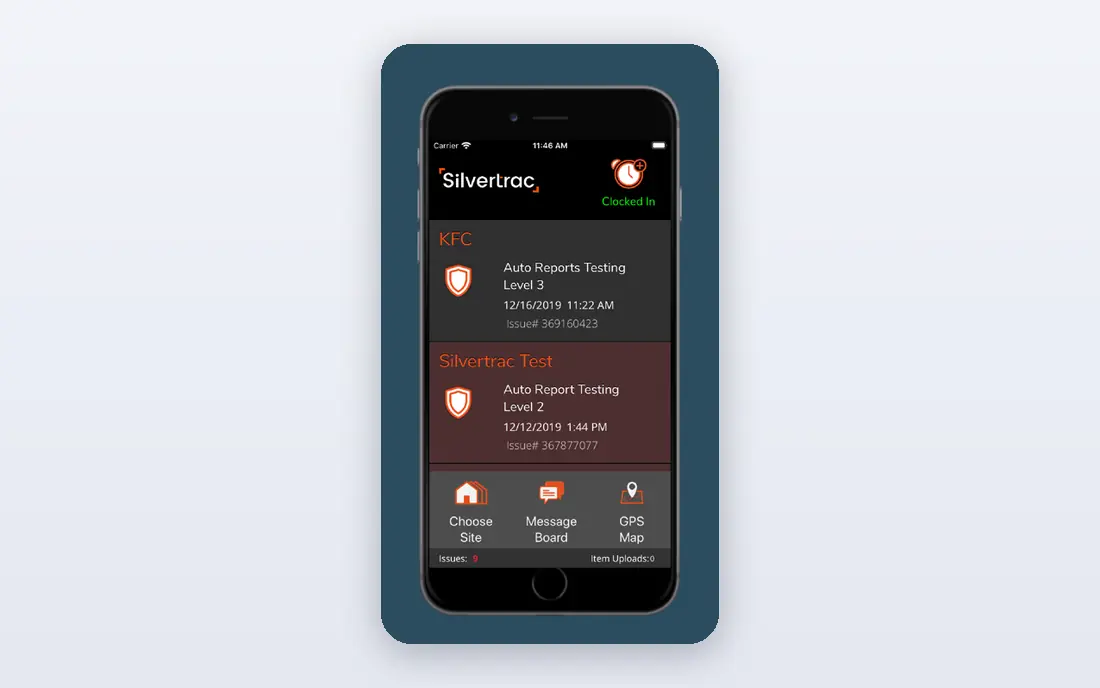
Silvertrac focuses on proof of patrol. Guards scan checkpoints, log incidents and submit reports from a mobile app, while supervisors and clients see tour progress and completed reports. That verification matters when clients pay for patrol coverage and want evidence, not just a schedule. Scheduling tools are present but less deep than in TrackTik or Belfry. Firms that need complex payroll and multi-site workforce planning may need another system alongside it. For tour-led operations, Silvertrac is a practical, focused choice.
- Checkpoint scanning, tour reports and incident tools, month-to-month options reported
- Scheduling depth is more basic than larger workforce platforms
Connecteam
Best for: Small guard teams that need simple scheduling, communication and time tracking
Connecteam is a good starting point for small firms that still schedule by text or spreadsheet. Managers can publish shifts, let guards claim open shifts, track time and share updates in one app. The entry plan and free tier make it easy to test with a small team. It is not a specialist guard tour system, so checkpoint-heavy firms may need extra tools for patrol proof. Payroll and client invoicing are also lighter than in Belfry or WinTeam. For scheduling and day-to-day communication, though, Connecteam is simple and affordable.
- Easy scheduling, team chat, forms and time clock in one app, clear entry pricing
- Not a dedicated guard tour platform, and payroll depth is limited
Deputy
Best for: Teams that need shift scheduling, availability and time tracking across sites
Deputy helps schedulers build rosters fast, match guards to shifts by availability and training, and track hours and labor costs. Mobile apps let guards view schedules, swap shifts within rules and clock in, which cuts phone calls and no-shows. Multi-site firms benefit from a single view of coverage. Because Deputy serves many industries, it lacks specialist guard tour and incident tools. Firms that need checkpoint verification should pair it with a patrol app. For pure scheduling and time control, Deputy is a polished, general workforce tool.
- Shift publishing, availability management, time tracking and labor cost insight
- Not built only for security, so guard tour features need other tools
GuardMetrics
Best for: Firms that want basic guard tour tracking with scheduling included
GuardMetrics covers the core guard workflow without enterprise complexity. Tours, schedules and reports sit in one system, so small and mid-size firms can verify patrols and manage shifts without a large implementation. That simplicity helps teams adopt it quickly. Larger firms may outgrow its reporting and payroll depth. Pricing is also quote-based, so budget comparison needs a demo. For firms that want tour proof plus scheduling in a straightforward tool, GuardMetrics is a sensible shortlist pick.
- Tour tracking, scheduling and reporting in a simpler package
- Less depth than enterprise platforms, and pricing needs a quote
Novagems
Best for: Mid-size security firms that need scheduling, patrols and reports
Novagems combines scheduling with guard tracking and reporting for mid-size operations. Supervisors can assign shifts, monitor patrols, review incidents and share reports with clients from one dashboard. Mobile apps keep guards connected in the field. Brand recognition in the US is lower than for TrackTik or Belfry, so references and a trial matter. Feature depth also varies by plan. Still, for mid-size firms that want a balanced platform without enterprise pricing, Novagems deserves a demo.
- Scheduling, guard tracking, incident reports and client reporting
- Less well known in the US than TrackTik, and setup varies by plan
WinTeam
Best for: Large firms that need scheduling plus payroll, invoicing and job costing
WinTeam, from TEAM Software, is the back-office pick for large security firms. Scheduling feeds into payroll, accounts receivable, general ledger and contract-level job costing, so leaders can see profit by site and client. That financial depth is rare in field-first tools. Implementation is a project, not a weekend setup, and pricing is enterprise. Small firms should not start here. For firms above 100 officers, where payroll and invoicing errors cost real money, WinTeam turns scheduling into a financial system.
- Full back-office system with payroll, invoicing, general ledger and job costing
- Enterprise scope and implementation, not a quick starter tool
How we picked these
We favored software that is live today, with an official homepage and a clear scheduling feature set for security work. Each pick had to handle guard shifts, availability or site coverage, not just generic calendars. We mixed specialist guard platforms with general workforce tools and one enterprise back-office system, so firms of different sizes find a fit. Where pricing was quote-based, we used See website. We also checked whether the guard mobile app was simple enough for field use, since a scheduling tool fails when guards do not check it, accept shifts or log patrols on time.
What to check before you choose
Start with your hardest scheduling problem. Is it last-minute call-offs, license and site requirements, overtime control or proof of patrol? The answer should drive the shortlist. Next, test the guard mobile app with real guards, since a scheduler-friendly dashboard means little if guards ignore the app. Also check how hours become pay and invoices. If your team still re-enters hours, a tool with payroll and invoicing links will save more than a prettier calendar. Finally, ask about contracts, device pricing and client portal access before signing, and run a pilot at one site before rolling out company-wide.
FAQ
What is the best security guard scheduling software?
TrackTik is the strongest all-around pick for larger firms, while Belfry suits firms that need payroll and billing tied to scheduling. Small teams should start with Connecteam or Deputy for simpler, lower-cost scheduling. The best choice depends on firm size and whether patrol proof or payroll matters more.
Can security guard scheduling software handle last-minute changes?
Yes, most tools in this list allow shift offers, open-shift claims and alerts when a guard calls off. The key is guard adoption, since alerts only help if guards check the app. Choose a tool with simple mobile notifications and clear shift acceptance rules.
Does guard scheduling software track patrols too?
Specialist tools such as TrackTik, Silvertrac, GuardMetrics and Novagems include tour and checkpoint tracking. General tools such as Deputy and Connecteam focus on scheduling and time, not patrol proof. If clients require tour evidence, pick a specialist platform.
How much does security guard scheduling software cost?
Pricing varies widely, from $29 per month for small-team tools to custom quotes based on guards, sites or devices for enterprise platforms. Always confirm what is counted, such as active guards, locations or mobile devices, before comparing quotes. A low per-user price can still grow fast at scale.
Should small security firms use scheduling software?
Yes, even a small team benefits from published shifts, availability tracking and time records. A simple tool reduces missed shifts, phone calls and payroll disputes. Start with a low-cost option, prove adoption at one site, then expand as the firm grows.
Sources
https://www.tracktik.com https://www.belfry.com https://www.silvertracsoftware.com https://connecteam.com https://www.deputy.com https://guardmetrics.com https://www.novagems.com https://www.teamsoftware.com