Best Productivity Tools for Software Developers in 2026: 8 Tools Compared
Compare the best productivity tools for software developers, from task lists and notes to issue tracking, with pricing and honest trade-offs in one clear guide.
- Editor's choice
 Linear
Issue tracking for dev teams
Starts atSee websiteVisit linear.appFull review - Great alternative
 Todoist
Fast personal task capture
Starts at$5 per monthVisit todoist.comFull review - Also consider
 Notion
Docs, wikis and tasks in one place
Starts at$10 per user per monthVisit notion.soFull review
TL;DR:
- Linear is our pick for dev teams, thanks to its speed and issue workflow built for shipping code.
- Todoist and TickTick cover personal task capture, with TickTick adding habits and a calendar.
- Notion and Obsidian suit docs and notes, with Notion favoring teams and Obsidian favoring local files.
- Visual Studio Code remains the free center of most dev workflows, with extensions for almost any task.
- The best stack is small: one task tool, one notes tool, and one issue tracker, not five overlapping apps.
Quick comparison
| Tool | Best for | Starts at | Free plan? | |
|---|---|---|---|---|
| Linear | Issue tracking for dev teams | See website | Yes | Visit |
| Todoist | Fast personal task capture | $5 per month | Yes | Visit |
| Notion | Docs, wikis and tasks in one place | $10 per user per month | Yes | Visit |
 TickTick | Tasks, habits and calendar in one app | $35.99 per year | Yes | Visit |
 Obsidian | Local-first notes and knowledge base | Free | Yes | Visit |
 ClickUp | All-in-one team work hub | $7 per user per month | Yes | Visit |
 Visual Studio Code | Free code editor and workflow hub | Free | Yes | Visit |
 Raycast | Fast launcher and shortcuts on Mac | See website | Yes | Visit |
The best productivity tools for software developers
We compared official pricing pages, dev-focused features and integration lists. Our pick for teams is Linear, while Todoist is our pick for personal task lists.
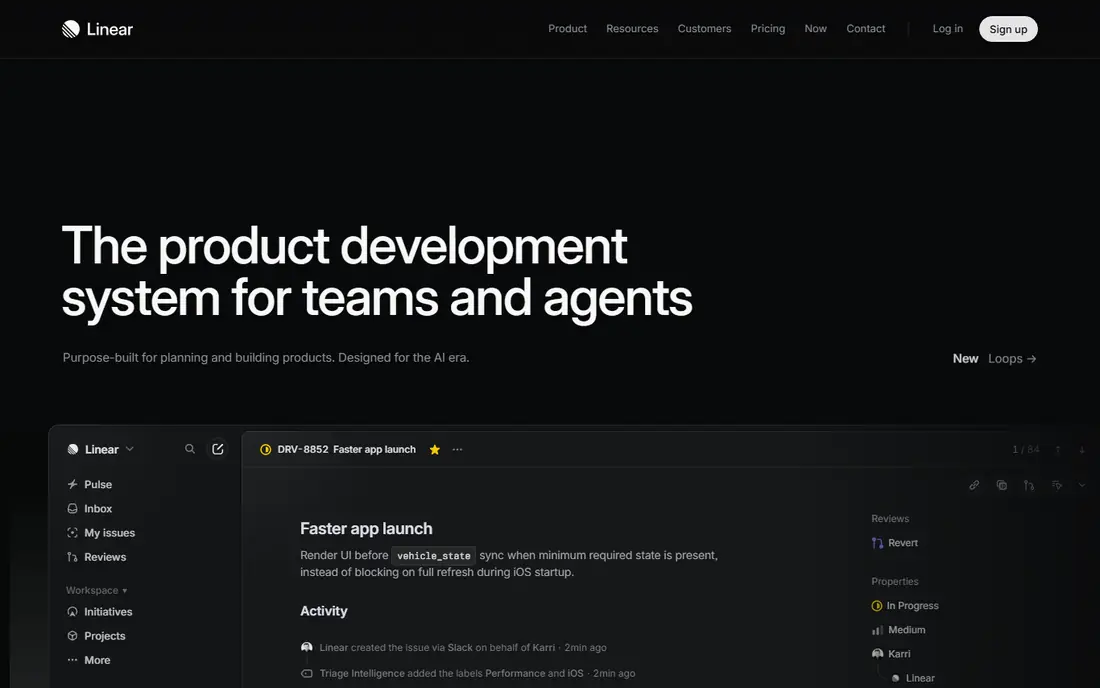
Linear is built for software teams, and it shows in the speed. Creating an issue, assigning it and moving it through a cycle takes seconds, with keyboard shortcuts throughout. Triage keeps new bugs and requests in one inbox, so nothing gets lost in chat.
GitHub and GitLab integrations link issues to pull requests, which keeps status honest without manual updates. Roadmaps and cycles help teams plan sprints without a separate planning tool. The main limit is scope: marketing or operations teams may find it too dev-focused, so many companies pair Linear with Notion for wider docs.
- Very fast, keyboard-first interface
- GitHub and GitLab integrations
- Cycles, triage and roadmaps built in
- Less suited to non-dev teams
- Paid plans needed for larger teams and advanced controls

Todoist is the fastest way to capture a task and trust that it will resurface. Type a phrase such as a task name plus a date, and Todoist parses it into a scheduled item. Projects, labels and filters let you slice work by client, area or priority without building a complex system.
For developers, Todoist works well as a personal layer on top of Linear or Jira. Keep team issues in the tracker, and keep personal follow-ups, reviews and learning tasks in Todoist. The free plan covers basic lists, while paid plans add reminders, calendar views and more projects.
- Natural language task entry
- Works on every platform
- Reliable reminders and recurring tasks
- No built-in notes or docs
- Team projects need a higher plan

Notion is the docs home for many dev teams. Specs, runbooks, meeting notes and project trackers can live in one workspace, with databases that filter by owner, status or sprint. Templates speed up common pages, such as incident reviews and launch checklists.
The flexibility is also the risk. Without a simple structure, a workspace can grow messy, so agree on a few page types and keep them consistent. Notion pairs well with Linear: track issues in Linear, and write the longer context in Notion. The free plan is generous for individuals, while teams will want a paid plan for version history and controls.
- Flexible docs and databases
- Strong templates for specs and runbooks
- Good team wiki features
- Can become slow on very large workspaces
- Setup takes time to get right
TickTick is our pick for developers who want one app for personal organization. Tasks sit next to a calendar, habits and a Pomodoro timer, so a daily plan can cover coding, reviews and personal routines in one view. The Eisenhower matrix view helps when the list grows long.
The price is low for what it covers, and the free plan is enough to test the workflow. TickTick is less strong as a team issue tracker, so use it for personal work and keep team issues in Linear or ClickUp. For solo developers, it can replace two or three separate apps.
- Tasks, calendar, habits and focus timer in one app
- Low annual price
- Good mobile apps
- Habit trends are lighter than dedicated trackers
- Shared lists can get messy with many editors
Obsidian suits developers who like plain text and local control. Notes are Markdown files on your own device, so you own the data and can use Git or another tool to back it up. Links between notes build a personal knowledge base for code patterns, debugging notes and learning.
Plugins add calendars, task lists, canvases and code tools, but the base app stays fast. The graph view shows how notes connect, which helps when researching a complex system. Sync across devices is paid, though many users sync with their own cloud or Git setup instead. Choose Obsidian when you value ownership and longevity over a polished team wiki.
- Notes stored as local Markdown files
- Graph view links ideas
- Large plugin community
- Sync is a paid add-on
- Setup takes effort for new users
ClickUp tries to replace several tools at once. Teams can manage tasks, docs, goals, time and dashboards in one workspace, with views for lists, boards, calendars and timelines. That breadth helps small teams that do not want to pay for five separate subscriptions.
The trade-off is complexity. New users can feel lost in settings and views, so start with one project type and add features only when a real need appears. For dev teams that already use Linear, ClickUp may be too much. For mixed teams that need one shared hub, it is a practical all-in-one choice.
- Tasks, docs, goals and time tracking in one place
- Many views including list, board and Gantt
- Broad integrations
- Feature depth can feel overwhelming
- Setup needs discipline to stay usable
Visual Studio Code is the editor most developers already use, and it doubles as a productivity hub. Extensions add task lists, notes, Git tools, AI assistance and language support, while the built-in terminal and debugger keep work in one window. Settings sync keeps your setup consistent across machines.
VS Code does not replace a task manager, but it reduces switching. You can review pull requests, run tests and check tasks without leaving the editor. Keep extensions lean, since a bloated setup can slow startup and editing. For cost and coverage, no other tool on this list matches it.
- Free and widely supported
- Huge extension library
- Built-in Git, terminal and debugging
- Heavy extension setups can slow it down
- Not a task or notes manager on its own
Raycast replaces the default Mac launcher with a faster, more capable tool. You can open apps, search files, run clipboard history, manage windows and trigger extensions from one keyboard shortcut. Extensions for GitHub, Linear, Todoist and calendar tools bring common actions to your fingertips.
Script commands let developers automate repetitive steps, such as opening a project, starting a server or checking build status. The free plan covers the core launcher and many extensions. The main limit is platform: Raycast is Mac only, so Windows and Linux users should look at similar launchers for their system.
- Fast search, clipboard history and window management
- Extensions for GitHub, Linear and Todoist
- Script commands for repetitive tasks
- Mac only
- Advanced AI features need a paid plan
How we picked these
We compared official pricing pages, dev integrations, and workflow fit for tools that are actively maintained in October 2026. We favored tools that reduce context switching, work with Git and issue trackers, and offer a free plan or free version. We left out tools that only serve one narrow job, such as a single-language linter, or that duplicate a stronger tool on the list.
Building a developer productivity stack
Keep the stack small. Pick one personal task tool, one notes home, and one team issue tracker, then let VS Code tie them together. Adding a fourth or fifth tool usually adds overhead without adding output, since each new app needs its own inbox check.
Review the stack every few months. If a tool is not opened weekly, drop it or fold its job into another app. Pay for the tool that holds team truth, such as Linear or Notion, and use free plans for personal tools where possible. The goal is fewer open tabs and more time in the editor.
Daily workflow tips
Start the day by reviewing the issue tracker and personal list together, then pick one main task. Use focus blocks for coding and batch small tasks, such as reviews and messages, into set times. End the day by updating issue status and writing a short note on what is blocked, so tomorrow starts with clarity instead of re-reading chat threads.
FAQ
What is the best productivity tool for software developers?
For teams, Linear is our pick for issue tracking, paired with Notion for docs. For personal work, Todoist is the fastest task tool, while TickTick adds habits and a calendar. The best choice depends on whether you need team tracking, personal lists or both.
Do developers need Notion and Linear?
Many teams use both, since they serve different jobs. Linear tracks issues, sprints and bugs, while Notion holds specs, runbooks and meeting notes. Using both avoids forcing docs into an issue tracker or issues into a docs tool, which keeps each system cleaner.
Is Obsidian good for developers?
Yes, especially for developers who like Markdown and local files. Obsidian works well for personal notes, code patterns and research, and it pairs with Git for backup. It is less suited as a shared team wiki, where Notion or a similar tool fits better.
What is the cheapest developer productivity stack?
Visual Studio Code, Obsidian and Todoist on free plans cover editing, notes and tasks at no cost. TickTick adds a calendar and habits for a low annual price. Paid plans become useful when a team needs shared controls, version history or advanced issue workflows.
How can developers reduce context switching?
Use one task list, one notes home and one issue tracker, and keep chat checks to set times. Extensions in VS Code and a launcher such as Raycast on Mac reduce tab switching. Batching reviews, messages and small tasks into blocks also protects longer coding sessions.