Best Platform for AI Worksheet Generation in 2026: 9 Tools Compared
Searching for the best platform for ai worksheet generation? We compared nine teacher tools on worksheet types, differentiation, pricing, and privacy.

- Editor's choice
 MagicSchool
Broad teacher toolkit
Starts at$8.33 per monthVisit magicschool.aiFull review - Great alternative
 Diffit
Leveled readings and questions
Starts at$14.99 per monthVisit diffit.comFull review - Also consider
 Eduaide.ai
Pedagogy detailed resources
Starts at$5.99 per monthVisit eduaide.aiFull review
TL;DR:
- MagicSchool is the broadest pick, with more than 80 teacher tools in one account and a free plan for individual teachers.
- Diffit is the strongest choice for differentiation, because it turns one source into leveled readings and questions.
- Eduaide offers strong pedagogy detail at a low paid price, with Pro reported at $5.99 per month.
- Every output still needs a teacher check for facts, reading level, and fit with the class in front of them.
- For student data, favor tools with education privacy controls and a signed agreement at school level.
Quick comparison
| Tool | Best for | Starts at | Free plan? | |
|---|---|---|---|---|
| MagicSchool | Broad teacher toolkit | $8.33 per month | Yes | Visit |
| Diffit | Leveled readings and questions | $14.99 per month | Yes | Visit |
| Eduaide.ai | Pedagogy detailed resources | $5.99 per month | Yes | Visit |
 Brisk Teaching | Google Docs and Slides work | See website | Yes | Visit |
 Curipod | Interactive live lessons | See website | Yes | Visit |
 Khanmigo | Free teacher help in the USA | See website | Yes | Visit |
 Education Copilot | Fast printable documents | See website | Yes | Visit |
 Twee | Language teaching worksheets | See website | Yes | Visit |
 Monsha | Plans, worksheets, and quizzes together | See website | Yes | Visit |
The best platforms for AI worksheet generation
A good worksheet tool should turn a topic, a standard, or a source text into a printable, editable sheet in minutes, not a vague outline that needs rebuilding. We compared official pricing pages, worksheet types, differentiation tools, and privacy controls to find tools that fit different subjects and classrooms.

MagicSchool is our pick for most teachers because worksheets sit inside a much wider toolkit. A teacher can move from a worksheet to a quiz, then to a rubric and feedback prompts, without opening a separate product for each step. That breadth saves time on a busy school day, when the gain comes from staying in one workflow rather than from any single generation being perfect.
The catch is editing. Outputs still need a teacher to check facts, reading level, and fit with the class, and the size of the library can feel busy at first. The free plan covers a normal week of planning for many teachers, while Plus removes generation limits and adds history and editing. Schools that need admin controls and a signed data agreement should price Enterprise separately.
- More than 80 teacher tools in one account
- Worksheet, quiz, and rubric generators together
- Free plan for teachers
- Large library can feel busy at first
- Plus costs $8.33 per month billed annually, or $12.99 monthly
Diffit suits teachers whose main problem is one class with many reading levels. Paste a source, choose a level, and Diffit returns adjusted text, a vocabulary list, and comprehension questions that can become a worksheet in minutes. That focus on differentiation is what sets it apart from general toolkits, which often generate a single level and leave leveling to the teacher.
The price is higher than some rivals, at $14.99 per month or $149.99 per year for an individual teacher, with a free Basic plan for lighter use. Diffit is not trying to be a full lesson planning suite, so teachers who want rubrics, IEP drafts, and unit planners may pair it with MagicSchool or Eduaide. For leveled reading work, it is the strongest tool here.
- Turns articles, PDFs, and videos into leveled text
- Vocabulary lists and questions included
- Strong for mixed reading levels
- Individual plan costs $14.99 per month or $149.99 per year
- Less of a general lesson planning suite
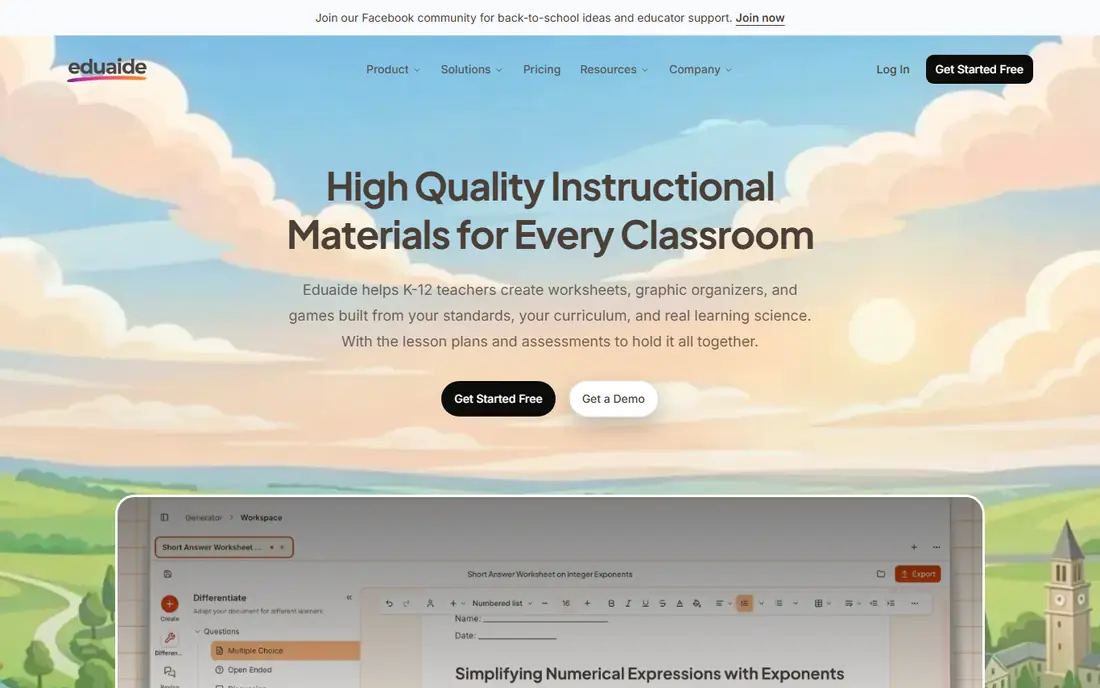
Eduaide.ai appeals to teachers who want pedagogy detail in the draft, not just an outline. Its generators cover worksheets, feedback, and lesson resources, with alignment to frameworks such as 5E Inquiry, Universal Design for Learning, Backward Design, and Webb Depth of Knowledge. That detail helps a teacher who must show how a sheet fits a standard or a learning goal.
The paid Pro plan is reported at $5.99 per month or $49.99 per year, which makes it one of the cheapest paid tiers in this list. The free plan gives a limited number of generations each month, so a heavy user will need Pro. The template library takes a little learning, but for teachers who value instructional design, Eduaide is a strong value pick.
- More than 75 resource generators
- Pedagogy frameworks such as 5E and Universal Design for Learning
- Low paid price
- Free plan has monthly generation limits
- Interface has many templates to learn
Brisk Teaching fits teachers who already live in Google Docs and Slides. As a Chrome extension, it works inside the document you are already editing, so a worksheet can be generated, adjusted, and shared without exporting to another app. Feedback tools, differentiation, and quiz creation sit in the same workflow, which keeps grading and planning close together.
The limit is ecosystem. Brisk works best inside Google Workspace, and teachers on Microsoft tools will get less from it. The free Educator plan covers more than 20 tools with usage limits, while school Premium pricing is by quote and adds admin controls. For a Google school, it is one of the most natural worksheet tools here.
- Chrome extension over Docs, Slides, and Forms
- Feedback and worksheet tools inside documents
- Free Educator plan
- Best inside Google Workspace
- School Premium pricing is by quote
Curipod suits teachers who want a worksheet idea to become a live class activity. Enter a prompt such as a grade, a subject, and a standard, and Curipod builds an interactive slide lesson with polls, drawings, and word clouds that students answer on their own devices. The response data shows when participation drops, which helps a teacher adjust in the moment.
The trade-off is format. Curipod is built for live lessons, so a teacher who needs a clean printable worksheet may still export or rebuild parts of it elsewhere. Paid pricing is not published as a simple teacher rate, and schools usually price it by quote. Pair it with MagicSchool or Eduaide when you need both live lessons and printable sheets.
- Turns a prompt into interactive slides
- Live polls, drawings, and word clouds
- Student response data
- Output is a live lesson more than a printable sheet
- Paid pricing is by quote for schools
Khanmigo, from Khan Academy, is a strong free option for US teachers. Teacher tools are free, with curriculum linked help for planning, differentiation, and feedback. Its student side uses a Socratic style that guides learners toward answers rather than giving answers outright, which suits teachers who worry about AI doing homework for students.
The limit is scope for worksheet generation. Khanmigo is not a worksheet specialist, so a teacher who needs many printable formats, varied question types, and fine control over layout may prefer Diffit or Eduaide. Still, as a free, nonprofit backed starting point with clear education privacy positioning, it deserves a place in every US teacher toolkit.
- Free for US teachers
- Curriculum linked help
- Socratic tutoring style for students
- Worksheet generation is narrower than specialist tools
- Student tutor access is a district purchase
Education Copilot suits teachers who want a clean, print ready document fast. Its generators produce lesson plans, worksheets, and rubrics in a format that needs little reformatting before printing. That focus on output quality matters when a sheet must go to a copier in ten minutes, not after an hour of layout fixes.
The trade-off is breadth. Education Copilot has a smaller toolkit than MagicSchool, and it does not offer the same live lesson or feedback depth as Curipod or Brisk. A free tier is available for lighter use, with paid pricing to confirm on the vendor site. For fast, tidy printable work, it is a dependable choice.
- Clean printable lesson documents
- Rubric and worksheet generators
- Standards aligned drafts
- Smaller toolkit than MagicSchool
- Paid pricing details need checking on the vendor site
Twee is built for language teachers, and that focus shows in its worksheet types. It generates reading, vocabulary, grammar, and listening activities aligned to CEFR levels, with support for many languages. An English or world language teacher can produce a leveled sheet, a dialogue, or a set of comprehension questions without adapting a general tool to language work.
The limit is subject range. Twee is less useful for math, science, or history worksheets than a general toolkit, so a teacher across subjects will need another tool beside it. A free tier is available, with paid pricing to confirm on the vendor site. For language classrooms, it is the most tailored worksheet generator here.
- Language focused generators
- CEFR aligned levels
- Support for many languages
- Narrower for non language subjects
- Paid tiers need checking on the vendor site
Monsha suits teachers who want plans, worksheets, and quizzes from a single set of prompts, without juggling three tools. Enter a topic, grade, and standard once, and the platform builds linked resources that stay consistent with each other. That consistency helps when a worksheet, a quiz, and a lesson plan must match the same learning goal.
The catch is maturity. Monsha is newer and smaller than MagicSchool, so its library, integrations, and school level controls are less proven. A free tier is available, with paid pricing to confirm on the vendor site. For a teacher who values a linked workflow over the largest toolkit, Monsha is worth a trial beside the bigger names.
- Plans, worksheets, and quizzes from one prompt set
- Clean exports
- Teacher friendly workflow
- Newer and smaller than MagicSchool
- Pricing details need checking on the vendor site
How we picked these
We compared official pricing pages, worksheet and quiz generators, differentiation tools, and education privacy controls. We favored tools that produce editable, printable output, support reading levels or standards, and explain how student data is handled. Tools that only produced generic text, with no worksheet structure, were left out. Prices were checked against vendor pages and recent published comparisons, and we used See website where a paid rate was not published clearly.
How to get a worksheet students can actually use
Start with a clear prompt: grade, subject, standard, reading level, question types, and length. A vague prompt gives a vague sheet, while a specific prompt gives a sheet a teacher can edit in minutes. After generation, check every fact, every answer key item, and every reading level claim, because AI tools can invent details that look confident.
Edit for your class, not for the tool
Remove questions that do not fit your lesson, add one question that checks the core idea, and adjust vocabulary for the students in front of you. Keep the layout simple, with clear instructions and enough white space for answers. A worksheet that a teacher has edited for ten minutes will almost always beat a raw generation that goes straight to the copier.
FAQ
Can AI worksheet generators replace teacher planning?
No. They speed up drafting, differentiation, and formatting, but a teacher must still choose the learning goal, check facts, and adapt the sheet to the class. The best use is a first draft that a teacher edits, not a finished sheet sent straight to students.
Which tool is best for different reading levels?
Diffit is the strongest pick for leveled readings, because it adjusts a source text and adds vocabulary and questions at the chosen level. Brisk Teaching and MagicSchool also offer differentiation tools, but Diffit makes leveling the central job rather than an add-on.
Are these tools safe for student data?
It depends on the tool and the school agreement. Favor tools with education privacy controls, such as FERPA and COPPA alignment, and a signed data privacy agreement at district level. Avoid entering student names or sensitive data into a free consumer tool without school approval.
Can I print AI generated worksheets?
Yes, most tools in this list offer printable or exportable output, and Education Copilot is built around clean printable documents. Check the export format before you commit, because a tool that only works on screen will slow down a classroom that still uses paper.
How much do AI worksheet tools cost?
Many offer a free teacher plan with limits. Paid individual plans in this list range from about $5.99 per month for Eduaide Pro to $14.99 per month for Diffit, with MagicSchool Plus at $8.33 per month billed annually. School and district pricing is usually by quote and adds admin controls.