Best Physical Security Software in 2026: 8 Platforms Compared
We compared the best physical security software for video, access control, and sensors, so you can pick one platform that fits your buildings and budget.
- Editor's choice
 Verkada
Firms that want one vendor for everything
Starts atSee websiteVisit verkada.comFull review - Great alternative
 Genetec Security Center
Large campuses and unified security operations
Starts atSee websiteVisit genetec.comFull review - Also consider
 Milestone XProtect
Teams keeping their existing cameras
Starts atSee websiteVisit milestonesys.comFull review
TL;DR:
- Most buyers now choose between one-vendor cloud suites and open platforms that work with cameras they already own.
- Cloud systems cut server upkeep but usually lock you into one hardware brand, so check compatibility before you buy.
- Pricing is mostly quote-based, so treat any published per-camera or per-door figure as a starting point, not a final bill.
- Access control, video, and sensors on one dashboard save the most time for small security and IT teams.
Quick comparison
| Tool | Best for | Starts at | Free plan? | |
|---|---|---|---|---|
| Verkada | Firms that want one vendor for everything | See website | Free trial | Visit |
| Genetec Security Center | Large campuses and unified security operations | See website | No | Visit |
| Milestone XProtect | Teams keeping their existing cameras | See website | Yes | Visit |
 Rhombus | Cloud video with published pricing | See website | Free trial | Visit |
 Brivo | Multi-site cloud access control | See website | Free trial | Visit |
 Kisi | Modern offices using phone access | See website | Free trial | Visit |
 Eagle Eye Networks | Camera fleets that need a camera-agnostic cloud | See website | Free trial | Visit |
 Avigilon Alta | Organizations wanting a Motorola-backed cloud suite | See website | Free trial | Visit |
The best physical security software
Physical security software is the brain behind cameras, door readers, and sensors. The right platform lets a small team watch many sites from one screen, review incidents fast, and control who can enter each door. The wrong one leaves you juggling separate apps and servers.

Verkada is the simplest path to a modern system if you are starting fresh. Cameras, badge readers, environmental sensors, and alarms all report to the Command platform, so one browser tab covers video, door events, and air quality alerts. Setup is close to plug and play, with no on-site recording server to maintain.
The catch is lock-in. Existing cameras from other brands will not join the system, so a site with good cameras already installed faces a full replacement. Pricing is quote-based, which makes early budgeting awkward. Still, for lean teams managing several offices, the time saved on maintenance often outweighs the hardware swap.
- Single cloud dashboard for video, access, and sensors
- Simple deployment
- Long hardware warranty
- Only works with Verkada hardware
- Quote-based pricing
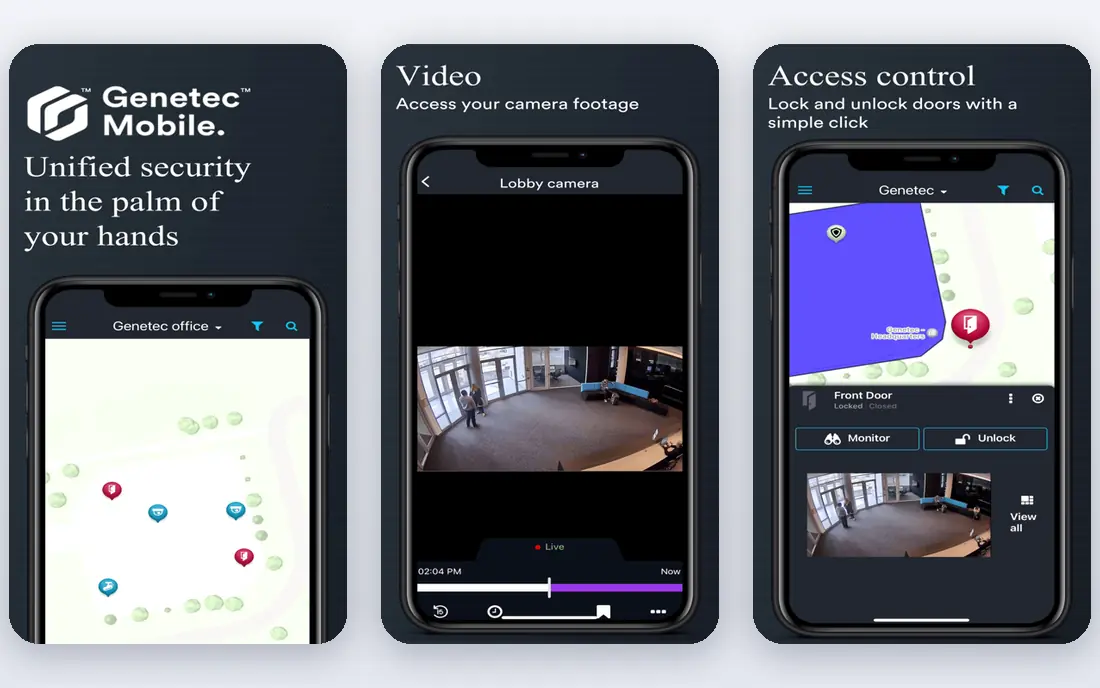
Genetec Security Center is the platform big campuses pick when they need video, access control, and automatic license plate recognition in one system. It supports a wide range of camera and reader brands, which protects past hardware investments. Operators get one interface for live video, door events, and alarms, with detailed permissions for large teams.
That power comes with complexity. Configuration takes trained staff or a good integrator, and the price reflects enterprise scale. A single office with two doors does not need this. A hospital, university, or logistics campus with many buildings and compliance needs will find it hard to beat.
- Unifies video, access, and license plate recognition
- Open to many hardware brands
- Strong for large sites
- Complex to configure
- Overkill and costly for a single small office

Milestone XProtect is the open-platform answer to vendor lock-in. It supports a huge range of camera models, so a business can upgrade software without replacing cameras that still work. Editions scale from a free basic version for small sites up to enterprise deployments, and the video tools for search and export are strong.
Access control is less native than in Verkada or Brivo, arriving through integrations and add-ons rather than one built-in suite. That is fine if video is your priority and doors are a secondary need. For a team with a mixed camera fleet and a limited budget, XProtect protects your hardware investment better than most rivals.
- Works with thousands of camera models
- Flexible editions
- Free basic edition
- Access control needs add-ons
- Larger setups need integrator help
Rhombus built its name on cloud cameras with a clean interface and search features that find people, vehicles, and events without scrubbing hours of footage. Its published license pricing is a welcome change in a market where most vendors hide prices behind sales calls. Multi-site teams can manage every camera from one dashboard with no local servers.
Like Verkada, Rhombus requires its own cameras, so existing hardware does not carry over. Its access control line is newer and less proven than its video platform. If video is the core need and you value clear pricing, Rhombus is an easy shortlist pick.
- Cloud video with AI search features
- Published license pricing
- Modern interface
- Rhombus cameras required
- Access control is newer than video
Brivo is a veteran of cloud access control, and it shows in multi-site management. Administrators can set door schedules, grant and revoke credentials, and watch events across dozens of locations from one portal. Mobile credentials let staff use phones instead of cards, which cuts the cost and hassle of lost badges.
Video comes through integrations with camera partners rather than a fully native platform, so a buyer who wants one vendor for both may prefer Verkada or Avigilon Alta. For organizations whose main pain is doors, especially property managers and franchises, Brivo is a dependable core choice.
- Cloud access control across many sites
- Mobile credentials
- Video integrations
- Video is partner-based rather than native
- Pricing varies by doors and features
Kisi targets offices that want to ditch keys and cards. Employees open doors with their phones, visitors get time-limited access, and admins manage everything from a web dashboard. Installation is simpler than legacy panel systems, and the admin experience is one of the friendliest in this category.
Very large sites or facilities with strict compliance needs may outgrow Kisi, and per-door hardware still adds up across many entrances. For a growing company with one to ten offices, Kisi hits a sweet spot between simplicity and control, and staff tend to adopt phone access quickly.
- Phone and card access with a clean admin panel
- Fast to deploy
- Good for offices
- Less suited to very large or high-security sites
- Hardware costs add up per door
Eagle Eye Networks offers cloud video management that does not force a single camera brand. Businesses can bridge many existing cameras to the cloud, choose retention periods, and add analytics for people and vehicle detection. Its reseller and integrator network helps smaller buyers get installation support.
The trade-off is a less slick interface than Verkada or Rhombus, and total cost depends on camera count and retention choices, so quotes vary. For multi-site retailers and franchises with mixed cameras, Eagle Eye is a practical bridge to the cloud without a full hardware refresh.
- Works with many camera brands
- Cloud storage and AI analytics
- Strong reseller network
- Pricing depends on retention and cameras
- Interface is less polished than newer rivals
Avigilon Alta, from Motorola Solutions, combines cloud video and access control in a single platform called Alta. Its analytics cover appearance search, occupancy, and unusual activity, which helps small teams review incidents faster. The Motorola backing reassures buyers worried about a startup disappearing.
Pricing is quote-based and some capabilities work best with Avigilon hardware, so mixed fleets need checking. For mid-size organizations that want a single enterprise-grade suite with a large vendor behind it, Alta is a solid alternative to Verkada with a different hardware story.
- Cloud video and access in one suite
- Strong analytics
- Enterprise backing
- Quote-based pricing
- Some features need Avigilon hardware
How we picked these
We compared official product pages, pricing information, and public reviews for leading physical security platforms, focusing on systems that are actively sold in 2026 for video, access control, or both. We favored platforms with real multi-site deployments, cloud or hybrid options, and clear support channels. We left out single-feature tools like standalone visitor sign-in apps and guard tour apps, since they cover only one slice of physical security.
What to check before you buy
Start with your hardware. List every camera and reader you own, with brand and model, and confirm which platforms support them before you fall in love with a dashboard. Replacing cameras across many sites can dwarf the software cost, and that surprise kills many projects.
Next, map your sites and users. A single office needs simple admin and mobile credentials, while a campus needs role-based permissions, audit logs, and retention rules. Ask vendors how video retention is priced, how exports work for police requests, and what happens if internet access drops at a site.
Finally, test the daily workflow, not just the demo. Grant access to a new hire, revoke it, find an incident from last Tuesday, and export a clip. If those four tasks take more than a few minutes each, the platform will frustrate your team every week. Get the total cost in writing, including licenses, hardware, and installation, before signing.
Cloud, on-premise, or hybrid
Cloud systems remove servers and update themselves, but they need reliable internet and ongoing licenses. On-premise systems keep video local and can run without the cloud, but they need server upkeep and patching. Hybrid systems store video locally and manage it from the cloud, a good middle path for sites with weak internet or strict retention rules. Match the model to each site rather than forcing one model everywhere.
FAQ
What is the best physical security software?
For a fresh multi-site deployment, Verkada is the simplest all-in-one choice. If you already own cameras, Milestone XProtect or Eagle Eye Networks protect that investment. For doors first, Brivo and Kisi lead, while Genetec suits large campuses with complex needs.
What is top rated software for physical security?
Top rated platforms in public reviews include Verkada, Genetec Security Center, Milestone XProtect, and Rhombus, each leading in a different niche. Ratings vary by use case, so weigh video quality, access features, and support for your site count rather than a single score.
Is cloud physical security software safe?
Reputable cloud platforms encrypt video in transit and at rest, offer two-factor authentication, and provide audit logs. Check the vendor's data center certifications, retention controls, and what happens during an internet outage before you commit.
Do I need to replace my cameras to use cloud software?
It depends on the platform. Verkada and Rhombus require their own cameras, while Milestone and Eagle Eye work with many existing brands. Confirm your exact camera models with the vendor before budgeting.
How much does physical security software cost?
Most enterprise platforms use quote-based pricing tied to cameras, doors, licenses, and retention. Smaller office systems may publish per-door or per-camera pricing, but installation and hardware are usually extra. Get an itemized quote for your site count before comparing vendors.