Best Photo Editor Software for Professionals in 2026: 8 Tools Compared
The best photo editor software for professionals in 2026, compared for RAW processing, retouching, tethered shooting, libraries and one time pricing today.
- Editor's choice
 Adobe Photoshop
Retouching and compositing
Starts at$22.99 per monthVisit adobe.comFull review - Great alternative
 Adobe Lightroom
RAW workflow and library management
Starts at$11.99 per monthVisit adobe.comFull review - Also consider
 Capture One
Studio and tethered shooting
Starts at$18 per monthVisit captureone.comFull review
TL;DR:
- Adobe Photoshop remains the standard for retouching and compositing, while Lightroom leads for large photo libraries and RAW workflows.
- Capture One is our pick for studio and tethered shooting, with color tools that many commercial photographers prefer.
- Affinity Photo is now free under Canva, which makes it the best value pixel editor for professionals on a budget.
- DxO PhotoLab gives the strongest RAW image quality for photographers who judge files at full size.
Quick comparison
| Tool | Best for | Starts at | Free plan? | |
|---|---|---|---|---|
| Adobe Photoshop | Retouching and compositing | $22.99 per month | Free trial | Visit |
| Adobe Lightroom | RAW workflow and library management | $11.99 per month | Free trial | Visit |
| Capture One | Studio and tethered shooting | $18 per month | Free trial | Visit |
 Affinity Photo | Full pixel editing without a subscription | Free | Yes | Visit |
 DxO PhotoLab | Maximum RAW image quality | $149.99 one time | Free trial | Visit |
 Luminar Neo | Fast AI assisted editing | See website | Free trial | Visit |
 ON1 Photo RAW | All in one organizing and editing | $99.99 one time | Free trial | Visit |
 Corel PaintShop Pro | Budget Windows editing | See website | Free trial | Visit |
The best photo editor software for professionals
Professional editing splits into two jobs: developing RAW files and managing a library, and pixel level retouching and compositing. Some tools do both, but most lean one way. This list covers both sides, with subscription and buy once options, so you can match the tool to the work you actually sell.

Photoshop is still the tool clients and collaborators expect when retouching gets serious. Layers, masks, frequency separation, compositing and precise color work are all here at a depth no rival matches, and PSD files move between photographers, retouchers and designers without friction. Generative Fill and Generative Expand now sit inside that workflow, useful for extending backgrounds and cleaning scenes when the brief allows it.
The cost is a subscription, and the learning curve is real. Photographers who only need RAW development should start with Lightroom or Capture One instead. For commercial retouching, advertising composites and complex edits, Photoshop remains the professional default, and its trial lets you confirm that before paying.
- Deepest retouching, layer and masking tools
- Industry standard file compatibility
- Generative Fill and Expand for complex edits
- Subscription only
- More tool than most photographers need for simple RAW work
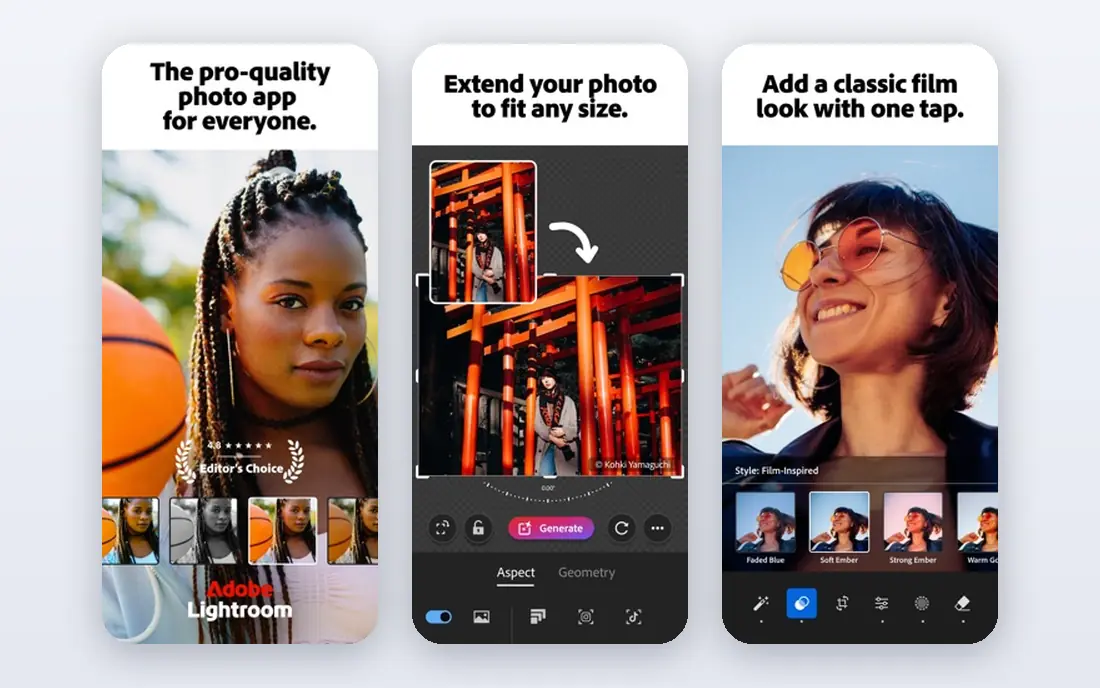
Lightroom is the workhorse for photographers who shoot volume: weddings, events, sports and editorial work where hundreds or thousands of frames need culling, grading and delivery. Its catalog, ratings, presets and batch tools turn a long shoot into a finished gallery faster than a pixel editor can, and mobile sync lets you start edits away from your desk.
Lightroom Classic, included in the Photography plan, suits desktop first photographers who prefer local storage. The cloud based Lightroom suits photographers who move between devices. Either way, Lightroom pairs naturally with Photoshop for the few frames that need deep retouching, which is why the Photography plan bundles both.
- Fast culling and editing for large shoots
- Cloud sync across desktop and mobile
- Strong presets and masking tools
- Subscription only
- Catalog can slow with very large libraries if not maintained

Capture One is the studio standard for a reason. Tethered shooting is fast and stable, live view and capture tools feel built for a working set, and color grading tools give precise control over skin tones and product color. Sessions keep each shoot self contained, which suits commercial and fashion workflows where a job must stay organized from capture to delivery.
The price is higher than Adobe's Photography plan, and photographers used to Lightroom will need time to relearn shortcuts and catalog habits. If you shoot tethered in a studio, that cost is easy to justify. If you shoot mostly outdoors and deliver in volume, Lightroom may serve you better for less money.
- Excellent tethered capture
- Refined color editing and skin tone tools
- Strong session workflow for studio work
- Higher price than Adobe plans
- Steeper learning curve for newcomers
Affinity Photo, now free under Canva, is the biggest value shift in professional editing in years. It offers layers, live filters, frequency separation, panorama stitching, focus stacking and PSD support in a fast desktop app for Windows, Mac and iPad. For photographers who need a pixel editor but refuse subscriptions, there is no longer a price excuse to avoid it.
The limits are ecosystem and catalog. Photoshop plugins and some automation workflows do not carry over, and Affinity has no Lightroom style library manager, so you will pair it with a separate organizer or file system workflow. Check the current terms on the Canva site before relying on the free offer for commercial work, but as an editor it is genuinely professional grade.
- Full layer, masking and retouching tools at no cost
- Fast performance
- PSD compatibility for client work
- Smaller plugin ecosystem than Photoshop
- No built in photo library catalog
DxO PhotoLab is built around one idea: get the best possible file out of your camera and lens. Its lens modules correct distortion, vignetting and sharpness for specific camera and lens pairs, and its DeepPRIME noise reduction rescues high ISO images that other converters leave grainy. Photographers who print large or judge files at full size notice the difference.
PhotoLab is weaker as a library manager than Lightroom or Capture One, and it does not try to be a pixel editor. Use it as your RAW developer, then send selected frames to Affinity Photo or Photoshop for retouching. The buy once license, with paid upgrades for major versions, also appeals to photographers tired of subscriptions.
- Outstanding lens corrections and noise reduction
- DeepPRIME processing for high ISO files
- Buy once license
- No catalog as full as Lightroom
- Slower export for very large batches
Luminar Neo aims at speed. AI tools replace skies, relight scenes, clean skin and enhance portraits with a few sliders, which suits photographers who deliver social and client galleries fast and do not want to hand mask every frame. The interface stays approachable, and batch processing helps with event and portrait volume.
Precision is the trade off. When a job needs exact color, careful masking or print level retouching, Luminar Neo cannot match Capture One or Photoshop. AI edits also deserve a close check, since a replaced sky or smoothed face can look wrong at full resolution. Use it for fast, good looking work, not for the most demanding commercial retouching.
- Quick AI tools for sky, portrait and scene edits
- Friendly interface
- Good for fast turnaround work
- Less precise manual control than Capture One or Photoshop
- AI results need checking at full size
ON1 Photo RAW tries to cover the whole job in one purchase: browse without importing, develop RAW files, layer edits, apply effects and export. That all in one approach suits photographers who want one app and one license, and the buy once price keeps long term costs low. Effects, portrait tools and panorama and HDR merging add value for outdoor and travel shooters.
The interface packs a lot in, and new users may need time to find their way around. Performance and polish also vary by feature, so the trial matters: run your own files through it, especially large RAW batches, before buying. For photographers who like its workflow, ON1 is a capable single app alternative to an Adobe subscription.
- RAW editing, layers and catalog in one app
- Buy once option
- No import step for browsing files
- Interface can feel busy
- Some tools lag the polish of Adobe and Capture One
PaintShop Pro is a long running Windows editor that covers layers, retouching, RAW editing and graphic design tools in one buy once package. It suits Windows photographers who want a capable editor without a subscription and without learning a new platform. AI based background removal, portrait tools and photo restoration features cover common client requests.
The limits are platform and ecosystem. There is no Mac version, and tutorials, plugins and hiring familiarity all trail Adobe and Affinity. If you work on Windows and your editing needs are broad rather than specialized, PaintShop Pro offers solid value. Studio and high end commercial photographers should still shortlist Capture One or Photoshop first.
- Full layer editing and photo tools at a low one time price
- AI tools for portraits and backgrounds
- Windows focused
- Windows only
- Smaller community and tutorial base than Adobe or Affinity
How we picked these
We compared official pricing pages, feature documentation and public professional reviews for photo editors used in paid work. We kept only editors that handle professional file types, RAW development or deep retouching, and that were current in October 2026. We favored tools with a clear professional use case and noted where pricing is buy once, subscription or free, since total cost over several years matters as much as the monthly figure.
Choosing between subscription and buy once
The math is simple, but the workflow question matters more. Add up five years of subscription cost against a buy once license plus likely paid upgrades. For many photographers, Affinity Photo, DxO PhotoLab and ON1 Photo RAW win that math easily.
When a subscription still makes sense
Subscriptions win when you need constant updates, cloud sync, client file compatibility and the newest AI tools on day one. Wedding and commercial photographers who live in Adobe files and collaborate with retouchers often find the Photography plan worth it despite the ongoing cost.
When buy once wins
Buy once wins when your editing needs are stable, you work solo, and you do not need every new feature at launch. A DxO plus Affinity pairing covers RAW quality and pixel editing for a one time outlay, with upgrades only when a new version earns it.
Try before you buy
Every paid tool here offers a trial except Affinity Photo, which is free. Run a real job through the trial: your camera files, your export settings, your delivery deadline. A tool that feels fast on sample images can still slow down on your full wedding or product catalog.
FAQ
What is the best photo editor software for professionals?
Adobe Photoshop leads for retouching and compositing, Lightroom leads for high volume RAW workflows, and Capture One leads for studio and tethered work. The best pick depends on whether your income comes from retouching, volume delivery or studio shooting. Many professionals use two tools together, such as Lightroom plus Photoshop.
Is Affinity Photo really free for professionals?
Affinity Photo became free under Canva, and the desktop apps are available at no cost, with terms published on the Affinity site. Check the current license terms for commercial use before building a business around it, since offers can change. As an editor, it covers professional layer and retouching work.
Should professionals buy Photoshop or Lightroom?
Photoshop is a pixel editor for retouching and compositing, while Lightroom is a RAW workflow and library tool for culling and grading many images. Most professionals who shoot volume need Lightroom first and add Photoshop for selected frames. The Photography plan bundles both, which is why it is popular.
What is the best one time purchase photo editor?
DxO PhotoLab and ON1 Photo RAW are the strongest buy once RAW editors, while Affinity Photo covers pixel editing at no cost and PaintShop Pro covers Windows editing at a low one time price. Capture One also offers a perpetual license option alongside its subscription. Compare upgrade costs, since major version upgrades are usually paid.
Do professionals need AI editing tools?
AI tools help with speed tasks such as sky replacement, portrait cleanup and background extension, but they do not replace judgment on color, retouching and print quality. Luminar Neo and Photoshop both include AI features, and both need a careful check at full size before delivery. Use AI to save time, not to skip review.
Which photo editor is best for tethered shooting?
Capture One is the best choice for tethered shooting, with fast, stable capture, live view and session organization built for studio work. Lightroom also supports tethering for many cameras, but Capture One is the tool most commercial studios standardize on for this job.