Best Payroll Services for Churches in 2026: 8 Providers Compared
We compare the best payroll service for churches in 2026, covering clergy housing allowance, tax filing, multi-state staff and prices for small ministries.
- Editor's choice
 Gusto
Small churches wanting simplicity
Starts at$49 per month plus $6 per personVisit gusto.comFull review - Great alternative
 OnPay
Multi-state church staff
Starts at$49 per month plus $6 per personVisit onpay.comFull review - Also consider
 Patriot Payroll
Budget-conscious churches
Starts at$17 per month plus $4 per personVisit patriotsoftware.comFull review
TL;DR:
- Church payroll differs from business payroll because of clergy housing allowance, dual tax status and minister tax rules, so confirm those features before buying.
- Patriot Payroll Full Service is the cheapest published full-service option, while Gusto and OnPay suit small churches that want clear published prices.
- MinistryWorks and PowerChurch Plus are the church-specific options for ministries that also need church accounting and member tools.
- This is general information, not tax advice. Check clergy tax treatment with a qualified tax professional for your state and situation.
Quick comparison
| Tool | Best for | Starts at | Free plan? | |
|---|---|---|---|---|
| Gusto | Small churches wanting simplicity | $49 per month plus $6 per person | Free trial | Visit |
| OnPay | Multi-state church staff | $49 per month plus $6 per person | Free trial | Visit |
| Patriot Payroll | Budget-conscious churches | $17 per month plus $4 per person | Free trial | Visit |
 Paychex Flex | Churches wanting a specialist | See website | Free trial | Visit |
 ADP RUN | Growing churches | See website | Free trial | Visit |
 Square Payroll | Churches with hourly staff | $35 per month plus $6 per person | Free trial | Visit |
 MinistryWorks | Church-specific payroll | See website | Free trial | Visit |
 PowerChurch Plus | Church accounting plus payroll | See website | Free trial | Visit |
The best payroll services for churches
We compared payroll services that can handle church staff, including pastors, part-time staff, musicians and childcare workers, with tax filing and clergy-specific pay settings.

Gusto Simple at $49 per month plus $6 per person is a strong pick for a small church that wants payroll to run without a finance degree. It handles direct deposit, automatic tax calculations and filings, W-2s and contractor payments, with a clean interface that a volunteer treasurer can learn. Benefits and time tracking sit on higher tiers if the church grows.
Churches must set up clergy pay carefully, including housing allowance and the dual tax status rules that apply to ministers in the US. Gusto can handle these settings, but you should confirm the setup with your tax adviser before the first clergy pay run. For most small churches with a handful of staff, Gusto's simplicity wins.
- Clear published pricing
- Automatic tax filing
- Easy onboarding for small teams
- Clergy settings need careful setup
- Higher tiers needed for multi-state and advanced HR
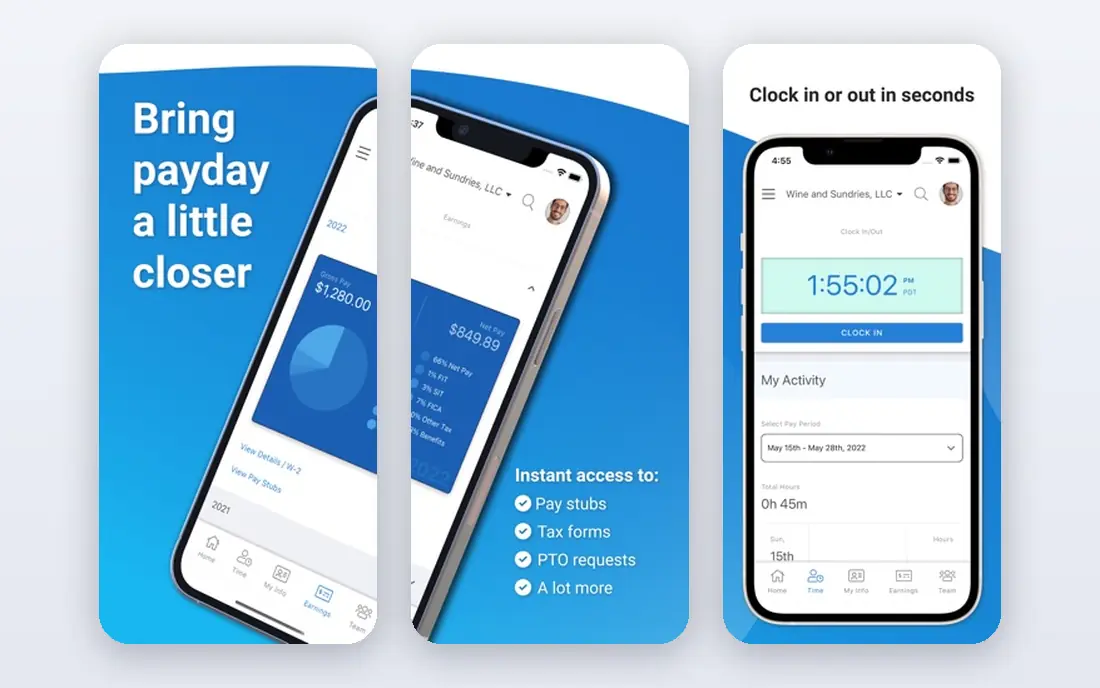
OnPay Payroll Essentials at $49 per month plus $6 per worker suits churches with staff in more than one state, or with a mix of salaried, hourly and part-time workers. It includes unlimited payroll runs, tax filings and multi-state support in the base plan, which avoids the add-on surprises that some rivals charge for. The first month is free, which gives a church a full pay cycle to test it.
Time tracking, HR tools and live HR support are bundled add-ons rather than included features, so a church that needs those should price the bundle, not just Essentials. For straightforward church payroll across states, OnPay is one of the cleanest published prices in this list.
- One simple price
- Unlimited pay runs
- Multi-state filing included
- HR and time tracking cost extra
- Integration list is shorter than rivals
Patriot Payroll Basic at $17 per month plus $4 per paid worker is the cheapest entry in this list, and Full Service at $37 per month plus $5 per worker is the cheapest published full-service option. That matters for small churches where every dollar comes from donations. The 30-day trial lets a treasurer run a real pay cycle before committing.
The catch is the tier split. Basic calculates payroll but does not file taxes for you, so churches that want full filing must choose Full Service. Multi-state filing also costs extra per state on some plans. For a single-state church on a tight budget, Patriot Full Service is excellent value, provided clergy settings are checked carefully.
- Lowest published starting price
- 30-day trial
- US-based support
- Basic plan does not file taxes
- Full Service needed for full tax filing
Paychex Flex suits churches that want a named specialist rather than a purely self-service tool. It covers payroll, tax filing, time tracking, HR and benefits in one platform, with support for nonprofits and churches among its customer base. A specialist can help with setup questions that a small church may not want to solve alone.
Pricing is by quote, with recent summaries placing entry around $39 per month plus $5 per employee, though your quote will depend on headcount, states and services. Get the quote in writing, including what is included and what is an add-on. For churches that value human help over the lowest price, Paychex is a strong option.
- Dedicated payroll specialist option
- Broad HR and benefits depth
- Long track record
- Pricing by quote
- Published entry estimates vary, so get a written quote
ADP RUN is built for businesses with 1 to 49 employees, which covers most churches, and it brings the compliance depth and support scale of a large provider. Payroll, tax filing, time tracking and HR tools sit in one system, and the platform can grow if a church adds a school, childcare centre or second campus. That growth path matters for ministries planning expansion.
Pricing is by quote only, so small churches cannot compare ADP directly from a price page. Ask for a full quote for your headcount and states, and check contract length and add-on fees. For a growing church that wants a provider it will not outgrow, ADP RUN is worth the quote process.
- Large provider scale
- Compliance depth
- Room to grow with the church
- Pricing by quote
- Small churches may pay for scale they do not need
Square Payroll at $35 per month plus $6 per person suits churches with hourly workers, such as childcare staff, custodians, musicians and event help. It handles time tracking, tax filing in federal and state systems, and direct deposit, with a contractor-only plan at $6 per contractor for churches that mainly pay contractors. The interface is simple for a volunteer team.
Square is a general payroll tool, not a church-specific one, so clergy housing allowance and minister tax settings need the same careful setup as with Gusto or OnPay. If your church also uses Square for donations or events, the shared system is a bonus. If not, compare it on payroll features alone.
- Good for hourly and part-time staff
- Contractor-only plan available
- Simple interface
- Church-specific features are generic
- Benefits depth is thinner than Gusto or Paychex
MinistryWorks is the church-specific pick in this list. It is built for churches, ministries and Christian schools, with payroll handling that understands clergy pay, housing allowance and church staffing patterns. Support staff who work with churches every day can be a real help when a question is about ministry tax rules rather than generic payroll.
Pricing is by quote, and the general HR and benefits depth is narrower than Gusto, Paychex or ADP. A church that also needs advanced HR, hiring and benefits tools may need a second system. A church that wants payroll handled by people who understand church life will find MinistryWorks a natural fit.
- Built for churches and ministries
- Clergy-aware payroll
- Church support experience
- Pricing by quote
- Narrower general HR feature set than large providers
PowerChurch Plus is an all-in-one church management package with payroll built into church accounting, contributions, membership and fund accounting. For a church that wants one system for finances, giving and payroll, rather than three separate subscriptions, that integration is the appeal. A free demo is available, and pricing starts around $395 for the software, depending on version and options.
The trade-off is style. PowerChurch feels like traditional church software, not a modern cloud payroll app, and it suits churches that already manage accounting in PowerChurch. If you only need payroll, a cloud tool such as Gusto or OnPay will be simpler. If you need church accounting plus payroll, PowerChurch Plus is worth a demo.
- All-in-one church software
- Payroll inside church accounting
- Membership tools
- Desktop-style software, not a modern cloud payroll app
- Pricing varies by version
How we picked these
We compared official pricing pages and recent nonprofit and church payroll guides for services available in October 2026. We kept only services that can pay church staff, file payroll taxes and handle W-2s, and that fit a clear need: budget, simplicity, multi-state, specialist help or church-specific design. Prices are published list prices where available, and See website where vendors price by quote. This article is general information, not tax or legal advice.
How to choose payroll for a church
Start with clergy pay, not with price. List every worker type: ordained ministers, part-time staff, hourly workers, musicians and contractors. Confirm how each provider handles housing allowance, minister dual tax status, Social Security elections and state rules for your church. A provider that cannot answer those questions clearly is not the right fit, however cheap it is.
Check tax filing and state coverage
Confirm that the plan you buy files federal and state payroll taxes, deposits them on time, and produces W-2s and 1099s. Check whether multi-state filing is included or an add-on, and whether off-cycle or bonus runs cost extra. A church with staff in two states, or with a school attached, needs those answers before the first pay run.
Plan for volunteer treasurers and audits
Choose a system that a volunteer treasurer can run, with clear reports for the board and an audit trail for donations-funded pay. Set permissions so one person does not control pay setup, approval and bank changes alone. Keep payroll records, housing allowance designations and board approvals in one place, and review them annually with your tax adviser.
Trial with a real pay cycle
Use the free trial or first free month to run a real pay cycle, including a clergy paycheck, an hourly paycheck and a contractor payment if you have them. Check the pay stubs, tax calculations and direct deposit timing before you cancel the old system. A trial that only tests a salaried employee will miss the church-specific details that matter most.
FAQ
What is the best payroll software for churches?
Gusto and OnPay are our general picks for small churches, thanks to clear published pricing and automatic tax filing. MinistryWorks is the best church-specific option, and Patriot Payroll Full Service is the cheapest published full-service plan for budget-conscious churches.
How does clergy housing allowance work in payroll?
A church board designates a housing allowance in advance, and that amount is generally excluded from income tax, though not from Social Security and Medicare tax for ministers under dual tax status rules. Rules vary by situation, so confirm the designation and reporting with a qualified tax professional. This article is general information, not tax advice.
How much does church payroll cost?
Published prices in this list run from $17 per month plus $4 per person for Patriot Basic, to $49 per month plus $6 per person for Gusto and OnPay, with Full Service and specialist providers priced higher or by quote. For ten people, expect roughly $87 to $120 per month on published full-service plans, before add-ons.
Can a church use regular payroll software?
Yes, most churches use general payroll software, provided clergy pay is set up correctly. Church-specific tools such as MinistryWorks and PowerChurch Plus add church accounting and ministry-aware support, but a general tool with correct clergy settings works for many small churches.
Do churches need to file payroll taxes?
Yes, in most cases churches must withhold and file payroll taxes for employees, even though churches are generally exempt from income tax as organisations. Minister tax rules differ from regular employee rules, so get professional advice on withholding, filings and year-end forms for your church.