Best Mobility App in 2026: 8 Products Compared
Find the best mobility app in 2026 with 8 picks for stretching, joint mobility, movement routines and recovery sessions at home or in the gym for 2026.

- Editor's choice
 GOWOD
Athletes who want a mobility score and targeted protocols
Starts at$13.99 per monthVisit gowod.comFull review - Great alternative
 Pliability
Guided daily mobility, recovery, and sleep routines
Starts at$14.99 per monthVisit pliability.comFull review - Also consider
 Down Dog
Yoga-based flexibility sessions that change each time
Starts atSee websiteVisit downdogapp.comFull review
TL;DR:
- In this article, mobility means flexibility and movement apps for stretching, joint range of motion, and movement routines, not transport apps.
- GOWOD and Pliability suit structured daily mobility work, while Down Dog and StretchIt suit yoga-based and flexibility-focused sessions.
- A mobility test or assessment helps, because generic stretching routines may miss tight hips, shoulders, or ankles that limit training.
- Free tiers from GOWOD and StretchFlow cover basic work, but personalised programs and full libraries usually need a subscription.
- This is general fitness information only, not medical advice, and people with pain, injury, or a medical condition should seek professional guidance before starting.
Quick comparison
| Tool | Best for | Starts at | Free plan? | |
|---|---|---|---|---|
| GOWOD | Athletes who want a mobility score and targeted protocols | $13.99 per month | Yes | Visit |
| Pliability | Guided daily mobility, recovery, and sleep routines | $14.99 per month | No | Visit |
| Down Dog | Yoga-based flexibility sessions that change each time | See website | Yes | Visit |
 StretchIt | Flexibility goals with milestone programs and progress photos | $19.99 per month | Limited | Visit |
 The Ready State | Movement library grounded in physiotherapy practice | See website | No | Visit |
 StretchFlow | Free timer-based stretching without video classes | Free | Yes | Visit |
 Bend | Desk workers who need short stretching breaks | See website | Yes | Visit |
 ROMWOD via Pliability | Long-time ROMWOD users who want CrossFit-style routines in Pliability | $14.99 per month | No | Visit |
The best mobility apps
We compared official feature pages, pricing pages, app store listings, privacy policies, and public reviews, with attention to assessments, program structure, session length, equipment needs, and price. We kept only apps focused on mobility, stretching, and movement routines.

GOWOD starts with a mobility test that scores range of motion, then builds daily protocols aimed at weak areas. Sessions range from short pre-workout routines to longer daily flows of 8, 15, or 22 minutes, with video demonstrations and voice cues. The free tier includes the test and an exercise library, which makes trying it low risk. Premium, listed at $13.99 per month or $124.99 per year in app store material, adds full follow-along routines. GOWOD stays close to functional training, so yoga lovers or desk workers may prefer a broader app. For lifters and functional athletes, the test-led approach is a clear strength.
- Mobility test, personalised daily protocols, short pre-workout routines
- CrossFit focus may feel narrow for non-athletes, full routines need Premium
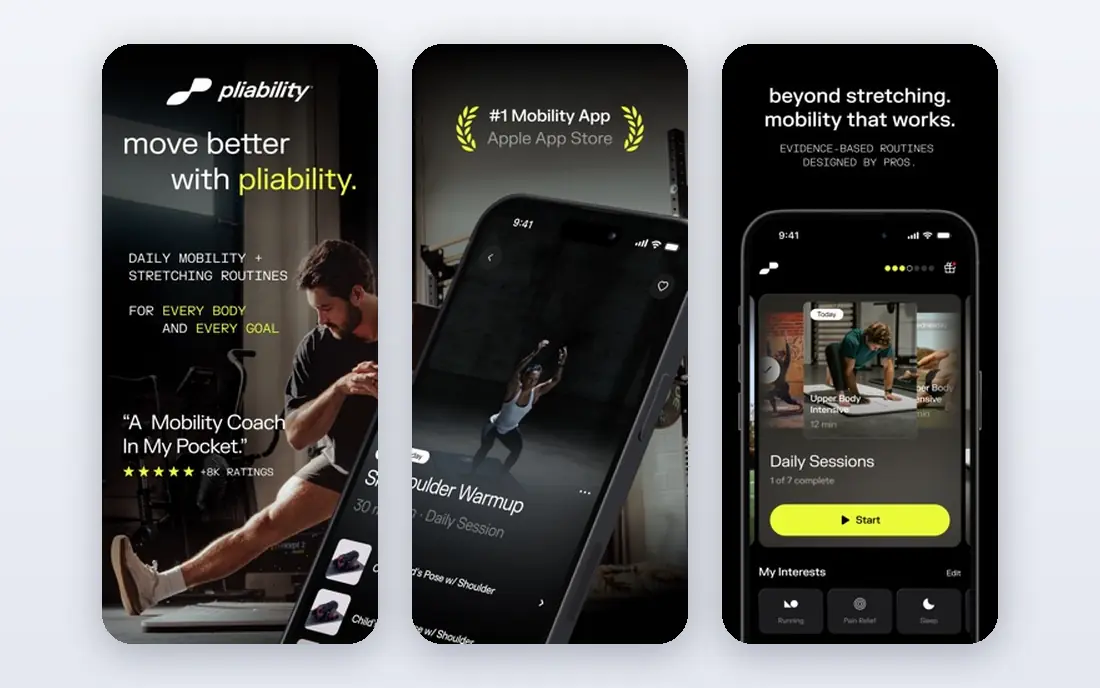
Pliability, formerly ROMWOD, offers guided daily sessions, multi-week paths for goals such as hip mobility, and routines for sports including running, golf, lifting, and desk work. A mobility assessment helps shape recommendations, and sessions cover performance, recovery, and sleep. The library is broad enough for athletes and everyday users alike. Pricing sits around $19.95 per month or $14.99 per month on an annual plan in recent reviews, with a 7-day free trial. There is no permanent free tier, so the trial week matters. Pliability suits people who want a coached daily session rather than a timer and exercise list.
- Large mobility library, multi-week paths, sport-specific routines
- No permanent free tier, only a 7-day trial, higher price than GOWOD

Down Dog generates yoga and flexibility sessions from a large set of configurations, so no two sessions feel identical. Users set level, pace, focus area, and session length, and the app builds a guided flow with music and instruction. That variety helps people who get bored repeating the same stretching video. Down Dog does not assess mobility or build a test-led protocol like GOWOD, so progress tracking is more self-directed. It is free to start, with a subscription for full access. For yoga-based flexibility and general movement, Down Dog is a strong, flexible pick.
- Generated sessions, many configurations, beginner to advanced levels
- No formal mobility assessment, yoga focus may not suit strength athletes
StretchIt
Best for: Flexibility goals with milestone programs and progress photos
StretchIt builds programs around flexibility milestones, such as front splits or deeper hip opening, with classes, progress photos, and structured steps. That goal focus helps people who want a clear target rather than a general daily routine. Classes vary by level and focus area, and the app tracks progress over weeks. Pricing in recent comparisons sits around $19.99 per month or $160 per year, with limited free classes. StretchIt suits committed flexibility learners more than casual stretchers. People who only want a five-minute daily routine may find a cheaper app sufficient.
- Goal programs such as splits, progress tracking, structured classes
- Higher price, limited free classes, trial asks for payment details in some listings
The Ready State
Best for: Movement library grounded in physiotherapy practice
The Ready State offers a large library of movement, mobility, and recovery routines, with a dedicated pain relief section and assessment tools that generate a routine. Content draws on physiotherapy-informed practice, which appeals to athletes and coaches who want explanations for why a movement helps. Routines cover many body areas and training needs. The Ready State is a subscription service with annual discounts, so check the current site for pricing. It can feel dense for beginners who want a single daily session without choices. For users who want depth and a library to explore, it offers strong value.
- Large movement library, pain relief section, assessment-led routines
- Pricing varies by plan, interface is denser than simpler apps
StretchFlow offers free core stretching routines with timer playback, streak and minutes tracking, and no account requirement for core use. That simplicity suits people who already know basic stretches and only need timing, structure, and habit tracking. Pro, listed around $2.99 per month in recent comparisons, adds AI posture coaching and recovery plans. StretchFlow does not provide video classes, personalised multi-week programs, or wearable integration like Pliability. It is lighter by design, which keeps the price low. For a free, no-fuss stretching timer, StretchFlow is hard to beat.
- Free core routines, timer playback, streak tracking, no account needed for core use
- No video classes or multi-week programs, AI features need Pro or credits
Bend focuses on short stretching routines for desk workers, with sessions aimed at neck, shoulders, back, and hips. Reminders help break up long sitting periods, and routines fit into work breaks without equipment or floor space. That focus makes Bend easy to use during a workday. Bend covers less ground than GOWOD or Pliability for athletes who need sport-specific mobility. Check the current store listing for pricing and free tier limits. For office workers who mainly need relief from sitting, Bend is a practical, focused pick.
- Short desk-friendly routines, reminders, focus on neck, back, and hips
- Narrower library than full mobility apps, premium needed for full access
ROMWOD via Pliability
Best for: Long-time ROMWOD users who want CrossFit-style routines in Pliability
ROMWOD was a popular CrossFit mobility program, and its content now lives within Pliability after the rebrand. Long-time users will recognise the daily routine format, with guided video sessions aimed at functional training needs. New users should sign up through Pliability rather than searching for a separate ROMWOD app. Listing ROMWOD separately helps readers who search the old name, but pricing and access follow Pliability. That overlap is a weakness for this list, since it is not a fully independent product today. Readers who want CrossFit-style mobility should start with Pliability and use its daily sessions.
- Familiar daily routine format, CrossFit-oriented programming, large library
- Brand now folded into Pliability, so separate ROMWOD signup is not the main route
How we picked these
We compared official feature pages, pricing pages, app store listings, privacy policies, and public reviews, and we kept only apps focused on mobility, stretching, and movement routines in October 2026. We framed mobility plainly as flexibility and movement work, and we did not mix in transport, ride, or parking apps. This is general fitness information only, not medical advice.
Buying guide: how to choose the best mobility app
Start with an assessment if you train hard
Athletes with lifting, running, or gymnastics goals benefit from a test-led app such as GOWOD or Pliability, because it points to real limits rather than generic tightness. Desk workers and casual stretchers may do fine with Bend, Down Dog, or StretchFlow, which need less setup.
Match session length to your day
A 22-minute daily protocol helps only if you will do it. Short pre-workout routines, desk breaks, or five-minute flows often beat long programs that get skipped. Check whether the app offers 5, 10, 15, and 20 minute options before subscribing.
Check equipment and space needs
Most mobility apps need only a mat and floor space, but some routines use a foam roller, mobility ball, or resistance bands. Check the equipment list for your chosen program, especially if you train at home with limited gear. A program that needs equipment you lack will stall quickly.
Use trials to test the coaching style
Mobility coaching varies from timer cues to full video instruction. Try the free tier or trial for a week, and keep the app you reopen without a reminder. Pain, sharp discomfort, or numbness should stop a session, and professional advice should be sought for persistent issues.
FAQ
What is the best mobility app for beginners?
GOWOD suits beginners who want a test and a clear protocol, while Down Dog suits beginners who prefer yoga-based flows. StretchFlow suits beginners who want a free, simple timer without a subscription.
What are the best mobility apps for CrossFit athletes?
GOWOD and Pliability suit CrossFit athletes best, because both offer pre-workout routines, mobility tests, and protocols aimed at lifts and gymnastics positions. Pliability covers a wider range of sports, while GOWOD stays closer to functional training.
How often should I do mobility work?
Many coaches suggest short daily work or pre-workout routines several times per week, rather than one long weekly session. Consistency matters more than session length, so pick a routine length you can repeat.
Can a mobility app help with back or hip pain?
Mobility apps can support general movement and flexibility, but they are not medical treatment. Persistent pain, injury, or neurological symptoms need professional assessment, and an app should not replace that care.
Do I need equipment for mobility apps?
Most routines need only a mat, while some use a foam roller, ball, or bands. Check the program details before buying equipment, since many apps offer no-equipment options.
Is Pliability the same as ROMWOD?
Yes, Pliability was previously called ROMWOD, and the brand shifted toward a wider audience beyond CrossFit. Current signup and pricing run through Pliability.
Sources
https://www.gowod.com https://www.pliability.com https://www.downdogapp.com https://www.stretchitapp.com https://www.thereadystate.com https://www.stretchflow.app https://www.bendapp.com