Best Measuring App in 2026: 8 Apps Compared
Best measuring app picks for 2026, compared for rooms, furniture and small objects, with AR accuracy notes, floor plans and free options for home projects.

- Editor's choice
 Apple Measure
Free iPhone measuring
Starts atFreeVisit apple.comFull review - Great alternative
 AR Ruler App
Cross-platform AR measuring
Starts atFreeVisit grymala.comFull review - Also consider
 CamToPlan
Room measuring and floor plans
Starts atFreeVisit camtoplan.comFull review
TL;DR:
- Apple Measure is the best free starting point for iPhone users, with LiDAR support on newer Pro models.
- AR Ruler App is the strongest cross-platform choice for quick length, height and distance checks.
- CamToPlan and Magicplan suit room measuring and floor plans, while Moasure suits long outdoor distances.
- No phone app replaces a tape measure for work that needs millimetre precision, such as cutting materials.
- Good light, slow movement and a textured surface improve AR accuracy more than any single app choice.
Quick comparison
| Tool | Best for | Starts at | Free plan? | |
|---|---|---|---|---|
| Apple Measure | Free iPhone measuring | Free | Yes | Visit |
| AR Ruler App | Cross-platform AR measuring | Free | Yes | Visit |
| CamToPlan | Room measuring and floor plans | Free | Yes | Visit |
 Magicplan | Professional floor plans | Free | Yes | Visit |
 Moasure | Long outdoor distances | See website | Free trial | Visit |
 Ruler App | Small on-screen objects | Free | Yes | Visit |
 Measure 3D | Volume and 3D shapes | Free | Yes | Visit |
 Google Measure | Simple Android measuring | Free | Yes | Visit |
The best measuring app options
A phone measuring app uses the camera and augmented reality to estimate distance, height and area, and some add floor plans, levels and on-screen rulers. Accuracy depends on your phone, the light and how steadily you move. The apps below cover different jobs, from checking whether a sofa fits to mapping a whole room.
Apple Measure is already on your iPhone, which makes it the obvious first try. Point the camera, tap to set start and end points, and the app draws a line with a length estimate. On Pro models with LiDAR, it also detects rectangular objects automatically and measures a person's height with less fuss.
The trade-off is scope. Measure handles single lengths well, but it does not build a full floor plan or keep a detailed project history. For a quick check before buying furniture, that simplicity is a strength. For a renovation project, pair it with a floor plan app from this list.
- Built into iPhone and iPad
- LiDAR on supported Pro models
- Simple point-to-point measuring and person height
- Apple devices only
- Fewer floor plan and export tools than specialist apps
AR Ruler App is the most flexible general measuring app we found. It measures straight lines, paths, angles and heights, and it supports metric and imperial units. The interface is clear, with on-screen guides that help you place points on a flat surface.
Free users will see ads, and some tools sit behind a subscription, so check which features you actually need before paying. For everyday jobs such as measuring a wall, a rug or a doorway, the free tier is usually enough. Move slowly and measure twice when the result matters.
- Works on iPhone and Android
- Length, distance, angle and height tools
- Room measuring in the companion app
- Ads in the free tier
- Full features need a subscription
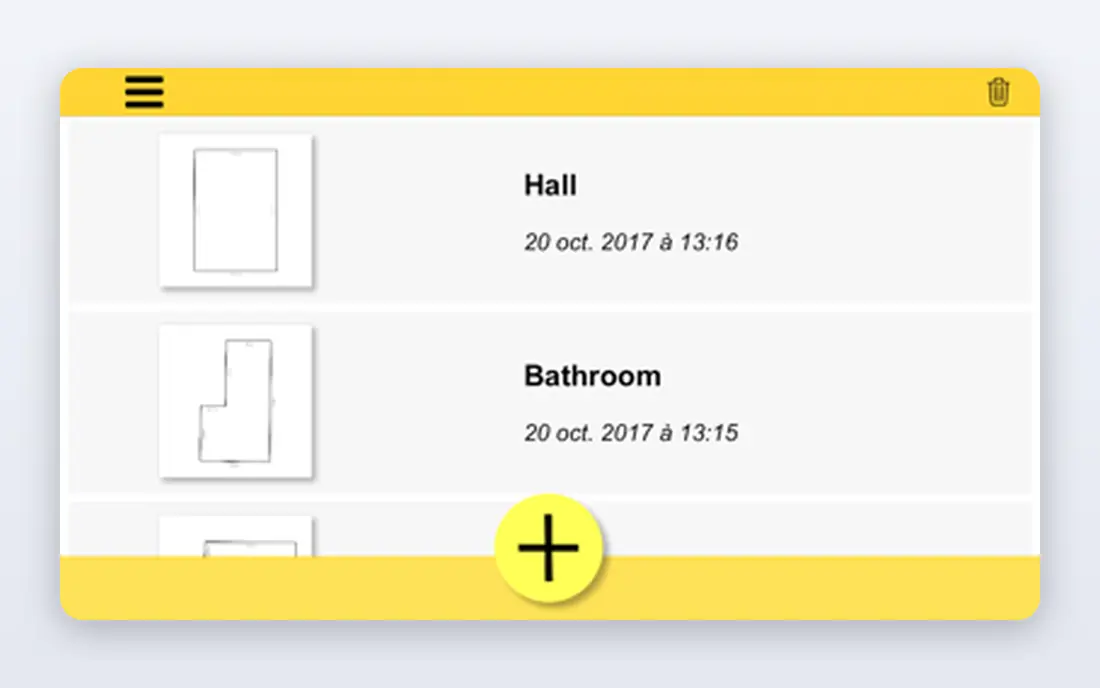
CamToPlan turns room measuring into a guided walk: point at each corner, and the app builds a plan with lengths and areas. That workflow suits estate agents, renters and anyone planning furniture layout or flooring. Seeing the plan grow on screen also makes missed corners easy to spot.
As with all AR tools, results are estimates, not survey data. Bright, even light and a slow pace give the best results, and you should confirm final dimensions with a tape measure before ordering fitted items. For planning and quotes, though, CamToPlan saves real time.
- Measures rooms with the camera
- Builds a floor plan as you go
- Exports plans in common formats
- Accuracy drops in poor light
- Some exports need a paid plan
Magicplan is aimed at tradespeople, inspectors and property professionals who need a presentable floor plan, not just a number. You can add rooms, doors, windows and objects, attach photos and notes, and share a report with a client or contractor. That structure makes it useful for quotes and job records.
The free tier covers basic plans, while polished exports and team tools need a subscription. Casual users may find the feature set larger than they need, and the first plan takes some patience. If you measure rooms for work, the time saved on paperwork can justify the cost.
- Floor plans with rooms, doors and objects
- Photo and note attachments
- Reports for contractors and clients
- Advanced exports and team features are paid
- Learning curve for first-time users
Moasure works differently from camera apps: it uses your phone's motion sensors as you walk or move the device between points, so it can measure long gardens, driveways and land boundaries. That approach suits outdoor jobs where a camera view of the full distance is hard to get.
The method takes practice, and short indoor measurements are often easier with an AR app. Moasure also costs money after its trial, so try it on a known distance first to judge its accuracy on your phone. For large outdoor plots, it is a genuinely useful alternative to a long tape.
- Measures up to long distances using motion sensors
- No need for a clear camera view of the whole span
- Angle and area tools included
- Paid app after the trial
- Needs practice to get consistent results
Ruler App solves a narrow job well: measuring a small object placed on your phone screen, such as a card, a screw or a piece of jewellery. You calibrate once for your screen, then read the size directly. There is no camera tracking to lose, which makes it steady and fast.
The limit is obvious: anything larger than your screen needs a different tool. Calibration also matters, so check the app against a known object before trusting a reading. For desk jobs and quick comparisons, it is a handy free tool to keep installed.
- Turns your screen into a ruler
- Simple unit switching
- No camera or AR setup needed
- Only for small, flat objects
- Screen size calibration matters
Measure 3D goes beyond flat lengths, with tools for rectangles, cylinders, polygons and curves, plus volume estimates. That range suits workshops, storage planning and rooms with awkward shapes. The level tool is a useful extra for hanging pictures and shelves.
The extra tools make the interface busier, and new users may need a few tries to pick the right tool for each shape. Start with simple rectangles before moving to polygons. For volume and shape work, the depth here beats most free AR rulers.
- Length, area and volume tools
- Rectangle, circle and polygon shapes
- Level tool included
- Interface is busier than Apple Measure
- Some tools need a paid upgrade
Google Measure is the Android equivalent of a basic built-in ruler: point, tap and read a length or height. It suits Android users who want a quick check without installing a feature-heavy app. The toolset is deliberately small, which keeps it fast.
Availability depends on your device and on ARCore support, and Google has shifted focus over time, so some phones may not offer it. If it is not on your phone, AR Ruler App is the better cross-platform pick. Either way, treat results as estimates and confirm with a tape for final cuts.
- Simple AR measuring on supported Android phones
- Length and height tools
- Free with no account fuss
- Limited availability by device and region
- Fewer features than AR Ruler App
How we picked these
We compared official app listings, vendor feature pages and public reviews, focusing on tools that still work on current phones in 2026. We favoured apps with clear accuracy limits, honest free tiers and a distinct job, rather than listing near-identical AR rulers. We also weighed device coverage, since an iPhone-only app is no help to an Android user.
How to get accurate measurements from a phone
Light comes first. AR tracking needs visible texture, so measure in a bright room and avoid plain white walls, mirrors and glass where possible. Move slowly, keep the phone steady at the start, and let the app settle for a second before placing points. Rushing is the most common cause of a bad reading.
Second, measure twice from different angles and compare the results. If two readings differ by more than a few centimetres, take a third and use a tape measure for the final number. For flooring, paint and fitted furniture, always confirm with a tape before ordering. Phone apps are best for planning, checking fit and rough quotes, not for cutting timber or ordering custom glass.
FAQ
What is the best measuring app for iPhone?
Apple Measure is the best free starting point for iPhone users, especially on Pro models with LiDAR. AR Ruler App and CamToPlan add more tools if you need room plans or cross-platform use.
What is the best measuring app for Android?
AR Ruler App is the strongest cross-platform choice for Android, with length, angle and height tools. Google Measure is a simpler option where it is available on your device.
How accurate are measuring apps?
Short indoor measurements are often within a few centimetres, while longer distances can drift by more. Light, surface texture, phone sensors and movement all affect results, so confirm important dimensions with a tape measure.
Can a measuring app make a floor plan?
Yes. CamToPlan and Magicplan build floor plans as you measure rooms, and both allow exports and sharing. They suit planning and quotes, but final building work still needs verified dimensions.
Do measuring apps need LiDAR?
No. Most AR measuring apps work with a standard camera, but LiDAR on newer iPhone Pro models improves speed and accuracy, especially in low light and on plain surfaces.
Which app is best for measuring land?
Moasure suits long outdoor distances because it uses motion sensors rather than needing a full camera view. For formal land boundaries, use a licensed surveyor instead of any phone app.