Best Invoice Management in Accounting Software in 2026: 9 Tools Compared
Compare the best invoice management in accounting software for 2026, covering invoicing, approvals, payments and sync for small firms and growing teams.
- Editor's choice
 QuickBooks Online
US firms wanting accountant-ready accounting
Starts at$38 per monthVisit quickbooks.intuit.comFull review - Great alternative
 Xero
Teams needing unlimited users
Starts atSee websiteVisit xero.comFull review - Also consider
 Zoho Books
Budget-conscious firms wanting full accounting
Starts atFreeVisit zoho.comFull review
TL;DR:
- The best invoice tool depends on whether you need full accounting, invoicing only, or approval and payment controls for bills you receive.
- QuickBooks Online and Xero give the widest accountant support, while Zoho Books and Wave lower the cost for smaller firms.
- Melio and BILL add approval workflows and payment handling that basic invoicing tools often lack.
- Watch for limits on invoice counts, users and payment fees, since those costs grow faster than the monthly subscription.
Quick comparison
| Tool | Best for | Starts at | Free plan? | |
|---|---|---|---|---|
| QuickBooks Online | US firms wanting accountant-ready accounting | $38 per month | Free trial | Visit |
| Xero | Teams needing unlimited users | See website | Free trial | Visit |
| Zoho Books | Budget-conscious firms wanting full accounting | Free | Yes | Visit |
 FreshBooks | Service firms billing time and projects | $23 per month | Free trial | Visit |
 Wave | Solo owners wanting free invoicing | Free | Yes | Visit |
 Melio | Small firms wanting bill pay and approvals | Free | Yes | Visit |
 BILL | Firms needing AP automation at scale | See website | No | Visit |
 Sage Intacct | Mid-market firms needing deep accounting controls | See website | No | Visit |
 Oracle NetSuite | Larger firms needing ERP-level invoicing | See website | No | Visit |
The best invoice management in accounting software
Invoice management covers two jobs that are easy to confuse. Sending invoices to customers is one job. Receiving, approving and paying supplier invoices is another. Good accounting software should handle both, keep the books updated, and show who owes you and who you owe at a glance. These nine tools cover that range.
QuickBooks Online
Best for: US firms wanting accountant-ready accounting
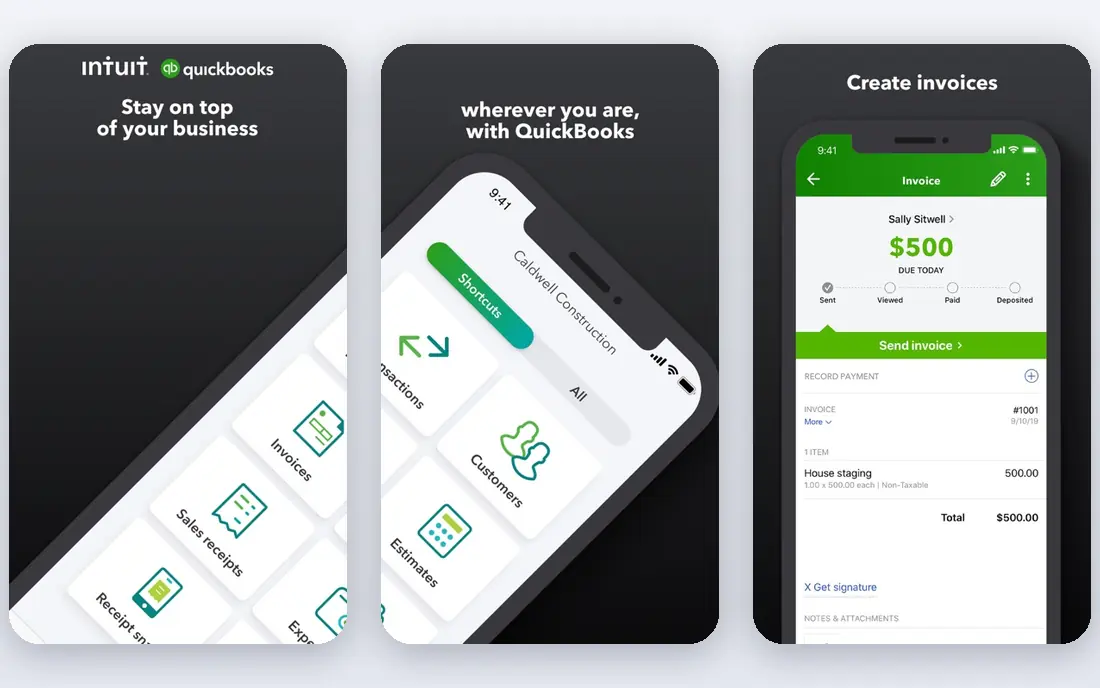
QuickBooks Online is the safe default for many US small businesses, mainly because accountants already know it. Invoicing is straightforward: create a branded invoice, send it, track when it is viewed and paid, and set reminders for overdue balances. Higher plans add bill pay, inventory and project profitability, which helps firms that outgrow basic invoicing. Payment links also let customers pay by card or bank transfer without a separate tool.
The limits are worth noting. Simple Start allows only one billable user, so teams need Essentials or higher for more seats. Costs also climb as users and features are added. For firms that work closely with a US accountant and want the widest support, QuickBooks Online still earns its place at the top of this list.
- Widely used by US accountants
- Strong invoicing and payment options
- Large integration range
- Per-plan user limits
- Price rises with higher tiers

Xero appeals to firms that hate per-seat pricing. Every plan includes unlimited users, so an owner, bookkeeper and accountant can all work in the same file without extra seat fees. Invoicing is clean and fast, with quotes, recurring invoices and online payment options. Bank reconciliation is a particular strength, and it helps keep invoice and payment records current with less manual matching.
The lowest plan caps monthly invoices and bills, so busy firms should start on a higher tier. Multi-currency support also sits on higher plans. Xero suits growing firms with several people touching the books, especially those with customers or suppliers abroad.
- Unlimited users on every plan
- Clean bank reconciliation
- Strong multi-currency support on higher plans
- Invoice and bill caps on the lowest plan
- Approval workflows are more basic than BILL

Zoho Books gives small firms real accounting for little or no cost. The free tier covers firms under a revenue limit, with invoicing, expenses and basic reporting included. Paid plans start at $20 per month and add inventory, workflows, project tracking and more users. Recurring invoices, payment reminders and client portals are included, which covers the daily invoicing work most firms need.
The main drawback is ecosystem fit. Firms already using Zoho CRM, Inventory or other Zoho apps get the most value, while firms tied to other tools may need extra setup. For cost-conscious owners who want full double-entry accounting without a large monthly bill, Zoho Books is hard to beat.
- Genuine free tier for smaller firms
- Strong automation
- Good value on paid plans
- Best value inside the Zoho suite
- Some limits on invoice volume by plan
FreshBooks was built around invoicing for service work, and it shows. Time tracking flows into invoices, estimates convert cleanly, and automated reminders chase late payments without awkward emails. Project tracking helps agencies and consultants see billable work by client. The interface is friendly, which matters for owners who do their own billing.
Lower plans limit billable clients, so growing agencies need Plus or Premium. Pure accounting depth is also lighter than QuickBooks or Xero, though double-entry accounting is available on higher plans. For freelancers and service firms where invoicing is the core job, FreshBooks is our pick for ease of use.
- Easy invoice templates
- Strong time tracking
- Automated reminders
- Client limits on lower plans
- Lighter accounting depth than QuickBooks or Xero
Wave offers free invoicing and bookkeeping for solo owners and very small firms, which is a rare deal. Invoices look professional, payments can be accepted online, and receipts and expenses stay linked to the books. Setup is quick, and there is no monthly subscription for the core functions.
The trade-offs are support and scale. Paid support, payroll and some bank feed features cost extra, and larger firms will outgrow Wave. For a side business, freelancer or new firm testing its first invoicing system, Wave lets you start properly at zero cost and move later if volume grows.
- Free core invoicing and accounting
- Simple setup
- No monthly fee for basics
- Paid support and payroll cost extra
- Fewer integrations than larger platforms
Melio focuses on the other side of invoicing: paying supplier bills in an orderly way. Bills can be captured, approved and paid from one place, with a dedicated bills inbox and approval workflows. The free Go plan includes five ACH payments per month, while Core at $25 per month raises that allowance to 20 and adds QuickBooks Online and Xero sync, batch payments and W-9 collection. That makes Melio a useful companion to accounting software, not just a replacement for it.
The free plan is genuinely useful but small, so firms with many monthly bills will need a paid tier. For small firms that want approval discipline without a full AP suite, Melio is the gentlest starting point in this list.
- Free Go plan with bill capture and approvals
- Payment by ACH, card, wire or check
- QuickBooks and Xero sync on paid plans
- Free plan covers one user and five ACH payments per month
- Advanced roles sit on higher tiers
BILL, formerly Bill.com, handles accounts payable and receivable automation for firms with real volume. Invoices and bills flow through approval rules, payments are scheduled and tracked, and accounting sync keeps the ledger current. That control matters when several people approve spending and finance needs a clear audit trail. BILL integrates with QuickBooks, Xero, NetSuite and Sage Intacct, among others.
Pricing is not always published clearly, and small firms may find BILL more than they need. For firms processing dozens or hundreds of bills a month, with multiple approvers and strict controls, BILL offers structure that basic invoicing tools cannot match.
- Strong approval workflows
- Two-way sync with major accounting systems
- Payment and document handling at scale
- Quote-based pricing for many firms
- More system than a tiny firm needs
Sage Intacct is a step up from small-business accounting. Invoice management sits inside a full financial system with multi-entity support, dimensional reporting and approval workflows that suit finance teams, not just owners. Firms with several locations, departments or entities can track invoice performance by dimension, which helps budgeting and audit work.
The cost is a quoted subscription plus implementation planning, so it suits mid-market firms rather than startups. For firms outgrowing QuickBooks or Xero and needing stronger controls without moving to a full ERP, Sage Intacct is a credible middle path.
- Strong multi-entity and dimensional reporting
- Good approval and workflow controls
- Scalable for growth
- Quote-only pricing
- Implementation takes planning
Oracle NetSuite ties invoicing to inventory, orders, CRM and finance in one ERP. That matters for firms where an invoice is not just a document, but the result of an order, shipment and contract. Multi-subsidiary and multi-currency support helps larger firms consolidate billing across entities. Custom workflows and approval rules can be built around complex sales and billing models.
NetSuite is priced by quote and needs a real implementation project, so it is not a small-firm pick. For larger firms that need invoicing inside a full ERP, rather than as a standalone tool, NetSuite offers depth that the rest of this list cannot match.
- Invoicing tied to ERP, inventory and CRM
- Strong multi-subsidiary support
- Broad customization
- Quote-only pricing
- Implementation is a major project
How we picked these
We compared official pricing pages, product documentation and public reviews for accounting and AP tools. We favored tools with real invoice creation, tracking, reminders, approvals and accounting sync, and we checked current starting prices where vendors publish them. Where pricing was not published, we used See website rather than guessing. We did not claim hands-on testing. Instead, we weighed invoicing ease, payment options, approval controls, integration with accounting systems and suitability for different firm sizes.
How to choose invoice software for your firm
Start with volume and roles. Count monthly customer invoices and supplier bills, and list who creates, approves and pays them. A solo owner needs simple invoicing and payment links. A firm with three approvers needs role-based approvals and an audit trail. Next, check the accounting link. If your accountant uses QuickBooks, choosing a tool that syncs cleanly with QuickBooks saves hours each month. If you have several users, Xero unlimited users may save more than a lower headline price elsewhere.
Then check payment costs. Subscription price is only part of the bill. Card processing fees, ACH limits, check fees and payment speed all affect cash flow. Finally, test the overdue workflow. Good invoice software reminds customers politely, shows aging clearly and makes it easy to see which invoices need action today. That daily view, more than any single feature, is what keeps cash flow healthy.
Red flags to watch
Watch for invoice caps that force an upgrade mid-year, user limits that block your accountant, and payment fees buried in fine print. Also check whether recurring invoices, partial payments and credit notes are included, since firms often discover those gaps after signing up.
FAQ
What is invoice management in accounting software?
Invoice management covers creating, sending, tracking and reconciling customer invoices, plus receiving, approving and paying supplier invoices. Good software links both sides to the ledger, so revenue, expenses and cash flow stay current without manual re-entry.
Is QuickBooks or Xero better for invoicing?
Both handle invoicing well. QuickBooks Online suits US firms whose accountant already uses it, while Xero suits teams that need unlimited users and clean bank reconciliation. Price, user count and multi-currency needs usually decide the choice.
Do I need separate AP software like BILL or Melio?
Not always. Small firms can manage approvals inside QuickBooks, Xero or Zoho Books. Firms with many bills, several approvers or strict audit needs benefit from Melio or BILL, which add approval workflows, payment handling and clearer audit trails.
Can invoice software accept online payments?
Most tools on this list can. QuickBooks, Xero, FreshBooks, Zoho Books and Wave all support online payment links, though processing fees apply. Melio and BILL focus more on paying suppliers, with card, ACH, wire and check options depending on plan.
What does invoice management cost?
Costs range from free for Wave and Zoho Books free tiers to quoted ERP pricing for Sage Intacct and NetSuite. QuickBooks Online starts at $38 per month, FreshBooks at $23 per month, and Melio Core at $25 per month. Payment processing and extra users add to the total, so check those fees before budgeting.