Best Inventory Management Software in 2026: 9 Tools Compared
We compare nine inventory tools for sellers, retailers, wholesalers and makers, covering stock, orders, integrations and pricing, so you can choose well.

- Editor's choice
 Zoho Inventory
Low-cost multichannel sellers
Starts atSee websiteVisit zoho.comFull review - Great alternative
 Cin7 Core
Growing omnichannel brands
Starts atSee websiteVisit cin7.comFull review - Also consider
 inFlow Inventory
Wholesalers and product businesses
Starts atSee websiteVisit inflowinventory.comFull review
TL;DR:
- The best tool depends on your sales channels, not on feature count alone, so start with where you sell and how you fulfil orders.
- Makers need production and raw-material tracking, while retailers need point-of-sale and multi-location stock in one view.
- Free tiers help small sellers start, but order caps, SKU limits and user limits matter once sales grow.
- Clean data matters more than fancy reports: standardise SKUs, barcodes and product names before you migrate.
Quick comparison
| Tool | Best for | Starts at | Free plan? | |
|---|---|---|---|---|
| Zoho Inventory | Low-cost multichannel sellers | See website | Yes | Visit |
| Cin7 Core | Growing omnichannel brands | See website | Free trial | Visit |
| inFlow Inventory | Wholesalers and product businesses | See website | Free trial | Visit |
 Sortly | Simple visual stock tracking | See website | Yes | Visit |
 Square for Retail | Shops that need POS and stock together | Free | Yes | Visit |
 Fishbowl | QuickBooks-based businesses | See website | No | Visit |
 Katana | Small manufacturers and makers | See website | Yes | Visit |
 Ordoro | Ecommerce shipping and fulfilment | See website | Free trial | Visit |
 Odoo Inventory | Businesses that want one system | See website | Yes | Visit |
The best inventory management software
We compared official feature pages, pricing notes and integration lists for tools that track stock, orders and purchases for small and mid-size businesses. The list covers online sellers, shops, wholesalers and makers, so you can match the tool to your daily workflow rather than buying the largest system on offer.
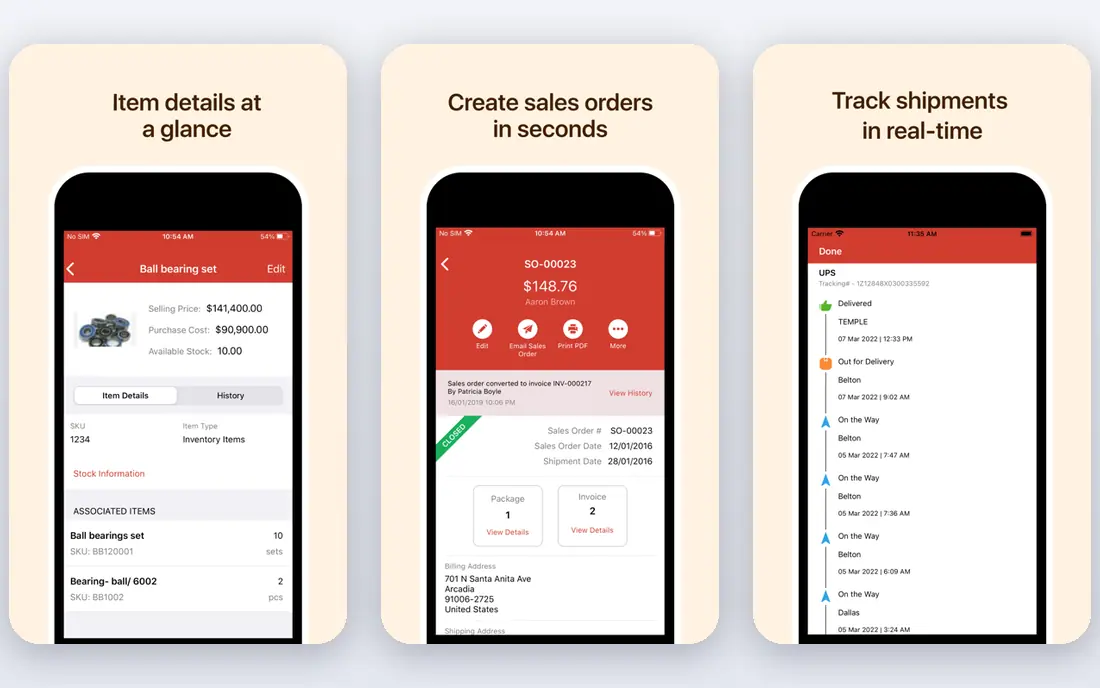
Zoho Inventory is a practical starting point for online sellers who need stock counts to stay in sync across channels. It connects to major marketplaces and stores, tracks sales and purchase orders, and links to Zoho Books for accounting. Small sellers can start on the free tier and learn the system before paying.
Growth brings limits to watch. The free plan caps orders, and multi-warehouse or advanced automation features sit on paid tiers. If you already use Zoho apps, the shared login and data flow add value. For a low-cost, multichannel start, Zoho is hard to beat.
- Free tier for small sellers
- Links to Shopify, Amazon and other channels
- Order and purchase management
- Free plan caps monthly orders
- Advanced warehouse features need higher plans

Cin7 Core, formerly DEAR Systems, suits brands selling on several channels at once. It syncs stock across stores and marketplaces, handles wholesale price lists, and automates order routing and purchase orders. That breadth helps a growing brand avoid overselling when a product sells fast in two places at once.
The trade-off is setup time. A small seller with one channel may find Cin7 more than needed, and onboarding takes care to map products, warehouses and channels correctly. For a brand moving from spreadsheets to a real system, though, Cin7 gives room to scale.
- Wide integration range
- Wholesale and retail pricing
- Automation for orders and stock
- More setup than a simple tracker
- Pricing suits growing firms more than tiny sellers

inFlow Inventory appeals to wholesalers and product businesses that want a clear, usable system without enterprise complexity. It tracks stock, purchase orders and sales orders, supports barcode scanning, and lets you set customer-specific pricing. The interface feels approachable for teams moving off spreadsheets.
Manufacturing is lighter here than in a dedicated production tool, so makers who assemble products may need an add-on or a different system. For wholesale, distribution and straightforward product sales, inFlow gives a good balance of depth and ease.
- Clear interface
- Barcode scanning
- B2B ordering and customer pricing
- No free tier for ongoing use
- Manufacturing features are lighter than Katana
Sortly is best for teams that need to know what they have, where it is, and how much is left, without running a full order system. You can add photos, barcodes and locations, track items on a phone, and set low-stock alerts. That visual approach suits supplies, tools, equipment and small retail stock.
High-volume ecommerce sellers will hit limits, since Sortly does not replace order management, marketplace sync or accounting. Use it where simple tracking is the job, such as a workshop, clinic or small shop, and choose a fuller system when orders and channels multiply.
- Visual, photo-based tracking
- Easy mobile app
- Simple setup for supplies and equipment
- Not a full order or accounting system
- Limited for high-volume ecommerce
Square for Retail suits physical shops that want checkout and stock to update together. When you sell an item at the till, stock drops at once, and reports show what moves, what sits, and when to reorder. The free basic tier covers a single location, which helps a new shop start without a large software bill.
The catch is ecosystem fit. Square works best when payments, POS and inventory stay inside Square, and advanced features such as purchase orders and multi-location tools need paid plans. For a shop already using Square payments, it is a natural, low-friction choice.
- POS and inventory in one system
- Free basic tier
- Easy checkout and reporting
- Best within the Square system
- Advanced inventory features need paid plans
Fishbowl is built for businesses that run on QuickBooks and need stronger inventory, manufacturing and warehouse control. It syncs stock, orders and costs with QuickBooks, tracks raw materials and finished goods, and supports barcode scanning across warehouses. That depth suits firms with complex stock and production needs.
Setup takes more effort than a cloud-only tracker, and pricing reflects its position as a fuller system. Small sellers may find it heavy, while QuickBooks users who have outgrown basic stock tracking will value the tighter link between inventory and accounts.
- Deep QuickBooks integration
- Manufacturing and warehouse features
- Barcode and order tools
- Desktop roots and setup time
- Pricing suits established firms
Katana is designed for makers who assemble, produce or batch-manufacture products. It tracks raw materials, shows what is available for production, and links finished stock to sales channels and accounting tools. The visual production view helps a small team see what to make next without a spreadsheet.
The free tier covers a limited number of SKUs, so growing makers will need a paid plan. Retailers who only resell finished goods may not need production features at all. For a maker moving from manual tracking to a real production system, Katana fits the job well.
- Production planning and raw-material tracking
- Shopify and accounting links
- Visual shop-floor view
- Free tier limits SKUs
- Higher plans needed for larger production volumes
Ordoro suits ecommerce brands where shipping speed and accuracy matter as much as stock counts. It syncs orders from marketplaces and stores, compares carrier rates, prints labels in bulk, and tracks stock as orders ship. Dropshipping support helps brands that do not hold all stock themselves.
Sellers who only need simple stock tracking may find Ordoro broader than required, and pricing reflects its shipping focus. For a Shopify or marketplace seller shipping many parcels a day, the combined inventory and shipping workflow saves real time.
- Shipping, inventory and dropshipping in one place
- Carrier rate comparison
- Marketplace sync
- Inventory alone is not its cheapest strength
- Setup needs channel mapping
Odoo Inventory fits businesses that want stock, sales, purchasing and accounting in one connected system rather than several separate tools. It supports multi-warehouse stock, barcode operations, replenishment rules and dropshipping, and it links cleanly to other Odoo apps as a business grows.
The breadth is also the challenge. Setting up Odoo well takes planning, and a firm that only needs stock tracking may find the suite larger than necessary. For a business planning to run sales, stock and accounts together, Odoo offers a path that avoids juggling many vendors.
- Inventory plus sales, accounting and CRM in one suite
- Flexible warehouse tools
- Open-source roots
- Full setup can be complex
- Best value comes from using several Odoo apps
How we picked these
We compared official feature pages, pricing notes, integration lists and free-tier terms for inventory tools aimed at small and mid-size businesses. We kept a mix of low-cost trackers, ecommerce systems, wholesale tools and manufacturing platforms, and we favoured tools that publish clear pricing or trial terms. We did not claim hands-on testing; our comparison rests on vendor pages and public documentation.
How to choose inventory software for your business type
Start with your sales channels and fulfilment flow. List every place you sell, every warehouse or shop location, and how orders move from sale to shipment. A tool that syncs those channels and updates stock in real time will prevent overselling, while a tool that only tracks a single stockroom will create manual work.
Next, check the limits that matter at your size: SKU count, monthly orders, users, locations and barcode support. Test the trial with your real products, including variants, bundles and raw materials if you make goods. Clean your product data first, since a new system will only be as accurate as the SKUs and counts you put into it.
FAQ
What is the best inventory software for a small online seller?
Zoho Inventory and Square for Retail are strong low-cost starting points, while Cin7 Core and Ordoro suit sellers with several channels and higher order volumes. Pick based on your channels, order count and whether you need shipping tools as well.
Do I need barcode scanning?
Barcode scanning helps once you hold more than a small number of products or handle many orders a day, since it cuts picking errors and speeds stock counts. Small sellers with few SKUs can start with manual counts and add scanning later.
Can inventory software sync with Shopify and Amazon?
Yes, most tools on this list sync with Shopify, Amazon and other major channels, but the depth of sync varies. Check that orders, stock levels and product variants update in both directions before you commit.
How much does inventory software cost?
Costs range from free basic tiers to several hundred dollars a month for fuller systems, depending on orders, SKUs, users and features. Start with a free tier or trial, then move up only when order caps or missing features affect daily work.
Should makers use the same tool as retailers?
Not always. Makers need raw-material and production tracking, while retailers need POS and multi-location stock. Katana and Fishbowl suit makers, while Square, Zoho and Cin7 suit retail and ecommerce sellers.