Best HR Software for Small Business Owners in 2026: 9 Tools Compared
Compare the best HR software for small business owners in 2026, with payroll, onboarding, time off, benefits and pricing for small teams and buying guidance.

- Editor's choice
 Gusto
Most small business owners
Starts at$49 per month + $6 per personVisit gusto.comFull review - Great alternative
 BambooHR
HR-first teams
Starts at$10 per employee per monthVisit bamboohr.comFull review - Also consider
 Rippling
Tech-forward teams wanting HR plus IT
Starts atFrom $8 per user per monthVisit rippling.comFull review
TL;DR:
- Gusto is our pick for most small business owners, at $49 per month plus $6 per person, because payroll, benefits and HR sit in one simple system.
- BambooHR suits owners who want a proper HR system first, with Core pricing from $10 per employee per month and a flat rate from $250 per month under 25 staff.
- Zoho People offers the most complete free tier, free for up to 5 users, which suits very small teams on a tight budget.
- Rippling fits tech-forward owners who want HR, payroll and IT together, starting from $8 per user per month before modules.
- Homebase is free for one location and up to 10 employees, making it the best free start for hourly and shift teams.
Quick comparison
| Tool | Best for | Starts at | Free plan? | |
|---|---|---|---|---|
| Gusto | Most small business owners | $49 per month + $6 per person | No | Visit |
| BambooHR | HR-first teams | $10 per employee per month | No | Visit |
| Rippling | Tech-forward teams wanting HR plus IT | From $8 per user per month | No | Visit |
 OnPay | Simple payroll plus HR | $49 per month + $6 per worker | No | Visit |
 Zoho People | Budget teams and tiny teams | $1.50 per user per month | Yes | Visit |
 Homebase | Hourly and shift teams | Free | Yes | Visit |
 Eddy | Hourly teams needing hiring help | $50 per month + $4 per person | No | Visit |
 Factorial | Growing SMBs wanting published pricing | From $8 per user per month | No | Visit |
 Justworks | Teams wanting a PEO option | $50 per month + $8 per employee | No | Visit |
The best HR software for small business owners
A small business owner does not need enterprise HR. You need payroll done on time, new hires onboarded without a paper chase, time off tracked without a spreadsheet, and benefits handled without a benefits broker on speed dial. The tools below cover those jobs in different combinations, and we compared official pricing pages and feature documentation to sort them by fit, not by marketing size.

Gusto is the default recommendation for a typical US small business, and it earns that spot by removing friction. Employees onboard themselves, enter tax and bank details, and enrol in benefits, while the owner runs payroll, files taxes automatically in all states on the right plan, and tracks time off in the same place. The Simple plan starts at $49 per month plus $6 per person, with Plus at $80 plus $12 and Premium at $180 plus $22.
The limits are worth knowing. The entry plan covers single-state payroll, so a second state pushes you up a tier, and a two-person company pays $61 per month for a tiny payroll run. Gusto also assumes a US-based team. For a domestic team of roughly five to 100 people, the polish and completeness are hard to beat.
- Payroll, benefits and HR in one login
- Clear published pricing
- Staff self-onboarding
- Entry plan covers one state
- Gets pricey for very small teams
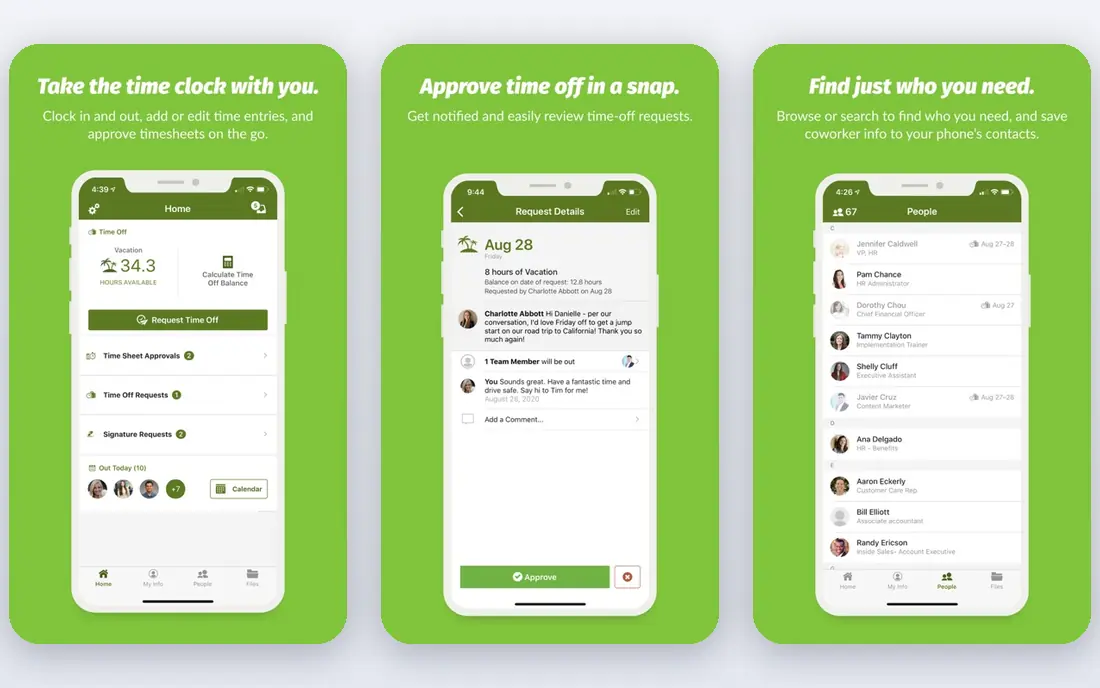
BambooHR is the pick when HR, not payroll, is the main job. It gives owners a clean employee database, onboarding workflows, time off tracking, performance notes and reporting that a payroll-first tool cannot match. Core pricing starts at $10 per employee per month, with a flat rate from $250 per month for teams under 25 employees, and Pro and Elite tiers add more automation and reporting.
Payroll is a separate, US-only add-on with quoted pricing, so the total cost needs a conversation if you want payroll inside BambooHR. Many owners pair BambooHR with Gusto for payroll and get the best of both. If your team is growing past the point where spreadsheets work, and culture, onboarding and records matter most, BambooHR is the strongest HR-first choice.
- Best employee self-service in the group
- Strong onboarding
- Clear HR reporting
- Payroll is a US-only add-on with quoted pricing
- Minimums apply on some plans

Rippling suits owners who want one system to handle hiring, payroll, benefits, app access and devices together. Onboarding a new hire can trigger payroll, benefits enrolment, Slack access and a laptop order in one workflow, and offboarding can revoke access just as cleanly. The platform floor starts at $8 per user per month, with payroll, HR, IT and finance modules added on top.
That breadth is also the catch. The final price needs a quote, and a five-person team will not use most of what Rippling offers. For a scaling team of 25 to 200 people, especially one with remote staff or strict access rules, the automation saves real admin time and reduces security mistakes.
- HR, payroll and IT in one system
- Powerful automation
- Handles contractors well
- Final price depends on modules
- More tool than a tiny team needs
OnPay keeps the buying decision simple, which many owners value more than a long feature list. One plan includes full-service payroll, tax filings, benefits administration support, onboarding and time off, at $49 per month plus $6 per worker. There is no tier puzzle to solve, and support has a good reputation among small business users.
OnPay will not match BambooHR on HR depth or Rippling on automation, and performance management tools are light. But for an owner who mainly needs payroll done correctly, staff onboarded cleanly, and time off tracked without fuss, OnPay is a calm, predictable choice that is easy to budget for.
- One plan with everything included
- Simple pricing
- Solid support
- Fewer HR extras than BambooHR
- Limited performance tools
Zoho People is the best free start for a very small team. The free plan covers up to 5 users with core HR features, including employee records, time off and attendance, and paid plans start at $1.50 per user per month. For a team of three to five people that needs proper HR records without a payroll bill, that free tier is genuinely usable, not a demo.
Payroll is not included, so owners who need payroll will pair Zoho People with a payroll tool or a Zoho payroll product where available. The interface also packs in many Zoho features, which can feel busy at first. For a budget-conscious owner inside the Zoho ecosystem, it is excellent value.
- Free for up to 5 users
- Broad HR features
- Works well inside the Zoho suite
- Payroll is not included
- Interface feels busy to some users
Homebase is built for the businesses that run on shifts: cafes, retail shops, salons and clinics with hourly staff. Scheduling, time tracking, team messaging and hiring tools are its core, and the free plan covers one location and up to 10 employees. That makes it the best no-cost start for a small hourly team, with paid plans adding payroll, HR and advanced scheduling from $20 per month in recent reports.
Payroll is a paid add-on, and HR features are lighter than BambooHR or Rippling. Homebase will not replace a full HR suite for a salaried office team. For an owner juggling shift swaps, late arrivals and weekly schedules, it solves the daily pain better than any general HR tool here.
- Free for one location and up to 10 employees
- Strong scheduling
- Easy team communication
- No payroll on the free plan
- HR depth is lighter than BambooHR
Eddy is designed for businesses with hourly, deskless or frontline workers, where hiring and onboarding happen often and paperwork piles up fast. It covers applicant tracking, onboarding, employee records, time off and payroll support, with Starter pricing at $50 per month plus $4 per person. That hiring focus sets it apart from tools that assume a stable salaried team.
Eddy is a smaller vendor than Gusto or BambooHR, so its integration list is shorter and its brand recognition is lower. For an owner who hires hourly staff regularly and wants hiring, onboarding and HR in one place without enterprise complexity, Eddy is a practical and well-priced fit.
- Built for hourly and deskless teams
- Hiring and onboarding included
- Clear base-plus-per-person pricing
- Smaller vendor than Gusto or BambooHR
- Fewer integrations than larger suites
Factorial gives growing small businesses a broad HR platform with a published entry price, which is rarer than it should be in this market. Starting from $8 per user per month, it covers employee records, time off, attendance, expenses, performance and hiring, with higher tiers adding more automation and reporting. That breadth suits a team moving from spreadsheets to a real system.
Higher tiers are quoted, so the full cost for a larger team needs a sales conversation, and US payroll depth should be checked against your state needs. For a growing SMB that wants one HR home without jumping straight to enterprise pricing, Factorial is a solid, modern option.
- Published entry pricing
- Broad HR features
- Good for growing teams
- Higher tiers are quoted
- US payroll depth varies by market
Justworks offers two paths, and owners should understand the difference. The payroll plan starts at $50 per month plus $8 per employee and covers payroll, tax filing and HR tools. The PEO option, starting at $79 per employee per month in recent reports, goes further: Justworks becomes a co-employer, handling benefits, compliance and HR risk, and giving a small team access to large-group health plans.
Co-employment is a bigger decision than buying software, since it changes the employment relationship, so read the terms carefully. For a team of 20 to 50 people struggling with small-group health insurance costs, the PEO route can be worth more than the fee. For a team that just needs payroll, the payroll plan alone is the right comparison.
- Payroll plan plus full PEO option
- Access to large-group benefits
- Compliance support
- PEO pricing is much higher
- PEO means co-employment, which is a bigger decision
How we picked these
We compared official pricing pages, feature documentation and public reviews for HR tools in active use by US small businesses in 2026. We favoured clear pricing, payroll or payroll integration, onboarding, time off and employee self-service, and we noted where pricing was quote-only or where payroll was an add-on. We did not run HR for a real business through every tool, and we did not invent user counts or ratings. Confirm current plan limits with each vendor, since pricing in this market changes often.
What a small business owner should check first
Start with headcount and pay type, not features. Count salaried staff, hourly staff and contractors separately, and note how many states you operate in. A tool priced per person looks cheap at five staff and expensive at 50, and a base fee plus per-person model, like Gusto at $49 plus $6, means the base fee is roughly half the bill at 10 employees. Work out your real monthly cost at your real headcount before comparing headline prices.
Next, check what payroll actually includes on the plan you buy. Full-service filing, multi-state filing, contractor payments and benefits administration are often on different tiers. Ask who files taxes, who fixes errors, and what happens if a filing is late. Also check onboarding: can a new hire complete tax forms, bank details and policy sign-off without the owner chasing paper? That single workflow saves more owner time than any dashboard.
Finally, test with a real pay run and a real new hire. Run a trial payroll with overtime, a new hire and a time-off request, and watch how long it takes and how clear the reports are. If the owner still needs a spreadsheet to answer a basic question, the tool is not doing its job, however good it looked in a demo.
FAQ
What is the best HR software for small business owners overall?
Gusto is our pick for most owners, at $49 per month plus $6 per person, because it combines payroll, tax filing, benefits and HR in one simple system. BambooHR is better if HR depth matters more than payroll, and OnPay is better if you want one plan with everything included. Match the tool to your main pain, not to the longest feature list.
Is there free HR software for a small business?
Yes, with limits. Zoho People is free for up to 5 users with core HR features, and Homebase is free for one location and up to 10 employees with scheduling and time tracking. Neither includes full payroll on the free plan, so budget for payroll separately if you need it.
Do I need payroll and HR in the same tool?
It helps, but it is not required. Gusto, Rippling and OnPay combine both, which reduces double entry. BambooHR plus Gusto is a common pairing for owners who want deeper HR with reliable payroll. Choose the combination that keeps records in one place for the questions you answer most often.
How much does HR software cost for 10 employees?
At 10 employees, Gusto Simple costs $109 per month, OnPay costs $109 per month, and BambooHR Core costs about $100 per month or a $250 flat rate for smaller teams, depending on the plan. Rippling starts at $80 per month before modules. Add benefits, payroll add-ons and any setup fees to get the true total.
What is a PEO, and should a small business use one?
A PEO, or professional employer organisation, becomes a co-employer and handles benefits, compliance and HR risk for your team. Justworks and TriNet offer this model. It can give a small team access to better health plans, but it costs more per employee and changes the employment relationship. It suits teams where benefits costs or compliance risk outweigh the fee.
Can HR software handle hourly and shift workers?
Yes, but check the fit. Homebase and Eddy are built for hourly and shift teams, with scheduling and time tracking at the core. Gusto and BambooHR handle hourly staff well too, but shift scheduling is thinner. If shift swaps and attendance are your daily pain, start with a shift-first tool.