Best Free Phone Cleaner App in 2026: 8 Apps Compared
Best free phone cleaner app compared for Android and iPhone, with duplicate photos, junk files, and storage tools, plus safe picks and apps to avoid in 2026.

- Editor's choice
 Files by Google
Free Android cleaning
Starts atFreeVisit google.comFull review - Great alternative
 CCleaner
Cross platform cleaning
Starts atFreeVisit ccleaner.comFull review - Also consider
 Avast Cleanup
Android junk and photo tools
Starts atFreeVisit avast.comFull review
TL;DR:
- Files by Google is the safest free Android cleaner, with no paid tier for core cleaning.
- On iPhone, built in storage tools plus a photo cleaner app cover most needs, since iOS limits system cleaning.
- CCleaner works on both platforms, but its iPhone version focuses on photos, videos, and contacts.
- Avoid cleaner apps with heavy ads and broad permissions, and always review files before deleting.
- Back up photos and videos before any bulk cleanup, since deleted files can be hard to recover.
Quick comparison
| Tool | Best for | Starts at | Free plan? | |
|---|---|---|---|---|
| Files by Google | Free Android cleaning | Free | Yes | Visit |
| CCleaner | Cross platform cleaning | Free | Yes | Visit |
| Avast Cleanup | Android junk and photo tools | Free | Yes | Visit |
 AVG Cleaner | Simple Android cleanup | Free | Yes | Visit |
 Norton Clean | Trusted brand cleanup | Free | Yes | Visit |
 SD Maid | Power user control | Free | Yes | Visit |
 Clever Cleaner | iPhone photo cleanup | Free | Yes | Visit |
 Smart Cleaner | iPhone contacts and photos | Free | Yes | Visit |
The best free phone cleaner app
We compared free tier limits, permissions, ad load, and what each app can actually clean on Android and iPhone. iOS limits mean no app can clean system cache like on Android, so we judge iPhone apps on photo and file tools.
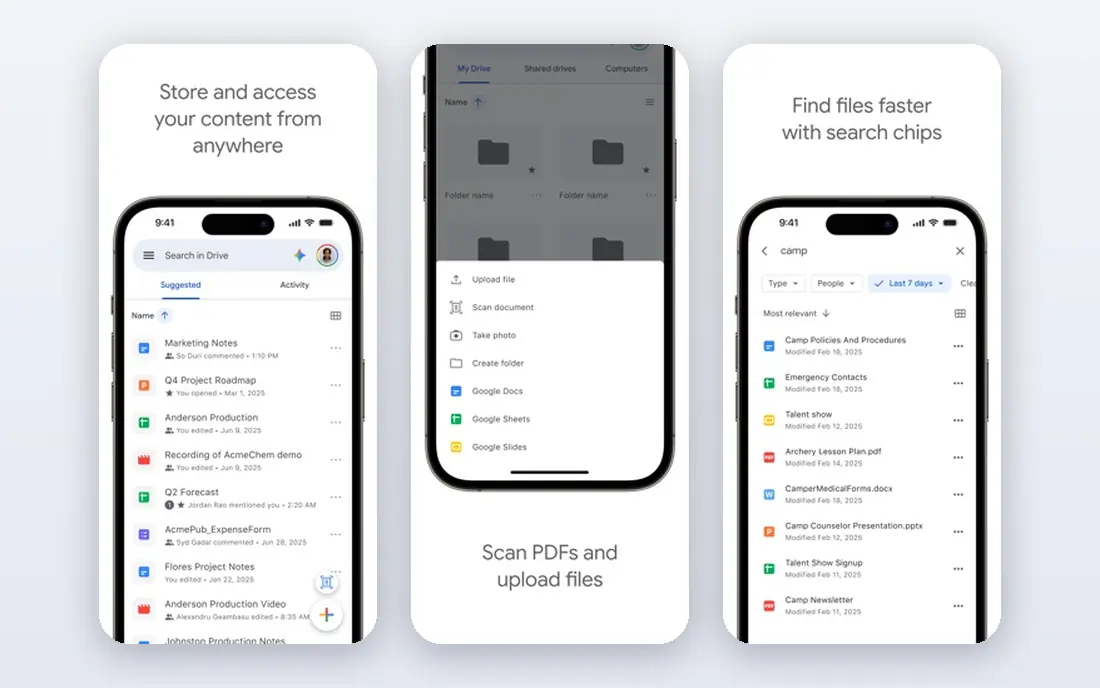
Files by Google is our top pick for Android because it is free, ad free for core cleaning, and comes from the maker of Android. The Clean tab suggests junk files, duplicate files, large files, old screenshots, and unused apps, and you review each group before deleting. That review step matters, since it stops bulk deletion mistakes. It also works as a file manager, so you can move files and share them offline. If you own an Android phone, start here before installing any third party cleaner. It covers most storage problems without extra cost or heavy ads.
- Free with no paid cleaning tier
- Finds junk, duplicates, and large files
- Made by Google for Android
- Android only
- Does not clean iPhone system files

CCleaner is the best known cross platform cleaner, with Android and iPhone versions. On Android, it finds junk files, analyses storage, and lists rarely used apps. On iPhone, it focuses on photos, videos, and contacts, finding large, old, duplicate, and similar media. The free version is useful, but deeper photo cleaning and some automation need a paid plan. Use CCleaner if you want one brand across devices, and use Files by Google on Android if you want the simplest free path.
- Long running cleaner brand
- Android junk and app tools
- IPhone photo and contact tools
- Some features need a paid upgrade
- IPhone cleaning is limited by iOS rules
Avast Cleanup, from the security firm Avast, offers junk cleaning, photo tools, and app management on Android. Its storage breakdown shows what takes space, and its hibernation tools can stop unused apps from running in the background. That mix helps phones that feel slow as well as full. The free tier covers core cleaning, but advanced automation and deeper photo tools sit behind a premium plan. If you already trust Avast for security, its cleaner is a natural add on, but Files by Google remains simpler for basic cleanup.
- Junk cleaning plus photo analysis
- App hibernation tools
- Clear storage breakdown
- Some features need a premium plan
- Prompts to upgrade can be frequent
AVG Cleaner offers a simple path to junk cleaning, cache clearing, and app insights on Android. It suits users who want a guided cleanup without many settings. Its battery and performance views help you see which apps use the most resources. It does not beat Files by Google on price simplicity, since some features need payment. It earns a place for users who prefer a security brand cleaner with a clear, guided flow.
- Simple junk and cache tools
- Battery and app insights
- From a known security brand
- Some features need a paid plan
- Interface includes upgrade prompts
Norton Clean is a lightweight Android cleaner from Norton, focused on junk files, residual files, and cache. It suits users who want a trusted name and a simple cleanup, without a large set of extra tools. Its interface is clear and fast to use. It is not the most feature rich cleaner on this list, and it does not offer iPhone system cleaning. For a basic, trusted Android cleanup, it is a safe option, especially if you already use Norton products.
- From a well known security brand
- Junk and residual file tools
- Simple interface
- Feature set is narrower than some rivals
- Availability varies by region and device
SD Maid is the power user pick. It finds leftover files from uninstalled apps, duplicate files, and large files, with more control than most cleaners. Advanced users can run scheduled cleanups and check databases in detail. That control helps when a simple cleaner misses leftover data. Beginners should use Files by Google first, since SD Maid settings can delete files you may want to keep if used without care. For experienced Android users, SD Maid offers the deepest free control on this list.
- Detailed file and corpse finder tools
- Database optimisation
- Strong control for advanced users
- Interface is complex for beginners
- Some features need the pro version
Clever Cleaner, by CleverFiles, is an iPhone focused cleaner that groups duplicate and similar photos and marks the best shot in each group. It also sorts videos by size and gathers screenshots in one place, which helps iPhone users find space fast. Its design suits photo heavy libraries. Free use has daily limits, so heavy cleanups may need a premium plan or several days of use. Back up photos before deleting, and review each group, since similar photos are not always duplicates you want to lose.
- Groups duplicate and similar photos
- Finds large videos and screenshots
- No ads listed
- IPhone only
- Free use has daily limits, with a premium plan for unlimited use
Smart Cleaner covers the main iPhone cleanup jobs in one app: duplicate photos, large videos, old screenshots, and duplicate or incomplete contacts. That breadth helps users who want one app for a full iPhone tidy, rather than separate tools for photos and contacts. As with all iPhone cleaners, it cannot clean system cache, so pair it with iPhone Storage settings for app offloading and large attachments. Review contacts carefully before merging or deleting, since contact cleanup is harder to undo than photo cleanup.
- Photo, video, and contact cleanup in one app
- Finds duplicates and old screenshots
- Simple review flow
- Some features need a paid plan
- IPhone only for full photo tools
How we picked these
We compared official app listings, developer pages, and public feature lists for cleaners that are actively available in 2026. We favoured apps from known developers, with clear free tiers and limited ad load. We excluded cleaner apps with vague privacy policies or aggressive permission requests, since a cleaner should not create a new privacy risk. We did not claim hands on testing. Our picks reflect documented features, platform limits, and safe use for Android and iPhone.
How to clean your phone safely
Start with your phone settings, not a new app. Android Storage and iPhone Storage both show what takes space and suggest safe deletions. That built in view is often enough to find the biggest wins.
Back up first
Back up photos, videos, and important files to cloud storage or a computer before bulk deletion. Check that the backup completed before you delete originals. This step prevents the most common cleanup regret.
Review before you delete
Cleaner apps suggest files, but you decide. Check duplicate photo groups, large videos, and downloaded files one by one. Do not delete files from messaging apps or work folders without checking their contents first.
Avoid risky cleaner apps
Avoid apps that promise to boost RAM by large amounts, ask for broad accessibility access, or show constant ads and warnings. Those apps often collect data or push paid upgrades. Stick to the known apps on this list and your built in storage tools.
FAQ
What is the best phone cleaner app for Android?
Files by Google is the best free Android cleaner for most users, since it is free, ad free for core cleaning, and made for Android. CCleaner and SD Maid are good next options, with CCleaner offering a simpler flow and SD Maid offering more control. Start with Files by Google before paying for anything.
What is the best phone cleaner app for iPhone?
On iPhone, start with Settings, General, iPhone Storage, which offers offloading and large attachment review. For photo cleanup, Clever Cleaner and Smart Cleaner help find duplicates, large videos, and old screenshots. No iPhone app can clean system cache like on Android, due to iOS limits.
Is there a truly free phone cleaner app?
Files by Google is truly free for core Android cleaning, with no paid tier to open basic junk and duplicate tools. Many other cleaners offer a free tier but charge for deeper photo tools or automation. Check the free limits in the app listing before you rely on a cleaner for a large cleanup.
Do phone cleaner apps really make phones faster?
Cleaner apps can free storage and stop some background apps, which may help a full phone feel smoother. They cannot fix old hardware, a failing battery, or a phone that needs a software update. If your phone stays slow after freeing space, check battery health and app updates next.
Are phone cleaner apps safe?
Cleaners from known developers with clear privacy policies are generally safe when you review deletions. Risk rises with unknown apps that request broad permissions or show aggressive ads. Read the privacy policy, limit permissions to files and photos you want cleaned, and avoid apps that ask for unrelated access.
What is the best app cleaner for duplicate photos?
Clever Cleaner is a strong iPhone pick for duplicate and similar photos, while Files by Google and CCleaner cover duplicates on Android. Always review similar photo groups before deleting, since burst photos may include shots you want to keep. Back up your library first.