Best Email Forwarding Services in 2026: 9 Services Compared
Searching for the best email forwarding service? We compare 9 services on aliases, privacy, custom domains, and price so your real inbox stays protected.
- Editor's choice
 SimpleLogin
Most people who want full alias control
Starts at$4 per monthVisit simplelogin.ioFull review - Great alternative
 addy.io
Unlimited aliases at no cost
Starts at$1 per monthVisit addy.ioFull review - Also consider
 Firefox Relay
Firefox users who want one-click aliases
Starts at$0.99 per monthVisit relay.firefox.comFull review
TL;DR:
- SimpleLogin is the best all-around choice, with 10 free aliases, unlimited aliases on Premium, and custom domain support.
- addy.io offers the most generous free tier, with unlimited standard aliases, and it is open source.
- Firefox Relay is the easiest option for Firefox users, and DuckDuckGo Email Protection is the best fully free choice.
- If you own a domain, pick a service with custom domain and catch-all support so every address at your domain forwards to you.
- Forwarding hides your real address from senders, but it does not encrypt your mail by itself; pair it with a secure mailbox for sensitive messages.
Quick comparison
| Tool | Best for | Starts at | Free plan? | |
|---|---|---|---|---|
| SimpleLogin | Most people who want full alias control | $4 per month | Yes | Visit |
| addy.io | Unlimited aliases at no cost | $1 per month | Yes | Visit |
| Firefox Relay | Firefox users who want one-click aliases | $0.99 per month | Yes | Visit |
 DuckDuckGo Email Protection | Free unlimited aliases with tracker removal | Free | Yes | Visit |
 Apple Hide My Email | iPhone, iPad, and Mac owners | $0.99 per month | No | Visit |
 Proton Pass | Proton Mail and Pass users | $1.99 per month | Yes | Visit |
 Forward Email | Custom domain owners who want simple forwarding | See website | Yes | Visit |
 ImprovMX | Quick free forwarding for one domain | See website | Yes | Visit |
 Pobox | Long-term reliable forwarding with support | See website | No | Visit |
The best email forwarding services
An email forwarding service gives you alias addresses that forward to your real inbox, so you can hand out a different address to every site and shut off any alias that starts getting spam. We compared the leading services on free tiers, alias limits, custom domains, privacy, and price.
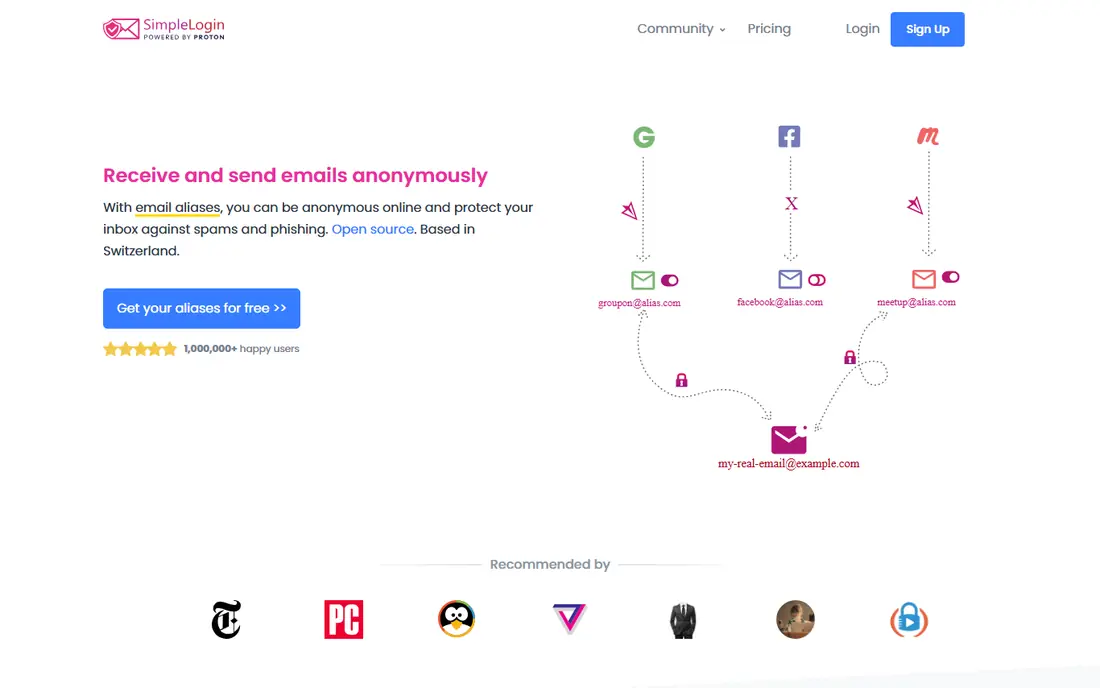
SimpleLogin is our pick for most people because it covers every use case well. The free plan includes 10 aliases, unlimited bandwidth, replies from aliases, and one mailbox. Premium costs $4 per month or $36 per year and adds unlimited aliases, unlimited custom domains, catch-all domains, unlimited mailboxes, PGP encryption, and the ability to start new emails from an alias. It is open source, can be self-hosted, and is based in Switzerland under Proton.
The free tier's 10-alias limit fills up fast if you alias every service, and the reverse-alias system for sending takes a minute to learn. Those are modest complaints against a service that also bundles Proton Pass premium. If you want one alias service to grow with you from casual use to a custom domain, start here.
- 10 free aliases
- Premium adds unlimited aliases, custom domains, and PGP encryption
- Open source and based in Switzerland
- Proton Pass premium included
- Premium costs $4 per month billed monthly or $36 per year
- Replying from an alias needs a reverse-alias setup
- Free plan allows only one mailbox
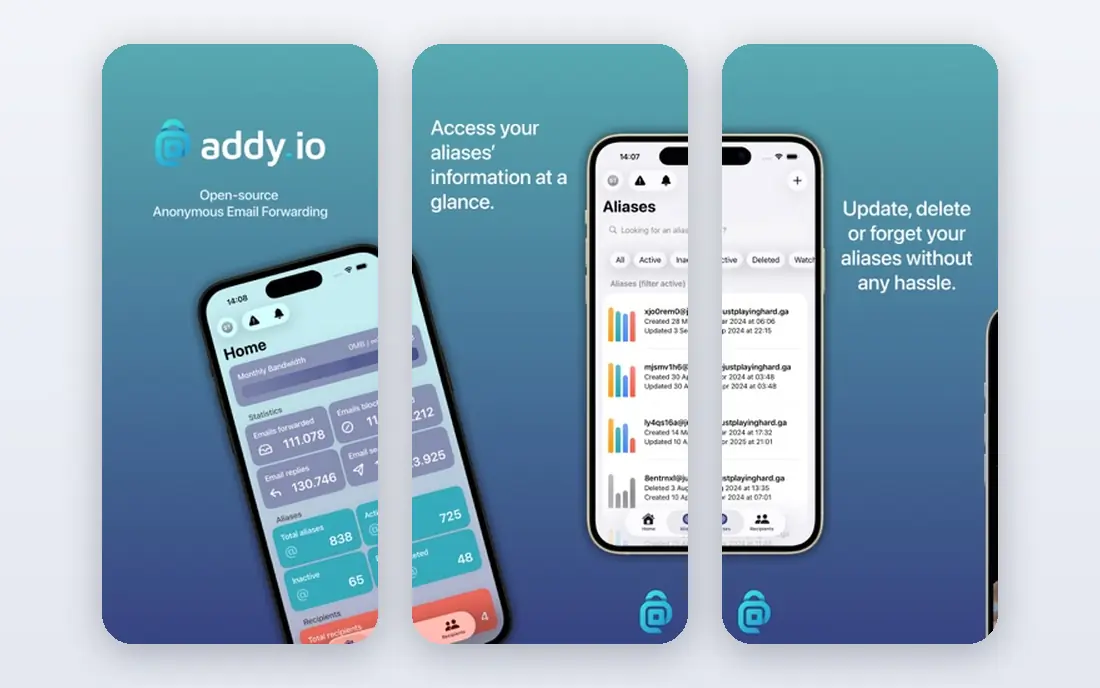
addy.io, formerly AnonAddy, offers the most generous free tier in this list. You get unlimited standard aliases based on your username subdomain, such as [email protected], plus reply support on paid plans. Paid plans start at $1 per month for Lite and $3 per month for Pro, adding custom domains, more bandwidth, and PGP encryption. The code is open source and can be self-hosted.
The free tier's limits are real: 10 MB of monthly bandwidth and a single recipient mailbox, plus limits on shared-domain aliases. The web interface also feels more utilitarian than SimpleLogin's. If you want unlimited aliases without paying and you are comfortable with a plainer interface, addy.io is the best free-first option.
- Unlimited standard aliases on the free tier
- Open source and self-hostable
- Paid plans from $1 per month
- Custom domains on paid plans
- Free tier limits bandwidth to 10 MB per month and one recipient
- Interface is less polished than rivals
- Shared-domain aliases are limited on free

Firefox Relay is the easiest alias service for Firefox users. The browser integration lets you generate a new alias in a signup form with one click, and Premium costs $0.99 per month with annual billing for unlimited aliases, replying from aliases, and a custom subdomain. Mozilla's tracker removal strips many email trackers from forwarded messages, which is a genuine privacy gain.
The free tier is small, with a limited number of masks, and you cannot bring a full custom domain the way SimpleLogin and addy.io allow. A higher-priced tier adds phone number masking. If you live in Firefox and want aliases with almost no setup, Relay is the natural choice.
- Built into Firefox with one-click alias creation
- Premium adds unlimited aliases and replying
- Removes trackers from forwarded mail
- Open source under Mozilla
- Free tier is limited
- Custom domain support is limited to a subdomain on Mozilla's domain
- Phone masking costs extra on a higher tier
DuckDuckGo Email Protection
Best for: Free unlimited aliases with tracker removal
DuckDuckGo Email Protection is the best fully free option. You get unlimited @duck.com aliases, automatic tracker removal, and forwarding to any mailbox, with no subscription at all. Setup takes a few minutes through the DuckDuckGo browser or extension, and aliases can be created on the fly for each new signup.
The limits are that there is no custom domain support and no paid tier, so power users who want their own domain will outgrow it. Replying to a forwarded message also routes through a special address format rather than a simple reply button. For readers who want solid privacy protection at zero cost, this is the easiest recommendation in the list.
- Completely free with unlimited @duck.com aliases
- Removes email trackers automatically
- Works with any browser and mailbox
- No custom domain support
- No paid tier with extra features
- Replying uses a special reply address format
Apple Hide My Email is the zero-effort option for Apple households. When you sign up in Safari or an app, or compose in Apple Mail, Apple can generate a random alias that forwards to your iCloud mailbox, and you can manage or deactivate aliases in Settings. It is included with iCloud+, which starts at $0.99 per month and also adds storage and Private Relay.
The lock-in is total: aliases are tied to Apple services, you cannot choose custom usernames, and there is no Android or Windows equivalent. If your household runs on Apple devices and you want aliases without installing anything new, Hide My Email is excellent. If you mix platforms, choose a cross-platform service instead.
- Built into Safari, Mail, and Sign in with Apple
- Random aliases generated automatically
- Included with iCloud+ from $0.99 per month
- Requires Apple devices and iCloud+
- No username customization
- Aliases only work inside the Apple ecosystem
Proton Pass bundles alias creation with Proton's password manager. The free tier includes 10 aliases, and the paid plan from $1.99 per month adds unlimited aliases, custom domains, and the full Pass feature set, with SimpleLogin's alias engine under the hood. If you already use Proton Mail, aliases integrate cleanly with your mailbox and vault.
The catch is that Proton Pass is at its best inside Proton's own apps. Sending from an alias outside Proton Mail is less smooth than with SimpleLogin's reverse-alias system, and custom domains need the paid plan. For readers already in the Proton ecosystem, it is the obvious choice. For everyone else, standalone SimpleLogin is more flexible.
- 10 free aliases
- Paid plan from $1.99 per month
- Integrated with Proton Mail and Pass
- Swiss-based with strong privacy practices
- Full alias features need a paid plan
- Custom domains are paid-only
- Sending from aliases works best inside Proton Mail
Forward Email is a forwarding-only service built for people who own a domain. You point your domain's mail records at Forward Email, and any address at your domain, such as [email protected], forwards to your real inbox. The free tier covers basic forwarding, and paid plans add more domains, recipients, and features. Because it is open source, privacy-minded users can inspect how it works.
The trade-off is that Forward Email is not a mailbox: you still need an inbox elsewhere, and setup requires editing DNS records, which is a step beyond signing up for an alias app. If you own a domain and want clean, simple forwarding without a subscription for every alias, it is a strong pick. If you do not own a domain, start with SimpleLogin or DuckDuckGo instead.
- Free tier for basic domain forwarding
- Open source
- Supports catch-all addresses and multiple recipients
- No mailbox required
- It forwards mail only and is not a mailbox
- Advanced features need a paid plan
- Setup requires DNS changes
ImprovMX is the simplest way to get forwarding for a domain you own. The free tier covers one domain with unlimited aliases, and setup takes a few minutes of DNS changes. Mail sent to [email protected] lands in your chosen mailbox, and you can add more domains and higher limits on paid plans.
ImprovMX has no browser extension or mobile app, so alias creation is a matter of inventing addresses on the fly rather than clicking a button. Free-tier volume limits also mean heavy users should upgrade. For a small business or personal domain where you want every address to work without managing a list, ImprovMX is a clean, low-cost answer.
- Free tier for a single domain
- Very fast setup
- Unlimited aliases on your domain
- Works with any mailbox
- Free tier has limits on volume
- Advanced features such as API access need a paid plan
- No alias apps or browser extensions
Pobox is the veteran of this list, offering email forwarding since the early days of the web. Its plans include spam filtering, forwarding to multiple mailboxes, custom domain support, and catch-all addresses, with a reputation for reliability over decades. Support is US-based and responsive, which matters when your email address is on a business card.
Pobox has no free tier, and its interface and feature set feel older than the newer alias services. It lacks one-click browser alias generation and modern extras such as tracker removal. If you want a forwarding address you can keep for decades with human support behind it, Pobox is a safe, if unglamorous, choice.
- Operating since the 1990s with a strong reliability record
- Spam filtering included
- Custom domain and catch-all support
- US-based support
- No free tier
- Interface feels dated
- Fewer modern features than SimpleLogin or addy.io
How we picked these
We compared services that forward mail to an existing inbox, rather than full mailbox providers, and checked their free tiers, alias limits, custom domain support, privacy policies, and current pricing. We used official pricing pages, including SimpleLogin's published Premium rate of $4 per month or $36 per year, and current comparison data for the other services. We did not claim hands-on testing; our comparison rests on official feature pages, pricing pages, and privacy policies. Prices and free-tier limits change, so confirm them on the vendor's site before signing up.
How to set up aliases without creating a mess
Start with one alias per important account: your bank, your main shopping sites, and your social accounts each get their own address. That way, if one alias starts receiving spam, you can disable it without touching anything else, and you can tell from the alias which site shared your address.
Next, decide whether you need a custom domain. A custom domain costs a few dollars a year plus a paid alias plan, but it lets you create unlimited addresses and keep them even if you switch alias providers. Finally, keep a simple list of which alias goes where, ideally in your password manager, so you can recover an account later. An alias you cannot remember is worse than no alias at all.
FAQ
What is an email forwarding service?
An email forwarding service gives you alias addresses that forward incoming mail to your real inbox. You share the alias instead of your real address, and you can disable any alias that starts getting spam. Most services also let you reply from the alias so the sender never sees your real address.
Is email forwarding safe?
Yes, when used with a reputable provider. Forwarding hides your real address from senders and helps you spot which site shared your data. It does not encrypt your mail by itself, so sensitive messages still depend on your mailbox provider's security. Choose a provider with a clear privacy policy and two-factor authentication for your account.
Can I use my own domain with an email forwarding service?
Yes, with SimpleLogin, addy.io, Proton Pass, Forward Email, ImprovMX, and Pobox on paid plans. You add mail records to your domain's DNS settings, and then any address at your domain can forward to your inbox. Catch-all support means even addresses you never created will still reach you.
What happens if I disable an alias?
Mail sent to a disabled alias is rejected or discarded, depending on the service, so the sender cannot reach you through it. That is the main benefit: you can cut off a spammy sender without changing your real address. Make sure you have moved any important account to a new alias before disabling the old one.
Is there a completely free email forwarding service?
Yes. DuckDuckGo Email Protection offers unlimited aliases free with tracker removal, and SimpleLogin and addy.io both offer free tiers. Free tiers have limits on alias counts or bandwidth, so heavy users usually upgrade to a paid plan costing $1 to $4 per month.
Sources
- https://simplelogin.io/pricing/
- https://emcognito.com/compare
- https://www.cloaked.com/post/best-disposable-email-services-2026
- https://simplelogin.io
- https://addy.io
- https://relay.firefox.com
- https://duckduckgo.com
- https://www.icloud.com
- https://proton.me
- https://forwardemail.net
- https://improvmx.com
- https://www.pobox.com