Best Donor Management Software in 2026: 8 Tools Compared
Best donor management software for nonprofits in 2026, compared on donor retention, fundraising tools, pricing, ease of use and support for small teams.

- Editor's choice
 Bloomerang
Donor retention and engagement
Starts at$125 per monthVisit bloomerang.coFull review - Great alternative
 Little Green Light
Small nonprofits on a tight budget
Starts at$45 per monthVisit littlegreenlight.comFull review - Also consider
 DonorPerfect
Complex multi-channel fundraising
Starts at$99 per monthVisit donorperfect.comFull review
TL;DR:
- Bloomerang at $125 per month is the strongest pick for nonprofits that want to focus on keeping donors, with retention and engagement tools built in.
- Little Green Light at $45 per month and DonorSnap at $50 per month are the most affordable paid donor databases for small nonprofits leaving spreadsheets.
- Givebutter and Zeffy are genuinely free starting points, funded by optional donor tips, though their donor databases are simpler than paid CRMs.
- DonorPerfect from $99 per month and Neon CRM from $99 per month suit larger or more complex fundraising operations with events, memberships and automation.
- Payment processing fees are separate from software subscriptions in most cases, so check both costs before you choose the best donor software for your team.
Quick comparison
| Tool | Best for | Starts at | Free plan? | |
|---|---|---|---|---|
| Bloomerang | Donor retention and engagement | $125 per month | No | Visit |
| Little Green Light | Small nonprofits on a tight budget | $45 per month | Free trial | Visit |
| DonorPerfect | Complex multi-channel fundraising | $99 per month | No | Visit |
 Neon CRM | Memberships, events and fundraising together | $99 per month | No | Visit |
 Givebutter | Free all-in-one fundraising | Free | Yes | Visit |
 Zeffy | Zero-fee donations for nonprofits | Free | Yes | Visit |
 DonorSnap | Simple affordable donor database | $50 per month | Free trial | Visit |
 Keela | AI-assisted fundraising asks | See website | No | Visit |
The best donor management software
A good donor system does more than store names. It should show who gave, when, how often and what to do next, without forcing a small team to learn a complex enterprise tool. We compared official pricing pages, feature lists and public nonprofit reviews to find tools that fit different sizes and budgets.
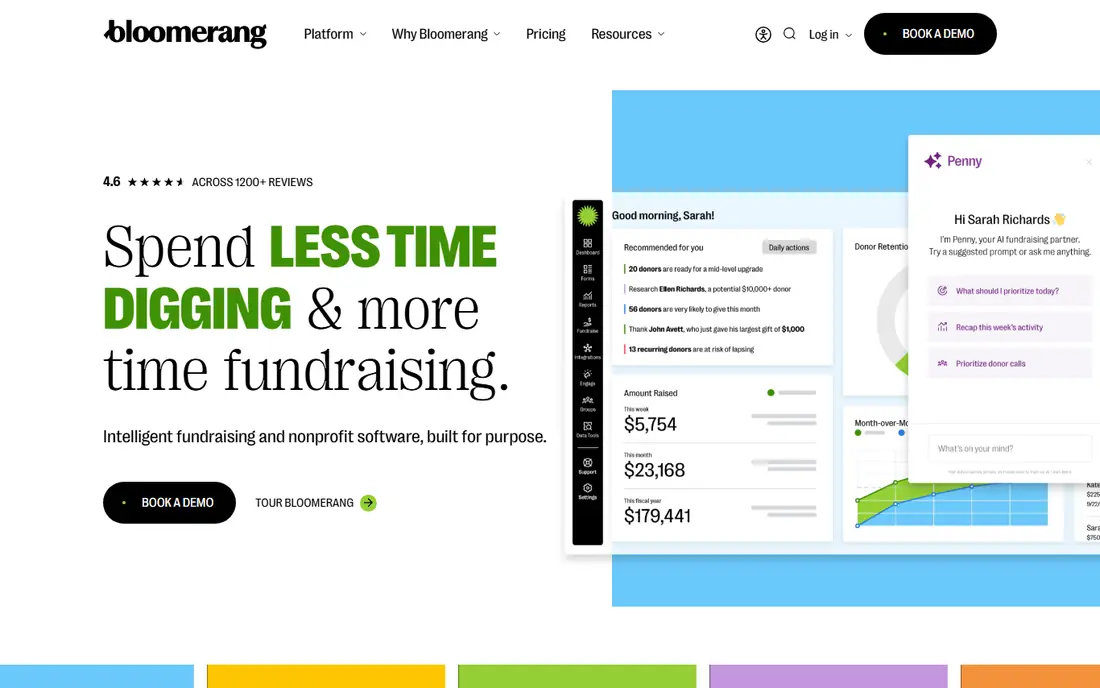
Bloomerang is built around one idea that many nonprofits lose sight of, which is that keeping a donor matters as much as finding a new one. Its retention dashboard and engagement scoring help staff see which donors are drifting, which are becoming more active and who needs a thank-you or a personal note. That focus makes it a natural fit for small to mid-size nonprofits that already have a donor base and want to grow it steadily, rather than chasing one-off gifts. The interface is generally described as friendly for non-technical staff, and unlimited users on plans help small teams share the work.
The tradeoff is price and packaging. At $125 per month, Bloomerang costs more than Little Green Light or DonorSnap, and its separate fundraising plan adds cost if you want forms and campaigns inside the same system. Larger nonprofits may also need integrations or custom reporting that budget tools handle differently. Still, if donor retention is your main weakness, Bloomerang gives you the clearest tools for that job, and that focus justifies its place at the top for many teams.
- Retention dashboard and engagement scoring
- Donor profiles with giving history
- Fundraising tools available as add-ons
- Higher starting price than budget rivals
- Fundraising features are separate from the core CRM plan

Little Green Light is the classic spreadsheet replacement. For $45 per month for up to 2,500 records, a small nonprofit gets a real donor database with gifts, contacts, notes, acknowledgments and reports, without paying per seat. That pricing model matters for volunteer-heavy teams, because everyone who needs access can have it. The design is plain and practical, which helps staff who do not want to learn a large system just to record a donation and send a receipt.
The limits are honest ones. Support is mainly by email, so teams that need phone help at short notice may feel the gap. Integrations and advanced automation are more limited than in larger platforms, and payment processing still carries processor fees. For a small nonprofit that needs a dependable, affordable database and does not need complex event or membership tools, Little Green Light is hard to beat on value.
- Every feature included on every plan
- Pricing by record count, not per user
- Unlimited users
- Support is mainly by email
- Reporting and integrations are simpler than enterprise CRMs
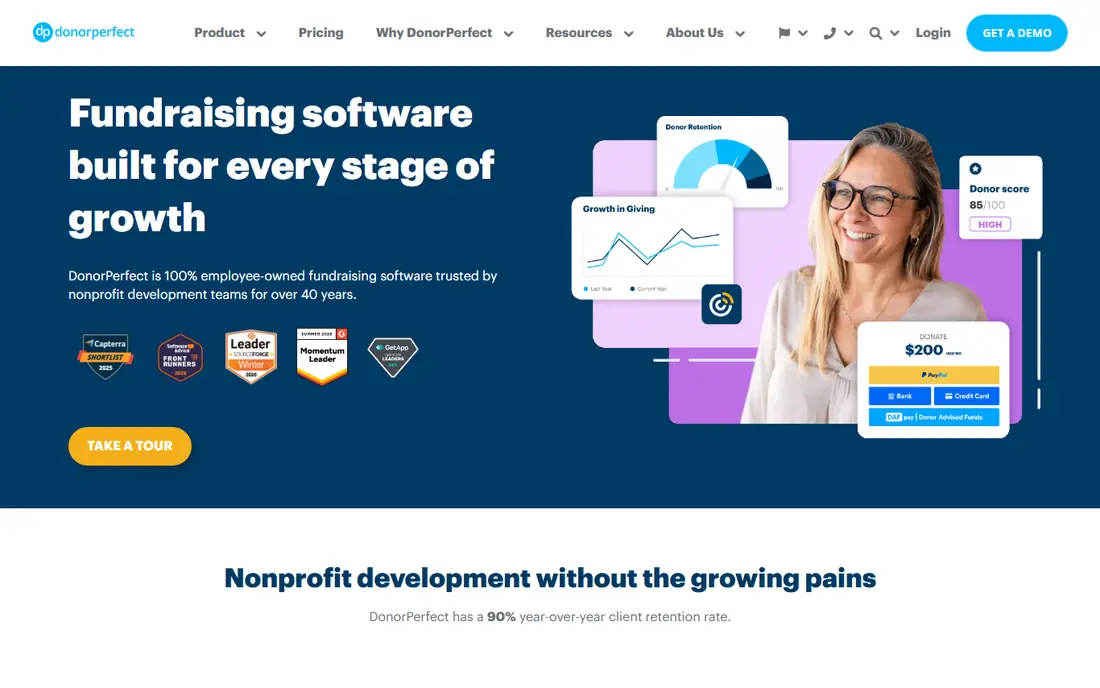
DonorPerfect has served nonprofits for many years, and that maturity shows in the breadth of its fundraising coverage. Donor records, online forms, automated receipts, pledges, events and reporting sit in one system, which reduces the need to stitch together separate tools. It suits mid-size nonprofits that run several fundraising channels at once, such as direct mail, online giving and events, and need consistent records across all of them. Staff who have used older CRMs will find many familiar workflows here, and the depth helps as an organization grows.
The main drawback is feel and pricing clarity. The interface is less modern than newer rivals, and while a $99 per month starting point is published, larger databases and higher tiers move to quotes. Training may take longer for new staff, and some advanced features sit in higher plans. If you value depth, reliability and a vendor with long nonprofit experience over a fresh interface, DonorPerfect remains a safe and capable choice.
- Long track record with nonprofits
- Integrated donation forms and receipts
- Broad reporting and automation options
- Interface feels dated in places
- Exact tier pricing requires a quote for larger databases
Neon CRM, part of Neon One, is designed for organizations that do more than collect donations. Membership groups, arts organizations, associations and nonprofits with events will find membership management, event registration and fundraising in the same database, which avoids duplicate records across tools. Workflow automation can handle renewals, reminders and follow-ups, saving staff time as membership and donor lists grow. Starting at $99 per month, it competes directly with DonorPerfect on price while offering a broader activity mix.
New users should expect a learning period. The breadth that makes Neon powerful also means more settings to learn, and onboarding help may add cost. Small nonprofits that only need a simple donor list may find it more than they need. For membership-based nonprofits that juggle many activities, however, Neon CRM brings those activities into one place, and that consolidation is worth the setup effort.
- Combines CRM, memberships, events and fundraising
- Unlimited records on plans
- Strong workflow automation
- Learning curve can be steep at first
- Onboarding fees may apply
Givebutter is the best free starting point for many small nonprofits. Its free plan covers fundraising campaigns, events, auctions and a basic CRM, funded by optional tips that donors can choose to add. That model lets a new or very small nonprofit launch online fundraising without a monthly subscription, which is a real advantage when budgets are tight. The platform is modern and easy to use, and its campaign pages look polished without design help.
The catch is depth. Its built-in CRM is useful for basic donor tracking, but it is not a full replacement for Bloomerang or DonorPerfect for complex segmentation and reporting. Card processing fees still apply, and some donors may dislike the tip prompt, although it can be adjusted. A paid Plus plan from $29 per month adds features for larger teams. If your priority is to start fundraising now at no software cost, Givebutter is the most complete free option here.
- Free plan funded by optional donor tips
- Campaigns, events and auctions in one place
- Built-in basic CRM
- Donor CRM is simpler than paid CRMs
- Processing fees apply
- Tip prompt may not suit every donor audience
Zeffy takes the free model one step further by charging no platform fee and no transaction fee, funded instead by optional contributions from donors. For nonprofits, that means more of each gift reaches the mission, at least on paper, and the platform covers donations, peer-to-peer fundraising, events, memberships and raffles. Automatic tax receipts reduce admin work, and the setup is simple enough for a small team to launch quickly. It is a strong fit for charities that want a free, all-in-one fundraising tool without monthly bills.
As with Givebutter, the tradeoff is CRM depth. Zeffy is primarily a fundraising platform with donor tracking, not a deep donor CRM with advanced retention analytics. Larger nonprofits with complex reporting, major gift workflows or many integrations may outgrow it. Donor contribution prompts also need to suit your audience. For small nonprofits that want zero fees and simple fundraising, Zeffy is an excellent and honest free choice.
- No platform fees and no transaction fees on its model
- Donations, events, memberships and raffles included
- Automatic tax receipts
- Funded by optional donor contributions
- CRM and reporting are more basic than paid tools
- US and Canada focus
DonorSnap is a focused donor database for small nonprofits that want affordability without the complexity of a large CRM. At $50 per month for up to 1,000 contacts, with unlimited users, it sits close to Little Green Light on price while offering built-in donation forms and straightforward reporting. The interface is practical rather than flashy, and staff can usually learn the core workflows quickly. That simplicity is a feature for teams with limited time for training.
The limits appear as needs grow. Advanced automation, major gift pipelines and deep integrations are more limited than in Neon CRM or DonorPerfect, and event and auction tools come as separate products. Pricing also rises with contact count, so a growing list will cost more over time. For a small nonprofit that wants a clean, affordable donor database and does not need enterprise depth, DonorSnap is a dependable middle ground between free tools and pricier CRMs.
- Flat contact-based pricing with unlimited users
- Built-in donation forms
- Focused feature set that is easy to learn
- Fewer advanced automation features than larger CRMs
- Event and auction tools are separate add-ons
Keela aims at nonprofits that want help deciding who to ask, when and for how much. Its AI features surface donor insights and suggested asks, while the CRM covers contacts, gifts and email communications in one place. That combination suits growing nonprofits that have a donor list but lack a dedicated analyst to segment it. The interface feels modern, and the focus on fundraising outcomes, rather than just record keeping, sets it apart from simpler databases.
Pricing is the main uncertainty, because Keela does not publish a single clear starting price for every plan, so you will need a quote or demo to budget accurately. It also lacks native event and auction tools, which membership and event-heavy nonprofits may need elsewhere. If AI-assisted fundraising and a modern CRM appeal to you, and you are willing to talk to sales for pricing, Keela is worth adding to your shortlist.
- AI tools for donor insights and ask amounts
- Fundraising CRM with communications built in
- Modern interface for growing teams
- Pricing is not fully published for all plans
- No native event or auction tools in the core product
How we picked these
We compared official pricing pages, feature lists and public nonprofit reviews, focusing on tools that are actively sold to US nonprofits in 2026. We favored products with clear donor records, gift tracking, receipts and reporting, and we included free, budget and mid-range options so teams of different sizes can compare honestly. We checked starting prices against vendor pages and recent comparisons, and we used See website where pricing is quote-based rather than guessing a figure.
We also weighed ease of use for small teams, because a powerful CRM that staff avoid using will not improve fundraising. That is why simple tools such as Little Green Light and DonorSnap sit alongside deeper systems such as DonorPerfect and Neon CRM. The right choice depends on your donor count, fundraising channels and staff capacity, not on feature count alone.
How to choose the right donor software
Start by counting your records and listing your fundraising channels. A nonprofit with 800 donors and online gifts only has different needs from one with 10,000 donors, members, events and direct mail. Next, test the daily workflow during a trial: enter a gift, send a receipt, build a simple report and find a lapsed donor. If those tasks feel slow or confusing, the tool will frustrate staff even if its feature list looks strong.
Then check total cost, not just the subscription. Add payment processing fees, onboarding charges and any add-ons for forms, events or email. Ask about data migration from spreadsheets or your old system, and whether you can export your donor data at any time. Finally, consider who will own the system. A tool with unlimited users helps volunteer teams, while a tool with strong automation helps a small paid staff. Choose the system your team will actually use every week, because clean, current donor data is what makes retention and fundraising improve.
FAQ
What is the best donor management software for nonprofits?
Bloomerang is a strong all-around pick for donor retention, while Little Green Light is best for small budgets and Neon CRM is best for memberships and events. Givebutter and Zeffy are best if you need a free start. The best donor management software for your nonprofit depends on donor count, fundraising channels and staff time.
What is the best donor software for small nonprofits?
Little Green Light at $45 per month and DonorSnap at $50 per month are strong paid options for small nonprofits, and Givebutter and Zeffy are free options. Small teams should favor simple tools with unlimited users and clear pricing, and upgrade only when reporting or automation needs grow.
Is there free donor management software for nonprofits?
Yes. Givebutter offers a free plan funded by optional donor tips, and Zeffy offers a free model with no platform or transaction fees, funded by optional donor contributions. Both include basic donor tracking, but paid CRMs offer deeper retention, segmentation and reporting tools.
How much does donor management software cost?
Expect free plans from Givebutter and Zeffy, budget paid tools from $45 to $50 per month, and mid-range CRMs from $99 to $125 per month for small to mid-size databases. Larger databases, onboarding and payment processing fees add cost, so ask for a total quote based on your record count.
Can donor management software handle events and memberships?
Neon CRM handles memberships and events alongside fundraising, and Givebutter and Zeffy cover events and memberships in their fundraising platforms. DonorPerfect and Bloomerang focus more on donor records and fundraising, with events handled through add-ons or integrations. Check the exact event features before you choose.
Should a nonprofit switch from spreadsheets to donor software?
Yes, once donor records, gifts and receipts become hard to track in spreadsheets, a donor database reduces errors, improves thank-you timing and makes retention visible. Start with a budget tool such as Little Green Light or a free tool such as Givebutter, and migrate clean data rather than importing every old spreadsheet column.