Best Design Collaboration Tools in 2026: 9 Tools Compared
Compare the best design collaboration tools for 2026, from Figma and Miro to Framer and Penpot, with pricing, commenting and handoff features compared.

- Editor's choice
 Figma
Product teams designing interfaces together
Starts atFreeVisit figma.comFull review - Great alternative
 FigJam
Brainstorming and early design workshops
Starts atFreeVisit figma.comFull review - Also consider
 Miro
Workshops, roadmaps and cross-team boards
Starts atFreeVisit miro.comFull review
TL;DR:
- Figma is our pick for most product teams, because design, prototyping, commenting and developer handoff live in one browser-based file.
- Miro is the best choice for workshops and early-stage collaboration, with whiteboards, templates and facilitation tools that Figma does not match.
- Framer suits teams that want to design and publish a live website from the same canvas, without a separate build step.
- Penpot and Sketch offer strong alternatives for open source teams and Mac-based teams, respectively, at lower cost than Figma at scale.
- Zeplin, Abstract and Mural fill narrower roles, from design handoff to version control to facilitated workshops, and are best added alongside a main design tool.
Quick comparison
| Tool | Best for | Starts at | Free plan? | |
|---|---|---|---|---|
| Figma | Product teams designing interfaces together | Free | Yes | Visit |
| FigJam | Brainstorming and early design workshops | Free | Yes | Visit |
| Miro | Workshops, roadmaps and cross-team boards | Free | Yes | Visit |
 Framer | Teams that design and publish websites directly | Free | Yes | Visit |
 Sketch | Mac-based teams that prefer native apps | $9 per editor per month | Free trial | Visit |
 Penpot | Open source teams that want self-hosting | Free | Yes | Visit |
 Zeplin | Handing finished designs to developers cleanly | See website | Yes | Visit |
 Abstract | Version control for Sketch and design files | See website | Free trial | Visit |
 Mural | Facilitated workshops with structured methods | $9.99 per user per month | Free trial | Visit |
The best design collaboration tools
Design collaboration means more than sharing a file: it means commenting on a specific frame, tracking versions, handing specs to developers and running workshops without losing decisions. We compared real-time editing, commenting, prototyping, handoff, version control and price, and we favored tools that are actively maintained in October 2026.
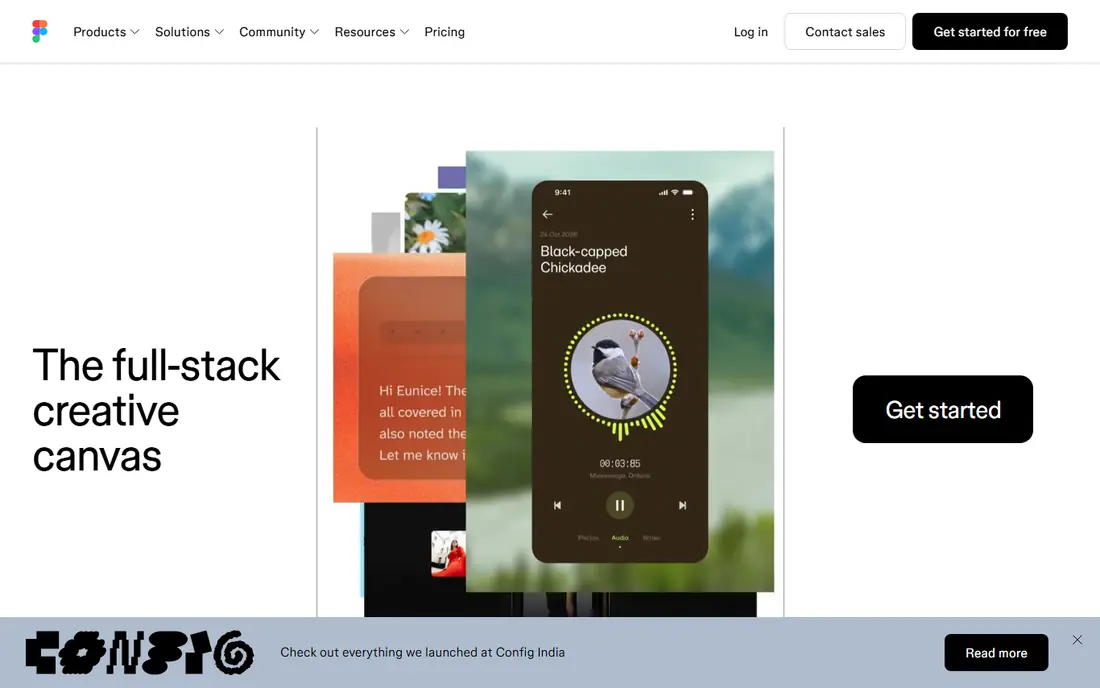
Figma is the default design collaboration tool for most product teams because the whole workflow happens in one browser file. Multiple designers can edit together, stakeholders can comment on exact frames, product managers can follow prototypes, and developers can inspect specs, variables and code snippets in Dev Mode. Shared libraries and variables keep colors, type and components consistent across a product, which matters as a team grows.
Pricing is the main watch point. Starter is free with limited collaborative files, while Professional costs $16 per full seat per month on annual billing, with lower-cost dev and collab seats for other roles. Organization and Enterprise tiers, at $55 and $90 per full seat per month annually, add controls that larger companies need. For a small team, Professional is usually enough, and the free tier is a fair way to test the workflow first.
- Real-time multiplayer editing
- Strong prototyping
- Dev Mode for developer handoff
- Professional seats cost $16 per editor per month annually
- Large files can slow down

FigJam is Figma's whiteboard, and its strength is proximity to design work. A team can brainstorm user flows, map a journey or run a quick critique on a FigJam board, then move the best ideas into a Figma file without exporting or re-uploading. Collab seats are inexpensive, at $3 per month on annual billing in the Professional setup, so stakeholders can join without a full design seat.
The trade-off is breadth. FigJam lacks some of Miro's facilitation tools, timer and voting depth, and its template library is smaller. For a design team already on Figma, that rarely matters, and the lower cost and direct handoff win. For a company running cross-functional workshops beyond design, Miro or Mural may be the better main board.
- Simple whiteboard inside Figma
- Easy handoff to Figma files
- Low cost for collaborators
- Fewer facilitation features than Miro
- Tied to the Figma ecosystem

Miro is the broadest whiteboard in this list, used for design sprints, product roadmaps, retrospectives, org planning and research synthesis. Its template library covers hundreds of workshop formats, and features such as voting, timers, breakout frames and commenting help a facilitator run a session with a large group. Integrations with Figma, Jira, Slack and Google Workspace keep boards connected to the rest of a team's work.
Pricing starts free with three editable boards, while Starter costs $8 per user per month on annual billing and Business $16. The free plan is enough to test a workshop, but a team running regular sessions will need a paid tier for unlimited boards and private workspaces. Miro can also feel sprawling when boards grow unchecked, so a facilitator should set a clear board structure before a session starts.
- Huge template library
- Strong facilitation tools
- Many integrations
- Starter costs $8 per user per month annually
- Can feel sprawling on large boards
Framer closes the gap between design and a live website. A designer can lay out pages, add interactions and animations, connect a CMS and publish to Framer hosting, without handing a static file to a developer for a marketing site or landing page. Collaboration covers commenting, shared projects and role-based access, so marketing and design can iterate on a live page together.
The limit is scope. Framer excels at websites, but it is not the tool for native mobile app design or complex product systems, where Figma remains stronger. Pricing includes a free tier for small sites, with paid plans for custom domains, more pages and CMS capacity. For a team whose main output is a website, Framer saves a handoff step that otherwise costs days.
- Designs publish as live sites
- Strong animation and interactions
- Built-in hosting and CMS
- Less suited to native app design
- Advanced sites still need code
Sketch remains a strong choice for Mac-based design teams that prefer a native application over a browser tool. Its editor is fast, its symbols and libraries handle design systems well, and its web app lets stakeholders view, comment and inspect files in a browser, even though editing stays on Mac. Pricing is $9 per editor per month on a monthly basis, or $99 per year, which can be cheaper than Figma at scale for Mac-only teams.
The obvious limit is platform. Windows and Linux users cannot edit in Sketch, which rules it out for mixed-platform teams. Its real-time collaboration and plugin community are also smaller than Figma's. For a Mac-only studio with an established Sketch workflow, though, it remains a capable and cost-effective collaboration tool.
- Fast native Mac app
- Strong symbol and library system
- Web app for sharing and comments
- Mac only for editing
- Smaller collaboration community than Figma
Penpot is the open source design collaboration tool, built for teams that want to own their files, self-host the platform and avoid per-seat pricing. It runs in a browser, supports real-time collaboration, shared libraries and developer handoff, and uses open standards such as SVG, which keeps designs portable. For public sector teams, universities and open source projects, that control matters as much as the feature list.
The ecosystem is the trade-off. Penpot has fewer plugins, templates and community files than Figma, and some advanced prototyping features are less polished. A team that needs the largest plugin library or the deepest Figma integrations will feel the gap. A team that values openness, self-hosting and zero license cost will find Penpot a genuine alternative, not just a budget compromise.
- Free and open source
- Self-hosting option
- Browser-based collaboration
- Smaller ecosystem than Figma
- Fewer plugins and templates
Zeplin sits between design and development, turning finished screens into organized specs with measurements, colors, typography, assets and code snippets. Developers can browse a project, download assets in the right formats and follow version changes without opening the design file itself. That separation helps larger teams where developers should not need a design license to build from specs.
The question is whether you still need it. Figma's Dev Mode now covers much of the same ground for Figma teams, so Zeplin makes most sense for teams using Sketch, Adobe tools or a mix of sources, or for organizations that want a single handoff hub across tools. Pricing varies by plan, with a free tier for small projects, so test it on one real handoff before committing the whole team.
- Clear specs, assets and code snippets
- Version history
- Works with Figma and Sketch
- Adds another tool to the stack
- Less useful if Figma Dev Mode already covers handoff
Abstract brings Git-style version control to design, with branches, commits, merging and review for design files. That helps a team working on a large design system, where several designers change shared components and need to review, approve and roll back changes without overwriting each other's work. Its review workflow, with comments tied to specific versions, keeps design decisions traceable.
The scope is narrow. Abstract is built around Sketch workflows, so Figma teams already get branching and version history inside Figma and will gain little from adding it. Small teams may also find the branch-and-merge process heavier than Figma's simpler version history. For a large Sketch-based system team, Abstract's control is worth the process, but it is a specialist tool, not a general collaboration platform.
- Branching and merging for design
- Clear change history
- Review workflows
- Focused on Sketch workflows
- Adds process overhead for small teams
Mural is built for facilitated sessions: design thinking workshops, strategy mapping, research synthesis and team alignment. Its templates guide a group through structured methods, with private breakout rooms, voting, timers and facilitator controls that keep a large session on track. That focus makes it popular with consultancies, innovation teams and enterprise groups that run workshops as a core service.
Pricing starts at $9.99 per user per month for the Team plan, with a free trial rather than a permanent free tier, so it costs more to start than Miro. Mural is also not a design file editor, so it pairs with Figma or Sketch rather than replacing them. For a team whose main need is running better workshops, Mural's facilitation depth justifies the price, but for everyday boards, Miro or FigJam will be cheaper.
- Strong facilitation features
- Templates for design thinking
- Private rooms and voting
- Higher entry price than Miro Starter
- Less suited to everyday design files
How we picked these
We compared official feature pages, pricing pages and public reviews for each tool, focusing on real-time editing, commenting, prototyping, developer handoff, version control and facilitation. We favored tools that are actively maintained in October 2026 and that cover different roles, from main design editors to whiteboards, handoff hubs and version control. We did not claim hands-on testing, and seat prices vary by seat type and billing period.
How to run design collaboration without chaos
Agree on one source of truth per project, and name it clearly. If Figma holds the product designs, Miro should hold workshop boards and Zeplin should hold handoff specs, with links between them, not competing copies of the same screens. That rule prevents the common failure where three versions of a homepage circulate and nobody knows which one developers should build.
Set commenting and approval rules early
Comments should name the frame, the problem and the suggested fix, not just a vague reaction. Set a review window, a single approver for each stage, and a rule for resolving comments once addressed. Keep stakeholder comments in the design file or board where the work lives, rather than in scattered chat threads, so decisions stay attached to the design. A short weekly design review, with a fixed agenda, beats constant ad-hoc feedback.
Keep libraries and permissions tidy
Shared libraries, variables and components save time only if someone owns them. Assign a library owner, review new components before they enter the shared set, and archive outdated files rather than deleting them outright. Give stakeholders view and comment access by default, and reserve edit access for designers, since accidental edits to a shared library can ripple across many files. Regular library cleanups, even quarterly, keep a growing system usable.
FAQ
What are the best design collaboration tools for small teams?
Figma is the best main tool for most small product teams, with a free Starter tier and Professional at $16 per editor per month annually. FigJam covers brainstorming inside the same ecosystem, while Miro suits workshops beyond design. Small teams should start with one main editor and one whiteboard, not a stack of overlapping tools.
What is the best free design collaboration tool?
Penpot is the best fully free and open source option, with self-hosting and browser collaboration at no license cost. Figma Starter and Miro Free are also strong free starting points, with limits on collaborative files or boards. Choose Penpot for openness, Figma for the largest community, and Miro for workshop templates.
How is Figma different from Miro?
Figma is a product design editor for interfaces, prototypes and design systems, while Miro is a whiteboard for workshops, roadmaps and brainstorming. Teams often use both: Miro for early exploration and alignment, Figma for detailed interface design. FigJam sits between them, as a whiteboard inside the Figma ecosystem.
Do design collaboration tools replace developer handoff tools?
Not always. Figma Dev Mode covers handoff for many Figma teams, but Zeplin still helps teams using multiple design sources or wanting a single handoff hub. Abstract adds version control for Sketch teams. Choose handoff tooling based on your design sources and team size, not on feature count alone.
Can non-designers collaborate in these tools?
Yes, most tools offer view and comment access for stakeholders without a full design seat. Figma offers low-cost collab seats, Miro and Mural support guests and viewers on paid plans, and Penpot is free for all collaborators. Give stakeholders comment access first, and add edit access only when they truly need to change designs.