Best CRM Software for Small Business in 2026: 8 Tools Compared
Compare the best CRM software for small business in 2026, with contact management, sales pipelines, pricing, and honest limits for every tool listed today.
- Editor's choice
 HubSpot CRM
Most small businesses starting with a CRM
Starts atFreeVisit hubspot.comFull review - Great alternative
 Zoho CRM
Small businesses that want value and customization
Starts atSee websiteVisit zoho.comFull review - Also consider
 Pipedrive
Sales teams focused on moving deals forward
Starts atSee websiteVisit pipedrive.comFull review
TL;DR:
- The best CRM software for small business for most teams is HubSpot CRM, thanks to its generous free tier and clear upgrade path.
- Zoho CRM is our pick for value and customization, while Pipedrive is our pick for teams that live in their sales pipeline.
- Most small businesses need contact management, deal tracking, email integration, and simple reporting first, not advanced enterprise features.
- Pricing is usually per user per month, so calculate the total for your whole team, not just for one user.
- Our advice is to trial two CRMs with your real contacts and deals for two weeks, since the best CRM is the one your team will actually use daily.
Quick comparison
| Tool | Best for | Starts at | Free plan? | |
|---|---|---|---|---|
| HubSpot CRM | Most small businesses starting with a CRM | Free | Yes | Visit |
| Zoho CRM | Small businesses that want value and customization | See website | Yes | Visit |
| Pipedrive | Sales teams focused on moving deals forward | See website | Free trial | Visit |
 Salesforce Starter | Small businesses that plan to grow into Salesforce | See website | Free trial | Visit |
 Freshsales | Small teams that want phone, email, and chat in the CRM | See website | Yes | Visit |
 Insightly | Small teams that also track projects after the sale | See website | Free trial | Visit |
 Monday Sales CRM | Teams that prefer a visual, board-based workflow | See website | Free trial | Visit |
 Capsule CRM | Very small teams that want a simple CRM | See website | Yes | Visit |
The best CRM software for small business
A CRM should help a small team remember every customer, follow up on time, and see which deals are moving. We compared official pricing pages, feature pages, and plan structures to build this list.

HubSpot CRM is our pick for most small businesses because the free tier covers the core job well. You can store contacts and companies, track deals through a pipeline, log emails and calls, and create simple reports without paying. That free start lets a small team learn CRM habits before committing to a paid plan, and the upgrade path to marketing, sales, and service hubs is clear when growth demands more.
The main caution is cost creep. Advanced automation, forecasting, and reporting require paid hubs, and adding several hubs for a growing team can become expensive. For a team of up to about 20 people that wants a reliable, well-supported CRM with a gentle learning curve, HubSpot is the safest first trial.
- Generous free tier
- Contact and deal management
- Email and marketing tools
- Advanced features require paid hubs
- Costs rise as you add hubs and users

Zoho CRM offers strong value, with low-cost paid plans and a free tier for very small teams. It covers leads, contacts, deals, tasks, email integration, and reporting, and it can be customized with custom fields, workflows, and automation rules. Businesses already using Zoho apps for email, books, or projects will find the integration convenient.
The interface can feel dense compared with HubSpot or Pipedrive, and setting up custom workflows takes time. Zoho rewards teams willing to invest a day in setup, since the result can match their exact sales process. For a budget-conscious business that wants flexibility without enterprise pricing, Zoho CRM is an excellent choice.
- Low-cost plans
- Strong customization
- Wide Zoho app ecosystem
- Interface can feel dense
- Setup takes time for custom workflows
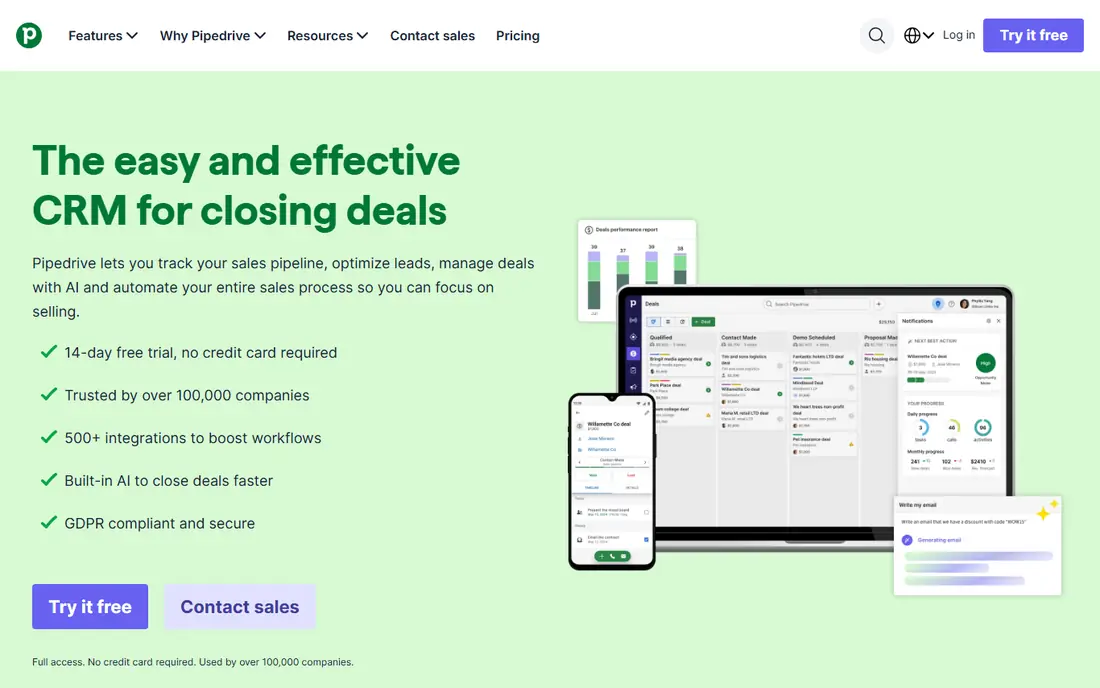
Pipedrive is built around one idea: a visual pipeline that shows where every deal stands and what to do next. Salespeople can drag deals between stages, set activity reminders, and see overdue follow-ups at a glance. That focus makes it easy for a sales team to adopt, since the daily job is clear: work the pipeline, complete activities, and move deals forward.
Marketing automation and customer service tools are thinner than HubSpot, so a business that needs full marketing in the same system may need another tool. There is also no permanent free tier, only a trial. For a small sales team that cares mainly about closing deals, Pipedrive is our pick.
- Clear visual pipeline
- Activity reminders
- Easy deal tracking
- Marketing features are thinner than HubSpot
- No permanent free tier
Salesforce Starter
Best for: Small businesses that plan to grow into Salesforce
Salesforce Starter, formerly Salesforce Essentials, is the entry point to the Salesforce platform for small businesses. It offers contact and account management, deal tracking, email integration, and reporting, with a path to the full Salesforce ecosystem as a business grows. Its reporting and customization depth exceed most small-business CRMs, and the AppExchange marketplace adds many integrations.
The trade-off is complexity. Setup and administration take more effort than HubSpot or Capsule, and pricing across editions can be confusing. Salesforce Starter suits a business that expects significant growth, needs strong reporting, or already plans to use Salesforce products. A very small team that wants simplicity may prefer HubSpot first.
- Scalable platform
- Strong reporting
- Large app marketplace
- Higher learning curve
- Pricing and setup can feel complex
Freshsales, from Freshworks, combines CRM with built-in phone, email, and chat tools, so a small team can contact customers without switching apps. It offers lead scoring, deal pipelines, workflow automation, and reporting, with a free tier for basic use. The interface is clean, and the built-in communication tools help teams that handle many calls and emails each day.
Advanced automation and AI features require higher tiers, and the third-party ecosystem is smaller than Salesforce or HubSpot. Freshsales is a good fit for a small sales or support team that wants communication and CRM in one place, without paying for a large enterprise platform.
- Built-in phone and email
- AI-assisted insights
- Clear pipeline views
- Some advanced features need higher tiers
- Ecosystem is smaller than Salesforce
Insightly pairs CRM with project management, which helps small businesses where the same team sells a job and then delivers it. You can convert a won opportunity into a project, track tasks and milestones, and keep customer history in one place. That continuity reduces handover errors between sales and delivery, which is a common pain point for service businesses.
The interface is functional rather than modern, and current plans focus on trials rather than a permanent free tier. Insightly is best for service businesses, agencies, and consultants who need to track work after the sale, not just the sale itself. Pure sales teams may prefer Pipedrive.
- CRM plus project management
- Task and milestone tracking
- Email integration
- No permanent free tier on current plans
- Interface feels business-like rather than modern
Monday Sales CRM builds on the Monday work platform, using boards, timelines, and automations to manage leads, deals, and customer work. Teams that already like visual project boards will find it natural, since deals, tasks, and communications can be organized in a flexible layout. Collaboration features, such as shared boards and updates, help small teams stay aligned.
Some users find it feels like a project management tool with CRM features, rather than a CRM built for sales first. Pricing is per user, so a larger team should calculate the total carefully. Monday Sales CRM suits visual teams and businesses already using Monday for other work, who want sales and delivery in one visual system.
- Highly visual boards
- Customizable workflows
- Strong collaboration features
- Can feel like a project tool first
- Pricing is per user and adds up
Capsule CRM is the simplest tool on this list, and that simplicity is its strength. It covers contacts, deals, tasks, and a sales pipeline in a clean interface that a small team can learn in an afternoon. It integrates well with Google Workspace and common email tools, and its free tier suits very small teams getting started.
Advanced automation, forecasting, and marketing features are thinner than HubSpot or Zoho, and reporting is basic. Capsule is best for a team of a few people who need to track customers and follow-ups reliably, without learning a complex system. If you outgrow it, moving to HubSpot or Zoho later is a normal step.
- Simple and easy to learn
- Contact and pipeline tracking
- Google Workspace integration
- Fewer advanced automation features
- Reporting is basic
How we picked these
We compared official pricing pages, feature pages, and plan structures for CRM software available to small businesses in October 2026. We kept only tools with contact management, deal pipelines, email integration, and a clear free or trial path. We left out enterprise-only platforms with no small-business pricing, tools with no verifiable homepage, and simple contact apps with no deal tracking.
How to choose the right CRM
Start by listing the jobs your CRM must do every week: store contacts, track deals, remind you to follow up, send emails, and report on sales. Then trial two tools with your real data, not demo data, for at least two weeks. Import a sample of contacts, create a few deals, log emails and calls, and run a simple report. That test reveals whether the team will actually use the tool, which matters more than any feature list.
Check total cost and data portability
Calculate pricing per user for your whole team, including any paid add-ons you need, and compare annual versus monthly billing. Also check data export options, since you should be able to export contacts, deals, and notes if you switch tools later. A CRM that locks your data in is a risk, even if the monthly price looks low. Finally, confirm email and calendar integrations for the tools your team already uses, since a CRM that does not connect to email will quickly fall out of use.
Keep adoption simple
Adoption fails when a CRM asks for too much data entry. Start with a few required fields, a simple pipeline with four to six stages, and one weekly habit, such as reviewing open deals every Monday. Add automation and custom fields only after the team uses the basics consistently. A simple CRM used daily beats a powerful CRM used once a month.
FAQ
What is CRM software?
CRM, or customer relationship management, software stores customer and prospect information, tracks deals through a sales pipeline, logs emails and calls, and reminds you to follow up. It helps a small team remember every customer conversation and see which deals need attention.
How much does CRM software cost for a small business?
Many tools offer a free tier, while paid plans are usually priced per user per month. The total depends on team size and features, so calculate the cost for all users who need access, not just one. Annual billing often costs less than monthly billing.
Is HubSpot CRM really free?
Yes, HubSpot offers a free CRM tier with contact, company, deal, and task management, plus basic email integration and reporting. Advanced marketing, sales, and service features require paid hubs. Many small businesses can run on the free tier for a long time before needing to upgrade.
How long does it take to set up a CRM?
A simple CRM such as Capsule or HubSpot can be set up in a day, including importing contacts and creating a basic pipeline. A customized setup in Zoho or Salesforce can take several days, especially if you add workflows and integrations. Start simple, and customize after the team is using the tool daily.
Can I switch CRM tools later?
Yes, most CRMs allow you to export contacts, companies, deals, and notes, though the export format varies. Before switching, export a full backup, check how the new tool imports data, and plan a short overlap period where both systems are available. Avoid switching in the middle of a major sales push if possible.