8 Best CRM Lead Management Software for Capturing and Closing Leads
We compared the best crm lead management software on capture, scoring, routing, follow-up and reporting, using vendor pages and public reviews for October 2026.
- Editor's choice
 HubSpot
Lead capture and nurturing in one system
Starts atFreeVisit hubspot.comFull review - Great alternative
 Salesforce
Enterprise lead routing and scoring
Starts at$25 per monthVisit salesforce.comFull review - Also consider
 Zoho CRM
Affordable lead scoring and workflows
Starts at$14 per monthVisit zoho.comFull review
TL;DR:
- Lead management is a chain: capture, routing, scoring, follow-up and reporting all need to work, or leads leak between steps.
- Speed matters: the first follow-up should happen in minutes, not days, so routing and alerts deserve as much attention as scoring.
- Scoring should reflect your real buyers, not a generic model, so customise scores from your own closed deals.
- Reporting should show lead source, response time and conversion by stage, so you can fix the weakest link first.
Quick comparison
| Tool | Best for | Starts at | Free plan? | |
|---|---|---|---|---|
| HubSpot | Lead capture and nurturing in one system | Free | Yes | Visit |
| Salesforce | Enterprise lead routing and scoring | $25 per month | Free trial | Visit |
| Zoho CRM | Affordable lead scoring and workflows | $14 per month | Yes | Visit |
 Pipedrive | Pipeline lead tracking for sales teams | $14 per month | Free trial | Visit |
 Freshsales | Lead scoring for smaller teams | $9 per month | Yes | Visit |
 Insightly | Lead and project tracking together | $29 per month | Free trial | Visit |
 Capsule | Simple lead management for small teams | See website | Free trial | Visit |
 Nutshell | Lead management with built-in outreach | See website | Free trial | Visit |
The best crm lead management software
We compared official feature and pricing pages, documentation and public reviews for CRM platforms that handle lead capture, routing, scoring, follow-up and reporting. We focused on tools available in October 2026 that suit lead-heavy sales teams, from small businesses to larger organisations, and we note where advanced lead features need a higher plan.

HubSpot is a strong lead management choice because capture and follow-up live in the same system. Forms, landing pages, live chat and email can create leads directly in the CRM, with source tracking, scoring and routing to the right rep or team. Marketing automation can then nurture leads that are not ready to buy, while sales sees the full history when a lead becomes qualified. The free CRM covers core lead records, while paid plans add deeper scoring, routing, sequences and reporting. Starter was listed in the pricing we reviewed as a low-cost entry, with Professional adding much stronger lead management. For teams that generate leads from a website and need marketing and sales to share one record, HubSpot is a practical default, provided you check which tier includes the scoring and routing rules you need.
- Forms, landing pages and chat capture built in
- Lead scoring and routing
- Marketing and sales in one record
- Costs rise at higher tiers
- Some lead features need paid Sales or Marketing Hub plans
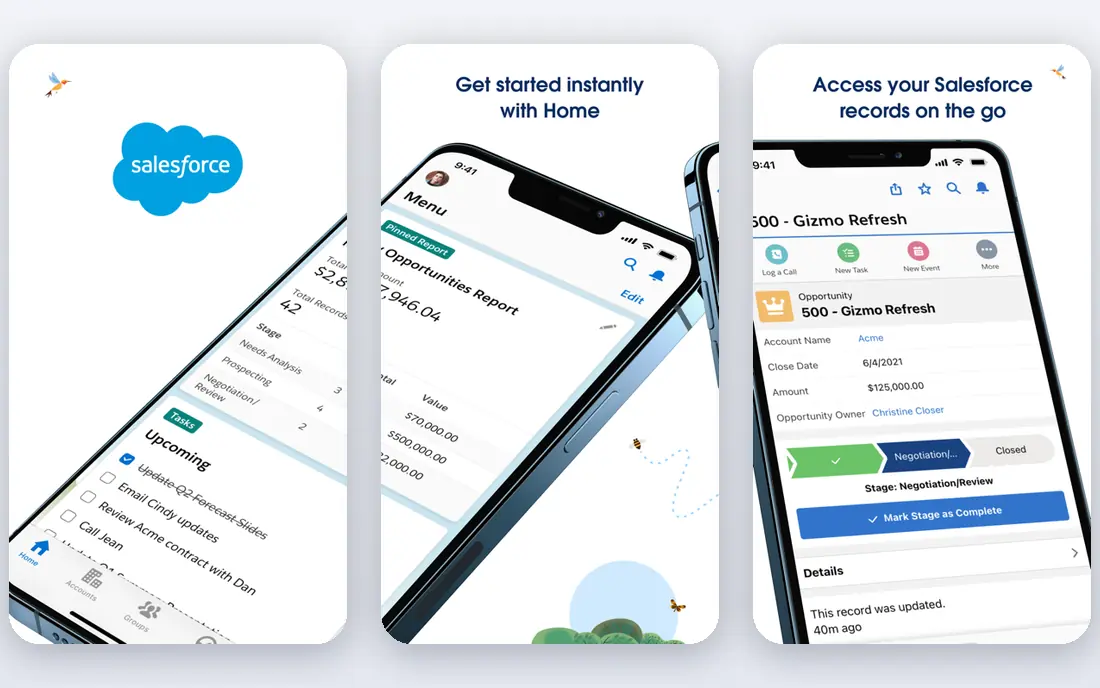
Salesforce suits larger teams with complex lead routing needs, such as multiple regions, product lines or partner channels. Assignment rules can route leads by territory, company size, source or product interest, while scoring and Einstein AI can prioritise leads for reps. Reporting can track lead source, response time, conversion by stage and rep performance in detail, which helps managers fix weak steps. Starter Suite was listed at $25 per user per month in the pricing we reviewed, but advanced lead features and AI scoring often sit on higher tiers, and setup can take time. Smaller teams may find that complexity outweighs the benefit. Choose Salesforce if your lead volume, routing rules and reporting needs are large enough to justify an admin and a careful implementation.
- Powerful lead routing, scoring and assignment rules
- Deep reporting
- Vast integration options
- Setup complexity and cost
- Needs admin support for advanced rules

Zoho CRM gives small and mid-size teams a full lead management toolkit at a lower price than enterprise rivals. Web forms capture leads, assignment rules route them, workflows automate follow-up tasks, and Zia AI can score leads and flag anomalies. That combination covers the full lead chain without a large budget, especially for teams already using Zoho apps. Standard was listed at $14 per user per month billed annually in the pricing we reviewed, with a free plan for up to three users. The system rewards a little setup: define lead stages clearly, set assignment rules by source or territory, and review scoring against real closed deals. If you want affordable, complete lead management and can invest time in setup, Zoho is a strong pick.
- Lead scoring, assignment and workflows at a low price
- Web forms and social capture
- Broad integrations
- Interface can feel dense
- Advanced lead features need higher tiers
Pipedrive handles leads as a pipeline job: new leads land in a lead inbox, reps qualify them, and qualified leads become deals in a visual pipeline. That clarity helps sales managers see how many leads are waiting, how long each has waited, and where follow-up has stalled. Lead scoring and routing features on higher plans add prioritisation for larger teams. Pricing in the material we reviewed started at $14 per user per month billed annually, with a 14-day trial. Note that full lead capture forms and chatbots come through the LeadBooster add-on, listed at $32.50 per month in some comparisons, so factor that into total cost if web capture matters to you. For sales teams that value a clean pipeline over marketing automation, Pipedrive is a good fit.
- Clear lead inbox and pipeline view
- Lead scoring and routing on higher plans
- Easy rep adoption
- No free plan
- Lead capture forms need LeadBooster add-on for full features
Freshsales suits smaller teams that want lead scoring and follow-up without a steep price or long setup. Leads can be captured from web forms and chat, scored by Freddy AI, and worked through phone, email and SMS inside the same tool. That single place for outreach helps small teams respond quickly, which is often the biggest win in lead management. Growth was listed at $9 per user per month billed annually in the pricing we reviewed, with a free plan for up to three users. Advanced scoring and workflow features sit on higher tiers, so check the plan page for the scoring model you need. If your team is small, your lead volume is manageable, and speed of follow-up is the priority, Freshsales offers strong value.
- Freddy AI lead scoring
- Built-in phone, email and chat
- Simple lead views and workflows
- Reporting depth is lighter than Salesforce
- Advanced scoring needs higher tiers
Insightly suits teams that sell a project or service and need to track the lead through to delivery in one place. Leads can be captured, qualified and converted to contacts and opportunities, then linked to projects, tasks and milestones once a deal closes. That continuity helps service businesses, agencies and consultancies where the handoff from sales to delivery often loses information. Pricing in the material we reviewed started at $29 per user per month for Plus, with a free trial rather than a free plan. That higher entry price makes Insightly less attractive for a pure lead-capture team, but reasonable for a team that also needs project tracking. Test the lead-to-project handoff during the trial, since that is where Insightly adds most value over a sales-only CRM.
- Lead management plus project delivery in one system
- Workflow automation
- Solid reporting
- Higher starting price than some rivals
- Interface is more functional than modern
Capsule suits small teams that want lead management without complexity. You can capture leads, track conversations, set follow-up tasks and see a simple pipeline, with email integration that keeps messages beside the lead record. The clean interface means a small team can start in a day, rather than spending weeks on setup and training. The limit is depth. Capsule does not offer the advanced scoring, routing and marketing automation of HubSpot or Salesforce, so larger teams with complex lead flows will outgrow it. For a team of a few people who need reliable lead tracking and fast follow-up, that simplicity is a benefit, not a weakness. Check the current plan page for user limits and workflow features before you commit.
- Simple, clean lead and contact management
- Easy setup
- Good Gmail and Outlook integration
- Advanced scoring and automation are lighter than larger CRMs
- Pricing needs checking by plan
Nutshell combines lead management with built-in email sequences, so a small sales team can capture leads, run follow-up sequences and track replies without a separate outreach tool. Pipeline views show where each lead stands, reporting covers source and conversion, and the interface is designed for sales teams rather than general project work. That focus helps teams that generate leads and work them through email at volume. Pricing is plan-based, with Pro listed at $49 per user per month in some comparisons, so check the current pricing page for the features you need. Nutshell suits small and mid-size B2B teams that want lead management plus outreach in one subscription. If you need deep marketing automation or enterprise routing, compare it against HubSpot or Salesforce first.
- Lead capture, sequences and reporting in one tool
- Built-in email outreach
- Clear pipeline views
- Smaller ecosystem than HubSpot or Salesforce
- Pricing varies by plan and add-ons
How we picked these
We compared vendor feature and pricing pages, documentation and public reviews, and we kept CRM platforms that cover lead capture, routing, scoring, follow-up and reporting and are available in October 2026. We did not run live lead campaigns for this guide, so we report documented features and published plan terms rather than claiming measured conversion rates. Lead results depend heavily on source quality, response time and sales process, so pilot any shortlist on real leads.
How to manage leads well in any CRM
Fix response time first
Set a clear service level for first response, such as within one business hour, and use routing rules and alerts to meet it. Track response time by source and rep, and review slow leads weekly. Faster first contact often improves conversion more than a small change to scoring.
Score from your own outcomes
Build scoring from the traits of leads that actually closed, not from generic best practice alone. Include fit signals such as company size and role, plus behaviour signals such as page visits, email replies and demo requests. Review scores monthly against outcomes, and lower the weight of signals that do not predict a sale.
Keep the pipeline clean
Define lead stages in plain language, such as new, contacted, qualified, proposal and closed, and move leads promptly when their status changes. Archive dead leads with a reason, rather than letting them clog the pipeline. A clean pipeline gives managers a true view of workload and forecast, and it helps reps focus on leads that can still close.
FAQ
What is the best crm software for lead management?
HubSpot suits teams that want capture, nurturing and sales in one system, Salesforce suits large teams with complex routing, and Zoho CRM and Freshsales suit smaller teams on a budget. Pipedrive suits pipeline-focused sales teams. Choose by lead volume, routing complexity and whether you need marketing automation in the same tool.
How do I capture leads in a CRM?
Most CRMs capture leads through web forms, landing pages, live chat, email and manual entry, plus imports from spreadsheets or lead providers. HubSpot and Zoho include forms in the core product, while Pipedrive adds full form features through LeadBooster. Test capture on your real website and check that source, consent and routing work before you launch a campaign.
What is lead scoring in a CRM?
Lead scoring ranks leads by how likely they are to buy, using fit signals such as role and company size and behaviour signals such as website visits and email engagement. AI scoring learns from your historical outcomes, while rule-based scoring uses points you assign. Review scores against real closed deals regularly, since buyer behaviour changes over time.
How fast should sales follow up with a new lead?
As fast as your team can manage, ideally within minutes for high-intent leads such as demo requests, and within one business hour for most web leads. Use routing rules, alerts and sequences to avoid delays, especially outside business hours. Track response time in your CRM and treat slow follow-up as a process problem to fix, not just a rep problem.
Can a CRM automate lead follow-up?
Yes, through workflows, sequences and task automation that send emails, create tasks and move leads between stages. Automation works best for routine follow-up, such as a welcome email or a reminder after a download, while personal follow-up still matters for qualified leads. Review automated messages regularly so they stay accurate and human in tone.
What reports should lead management software include?
At minimum, track leads by source, response time, conversion by stage, and pipeline value by rep and team. Add lead age, lost reasons and campaign performance for a fuller view. Those reports show where leads leak, which sources convert best, and where follow-up needs attention, which is more useful than a simple lead count.