Best Content Marketing Tools in 2026: 8 Platforms Compared
We compared the best content marketing tools for research, writing, design and distribution, so small teams can build a stack that fits their budget well.

- Editor's choice
 Semrush
SEO research and briefs
Starts at$139 per monthVisit semrush.comFull review - Great alternative
 HubSpot
Content plus CRM
Starts at$20 per monthVisit hubspot.comFull review - Also consider
 Buffer
Social publishing
Starts at$5 per monthVisit buffer.comFull review
TL;DR:
- Semrush and Ahrefs lead for SEO research, while HubSpot leads for joining content to leads and sales data.
- Buffer, Canva and Grammarly cover the daily work of publishing, design and editing at a lower cost.
- CoSchedule and Notion help small teams plan, brief and track content without a complex system.
- Start with one tool per job, such as research, writing, design, distribution and measurement, and add tools only when a gap is clear.
Quick comparison
| Tool | Best for | Starts at | Free plan? | |
|---|---|---|---|---|
| Semrush | SEO research and briefs | $139 per month | Free trial | Visit |
| HubSpot | Content plus CRM | $20 per month | Yes | Visit |
| Buffer | Social publishing | $5 per month | Yes | Visit |
 Ahrefs | Backlinks and content gaps | $129 per month | Yes | Visit |
 Canva | Visual content design | Free | Yes | Visit |
 Grammarly | Editing and clarity | $12 per month | Yes | Visit |
 CoSchedule | Marketing calendar | $29 per month | Yes | Visit |
 Notion | Planning and briefs | $10 per month | Yes | Visit |
The best content marketing tools
Content marketing needs several jobs done well, including research, writing, design, distribution and measurement. No single tool does all five best, so this list picks strong tools for each job that work well together.
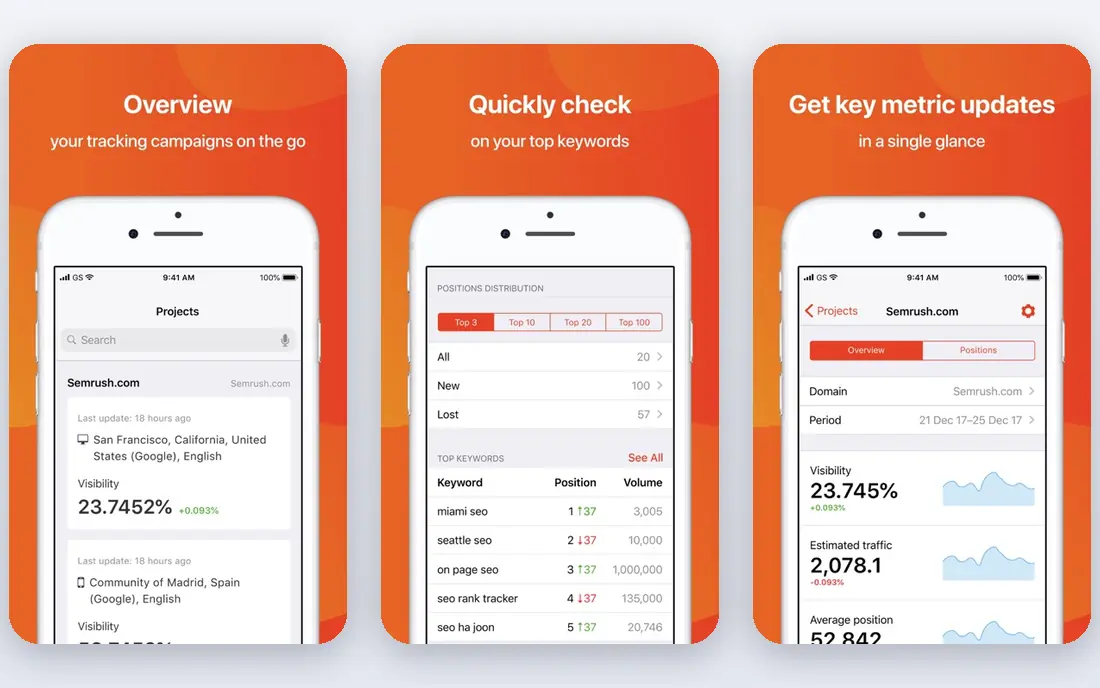
Semrush is the research hub for many content teams, since it covers keyword research, competitor content, topic ideas and site audits in one place. Its Content Toolkit can turn a topic into a brief with suggested headings, related questions and optimization guidance, which helps writers start faster. Rank tracking then shows if published content actually moves in search. The main barrier is cost and complexity. At $139 per month for the Pro plan, Semrush only makes sense if search traffic is a core goal and you will use it weekly. Smaller teams can start with a trial, run a focused set of keyword and competitor checks, and decide if the ongoing value justifies the price.
- Deep keyword and competitor research
- Content brief and optimization tools
- Site audit and rank tracking
- Price is high for solo creators
- The full toolkit takes time to learn

HubSpot suits teams that want content connected to leads, not just traffic. You can publish a blog post, capture leads with forms, send follow-up emails and see which pieces influenced deals, all inside the same system. Paid plans start at $20 per month, with a free edition covering basic marketing tools. That breadth is also a weakness, since HubSpot is not the deepest SEO research tool or the best social scheduler on its own. Many teams pair it with Semrush or Ahrefs for research and Buffer for social, using HubSpot as the home for publishing and measurement. If leads and sales matter more than raw traffic, HubSpot is a strong core choice.
- Blog, landing pages and email in one system
- Content tied to contacts and deals
- Free tools to start
- Costs rise as contacts and features grow
- Some tools feel broad rather than specialized

Buffer keeps social distribution simple, which is exactly what small teams need after publishing a post. You can schedule posts across channels, store content ideas, and check basic analytics to see what earned attention. Paid plans start at $5 per month per channel, and a free plan covers a small number of channels. Buffer does not try to be a full social listening or enterprise reporting suite, so teams that need deep audience analysis may outgrow it. For most small businesses, though, its clean calendar and low price make it the easiest way to turn each article into a week of social posts. It pairs well with Canva for graphics and HubSpot for email.
- Simple scheduling across channels
- Clear analytics
- Low starting price per channel
- Social listening and deep reporting are limited
- Larger teams may need a bigger platform
Ahrefs is best known for backlinks, and that data is valuable for content planning. You can see which pages earn links for competitors, find topics where rivals rank and you do not, and check the link profile of your own best content. Webmaster Tools gives limited free access for sites you own, which helps small teams start without paying. At $129 per month for the Starter plan, Ahrefs is a serious investment, similar to Semrush. Choose Ahrefs if link building and content gaps are central to your strategy, and choose Semrush if you want a broader marketing toolkit with more content brief features. Many teams use one, not both, to keep costs down.
- Strong backlink database
- Content gap and keyword tools
- Free Webmaster Tools for your own sites
- High starting price
- No ongoing free trial for the full paid toolkit in many cases
Canva is the fastest way for a non-designer to make content look polished. Templates cover social graphics, blog headers, presentations, infographics and short videos, and you can save brand colors, fonts and logos for reuse. The free plan is genuinely useful, while Pro adds more templates, background removal and brand controls. Canva will not replace professional design tools for complex illustration or print work, and heavy template use can make content look generic if you do not customize it. For daily marketing visuals, though, it saves hours and keeps a small team consistent. Pair Canva with Buffer so each graphic is scheduled as soon as it is finished.
- Huge template library
- Easy social graphics, presentations and documents
- Team sharing
- Advanced brand and asset controls need Pro
- Not a replacement for professional design software
Grammarly works inside browsers, documents and many writing apps, catching grammar and spelling errors before content goes live. Paid plans add clarity, tone and full-sentence rewrites, plus plagiarism checking, which helps teams that publish often. The free plan covers basic writing checks and is enough for short posts. The risk is over-editing. Grammarly aims for clear, safe prose, so a strong brand voice can get smoothed away if you accept every suggestion. Use it as a second pair of eyes, not as the final editor, and keep a human review for tone, facts and structure. At $12 per month for Pro, it is one of the cheapest quality gains in this list.
- Grammar, spelling and clarity checks in many apps
- Tone suggestions
- Plagiarism checking on paid plans
- Suggestions need human judgment
- Style advice can flatten a distinct voice if followed blindly
CoSchedule gives a content team one calendar for blog posts, social posts, email and campaigns, so deadlines stop living in separate spreadsheets. You can plan a campaign, assign tasks, and see social promotion tied to each article in the same view. Paid plans start at $29 per month, with a limited free option for a single profile. Smaller teams with only one writer may find Notion enough for planning, but CoSchedule earns its place once several people touch the same calendar. It reduces missed publish dates and duplicate social posts, which are common problems as output grows. If your team often asks what is publishing this week, CoSchedule answers that question at a glance.
- Shared marketing calendar
- Campaign and task views
- Social scheduling alongside content plans
- Best value comes with a paid plan
- Teams with simple needs may prefer Notion alone
Notion is the planning layer many content teams build first, since it can hold briefs, keyword notes, draft trackers and a published content library in one workspace. You can create a database for articles with status, owner, publish date and target keyword, then view it as a table, board or calendar. The free plan suits individuals and small teams, with paid plans from $10 per user per month. Notion does not publish content, schedule social posts or measure search performance, so it works best alongside Semrush, HubSpot or Buffer. Its flexibility is also its cost, since a messy workspace can slow a team down until someone sets clear templates. Start with one brief template and one tracker, and add views only when the team asks for them.
- Flexible pages, databases and docs
- Good for briefs, calendars and content libraries
- Generous free plan
- Needs setup to work well as a calendar
- Not a publishing or analytics tool on its own
How we picked these
We compared official feature pages, pricing pages, app listings and public reviews, focusing on whether each tool does one content job well, what its free plan or trial covers, and how it fits with the other tools on this list. We did not claim hands-on testing, and we favored tools with clear pricing and a track record with small businesses. Prices change often, so check the vendor pricing page before you buy.
How to build a content marketing stack that fits
Start with your bottleneck, not with a long shopping list. If you have ideas but no traffic, research comes first. If you publish often but no one sees it, distribution comes first. If drafts pile up unfinished, planning and editing come first.
A simple starter stack
A practical starter stack is Notion for planning, Grammarly for editing, Canva for visuals, Buffer for social and Google Search Console for free search data. Add Semrush or Ahrefs only when search becomes a main channel, and add HubSpot when you need leads tied to content.
A growth stack for small teams
As output grows, add a research tool for briefs and gaps, a calendar tool such as CoSchedule for coordination, and HubSpot for publishing, email and lead tracking. Keep one tool per job to avoid paying twice for the same feature, and review the stack every quarter.
Measure what matters
Pick one main number per channel, such as search traffic for SEO content, email signups for lead content, or booked calls for sales content. Check that number monthly, keep what works, and stop paying for tools tied to content that never moves it.
FAQ
What are the best tools for content marketing?
The best tools depend on the job, but a strong set is Semrush or Ahrefs for research, Notion or CoSchedule for planning, Grammarly for editing, Canva for design, Buffer for social and HubSpot for publishing and leads. Start with one tool per job and add more only when a clear gap appears.
What is the best content marketing software for small businesses?
HubSpot is a strong core choice for small businesses that want publishing, email and lead tracking in one place, with a free edition to start. Pair it with Canva for visuals and Buffer for social to cover daily work at low cost. Add Semrush or Ahrefs when search traffic becomes a priority.
What is the best content marketing platform for SEO?
Semrush and Ahrefs lead for SEO content, with Semrush stronger on briefs and topic research and Ahrefs stronger on backlinks and content gaps. Both cost over $100 per month for entry paid plans, so use a trial to run real keyword checks before committing. Free tools such as Google Search Console can cover basic search data in the meantime.
What are the best tools for social media marketing?
Buffer is our pick for simple, low-cost social scheduling, with a free plan and paid plans from $5 per month per channel. Canva covers the graphics, while HubSpot can join social posts to email and leads for larger teams. Choose a scheduler you will actually open daily, since consistency matters more than extra features.
Is there a free content marketing tool stack?
Yes, you can start free with Notion, Canva, Grammarly and Buffer free plans, plus Google Search Console and Google Analytics for measurement. That stack covers planning, editing, design, social and basic reporting without a monthly bill. Pay first for the job that limits your output most, such as research or email.
How much should a small team spend on content marketing tools?
A starter stack can cost $0 to about $50 per month using free plans and one or two low-cost tools such as Buffer and Grammarly. A growth stack with Semrush or Ahrefs and HubSpot can reach several hundred dollars per month, so it should be tied to traffic or leads that justify it. Review subscriptions quarterly and cancel tools you have not used in a month.