Best Bot Detection Software in 2026: 8 Tools Compared
We compared the best bot detection software for websites, apps and APIs, covering real-time signals, device checks, mitigation options and pricing in 2026.
- Editor's choice
 DataDome
Real-time web, mobile and API detection
Starts at$3,830 per monthVisit datadome.coFull review - Great alternative
 Cloudflare
Edge detection on a CDN you may already use
Starts at$20 per monthVisit cloudflare.comFull review - Also consider
 HUMAN Security
Enterprise bot and account protection
Starts atSee websiteVisit humansecurity.comFull review
TL;DR:
- The best bot detection software separates harmful automation from good bots, search crawlers and your own monitoring tools.
- Edge tools suit teams already on a CDN or WAF, while dedicated vendors suit teams facing scraping, scalping or credential stuffing.
- Device and behavioral signals catch more than IP blocking alone, since bot operators rotate IPs and browsers quickly.
- Most serious bot detection is quote-based, so budget for a sales process and a trial on your real traffic.
- Always allowlist good automation before you block, or you will break monitoring, price comparison feeds and partner integrations.
Quick comparison
| Tool | Best for | Starts at | Free plan? | |
|---|---|---|---|---|
| DataDome | Real-time web, mobile and API detection | $3,830 per month | No | Visit |
| Cloudflare | Edge detection on a CDN you may already use | $20 per month | Yes | Visit |
| HUMAN Security | Enterprise bot and account protection | See website | No | Visit |
 Akamai Bot Manager | Large-scale edge bot detection | See website | No | Visit |
 Fingerprint | Device intelligence and bot signals | $200 per month | Free trial | Visit |
 Arkose Labs | Account abuse and challenge flows | See website | No | Visit |
 Kasada | Advanced and persistent bot attacks | See website | No | Visit |
 IPQS | IP and fraud intelligence checks | $99 per month | Yes | Visit |
The best bot detection software
Bot detection software watches traffic for signs of automation: odd browser fingerprints, inhuman speed, repeated patterns and known bad IPs. The best tools score each request and let you decide whether to allow, challenge or block it. This list covers edge platforms, dedicated vendors and signal providers, all for legitimate defense of your own sites and apps.
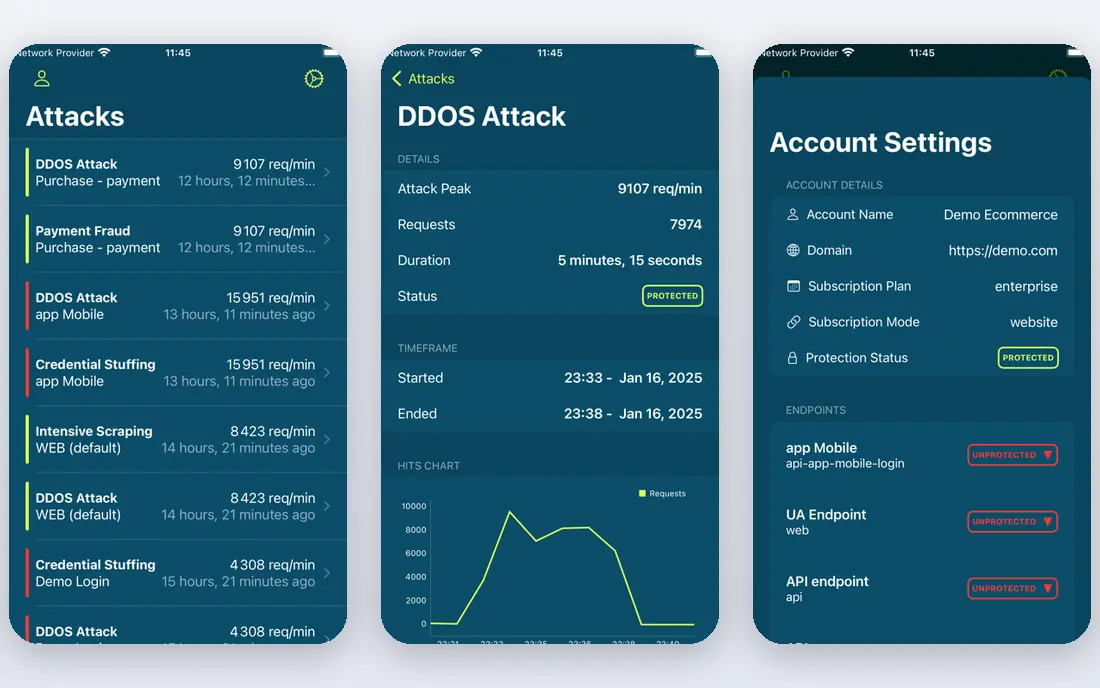
DataDome is a dedicated bot detection vendor, not a CDN add-on. It combines server-side signals with client-side behavioral signals and claims decisions in under two milliseconds per request. Deployment can be a reverse proxy module, a CDN integration or a mobile SDK, so it fits sites that are not already on one edge network.
The entry price is the main barrier. The Essentials plan starts at 3,830 dollars per month, and mobile and API protection sit on higher tiers. Investigation history also varies by plan, so check retention before you buy. For a site facing scraping, scalping or credential stuffing at scale, that managed depth is the reason to pay it.
- Fast per-request decisions
- Covers web, mobile and API
- Managed service included
- High entry price
- Investigation history varies by plan

Cloudflare is the default starting point for many teams because bot fighting ships with its plans. The free plan includes basic protection, and the Pro plan at 20 dollars per month adds stronger bot controls. If your site already runs behind Cloudflare for CDN and WAF, turning on bot detection is a small step, not a new project.
The catch is depth. The full Bot Management product, with advanced scoring and analytics, is an enterprise add-on with quoted pricing. Small teams get useful protection cheaply, but teams facing advanced bots may still need a dedicated vendor. Treat Cloudflare as the baseline, and add a specialist when attacks keep getting through.
- Free tier with basic bot fighting
- Huge global network
- Simple DNS setup
- Full Bot Management is enterprise only
- Per-domain pricing adds up
HUMAN Security, formed from White Ops and PerimeterX, sells Bot Defender for web and app traffic, Account Defender for credential stuffing and account takeover, and Code Defender for third-party script behavior. Its detection network verifies a very large volume of interactions each week, which helps it spot new bot patterns early.
Pricing is by quote and the product is aimed at larger companies, so smaller teams should expect a sales process. Application grouping also matters: splitting one application across several IDs can weaken behavioral analysis. For an enterprise facing account abuse and sophisticated bots, the module breadth and managed service are strong points.
- Bot, account and script protection modules
- Large detection network
- Managed service
- Quote-only pricing
- Setup needs careful application grouping
Akamai Bot Manager runs at the edge, close to users, and pairs bot detection with its CDN and WAF. That placement helps large sites absorb high traffic volumes without adding latency in a data center. Behavioral analysis looks at how a visitor acts over time, not just at one request, which catches bots that look normal on a single page load.
The product is usually bought as part of a larger Akamai bundle, so standalone pricing is quoted and varies with traffic and modules. Teams not already on Akamai may find a dedicated vendor simpler to deploy. For a high-traffic enterprise already on Akamai, Bot Manager is a natural extension of the edge stack.
- Edge scale and global reach
- Behavioral analysis
- Bundles with CDN and WAF
- Quote-only pricing
- Best value if you already use Akamai
Fingerprint identifies a visitor or device with a persistent identifier and returns bot signals that your backend can act on. That design suits teams that want detection as a signal, not a black-box block, because you keep control over what happens to a suspicious visit. It works well for account signup, login and checkout flows where device history matters.
The trade is that Fingerprint gives you signals, not a full mitigation policy out of the box. Your team writes the rules that turn a score into allow, challenge or block. Pricing starts at 200 dollars per month and scales with usage, so check your call volume. For product teams that want device intelligence inside their own fraud logic, it is a flexible pick.
- Persistent visitor identification
- Bot signals for your own rules
- API-first design
- You build the response logic
- Pricing scales with API calls
Arkose Labs focuses on stopping account abuse: fake accounts, credential stuffing and promotion abuse. Its adaptive challenges change based on risk, so real users see little friction while automated attackers face harder checks. Fraud workflows let teams route suspicious accounts to review rather than blocking every borderline case at once.
Pricing is quoted and bundled with support, so it fits midsize and large teams more than a small site. Challenge tuning also takes time, since a challenge that is too hard will frustrate real users. For a company where fake accounts are the main bot problem, Arkose Labs targets that problem directly instead of treating all bot traffic the same.
- Adaptive challenges
- Fraud workflows for accounts
- Managed SOC support in bundles
- Quote-only pricing
- Challenge design needs tuning
Kasada is built for attackers who adapt. Its client-side checks are designed to stay hidden from bot operators, so they cannot easily study and bypass them, and its managed service watches for new attack patterns. That approach suits sites facing persistent scraping, scalping or inventory hoarding where simpler tools have already failed.
The same design limits transparency. You will not get the same level of detail about each check as you would from a signal API, and pricing is quoted as a bundle. Teams that need full control over detection logic may prefer a different tool. Teams that want a vendor to stay ahead of a determined attacker will value the managed approach.
- Hidden client-side checks
- Strong against persistent attackers
- Managed service in bundle
- Quote-only pricing
- Less transparency into how checks work
IPQS, short for IPQualityScore, gives fraud and bot signals based on IP reputation, proxy and VPN detection, device data and email checks. A free tier lets a small team test the API, and paid plans start at 99 dollars per month. It is easy to add to signup, login or checkout flows where a quick risk check is enough.
IPQS is not a full bot management platform. It does not block traffic at the edge or run a WAF, so your team still needs to act on its scores. For a small site that wants a cheap, fast signal to feed its own rules, that is fine. For a large site under sustained attack, pair it with an edge tool or a dedicated vendor.
- Free tier to test
- IP reputation and proxy detection
- Simple API checks
- Signal provider, not a full bot manager
- Coverage varies by check type
How we picked these
We compared official product pages, pricing pages and public documentation for tools that are still sold in October 2026, and we only listed legitimate defensive tools for protecting your own websites, apps and APIs. We favored tools with real-time scoring, behavioral or device signals, and a clear way to allow good bots. Tools that help create or run bots were excluded.
How to choose without breaking real users
Start by measuring your bot problem before you buy. Look at traffic spikes, failed logins, fake signups and scraping patterns in your own logs, and separate them from search crawlers and partner feeds. A tool bought for scraping will not fix credential stuffing, and a tool bought for account abuse may be overkill for a blog.
Allow good bots first
Build an allowlist for search engines, monitoring tools, price feeds and partner integrations before you turn on blocking. Test in monitor mode first, where the tool scores traffic but does not block it, and review false positives for at least a week. A block that stops real customers costs more than a bot that slips through for a few days.
Decide what happens to a bad score
A score alone does not protect you. Decide in advance whether a suspicious visit gets a challenge, a rate limit, a review queue or a block, and make that response fit the page. Checkout and login deserve stricter action than a blog post, and a challenge is kinder than a block for a borderline visitor. Review blocked traffic weekly and tune the rules as attackers change tactics.
FAQ
What is bot detection software?
Bot detection software identifies automated traffic on websites, apps and APIs and scores it as human, good bot or bad bot. It uses signals such as browser fingerprints, behavior, IP reputation and request patterns. Your team then decides whether to allow, challenge or block each visit.
What is the difference between bot detection and bot mitigation?
Detection finds and scores bots, while mitigation acts on that score by blocking, challenging or rate-limiting traffic. Some tools do both, while others only return a signal and leave the action to your code or WAF. Check whether a product includes mitigation before you assume it blocks anything.
How much does bot detection software cost?
Costs range from free tiers and 20 dollars per month for edge basics to 3,830 dollars per month for dedicated vendor plans and custom enterprise contracts. Most serious vendors quote by traffic volume, so ask for a price based on your real request counts, not a generic estimate.
Will bot detection block search engines?
It should not, if you configure it well. Good tools recognize search crawlers and let you allowlist them, and monitor mode lets you check for false positives before blocking. Always test with your own monitoring tools and partner feeds included, since those look automated too.
Do I need bot detection for a small website?
A small site can often start with free or low-cost edge protection from a CDN. Add a dedicated tool when you see scraping, fake accounts, credential stuffing or inventory abuse that edge basics cannot stop. Measure the problem first, since a tool bought without a clear problem is hard to justify.
Is bot detection legal to use on my own site?
Yes, when you use it to protect your own website, app or API and you follow privacy law for the data you collect. Bot detection tools collect visitor signals, so check the vendor privacy documentation and your own privacy policy. Do not use detection tools to attack or scrape other sites.