Best App Builder in 2026: 8 Builders Compared
Compare the best app builder options for 2026, with pricing, native apps, and low code tools, so you can build a web or mobile app without hiring developers.
- Editor's choice
 Bubble
Complex web apps
Starts at$32 per monthVisit bubble.ioFull review - Great alternative
 Glide
Internal tools from spreadsheets
Starts at$19 per monthVisit glideapps.comFull review - Also consider
 FlutterFlow
Native mobile apps
Starts at$39 per monthVisit flutterflow.ioFull review
TL;DR:
- The best app builder depends on the app type: Bubble suits complex web apps, FlutterFlow suits true native mobile apps, and Glide suits internal tools.
- Bubble, Glide, Softr, Adalo, FlutterFlow and AppSheet all offer a free plan, so you can build and test before paying.
- Low code platforms such as AppSheet and the tools here trade some control for speed, which suits small teams with a clear idea.
- Watch usage pricing closely, because workload, updates and per-user charges can matter more than the headline monthly price.
Quick comparison
| Tool | Best for | Starts at | Free plan? | |
|---|---|---|---|---|
| Bubble | Complex web apps | $32 per month | Yes | Visit |
| Glide | Internal tools from spreadsheets | $19 per month | Yes | Visit |
| FlutterFlow | Native mobile apps | $39 per month | Yes | Visit |
 Softr | Portals on existing data | $19 per month | Yes | Visit |
 Adalo | Simple native mobile apps | $36 per month | Yes | Visit |
 AppSheet | Data-driven business apps | $5 per user per month | Yes | Visit |
 Thunkable | Beginners and educators | See website | Yes | Visit |
 GoodBarber | Template native apps | See website | No | Visit |
The best app builder
An app builder lets you create an app with visual tools instead of writing all the code yourself. Some builders focus on web apps, some on native mobile apps for the App Store and Google Play, and some on internal tools for your own team. The right pick depends on who will use the app and how complex its logic needs to be.
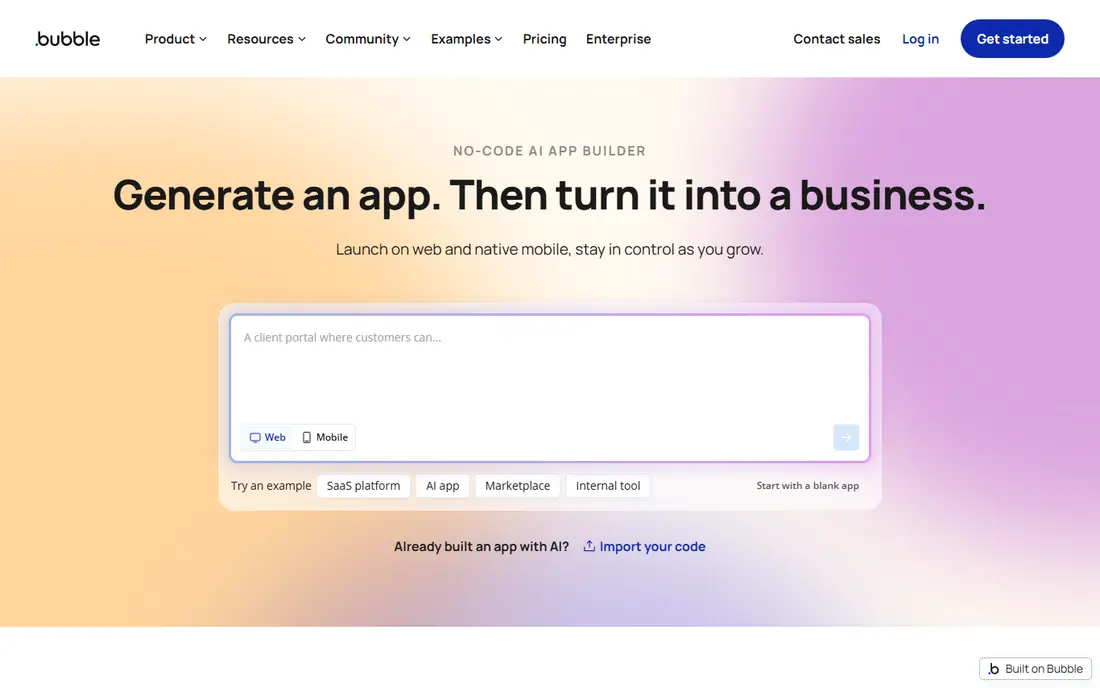
Bubble is our pick for most people who want a real web app, such as a marketplace, a booking platform or a customer portal with accounts and payments. The visual editor lets you design pages, define a database and build workflows that react to user actions, and the newer AI layer can generate a first version from a description that you then edit visually. That combination of depth and editing control is why Bubble still leads this category.
The catch is workload units, the meter Bubble uses for server processing. An app with inefficient searches or heavy workflows can burn through its allowance faster than expected, so you need to build with care and watch usage early. Bubble is also web-first, so a native mobile app needs extra work. If your app is mainly a web product with complex rules, that trade is worth it.
- Deepest visual logic in this list
- Built-in database and hosting
- Large plugin and template library
- Workload based pricing can surprise heavy apps
- Learning curve is steeper than simpler builders

Glide is the fastest route from a spreadsheet to a usable app. If your team already tracks jobs, inventory or customers in Google Sheets or Airtable, Glide turns that data into an app with lists, forms and dashboards in hours rather than weeks. That makes it a strong choice for internal tools, field teams and small businesses that need a working app now.
The limit is that Glide apps are web apps, not native apps published in the usual store sense, so it is not the pick for a consumer app that must live in the App Store. Pricing also depends on updates, which are counted when data changes, so a very busy app can cost more than the starting price suggests. For internal use, though, Glide is hard to beat for speed.
- Turns spreadsheets and data into working apps fast
- Easy for non-technical teams
- Good for internal tools
- Apps are web based rather than true native apps
- Costs rise with updates on higher plans
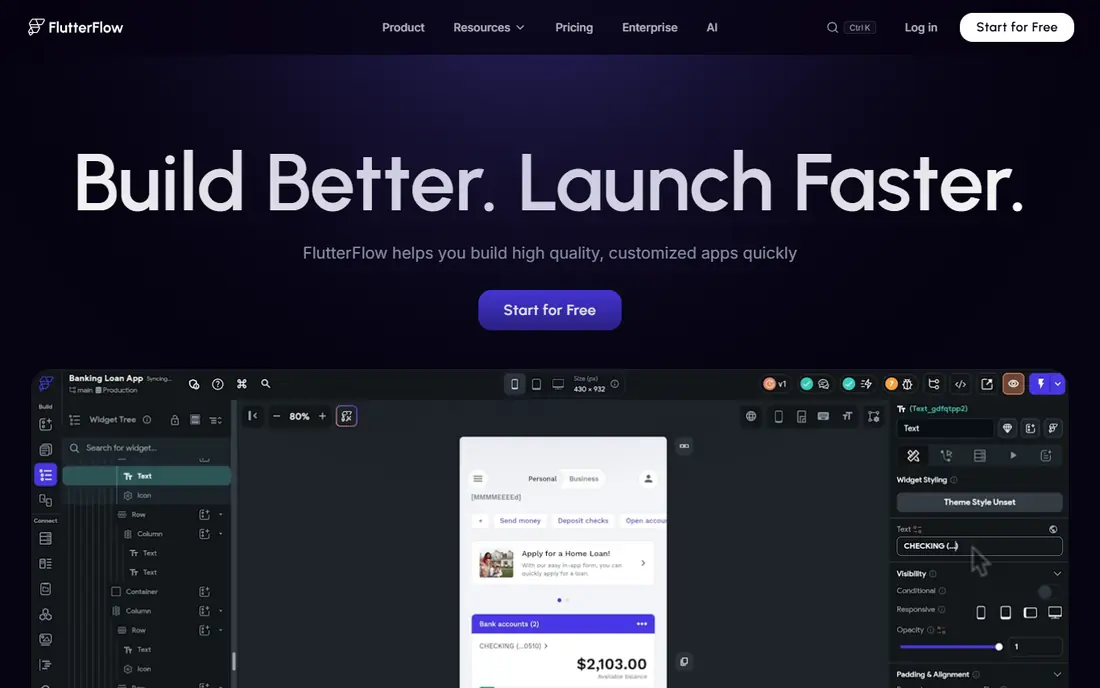
FlutterFlow is the pick when you need a real native mobile app on both iOS and Android. It generates Flutter code, which you can export and keep, and its visual builder handles layouts, navigation and app logic with a polish that simpler builders struggle to match. For a consumer app where store presence and native performance matter, that is a real advantage.
The extra setup is the honest downside. Logins and data usually need a Firebase project set up outside FlutterFlow, which adds a step that non-technical builders may find confusing. If you are comfortable with that one extra setup, or you have a developer to help, FlutterFlow gives you more long-term control than most no-code builders. If not, Adalo or GoodBarber will feel simpler.
- Builds true native iOS and Android apps
- Flutter code can be exported
- Strong visual design tools
- Needs a Firebase project for logins and data
- More setup than simpler builders
Softr is the builder to choose when your data already exists and you need a portal on top of it. A client portal, a member directory, an internal dashboard or a simple marketplace can be built from Airtable or Sheets data with blocks for lists, details and forms, and the result looks professional without design work. Small teams love it because the learning curve is short.
The limit appears when the app logic gets complex. Softr is not the tool for multi-step workflows, custom calculations and unusual rules, and that is where Bubble takes over. Think of Softr as the fastest portal builder here, not the most powerful app builder. If your app is mostly "show the right data to the right people," Softr is the best value pick.
- Connects fast to Airtable, Google Sheets and Notion
- Great for client portals and directories
- Clean templates
- Best when your data already lives elsewhere
- Less suited to complex custom logic
Adalo suits a founder who wants a simple native mobile app without learning a complex platform. You design screens, connect a database, add actions such as sending a notification or updating a record, and publish to iOS, Android and the web from the same project. That simplicity is its main strength, and it is why many first-time builders finish an app on Adalo when they stall on deeper tools.
The trade is power. Adalo will not handle the most complex logic or the largest datasets as smoothly as Bubble or FlutterFlow, and very ambitious apps may hit its limits. For a straightforward app with a clear set of screens, such as a booking app, a directory or a simple marketplace, Adalo is a good balance of native output and ease of use.
- Builds native iOS and Android apps plus web from one canvas
- Straightforward pricing
- Easy to learn
- Less powerful than Bubble or FlutterFlow for complex apps
- Performance limits on very large apps
AppSheet is the best low code platform here for a business that already uses Google Workspace. It turns spreadsheets and databases into mobile and web apps for tasks such as inspections, inventory, field reporting and approvals, with automation for notifications and data changes. The per-user price is the lowest in this list, which makes it cheap to roll out to a whole team.
The design is practical rather than polished, so AppSheet is not the pick for a consumer app where looks sell the product. It is also most at home inside a Google-centred workflow, and teams outside that world may prefer Glide. For operations apps where function matters more than style, AppSheet is excellent value and the free prototype option lets you test an idea before paying.
- Very low per-user starting price
- Strong for Google Workspace teams
- Good for field and operations apps
- App design is functional rather than beautiful
- Best for internal business apps, not consumer apps
Thunkable is the friendliest native builder for a beginner. Its block based logic works like building with pieces, which makes it popular with educators, students and first-time builders who want to understand how an app works. You can still publish real iOS and Android apps, and the drag-and-drop builder keeps early progress fast and encouraging.
For a commercial app with complex needs, Thunkable will feel limited sooner than FlutterFlow or Bubble. That is not a flaw, because it is built for learning and simpler apps, but it matters when choosing. Pick Thunkable to learn, to prototype, or to build a straightforward app with a small team. Pick a deeper tool when the app is the business itself.
- Block based logic is easy to learn
- Builds native iOS and Android apps
- Good for learning and prototypes
- Less suited to large commercial apps
- Advanced features need more work than on FlutterFlow
GoodBarber suits an established business that wants a polished native app quickly and does not want to design every screen from scratch. Its templates cover shops, content apps, delivery and services, and the apps are compiled as native iOS and Android apps with a web version alongside. For a restaurant, a shop or a local service, that template route saves weeks.
The trade is flexibility. A template builder will not match a fully custom design or unusual logic, and GoodBarber pricing needs a check on the vendor site before you budget. If your app fits a template well, GoodBarber is a fast, professional route. If your app idea is unusual, an open builder such as Bubble or FlutterFlow will serve you better.
- Polished native apps from templates
- No commission on sales in its model
- Managed publishing help available
- Less flexible than open builders
- Pricing is not as transparent as rivals here
How we picked these
We compared official pricing pages, builder capabilities and public comparisons for app builders that are available in 2026 and truly let a small team build an app without a full development team. We kept a mix of web builders, native mobile builders and low code platforms, and we favoured tools with a free plan or prototype option so you can test before paying. Prices change often, so confirm the current plan on the vendor site, especially where billing is per user or usage based.
Choosing between web, native and internal apps
The first decision is where the app will live. A web app suits software as a service, portals and tools used mainly on a computer. A native mobile app suits consumer products where App Store discovery, push notifications and offline use matter. An internal app suits a team tool that only staff will use, where speed and low cost matter more than store polish. Many failed app projects start with the wrong answer to that question, so settle it before comparing features.
Next, check who will maintain the app. A visual builder is only simple if the person maintaining it understands its logic model, whether that is Bubble workflows, FlutterFlow screens or AppSheet data rules. Finally, check exit options. Code export, data export and API access matter if the app grows, because switching builders later is painful. FlutterFlow scores well on code export, while most others rely on data export and APIs.
A note on apps for builders and contractors
The phrase "apps for builders" can mean two different things, and they are worth separating. The tools in this list build apps, including apps a contractor could use to manage jobs and clients. They are not job boards for finding contractor work, and they do not find clients for you. If your goal is finding work as a contractor, you need a marketplace or lead service, not an app builder. If your goal is building an app for a contracting business, Glide, AppSheet and Softr are the fastest starting points here.
FAQ
What is the best app builder for beginners?
Glide and Softr are the easiest starting points, because both turn existing data into a working app with little learning. Thunkable is also friendly for beginners who want a native mobile app. Bubble is more powerful but takes longer to learn, so start simple and move up only if the app needs it.
What is the best app builder software for a small business?
For most small businesses, Glide or Softr will cover internal tools and portals at a low price, while Adalo or GoodBarber cover a simple customer-facing mobile app. AppSheet is the best low code platform pick for a Google Workspace team that needs field or operations apps. Choose based on whether the app is for staff, customers, or both.
Can I build an app without coding?
Yes, all the tools here let you build without writing code for the core app, using visual editors, templates and blocks. Complex logic, custom integrations and store publishing may still need some technical help, especially on Bubble and FlutterFlow. A simple app is fully possible without code, while a complex app may need occasional developer help.
What is the best app builder for iOS and Android?
FlutterFlow is the strongest pick for true native iOS and Android apps with code export, while Adalo is simpler for a first native app. GoodBarber also builds native apps from templates for businesses that fit its templates. Glide builds web apps that work on phones but are not native store apps in the same sense.
How much does an app builder cost?
Starting prices here range from $5 per user per month for AppSheet to around $39 per month for FlutterFlow, with free plans on most tools. The real cost depends on users, updates, workload and add-ons, so test with real data during a free plan and watch usage before committing to a yearly plan.
Are no-code apps good enough for a real business?
Yes, for many businesses they are, especially for internal tools, portals, booking apps and simple marketplaces. Very large apps with heavy traffic or unusual logic may eventually need custom development, but most small businesses never reach that point. Start with a builder, prove the idea with real users, and rebuild only if growth demands it.