Best Apartment Apps in 2026: 9 Apps Compared
Compare the best apartment apps in 2026, with filters, alerts, and application tools, to find a rental that fits your budget and commute needs, in our guide.
- Editor's choice
 Zillow Rentals
Broadest rental search
Starts atFreeVisit zillow.comFull review - Great alternative
 Apartments.com
Large managed buildings
Starts atFreeVisit apartments.comFull review - Also consider
 Apartment List
Personalized matching
Starts atFreeVisit apartmentlist.comFull review
TL;DR:
- Use two or three apartment apps together, because no single app lists every landlord, building, or private rental in a market.
- Confirm availability before a tour, because listings can stay online after a unit is rented.
- Set a hard budget cap and a commute limit first, so alerts do not pull you into rentals you cannot afford or reach easily.
- Read fees, deposit rules, and lease terms carefully, and be wary of listings that ask for money before a tour or a signed lease.
Quick comparison
| Tool | Best for | Starts at | Free plan? | |
|---|---|---|---|---|
| Zillow Rentals | Broadest rental search | Free | Yes | Visit |
| Apartments.com | Large managed buildings | Free | Yes | Visit |
| Apartment List | Personalized matching | Free | Yes | Visit |
 Zumper | Fast-moving city markets | Free | Yes | Visit |
 Realtor.com | Rentals plus home listings | Free | Yes | Visit |
 Trulia | Neighborhood research | Free | Yes | Visit |
 Rent.com | Cash-back eligible rentals | Free | Yes | Visit |
 HotPads | Map-based search | Free | Yes | Visit |
 PadMapper | Map search with overlays | Free | Yes | Visit |
The best apartment apps
We compared official feature pages, pricing pages, app store listings, privacy policies, and public reviews, with a focus on listing breadth, filters, alerts, application tools, and scam warnings.
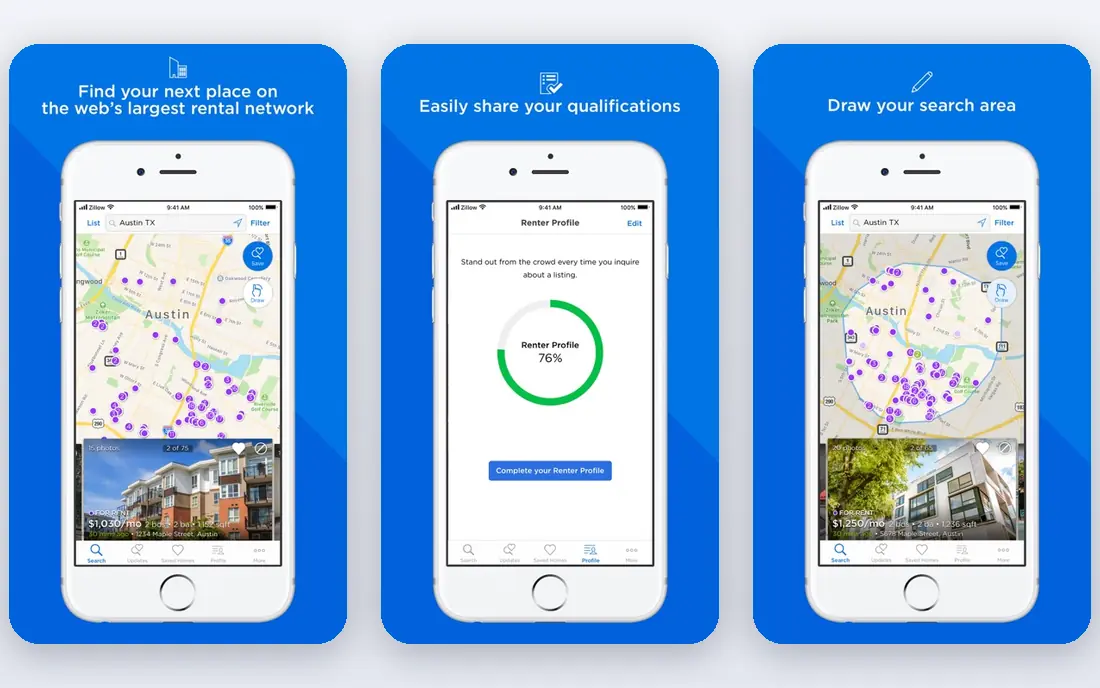
Zillow Rentals covers apartments, condos, townhomes, and houses, which makes it a good starting point when you are not sure which type of home fits. Filters for price, beds, pets, and amenities help narrow a large market, and saved searches with alerts keep you posted on new listings. Its shared application can save time if you apply to several participating rentals. The downside is staleness. Some listings stay online after a unit is rented, so confirm availability before you travel to a tour. The shared application also has a fee and is not accepted by every landlord, so ask first. For breadth, Zillow is still the first app most renters should check.
- Very broad rental listings
- Filters for price, beds, pets, and amenities
- Shared application for participating rentals
- Some listings go stale
- Shared application fee applies and not all landlords accept it

Apartments.com works directly with many large property managers, which gives it strong coverage of professionally managed buildings and more verified listings. Building pages often include photos, floor plans, amenities, and virtual tours, which help you shortlist before you visit. That depth suits renters who prefer a managed building with on-site staff and standard leases. Private landlords and small buildings are covered less well here than on Zillow, so use Apartments.com alongside another app if you want those options. Paid placement can also affect listing order, so sort by your own filters rather than default order. For managed buildings, it is a top pick.
- Strong coverage of large managed buildings
- Verified listings from property managers
- Detailed building pages and tours
- Smaller private landlord coverage
- Paid placement can push some listings higher

Apartment List starts with a short quiz about budget, move date, commute, and must-have amenities, then returns a shortlist that fits. That approach suits renters who feel overwhelmed by thousands of listings, because it narrows the search before you browse. A hard budget cap, map filters, and alerts for price drops help you stay within what you can afford. Coverage varies by market, and the match depends on how honestly you answer the quiz, so adjust filters if the shortlist feels too narrow. For a renter who wants a guided start rather than endless scrolling, Apartment List is the best first app to try.
- Quiz-based matching to budget and commute
- Hard budget cap and map filters
- Price-drop and availability alerts
- Coverage varies by market
- Matching is only as good as the answers you give
Zumper suits competitive city markets where a good apartment can go in days. New-listing alerts, saved searches, and instant apply help you move fast, which matters in New York, San Francisco, Chicago, and similar markets. The app is clean and quick to use on a phone, which helps when you need to apply from work or transit. Outside large cities, coverage is thinner, so pair Zumper with Zillow or Apartments.com in smaller markets. Some listings also appear on PadMapper, which Zumper owns, so check both if you want full coverage. For speed in a busy market, Zumper is a strong second app.
- Fast alerts for new listings
- Instant apply on many listings
- Strong in large city markets
- Coverage varies outside large cities
- Some listings also appear on PadMapper
Realtor.com is useful if you are torn between renting and buying, or if you want to compare rental prices with home prices in the same area. Rental listings include photos, details, and history where available, and the app is easy to use for saved searches. That context helps when you are deciding whether a rent price is fair for a neighborhood. Rental-specific tools, such as matching quizzes or cash-back offers, are thinner here than on Apartment List or Rent.com. For a pure rental search, a specialist app may work better. For a renter who also tracks the buying market, Realtor.com is a handy companion app.
- Rentals alongside homes for sale
- Clear listing details and history
- Useful if you may buy later
- Rental depth varies by market
- Fewer rental-specific tools than specialist apps
Trulia, owned by Zillow, adds neighborhood research to a rental search. You can check commute times, school data, and local insights alongside listings, which helps when you are choosing between two areas at a similar rent. Map filters make it easy to search a few blocks at a time, rather than a whole city. Because Trulia shares data with Zillow, its listings often overlap, so it works best as a research companion rather than a sole search tool. Use Trulia to compare neighborhoods, then use Zillow or Apartments.com to apply. For area research, it is a useful addition.
- Neighborhood data on crime, schools, and commute
- Rental listings with map filters
- Owned by Zillow, with broad data
- Listing depth mirrors Zillow in many markets
- Less rental-specific matching than Apartment List
Rent.com offers cash back on select rentals when you sign a lease through its program, which can offset moving costs. That perk suits renters who are flexible on building and want to check whether an eligible unit fits their budget and commute. The app also offers standard filters and saved homes for tracking a shortlist. Cash back does not apply to every unit, so do not choose a worse apartment just for a rebate. Check the terms, the eligible list, and the payout timing before you rely on it. For renters who value a rebate, Rent.com is worth checking alongside your main search apps.
- Cash back on eligible leases
- Rental listings with filters
- Simple search and saved homes
- Cash back applies only to select units
- Coverage varies by market
HotPads suits renters who have already narrowed their search to a few neighborhoods or blocks. Its map-first view, commute filter, and Walk Score layers help you judge whether a home fits your daily travel, not just its rent. That focus is useful in a city where a few blocks can change commute time a lot. Listing depth varies, and HotPads offers fewer matching tools than Apartment List, so it works best as a second app for map work. Use it to explore an area in detail, then confirm availability and apply through the listing source. For map-based searching, HotPads is a clear pick.
- Map-first search with commute filters
- Walk Score and neighborhood layers
- Good for searching specific blocks
- Listing depth varies by market
- Fewer matching tools than Apartment List
PadMapper aggregates listings from several sources onto one map, with overlays for transit, schools, and other local data. That view suits visual searchers who want to see many options at once and filter by area, price, and beds. It is especially useful when you are exploring a new city and do not yet know its neighborhoods. Some listings duplicate Zumper, since the two share ownership, and applying often means going to the source site. Treat PadMapper as a discovery tool, then apply through the original listing. For a map-first overview of a market, it is a helpful app to keep on your phone.
- Map search with useful overlays
- Aggregates listings from several sources
- Good for visual searchers
- Some listings duplicate Zumper
- Application must often go through the source site
How we picked these
We compared official feature pages, pricing pages, app store listings, privacy policies, and public reviews, and we favored apps with broad listings, useful filters, alerts, and application tools. We also weighed scam warnings, because rental fraud is common, and we favored apps that verify listings or warn users about upfront payment requests. Free browsing was a baseline, since most rental apps are free for renters, with fees only for applications or optional services.
How to search without wasting weeks
Start with a hard budget, a commute limit, and a move date, then set alerts on two or three apps. Tour only homes that pass those filters, and keep a shortlist with rent, fees, deposit, lease term, and commute time for each. That discipline stops a search from dragging on, and it makes it easier to compare homes fairly when you find a good one.
Verify before you tour or pay
Confirm the unit is available, the rent and fees are current, and the person showing it is authorized to lease it. Never send money before a tour and a signed lease, and be wary of listings priced far below similar homes, or landlords who cannot show the unit in person. If a listing asks for a deposit by wire or gift card, walk away.
Compare total cost, not just rent
Add parking, pet fees, utilities, renter insurance, and any amenity fees to the monthly rent before you compare. Check the deposit, the lease length, renewal terms, and early termination rules. A slightly higher rent with fewer fees can cost less overall than a low rent with many add-ons.
Apply strategically
Apply only to homes you would actually take, because application fees add up. Ask whether a landlord accepts a shared application, such as Zillow, and whether screening is included. Keep copies of your application, ID, and proof of income ready, so you can apply fast in a competitive market without rushing a decision.
FAQ
What is the best apartment app?
For most renters, Zillow Rentals is the best starting app for breadth, Apartment List is best for personalized matching, and Apartments.com is best for large managed buildings. Use two or three apps together, because no single app lists every rental. Zumper helps in fast-moving city markets.
What is the best app to find apartments?
The best app to find apartments depends on your market and needs. Zillow covers the broadest range, Apartment List narrows by budget and commute, and HotPads and PadMapper help with map-based searches. Set alerts on your top two apps so new listings reach you quickly.
What is the best app to look for apartments in a new city?
Apartment List and Zillow work well in a new city, because they cover many markets and let you filter by commute and budget. HotPads and PadMapper help you learn neighborhoods on a map, while Trulia adds neighborhood data. Tour in person when you can, or use a trusted local contact for a video tour.
What is the best apartment finder app for managed buildings?
Apartments.com is best for large managed buildings, because it works directly with many property managers and offers verified listings. Zillow also covers managed buildings, plus private rentals. Check building pages for amenities, fees, and lease terms before you tour.
Are apartment apps free for renters?
Yes, browsing and searching are free on the apps in this list, with fees only for applications, screening, or optional services. Zillow shared application has a fee and is not accepted by every landlord. Never pay a fee before a tour and a signed lease, and be wary of upfront payment requests.
How do I avoid rental scams on apartment apps?
Verify availability, tour in person when possible, and never wire money or pay by gift card before a signed lease. Be wary of prices far below market, landlords who cannot show the unit, and pressure to pay fast. Report suspicious listings to the app and to local authorities if needed.