Best AI Trading App in 2026: 9 Apps Compared
Compare the best ai trading app options for 2026, from Trade Ideas and TrendSpider to Composer and Danelfin, with pricing, tools and honest risks for traders.

- Editor's choice
 Trade Ideas
AI stock scanning
Starts at$127 per monthVisit trade-ideas.comFull review - Great alternative
 TrendSpider
Automated chart analysis
Starts at$59 per monthVisit trendspider.comFull review - Also consider
 Tickeron
AI pattern recognition
Starts atSee websiteVisit tickeron.comFull review
TL;DR:
- Trade Ideas and TrendSpider suit active traders who want AI scanning and chart automation, but both carry high monthly prices.
- Composer and Danelfin suit beginners better, because they focus on rules, strategies and stock scores rather than fast day trading.
- No AI tool guarantees profits, and past backtest results do not predict future returns.
- Check whether a tool executes trades, only suggests ideas, or needs a separate broker connection before you pay.
- This article is general information only, not financial advice, and trading carries risk, including loss of capital.
Quick comparison
| Tool | Best for | Starts at | Free plan? | |
|---|---|---|---|---|
| Trade Ideas | AI stock scanning | $127 per month | No | Visit |
| TrendSpider | Automated chart analysis | $59 per month | No | Visit |
| Tickeron | AI pattern recognition | See website | Yes | Visit |
 Composer | No-code automated strategies | See website | Yes | Visit |
 Danelfin | AI stock scores | See website | Yes | Visit |
 Capitalise.ai | Plain-English automation | See website | Yes | Visit |
 Magnifi | AI investing assistance | See website | Yes | Visit |
 Kavout | AI stock signals | See website | No | Visit |
 Stock Hero | Beginner trading bots | See website | Yes | Visit |
The best ai trading app
We compared AI trading tools that were operating in October 2026, using official feature and pricing pages and public documentation. Some tools scan and suggest, some automate chart work, and some run rules-based strategies through a broker. That distinction matters more than the word AI in the marketing. This is not financial advice, and trading carries risk. Never trade money you cannot afford to lose, and treat any AI signal as an idea to check, not as a promise.

Trade Ideas is built for active traders who want the market scanned for them. Its Holly AI system reviews patterns and generates trade ideas with entry, stop and target concepts, while live scanners and alerts track setups as they form. For day traders and active swing traders, that speed and breadth are the main appeal.
The price and complexity are real barriers. Standard access starts high, and the fuller AI signal set sits on a higher plan, so the total cost can exceed the headline figure. Beginners may feel lost in the scanner settings. We would only consider Trade Ideas if you already trade actively, understand risk controls, and can judge an AI idea before acting on it.
- Holly AI generates trade ideas from market scans
- Real-time scanning and alerts
- Backtesting tools on higher plans
- High monthly price
- Steep learning curve for new traders
- Holly signals need a higher plan

TrendSpider automates the chart work that takes hours by hand. It draws trendlines, detects candlestick patterns, compares timeframes and lets you build alerts from those patterns. Its Sidekick assistant can answer chart questions and help create scans in plain language. For technical traders, that automation saves time and reduces manual drawing errors.
There is no free tier, and the paid trial model means you pay to test properly. Advanced features and data add-ons can raise the total cost above the starting plan. Execution also needs a separate broker link in many setups. We would shortlist TrendSpider when chart analysis is your main workflow and you want automation without writing code.
- Automatic trendlines and pattern detection
- Multi-timeframe analysis
- Backtesting and alert tools
- No free tier
- Paid trial in many cases
- Broker execution needs a separate connection
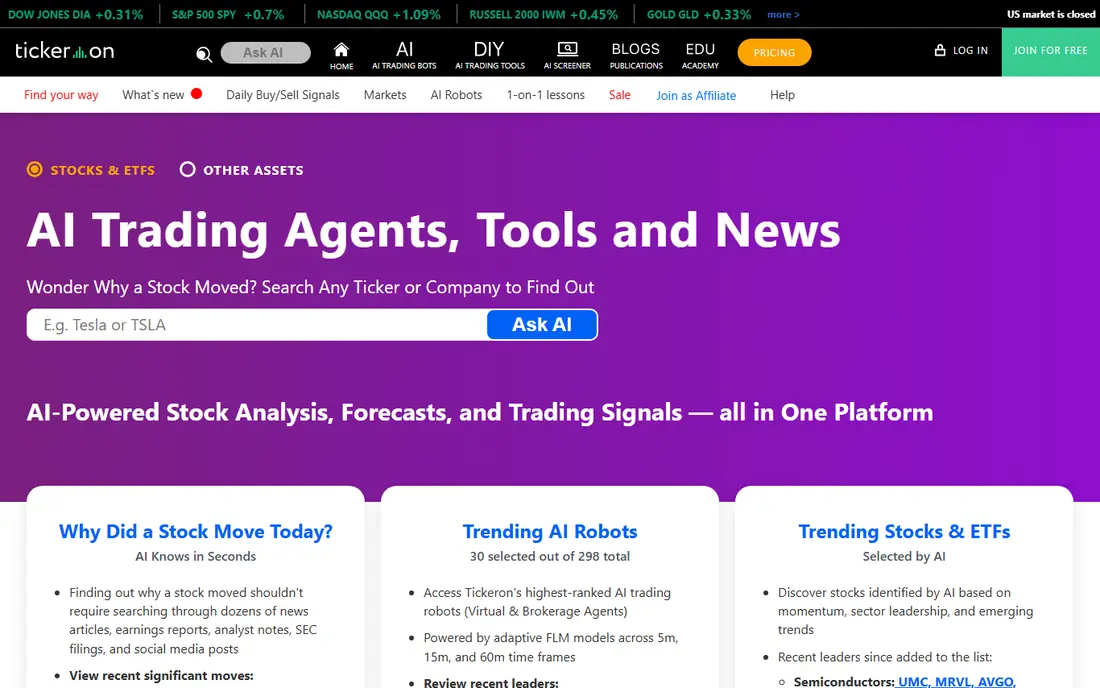
Tickeron offers a broad suite of AI tools, including pattern recognition, trend prediction and AI robots that apply machine learning signals to different markets. The breadth suits traders who want to compare signals across asset types in one account. Free access lets you explore the interface before committing to a paid robot or feature set.
Breadth is also the risk. With many robots and signals, it is easy to follow a backtest that looks strong and ignore volatility and drawdowns. Treat any annualised return claim with caution, and check how a robot behaved in falling markets. Tickeron suits curious traders who will test slowly, not beginners looking for a single set-and-forget bot.
- Wide AI robot and pattern tools
- Coverage across stocks, ETFs, forex and crypto
- Free access to explore
- Performance claims need careful reading
- Many tools can overwhelm beginners
- Pricing varies by robot and feature
Composer lets you build an investing strategy visually, using rules and conditions rather than code, then automates rebalancing through a connected brokerage account. That approach suits investors who like a clear rule, such as rotating between ETFs based on momentum or rebalancing on a schedule, without watching the market all day.
Automation does not remove risk. A rule that backtested well can still lose money, and rebalancing can trigger trades you did not expect if conditions change quickly. Check brokerage availability, fees and tax effects before you automate. We would use Composer for disciplined, rules-based investing, not for fast day trading.
- Visual strategy builder without coding
- Automated rebalancing
- Backtesting for built strategies
- US brokerage availability and rules apply
- Automated strategies still carry market risk
- Feature depth varies by plan
Danelfin uses machine learning to score stocks and ETFs, with explanations for the factors behind each score. That format helps beginners and busy investors build a research shortlist without reading dozens of filings at once. You can compare scores, check recent changes and use the score as one input alongside valuation, earnings and risk checks.
A score is not a recommendation. High scores can still fall, and a model can miss news, management changes or sector shocks. Danelfin works best as a filter: use it to find candidates, then do your own checks before any trade. For research-led investors, that honest limit makes it more useful than a tool that promises returns.
- Clear AI scores for stocks and ETFs
- Explanations for score factors
- Useful for research shortlists
- Scores are research aids, not buy orders
- Coverage focuses on listed stocks and ETFs
- Premium features need a paid plan
Capitalise.ai turns plain-English conditions into trading rules, such as buying when a stock crosses a moving average or selling on a price trigger. You can backtest those rules, set alerts and, where supported, automate execution through a broker. That plain-language approach lowers the coding barrier for traders who think in conditions rather than code.
The tool is only as good as the rule you write. A simple rule can overtrade, trigger at the wrong time or fail in volatile markets. Test with backtests and small size first, and review rules after market changes. Capitalise.ai suits traders who already have a strategy idea and want to automate it, not traders looking for the tool to invent one.
- Build strategies in plain English
- Backtesting and alerts
- Broker connections for automation
- Strategy quality depends on your rules
- Automation needs a supported broker
- Not a stock picker by itself
Magnifi combines an AI investing assistant with stock research and portfolio tools, aimed at everyday investors rather than professional day traders. You can ask questions about a stock, compare options and review portfolio ideas in plain language. That conversational style helps beginners learn without jumping straight into complex charts.
Keep the boundary clear. An AI assistant can summarise data and explain concepts, but it does not know your full financial situation and it cannot guarantee an outcome. Use Magnifi to learn and to shortlist ideas, then check fees, risk and diversification before you invest. For learning-led investors, it is a gentler entry point than a scanner.
- AI assistant for investing questions
- Portfolio and stock research in one place
- Beginner-friendly language
- Assistant answers are research help, not advice
- Brokerage and feature availability vary
- Premium tools need payment
Kavout offers an AI score, known as Kai Score, that blends fundamental and technical signals for stocks. The framing suits investors who want a single signal to compare with their own research, especially for larger listed companies. It is more research-oriented than a fast day-trading scanner, which may suit swing and position traders.
Retail access and pricing are less straightforward than on consumer apps, so confirm current plans before you rely on it. A score alone should not trigger a trade. Check earnings, valuation, sector risk and position size first. Kavout fits traders who already do research and want an extra signal, not beginners who want a simple buy list.
- Kai Score combines fundamental and technical signals
- Institutional-style research framing
- Useful for signal comparison
- Pricing and access are less transparent for retail users
- Signals need your own risk checks
- Not a beginner-first app
Stock Hero targets beginners who want to try trading bots without coding. It offers bot templates and a marketplace, with paper trading options that let you test a bot before risking real money. That testing path is valuable, because a bot that looks good in a description can behave very differently in live markets.
Vetting matters. Marketplace bots differ in strategy, risk and transparency, and past results do not predict future performance. Start with paper trading, use small size if you move to live trading, and set clear stop rules. Stock Hero suits learners who will test patiently, not users who expect a bot to trade profitably on its own.
- Bot marketplace and templates for beginners
- Paper trading options in many setups
- Stock and crypto bot options
- Bot performance varies widely
- Marketplace bots need vetting
- Trading bots still carry full market risk
How we picked these
We compared official feature pages, pricing pages and public documentation in October 2026, and we required a clear AI feature, not only a chart or a news feed. We included scanners, chart automation, scores, rules builders and bots, because AI trading covers all those jobs. We left out tools with no clear official homepage or no current AI product, and we treated backtest claims as marketing until a tool showed its method and risks.
How to use an AI trading tool without over-trusting it
Decide whether you need ideas, automation or research
Scanners give ideas, chart tools automate analysis, scores aid research, and rules builders automate execution. A tool that does one job well is often better than a tool that claims to do all jobs. Match the tool to the step where you actually need help.
Test small, check drawdowns and keep risk rules
Paper trade first where possible, then use small size and a clear stop rule. Check how a signal or bot behaved in down markets, not only in rising markets. Keep position size, diversification and cash reserves under your own control, because no AI tool manages your overall risk for you.
Read fees, broker links and data costs
Monthly prices, data add-ons, broker fees and execution costs all affect returns. Confirm whether real-time data is included, whether execution needs a separate service, and whether a trial is free or paid. This is general information only, not financial advice, and trading carries risk.
FAQ
What is the best ai trading app for beginners?
Danelfin, Magnifi and Composer are easier starting points than Trade Ideas or TrendSpider, because they focus on research, scores and rules rather than fast scanning. Beginners should start with paper trading or small size, and learn risk controls before paying for a high-priced scanner.
What is the best ai trading platform for active traders?
Trade Ideas suits active stock scanning, while TrendSpider suits automated chart analysis and alerts. Both are priced for serious traders, so active use and a clear strategy matter more than the AI label alone.
What are the best ai trading apps for stocks?
Trade Ideas, Tickeron, Danelfin and Kavout all cover stocks, but they do it differently: scanning, pattern robots, scores and signals. Choose by whether you want ideas, research help or automation, and test the tool on stocks you already follow.
Do AI trading tools guarantee profits?
No. AI tools can find patterns, score stocks and automate rules, but markets change, models fail and backtests can overfit past data. Treat every signal as an idea to verify, use risk limits, and never invest money you cannot afford to lose.
What are the best ai tools for trading crypto?
Tickeron and Stock Hero include crypto bot and signal options, but crypto adds volatility, liquidity and custody risks on top of normal trading risk. Check which exchanges and assets a tool supports, and confirm fees before you connect any account.
Is the best ai trading app free?
Some tools offer free plans or free research tiers, including Tickeron, Composer, Danelfin, Capitalise.ai, Magnifi and Stock Hero. Full scanning, automation and premium signals usually need a paid plan, and broker or data fees may apply separately.