Best AI Tools to Animate Old Photos: 8 Tools Compared
Our best ai tools to animate old photos guide reviews 8 legitimate tools for family portraits and memories, with consent notes, prices, and limits in 2026.

- Editor's choice
 MyHeritage Deep Nostalgia
Old family portraits
Starts atSee websiteVisit myheritage.comFull review - Great alternative
 CapCut
Easy phone animations
Starts atSee websiteVisit capcut.comFull review - Also consider
 Dreamina
Creative photo to video
Starts atSee websiteVisit dreamina.capcut.comFull review
TL;DR:
- MyHeritage Deep Nostalgia is our pick for old family portraits because it is built for faces, genealogy, and respectful restoration.
- General video generators such as Runway, Pika, and Luma give more motion control, but they need clearer prompts and review.
- Animate only your own photos or photos you have permission to use, and be thoughtful when animating images of people who have died.
- Photo quality matters: a cleaned, well-lit scan will animate far better than a faded, blurry original.
Quick comparison
| Tool | Best for | Starts at | Free plan? | |
|---|---|---|---|---|
| MyHeritage Deep Nostalgia | Old family portraits | See website | Yes | Visit |
| CapCut | Easy phone animations | See website | Yes | Visit |
| Dreamina | Creative photo to video | See website | Yes | Visit |
 Runway | Controlled video generation | See website | Yes | Visit |
 Pika | Short photo to video clips | See website | Yes | Visit |
 Luma | High quality video clips | $25 per month | No | Visit |
 Kaiber | Stylized photo motion | See website | Free trial | Visit |
 LeiaPix Converter | Depth and 3D-style motion | See website | Yes | Visit |
The best ai tools to animate old photos
Please use these tools lawfully and with consent: animate your own photos, or photos you have permission to use, and do not use them to create misleading, non-consensual, or deceptive imagery of real people. The tools below are legitimate photo and video tools, and none of them is listed here for undressing or non-consensual imagery. If you animate a photo of a deceased relative, consider how family members will feel about seeing that person move and speak, and share the result with care.
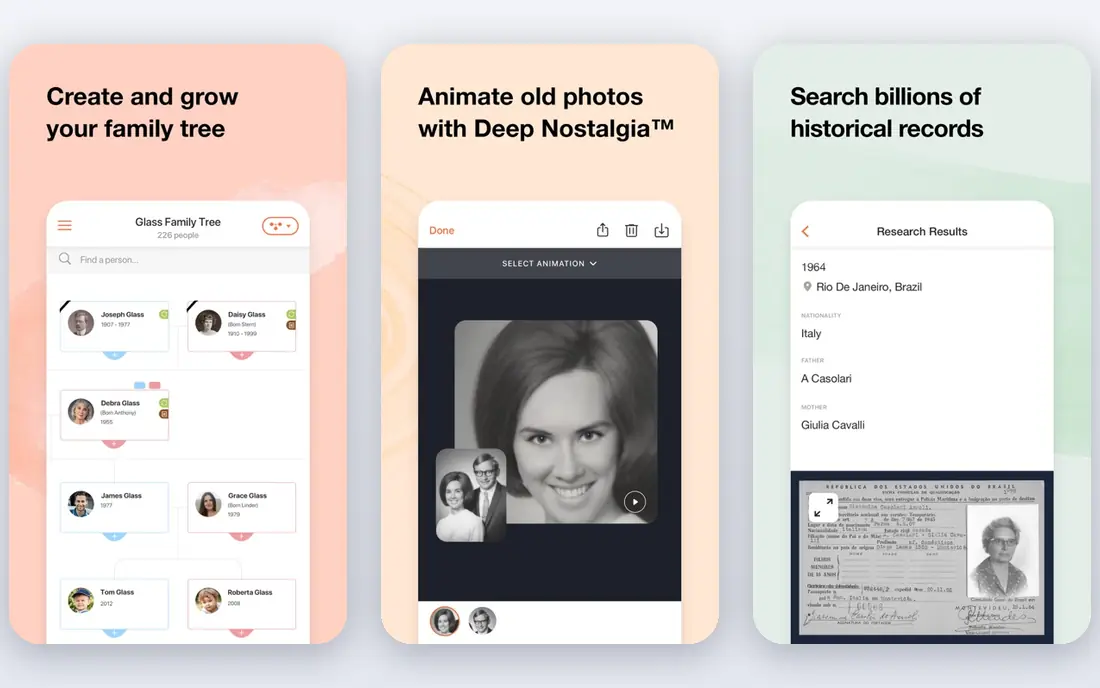
Deep Nostalgia is the natural starting point for old photos because it was made for them. Upload a portrait, and it animates the face with natural movement such as blinking, smiling, and turning the head. Photo enhancement can clean up an old scan first, which helps the animation look less harsh. For family history projects, the link to genealogy records adds context that general video tools do not offer. Motion is preset rather than directed, so you cannot ask a subject to perform a specific action. Free animations are also limited, and unlimited use sits inside a paid MyHeritage plan. If your goal is to see an ancestor's portrait move gently and share it with family, Deep Nostalgia is still the most fitting tool here.
- Built for old portraits
- Face animation with blinking and head movement
- Photo enhancement and genealogy context
- Limited free animations
- Full access needs a MyHeritage subscription
- Motion is preset, not custom

CapCut suits anyone who wants a quick animated photo on a phone without learning a video generator. Its templates and photo effects can add zoom, pan, and motion to a still image, and its editor makes it easy to add music, captions, and transitions. For birthdays, anniversaries, and family slideshows, that speed is a real advantage. CapCut is not a specialist for old portraits, so face animation will be less lifelike than Deep Nostalgia. Templates can also make different family videos look similar. Use CapCut when you want a shareable slideshow or a light animation, not when you want a realistic portrait animation.
- Easy mobile workflow
- Photo animation templates
- Simple sharing to social apps
- Templates can look generic
- Some effects need Pro
- Pricing varies by platform

Dreamina, from CapCut, turns a photo and a text prompt into a short video clip, with options to upscale and restore the source image first. That makes it useful for creative family projects, such as a gentle motion clip from a wedding photo or a stylized video from a scanned portrait. Free credits let you test it before paying. Prompt-based video can drift from the original photo, especially with faces, so review every clip and keep expectations modest for old, low-resolution portraits. Credit rules also vary, so check the current page in your region. For creative motion beyond a preset face animation, Dreamina is a flexible option.
- Photo to video from prompts
- Upscaling and restoration options
- Free daily credits in many regions
- Output varies by prompt
- Credit limits need checking
- Best for creative clips, not exact likeness
Runway is a professional video generation platform that can animate a still photo with detailed motion and camera control. You can describe movement, set camera direction, and generate several versions until one fits your project. For a filmmaker or a creator making a short film from archival photos, that control matters. Runway is not a one-tap family app. Credits, model choices, and prompt skill affect cost and quality, and old portraits may need restoration before they animate well. Use Runway when you want creative control and are willing to iterate, and use Deep Nostalgia when you want a simple portrait animation.
- Strong image to video models
- Camera and motion controls
- Good for creators and filmmakers
- Credit-based pricing can get pricey
- Learning curve is higher than phone apps
Pika turns a photo into a short video clip with a prompt, which suits social posts, slideshows, and creative projects. Its effects can add fun motion to scenery, objects, and portraits, and the interface is simpler than a full video studio. For a quick clip from a clear, well-lit photo, Pika is easy to try. Short clips and face distortion are the limits. Old photos with damage, blur, or small faces may produce odd results, so restore and crop the photo first. Credits also cap how many generations you can test. Pika is best for short, creative motion, not for a long, realistic portrait video.
- Simple image to video workflow
- Effects and motion options
- Good for short social clips
- Clip length is short
- Faces can distort on low quality photos
- Credits limit heavy use
Luma offers high quality image to video generation through its own models and, on current plans, several third-party models as well. That breadth gives creators choice over style and quality, and its video output can look polished when the source photo is clean. For professional creative work from photos, Luma is a serious option. Pricing is the barrier for casual family use. Plus starts at 25 dollars a month on annual billing, with no free tier shown on current pricing, and credit costs vary by model. That makes Luma better for creators who animate photos regularly than for a single family portrait. Check credit costs for your chosen model before generating many clips.
- High quality video models
- Image to video with strong motion
- Broad model access on paid plans
- No free tier on current pricing
- Credit costs vary widely by model
Kaiber suits artistic projects where you want a photo to become a stylized video, such as a music visual, an art piece, or a creative slideshow. Its styles and motion options turn a still image into something that looks intentionally artistic rather than like a real video of a person. That distinction is useful when realism is not the goal. Kaiber is not the best pick for a realistic old portrait, since its strength is style, not faithful face movement. Trial and credit limits also need checking before a larger project. Choose Kaiber when you want artful motion, and choose Deep Nostalgia when you want a portrait to move naturally.
- Stylized video from photos
- Music video and art styles
- Creative camera motion
- Stylized output, not realistic portraits
- Trial limits need checking
LeiaPix Converter takes a still photo and creates a moving image based on depth, so foreground and background shift as if the camera moves slightly. That effect works well for slideshows, social posts, and digital frames, and it does not require prompt skill. For an old photo where you want gentle motion without inventing new movement, it is a tasteful option. The motion is limited compared with a full video generator: it adds parallax and depth, not new actions or speech. It also suits web and social sharing more than broadcast video. If you want a subtle, respectful animation for a family slideshow, LeiaPix is a good, low-effort choice.
- Turns photos into depth-based motion
- Simple web workflow
- Good for slideshows
- Motion is depth-based, not full video
- Output format suits screens more than broadcast
How we picked these
We compared official feature pages, pricing pages, and public reviews for tools that animate still photos and are actively available in October 2026. We kept only legitimate photo and video tools, and we favored tools that handle old, scanned portraits well, offer clear consent and privacy terms, and produce motion without misleading claims. Tools for undressing or non-consensual imagery were excluded.
How to get a good animation from an old photo
Restore the scan first
Scan at a high resolution, crop to the face or subject, and fix obvious damage, fading, and tilt before animating. Most tools work better with a clean, front-facing, well-lit image. A blurry group photo with small faces will animate poorly in every tool, so pick a strong single portrait for your first test.
Keep motion gentle and honest
For family portraits, gentle motion usually feels more respectful than dramatic action. Avoid adding speech, gestures, or scenarios that imply a person said or did something they did not, especially for deceased relatives. Label the video as AI-animated when you share it, so viewers do not mistake it for real footage.
Check privacy before uploading
Read the privacy terms for any tool before uploading a family photo, and avoid uploading photos of other people without permission. Delete uploads when a tool allows it, and do not share an animation publicly if family members are uncomfortable with it. Consent and care matter more than a striking effect.
FAQ
What is the best tool to animate an old family photo?
MyHeritage Deep Nostalgia is the best fit for most old family portraits because it is built for faces, restoration, and genealogy. For creative motion or video projects, Runway, Pika, and Dreamina give more control, while LeiaPix gives gentle depth motion. Start with Deep Nostalgia for a portrait, then try a general video tool if you want a different style.
Is it okay to animate a photo of someone who has died?
It can be, when done with care and family agreement, especially for remembrance and family history. Share the result privately first, label it as AI-animated, and avoid adding speech or actions that misrepresent the person. If family members find it distressing, respect that view and do not share it publicly.
Can I animate a photo I found online?
Only if you have permission or a clear legal right to use that photo. Do not animate photos of private people, celebrities, or strangers without permission, and do not use animations to mislead viewers. When in doubt, animate only photos you took yourself or family photos you have permission to share.
Why does my old photo animate badly?
Common causes are low resolution, blur, damage, small faces, side profiles, and group photos with many faces. Restore the scan, crop to one clear face, and try again. Some tools also handle faces better than others, so a portrait that fails in a general video tool may work in Deep Nostalgia.
Do these tools keep my uploaded photos?
Policies vary by vendor, so read the privacy page before uploading, especially for family photos. Some tools delete uploads after processing or allow deletion from your account, while others retain files for service improvement unless you opt out. Avoid uploading sensitive photos to a tool whose terms you have not checked.