Best AI Tools for Slide Generation in 2026: 8 Tools Compared
Compare the best ai tools for slide generation in 2026, with pricing, free plans, exports and design controls to help you build polished decks faster.
- Editor's choice
 Gamma
Fast prompt to deck creation
Starts atSee websiteVisit gamma.appFull review - Great alternative
 Beautiful.ai
Consistent business decks
Starts atSee websiteVisit beautiful.aiFull review - Also consider
 Pitch
Startup and team pitch decks
Starts atSee websiteVisit pitch.comFull review
TL;DR:
- Gamma is the fastest prompt to deck option in this group, while Beautiful.ai gives the most consistent formatting for business decks.
- If you must stay inside PowerPoint or Google Slides, Plus AI and SlidesAI fit better than a separate web editor.
- Free plans are useful for a trial deck, but PDF and PowerPoint exports usually sit behind a paid plan.
- Canva and Visme suit teams that also need social graphics, charts and other visual content in the same account.
Quick comparison
| Tool | Best for | Starts at | Free plan? | |
|---|---|---|---|---|
| Gamma | Fast prompt to deck creation | See website | Yes | Visit |
| Beautiful.ai | Consistent business decks | See website | Free trial | Visit |
| Pitch | Startup and team pitch decks | See website | Yes | Visit |
 Canva | All round visual design plus slides | See website | Yes | Visit |
 Plus AI | AI inside PowerPoint and Google Slides | See website | Free trial | Visit |
 SlidesAI | Text to slides inside Google Slides | See website | Yes | Visit |
 Visme | Data heavy presentations | See website | Yes | Visit |
 Decktopus | Simple decks for founders and small teams | See website | Yes | Visit |
The best ai tools for slide generation
We compared prompt to deck speed, editing control, brand controls, exports and pricing. The tools below cover quick one off decks, team pitch decks and data heavy reports.
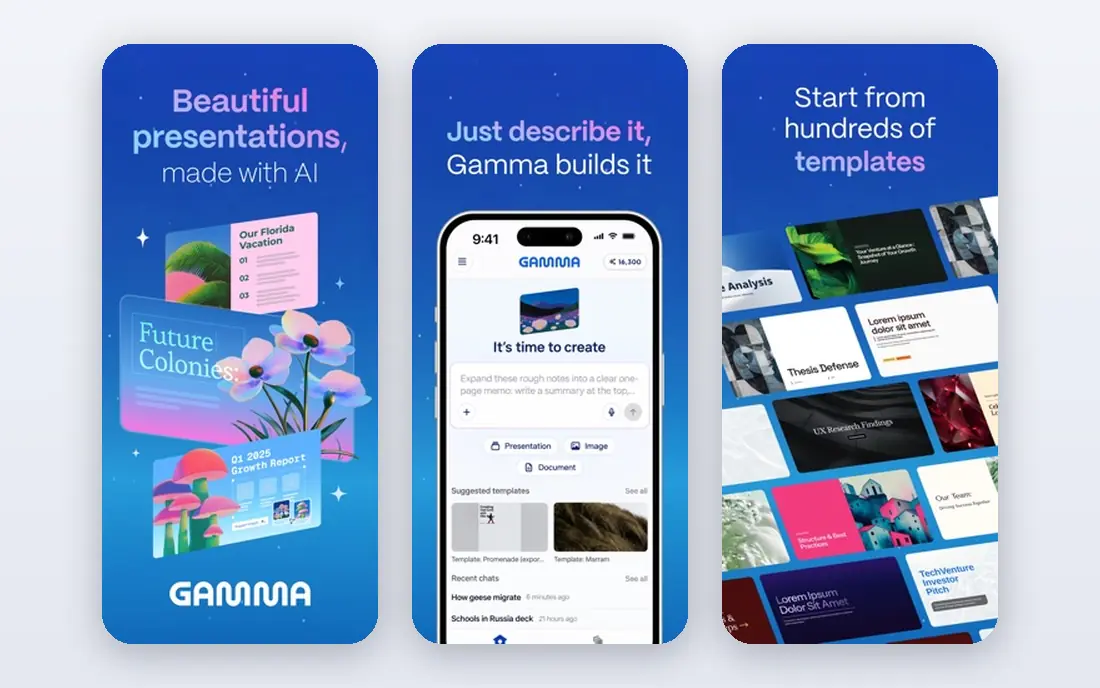
Gamma starts with a short prompt, an outline or a document, then builds a full deck with layouts, images and suggested copy. That speed is the main reason many people choose it for a first draft, a class talk or a quick internal update. You can then edit text, change the theme and reorder cards without rebuilding the whole deck from scratch.
The trade off is control. Gamma decks look polished in a browser, but fine tuning a single slide to match a strict company template can take extra work. Check the export options before you commit, because PowerPoint and PDF exports matter if your audience expects a file rather than a link. For speed and a modern look, it is still our pick for most people starting from a blank page.
- Very fast first draft from a prompt or pasted text
- Clean modern themes
- Web sharing with viewer analytics
- Export options are limited on the free plan
- Heavy editing can feel less precise than PowerPoint

Beautiful.ai is built around smart slides that keep spacing, alignment and text size balanced as you add or remove content. That helps a team produce decks that look alike even when several people edit them. It is a strong fit for consulting reports, board updates and sales decks where consistency matters more than a one off creative idea.
The cost is flexibility. You work inside its design system, so a wild custom layout may not be possible. Teams that need brand fonts, colors and locked templates will value that structure. Solo users who only make a deck now and then may find the trial useful, but they should weigh the monthly cost against a free editor.
- Smart slides adjust layout as you edit
- Strong brand and template controls for teams
- Clean professional look
- No permanent free plan
- Less freedom for highly custom creative layouts

Pitch focuses on decks that a team builds together and sends to outsiders, especially investors and clients. Real time collaboration, comments and link sharing sit at the center of the product. Founders can see which slides get attention, which helps them tighten a pitch before the next meeting.
Pitch does not try to replace a designer. Its AI features help with drafting and structure, but you still shape the story yourself. That is a plus for a pitch, where the argument matters as much as the visuals. Small teams can start free, then move up when they need more members, analytics or brand controls.
- Built for collaborative decks and sharing
- Per slide analytics on paid plans
- Solid template library
- AI help is more assistive than full prompt to deck
- Advanced analytics need a paid plan
Canva is the practical choice if presentations are only one part of your work. The same account can make social posts, documents, videos and print material, and the presentation editor shares those assets and brand kits. Magic Design and related tools can draft slides from a prompt, though you will still edit slide by slide for a longer deck.
The free plan is generous for basic decks, and paid plans add brand controls, background removal and larger storage. If you already use Canva for marketing, adding slides there avoids another subscription. If you want a full deck from one prompt with minimal editing, a dedicated tool like Gamma may save more time.
- Huge template and stock asset library
- Easy PowerPoint and PDF export
- Useful beyond presentations
- AI slide generation is less complete than dedicated deck tools
- Large teams may need a higher plan
Plus AI is an add on rather than a separate editor. It generates slides inside Google Slides and PowerPoint, and it can rewrite or expand an existing deck. That matters in offices where the final file must be a PowerPoint file, with company fonts and a set layout, and where a web link alone will not pass review.
Because it lives inside a familiar editor, learning time is short. You keep the charts, notes and sharing settings you already know. The catch is the same as with every AI writer: facts, numbers and claims need checking before you present them. Use it to speed up structure and drafting, not as a source of truth.
- Works inside tools teams already use
- Good for editing existing decks
- Keeps PowerPoint formatting
- No permanent free plan
- Output still needs human review and fact checking
SlidesAI turns pasted text or an outline into Google Slides, with a choice of theme and tone. Teachers, students and Google Workspace teams like it because the result lands directly in Slides, ready for sharing and comment. It is especially handy for turning notes, articles or meeting summaries into a short deck.
Design depth is limited compared with a full design platform. You get a clean deck fast, but you may want to adjust images, charts and spacing for a client facing presentation. The free tier lets you test the flow on a few decks a year, which is enough to judge if the style fits your work.
- Simple text to presentation flow for Google Workspace users
- Quick summaries from long text
- Low learning curve
- Design options are narrower than Gamma or Canva
- Best results need clear, well structured input text
Visme suits decks where numbers carry the story. You can build charts from a spreadsheet, add interactive elements and turn a report into a visual presentation without leaving the editor. Marketing and operations teams use it for quarterly reviews, proposals and training material that needs more than bullet points.
The interface has more panels and options than a minimal AI deck tool, so first time users should allow time to learn it. Once you know where the data tools sit, it is faster than building charts in a separate app and pasting images into slides. Check the free plan limits on projects and downloads before you build a large report in it.
- Strong charts, maps and data widgets
- Good for reports and infographics
- Brand kit on paid plans
- More steps to learn than a simple prompt tool
- AI generation is not the main strength
Decktopus asks a few questions about your topic and audience, then builds a deck you can edit in the browser. It is aimed at founders, freelancers and small teams who need a decent deck without hiring a designer or learning a complex editor. Forms, links and basic analytics can be added for lead capture and follow up.
The simplicity is both the appeal and the limit. You will not get the deep brand system of Beautiful.ai or the asset library of Canva. For a pitch, a proposal or a workshop deck, that trade off is often fine. Start on the free tier, and only pay if you need more AI credits, exports or team features.
- Quick AI deck creation with guided questions
- Built in forms and analytics options
- Simple editing
- Template range is smaller than Canva
- Advanced design control is limited
How we picked these
We compared official feature pages, pricing pages, export options and free plan terms for tools that generate slides from a prompt, outline or document in October 2026. We left out tools that had shut down or that only offer static templates with no AI generation. We favored tools with a working free plan or trial, clear PowerPoint or PDF export, and a distinct use case, so the list covers speed, consistency, collaboration and data, rather than eight versions of the same product.
What to check before you pay
Start with the end format. If your audience needs a PowerPoint file, test the export on a free or trial deck first, and check fonts, charts and images after export. A deck that looks fine on the web can shift in PowerPoint, and that rework eats the time you saved.
Next, check brand and fact controls. Look for custom fonts, colors and logo placement, and for a way to lock a template for a team. Then test the AI with your own material, not a demo topic. Paste a real outline with real numbers, and see how much editing the draft needs. If every slide needs a rewrite, a simpler editor plus your own outline may be faster.
Finally, count the decks you make in a month. Credit based plans suit occasional users, while a monthly plan suits a team that makes decks weekly. Watch for limits on AI credits, exports, viewers and team members, because those limits, not the headline price, decide the real cost.
A note on AI accuracy
AI slide tools can invent statistics, quotes and product details that sound confident. Treat every draft as a starting point. Verify numbers against your source documents, remove claims you cannot support, and keep your own notes for any figure you present. That check takes minutes and protects your credibility in the room.
FAQ
What are the best ai slide generation tools for beginners?
Gamma and Decktopus are the easiest starting points, because a short prompt produces a full draft you can edit. Canva is also easy if you prefer templates and manual editing. Try a free deck in each before paying, and pick the editor that feels least like work.
Can AI tools replace PowerPoint or Google Slides?
They can draft faster, but they do not replace the final file in most offices. Plus AI and SlidesAI work inside PowerPoint and Google Slides, while Gamma, Beautiful.ai and Pitch export to those formats on paid plans. Keep your final review in the tool your audience will open.
Are there free ai tools for slide generation?
Yes. Gamma, Pitch, Canva, SlidesAI, Visme and Decktopus all offer a free plan or free credits, with limits on exports, AI credits or projects. Beautiful.ai and Plus AI offer trials instead of a permanent free plan. Read the free limits before you build a deck you need to export.
How much do AI slide tools cost?
Prices change often and many vendors quote annual billing, so we list See website where a price could not be verified on the day of writing. In general, expect a solo paid plan in the low teens per month on annual billing, with team plans higher. Credit packs and per user pricing can change that total.
Do AI slide tools keep my content private?
Policies differ, so read the privacy and data terms before uploading sensitive material. Avoid pasting confidential client data, unreleased financial figures or personal data into a free tool. For sensitive decks, use a business plan with clearer data controls, or draft locally and use AI only for layout.