Best AI Tools for Lesson Planning in 2026: 8 Tools Compared
We compared the best ai tools for lesson planning for teachers, covering lesson drafts, rubrics, differentiation, pricing, and free plans for 2026 today.
- Editor's choice
 MagicSchool AI
Broad teacher toolkit
Starts at$12.99 per monthVisit magicschool.aiFull review - Great alternative
 Eduaide.ai
Template library and pedagogy options
Starts at$5.99 per monthVisit eduaide.aiFull review - Also consider
 Curipod
Live interactive lessons
Starts atSee websiteVisit curipod.comFull review
TL;DR:
- MagicSchool AI is our pick for most teachers because it covers lesson plans, rubrics, quizzes, and feedback in one free starting plan.
- Diffit is the strongest choice when one class spans several reading levels, since it builds leveled passages from almost any source text.
- Curipod stands out for live lessons, because students respond during class and teachers can give feedback while the lesson is still running.
- Eduaide.ai suits teachers who want a large template library and clear pedagogy options, including depth-of-knowledge levels.
- Brisk Teaching fits Google Workspace schools best, since it works inside Docs, Slides, and Forms rather than in a separate dashboard.
Quick comparison
| Tool | Best for | Starts at | Free plan? | |
|---|---|---|---|---|
| MagicSchool AI | Broad teacher toolkit | $12.99 per month | Yes | Visit |
| Eduaide.ai | Template library and pedagogy options | $5.99 per month | Yes | Visit |
| Curipod | Live interactive lessons | See website | Yes | Visit |
 Diffit | Leveled reading and differentiation | $14.99 per month | Yes | Visit |
 Brisk Teaching | Feedback inside Google Workspace | See website | Yes | Visit |
 LessonPlans.ai | Fast first drafts | See website | Yes | Visit |
 Education Copilot | Standards-aligned documents | $9 per month | Yes | Visit |
 Khanmigo | Tutoring plus teacher planning help | Free for teachers | Yes | Visit |
The best ai tools for lesson planning
These tools turn a topic, grade, and standard into a usable starting draft. We compared their planning features, free limits, pricing, and school controls, and we kept only tools that still work for teachers in 2026.

MagicSchool AI is the first tool we would try if a teacher wants one login for most planning jobs. A teacher enters the grade, subject, topic, and standard, then gets a structured plan with objectives, materials, activities, and assessment ideas. That structure matters, because a vague outline still leaves most of the work undone.
The library goes past lesson plans. It includes rubric builders, quiz makers, writing feedback, differentiation tools, and drafts for family emails and report card comments. Teachers who plan several subjects can stay in one place instead of opening a new tool for each task. Paid Plus adds unlimited generations, output history, and student tools, at $12.99 per month or $8.33 per month billed annually.
The honest catch is the free limit. A teacher who plans daily may hit the cap before the month ends, and the size of the library can feel busy at first. Student use also needs school approval and clear classroom rules, since AI output still needs a teacher check before it reaches students.
- More than 80 teacher tools in one place
- Lesson plans, rubrics, quizzes, and report comments
- Student tools with teacher oversight
- Free plan has usage limits
- Large library takes time to learn
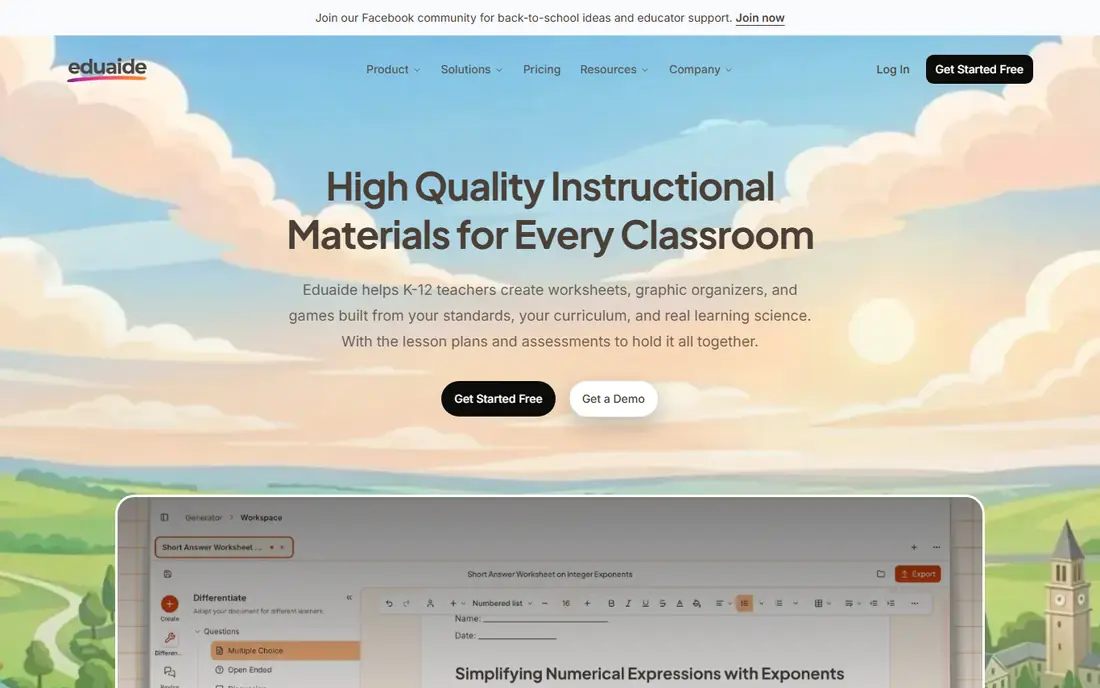
Eduaide.ai feels built for teachers who like to start from a clear template and then shape the result. Its library covers lesson plans, worksheets, assessments, rubrics, and feedback drafts, with options tied to instructional frameworks. A teacher can ask for a specific depth-of-knowledge level or a specific kind of practice, rather than accepting a generic draft.
The revision workflow is a real strength. Teachers can ask for changes based on evaluator-style feedback, and the tool can chat about an open document. That helps when a first draft is close but the wording, reading level, or task type needs work. Pro costs $5.99 per month or $49.99 per year, with unlimited generations on the paid plan.
The limit is the free tier, which gives 24 credits a month, enough for a handful of resources but not for heavy daily use. Eduaide.ai is also teacher-only, so it will not run student activities or tutoring. Teachers who want student-facing lessons will need a second tool for that job.
- Large library of resource types
- Feedback and revision tools
- Clear free starting point
- Free plan gives limited monthly credits
- Teacher-only, with no student accounts
Curipod starts from a different question than most planning tools. Instead of asking how to write a plan faster, it asks how students will take part while the lesson runs. A teacher creates interactive slides with polls, open responses, drawings, and writing tasks, and students join from their own devices. That live layer makes it a good fit for lessons where participation is the point.
The AI feedback during writing practice is the feature that sets it apart. Students write, and the tool gives quick feedback that a teacher can review and build on, rather than waiting until homework comes back. Teachers can also use AI to draft the slide deck itself, which keeps the planning step and the delivery step in one workflow.
The trade-off is pricing clarity. Curipod lists a free tier and school or district pricing on request, so an individual teacher cannot always see the full paid cost up front. It also shines most in a live classroom, so teachers who only need a written plan may find a simpler drafting tool a better fit.
- Live polls, word clouds, and writing practice
- Real-time AI feedback during lessons
- Student responses teachers can review
- Paid pricing is quote-based for schools
- Best value shows up in live class use, not solo planning
Diffit solves a narrow problem very well. A teacher pastes an article, a textbook passage, or a link, and Diffit rewrites it at several reading levels, then builds questions, vocabulary, and summaries to match. For a class where reading levels vary widely, that single step can save more time than a general lesson draft.
The tool also helps multilingual learners, because teachers can generate adapted versions and supporting materials from the same source. That keeps the whole class working on the same ideas, even when the reading support differs. The free Basic plan gives a taste of this, while the paid plan costs $14.99 per month or $149.99 per year.
The weakness is scope. Diffit is not a full planning suite, and it will not replace a tool that builds full unit plans, rubrics, and behavior supports. Teachers who need leveled reading every week will get strong value here, while teachers who need general planning may prefer MagicSchool AI or Eduaide.ai as the main tool.
- Turns any text into leveled passages
- Builds questions and vocabulary from the same source
- Useful for mixed-level classes
- Focused mainly on reading and differentiation
- Paid plan costs more than some general planners
Brisk Teaching takes the opposite approach from a big dashboard. It lives as a Chrome extension inside the Google tools teachers already use, so feedback, lesson resources, and differentiation happen in the document itself. A teacher grading in Docs can apply a rubric, adjust reading level, or generate feedback without copying text into another app.
That in-context design is why it fits Google Workspace schools so well. The workflow change is small, which matters when teachers are short on time and patience for new logins. The free educator plan covers many tools, while schools and districts can buy premium plans for admin dashboards and analytics.
The catch is the ecosystem lock-in. Teachers who work mainly in Microsoft tools or paper will get less from Brisk Teaching than a Google school will. Some premium school features also require a quote, so district buyers should ask for pricing early in the process.
- Works inside Google Docs, Slides, and Forms
- Rubric-based feedback without switching tabs
- Free plan for educators
- Best for Google Workspace schools
- School premium pricing is quote-based
LessonPlans.ai does one job and keeps it simple. A teacher enters a topic and grade, and the tool returns a structured lesson plan that can be edited right away. For a teacher who needs a starting point in minutes, that direct path beats a library with dozens of tools to learn.
The simplicity also helps new users. There is little setup, and the output follows a familiar plan format with objectives, activities, and assessments. Teachers can then add their own materials, local examples, and classroom routines, which is where a generic draft becomes a real lesson.
The limit is depth. LessonPlans.ai does not match the template range of Eduaide.ai or the student tools of MagicSchool AI, and every draft still needs a careful check for accuracy, fit, and reading level. Treat it as a fast first draft tool, not as a full planning system.
- Very fast lesson drafts
- Simple inputs for grade and topic
- Easy to edit after generation
- Drafts need teacher review and local detail
- Smaller feature set than full suites
Education Copilot appeals to teachers who want clean, print-ready documents. It generates lesson plans tied to standards, plus rubrics, worksheets, and other classroom handouts in a consistent format. That consistency helps when a teacher needs a set of materials that look and read like they belong together.
The tool is also easy to explain to a department. One teacher can draft a plan, a colleague can adjust it, and the result still follows the same structure. Paid plans start at about $9 per month for individuals, with school and district options available for larger groups.
The downside is range. Education Copilot does not offer live student activities or the huge tool library of MagicSchool AI, and its strength is documents rather than interactive lessons. Teachers who want both document generation and live class tools should pair it with Curipod or a similar tool.
- Lesson plans, rubrics, and worksheets in one place
- Consistent document formats
- School plans available
- Smaller tool range than the biggest suites
- Interface feels more document-focused than interactive
Khanmigo comes from Khan Academy, and that background shapes how it works. For students, it acts more like a tutor that asks guiding questions than a tool that hands over answers. For teachers, it offers planning help and classroom activities tied to Khan Academy content, which can be useful when a lesson already uses those materials.
The price is the clear draw. Khanmigo is free for US teachers, which makes it easy to try without a budget request. That matters for teachers in schools where paid subscriptions need approval, and for student teachers who need a tool they can use right away.
The planning side is narrower than a dedicated lesson planner, though. Teachers who need rubrics, IEP drafts, and a wide template library will still want MagicSchool AI or Eduaide.ai. Khanmigo works best as a tutoring and guided-practice companion, with lesson help as a useful extra rather than the main job.
- Free for US teachers
- Socratic tutoring style for students
- Tied to Khan Academy learning materials
- Teacher planning features are narrower than dedicated planners
- Student tutor access depends on district setup
How we picked these
We compared official feature pages, pricing pages, and app and extension listings, and we checked that each tool still offers lesson planning features for teachers in 2026. We favored tools with a free starting point, clear school privacy options, and a planning workflow that goes past a blank chatbot prompt. We also checked for tools that had shut down or changed focus, and we left those out rather than listing a dead product.
We did not claim hands-on classroom testing. Our comparison rests on published features, pricing, free limits, and public documentation about school use. Teachers should still review every AI draft for accuracy, bias, and fit for their students before using it in class.
What to check before you pay
A good lesson tool should save planning time without adding a new pile of checking work. Start with the workflow you already use, then pick the tool that fits inside it.
Match the tool to the planning job
General planning, leveled reading, live lessons, and grading feedback are different jobs. A general suite covers the first job well, Diffit covers the second, Curipod covers the third, and Brisk Teaching covers the fourth. Buying one tool for all four jobs often leads to a tool that does none of them well.
Check free limits against a real week
Free plans differ in a way that matters. Some give a set number of generations per month, while others give a set number of credits. Count how many plans, rubrics, and feedback drafts you make in a normal week, then multiply by four. If the free limit falls short, the paid price is the real price for you.
Review privacy and student data rules
Ask how student data is handled, whether data is used to train models, and what controls a school can set. Tools built for schools usually publish education privacy commitments and offer admin controls on paid school plans. If a tool cannot answer those questions clearly, keep student accounts out of it and use it for teacher-only drafting.
Keep the teacher in charge of the final draft
AI drafts can contain errors, outdated facts, or tasks that do not fit your students. Read each plan for learning goals, reading level, materials you actually have, and time you actually have. Add local examples, checks for understanding, and support for students who need it. The tool should speed up the first draft, not replace that review.
FAQ
What is the best ai tool for lesson planning for most teachers?
MagicSchool AI is our pick for most teachers, because it covers lesson plans, rubrics, quizzes, and feedback in one place with a free plan. Teachers who mainly need leveled reading should look at Diffit first, and teachers in Google Workspace schools should look at Brisk Teaching first. The best choice depends on whether your main job is drafting, differentiating, running live lessons, or grading.
Are there free best ai lesson planning tools that are actually useful?
Yes, several tools on this list offer free plans that cover a normal light planning week. MagicSchool AI, Eduaide.ai, Diffit, Brisk Teaching, and Khanmigo all offer free access for teachers, with limits that vary by tool. Check the monthly generation or credit limit before you rely on a free plan for daily planning.
Can AI lesson planners follow state standards?
Many of these tools let teachers enter a standard, grade, and subject, and they build the plan around that input. The result still needs a teacher check, because the tool may misread a standard or miss a local curriculum detail. Use the standard field as a starting point, then confirm the objectives and tasks against your district guide.
Is it safe to use AI tools with student data?
That depends on the tool and the school setup. Education-focused tools publish privacy commitments and offer school controls, but teachers should avoid entering sensitive student details into any AI tool without school approval. For teacher-only drafting, the risk is lower, since no student accounts or student work need to be involved.
How much time can an AI lesson planner really save?
The saving comes mainly on the first draft, not on the whole lesson. A teacher may get a structured plan in minutes, then spend the saved time on review, local examples, and materials. If a draft needs heavy rewriting every time, try a different prompt style or a different tool, because the fit may be wrong for that subject.