9 Best AI Text Effects Apps for Designers in 2026
Searching for the best ai text effects app for designers? We compared 9 tools for AI typography, 3D lettering, poster text, and design exports in 2026.

- Editor's choice
 Adobe Express
AI text effects with Adobe Fonts
Starts at$9.99 per monthVisit adobe.comFull review - Great alternative
 Canva
Fast social text effects
Starts atSee websiteVisit canva.comFull review - Also consider
 Kittl
Typography for merch and branding
Starts atSee websiteVisit kittl.comFull review
TL;DR:
- Adobe Express is the strongest all round choice for designers who want AI text effects with a large font library and stock assets.
- Kittl suits typography heavy merch and branding work, with text effects built for print and vector export on paid plans.
- Canva is the fastest option for social and marketing text effects, with templates and easy resizing.
- Ideogram stands out for AI generated text inside images, a task where many image generators still struggle.
- Free plans are good for testing, but commercial use, high resolution export, and vector files usually need a paid plan.
Quick comparison
| Tool | Best for | Starts at | Free plan? | |
|---|---|---|---|---|
| Adobe Express | AI text effects with Adobe Fonts | $9.99 per month | Yes | Visit |
| Canva | Fast social text effects | See website | Yes | Visit |
| Kittl | Typography for merch and branding | See website | Yes | Visit |
 Ideogram | AI text inside generated images | See website | Yes | Visit |
 VistaCreate | Quick poster and social text | See website | Yes | Visit |
 Typorama | Fast typographic posters on mobile | See website | Yes | Visit |
 Word Swag | Stylish text on photos | See website | Yes | Visit |
 Phonto | Custom text on photos | Free | Yes | Visit |
 PixelLab | Text effects on Android | Free | Yes | Visit |
The best ai text effects apps for designers
We compared official feature pages, pricing pages, and public reviews for tools that create, style, and export text effects for design work, not just plain captions.
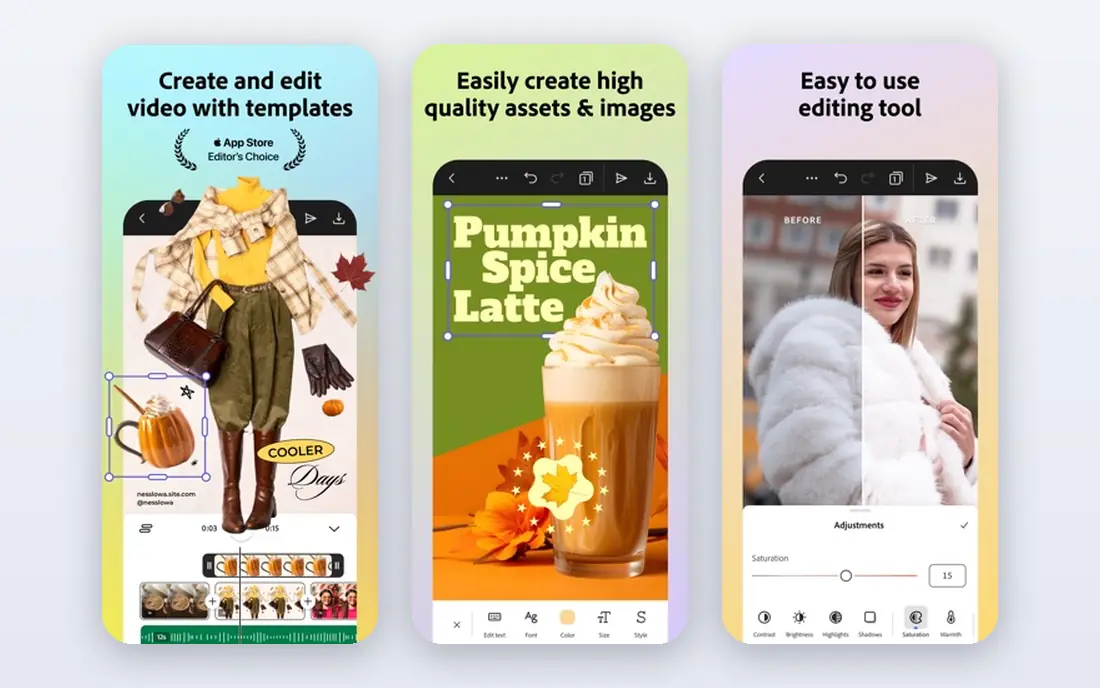
Adobe Express is the pick for designers who want AI text effects inside a serious design tool. Its Firefly features include text effects that turn a prompt into styled lettering, plus a huge Adobe Fonts library and stock assets on paid plans. Files can move to Photoshop and Illustrator for finishing, which matters for client work. The limit is credits. Generative AI use is capped by monthly credits, and the free plan gives only a small allowance. Test text effects on a real poster or social set before you commit, and check which fonts and assets are included on the plan you choose.
- Firefly AI text effects
- Large Adobe Fonts library
- Photoshop and Illustrator links
- Generative credits are limited
- Learning curve is steeper than Canva
Canva is the fastest route to a good looking text effect. You pick a template, type your words, apply effects such as shadows, outlines, curves, and glows, and resize for social, print, or presentation in a few clicks. Its AI tools add background and image options, though the strongest AI features sit on paid plans. Precision is the trade off. Canva is not a replacement for Illustrator for detailed vector lettering, and font control is simpler than in Adobe tools. For marketing, social, and quick client drafts, that speed is a strength, not a weakness.
- Many text effects and templates
- Easy resizing
- Large template library
- AI features are limited on free plan
- Less precise than pro design tools

Kittl is built for typography heavy design, especially merch, logos, and branding. Its editor combines text effects, mockups, and AI image generation, so you can test a shirt or poster design with styled lettering and see it on a product mockup quickly. Paid plans add vector PDF and SVG export and commercial licensing. The free plan is the catch. It is personal use only, with small exports and a limited token allowance, so commercial work needs a paid plan. Check current Pro pricing on its site, since sources in 2026 list different monthly and yearly figures, and confirm export size before you sell a design.
- Strong typography tools
- Text effects for merch
- Vector export on paid plans
- Free plan is personal use only
- AI use is token based
Ideogram earns its place for a specific skill: rendering readable text inside AI generated images. Many image generators garble words, while Ideogram is known for cleaner poster, logo, and typographic image output. Designers can prompt a poster style, get lettering as part of the image, and then refine it in another tool. Output still needs review. Spelling, spacing, and letter shapes can be off, especially on long phrases, so check every word before use. Use Ideogram for concepts and poster art, then finish type in Adobe Express, Canva, or Kittl for client ready files.
- Better AI rendered text than many rivals
- Poster and logo styles
- Prompt control
- Output needs checking
- Commercial terms and credits vary by plan
VistaCreate, formerly Crello, is a solid alternative to Canva for quick poster and social text. It offers templates, text styling, and animations, with a free starter plan that allows standard downloads. For small businesses that need a poster or social graphic in an hour, it is fast and approachable. The library is smaller than Canva, and its AI text tools are less deep than Adobe Express or Kittl. Choose VistaCreate when you want a simple template tool with a free plan, not when you need advanced AI lettering or vector export for print.
- Templates for posters and social
- Text effects and animations
- Free starter plan
- Smaller library than Canva
- AI features are more limited
Typorama is a mobile app for turning a short phrase into a typographic poster. You type text, pick a style, adjust layout and background, and export a shareable image. That speed suits social quotes, event announcements, and quick promotional graphics made on a phone. Desktop control is limited, and Typorama will not replace a full design tool for branding or print. Use it for fast mobile posters, and move to Canva or Adobe Express when you need precise layout, brand fonts, or print ready files.
- Quick typographic posters
- Many text styles
- Mobile friendly
- Mobile only focus
- Less control than desktop design tools
Word Swag focuses on stylish text over photos. Its curated styles help non designers make a clean quote graphic or announcement without choosing fonts, colors, and spacing from scratch. That curation is useful for coaches, small businesses, and creators who post text graphics often. The preset feel is the limit. If you need a unique brand typeface or detailed layout, Word Swag styles can look familiar. Use it for fast social graphics, and keep a desktop tool for brand work where originality matters more than speed.
- Curated text styles
- Photo backgrounds
- Quick social graphics
- Style choices can feel preset
- Full features need a paid upgrade
Phonto is a simple, free app for adding text to photos. You can place, rotate, resize, and style text, use many fonts, and save the result for social sharing. Its simplicity makes it a good backup tool when you just need clean text on an image without opening a full design app. It has no AI text generation and a basic interface, so it will not create new lettering styles from a prompt. Use Phonto for captions, watermarks, and simple overlays, and use Adobe Express or Ideogram when you need AI generated effects.
- Free to use
- Many fonts
- Custom text placement on photos
- Interface is basic
- No AI generation
- Ads in free version
PixelLab is a popular Android app for text effects, with 3D text, shadows, gradients, stickers, and drawing tools. It suits Android users who want more control than a simple caption app, without paying for a desktop subscription. Export options cover social sizes and common formats. The Android focus means iPhone users need another tool, and the interface can feel crowded at first. Spend a session learning layers and effects, and you can make strong social graphics. For print or brand work, export to a desktop tool for final sizing and color checks.
- Free Android text tool
- 3D text, shadows, and stickers
- Many fonts
- Android focus
- Ads in free version
- Learning curve for advanced effects
How we picked these
We compared official feature pages, pricing pages, and public reviews for tools that create or style text effects, not just add a caption. We favored tools with AI text effects, a strong font library, or distinctive typography controls, and we included mobile and desktop options so designers can work on either. We excluded plain photo caption apps with no effects, and AI image tools with no useful text control.
Choosing text effects that still read clearly
Start with readability. An effect should help words stand out, not hide them. Test your design at the size it will actually be seen, such as a phone feed or a poster at a distance, and check contrast between text and background. A glow, shadow, or outline that looks good at full size can turn muddy at small size. Next, check licensing and export. Free plans often limit commercial use, export size, or vector formats, which matters for client work and print. Confirm that fonts are licensed for your use, that exports are high enough resolution, and that AI generated text is spelled correctly before delivery. For merch, confirm vector export and print run limits on paid plans. Finally, keep a consistent type system. Pick one display style for headlines, one clean style for body text, and a limited color palette, then reuse them across a campaign. Consistent type makes even simple effects look professional, while a new effect on every graphic looks scattered.
A quick workflow for AI text effects
Generate a concept in Ideogram or Adobe Express, check spelling and spacing, then refine type in a design tool with your brand fonts. Export a test at final size, view it on a phone and in print if needed, and fix contrast before you publish. That loop takes minutes and prevents most embarrassing errors.
FAQ
What is the best ai text effects app for designers?
Adobe Express is our overall pick for designers, with Firefly AI text effects, a large font library, and links to Photoshop and Illustrator. Kittl is better for typography heavy merch, and Canva is faster for social graphics. Choose based on whether you need print, branding, or social output.
Can AI generate text effects from a prompt?
Yes, Adobe Express, Kittl, and Ideogram all offer AI text or image generation from prompts. Results vary, especially for long phrases, so always check spelling, letter shapes, and spacing. Use AI for concepts and first drafts, then refine in a design tool for final work.
Is there a free ai text effects app for designers?
Yes, Adobe Express, Canva, Kittl, and Ideogram all offer free plans or free credits for testing. Free plans usually limit commercial use, export size, or AI credits. For paid client work, check licensing and export limits, and upgrade if you need vector files or high resolution output.
Which app is best for 3D text effects?
PixelLab offers 3D text, shadows, and gradients on Android for free, and Adobe Express and Kittl offer layered effects that can mimic depth. For true 3D lettering in branding, a desktop vector or 3D tool will give more control than a mobile effects app.
Can I use these text effects for commercial work?
It depends on the plan and the tool. Kittl free is personal use only, while paid plans add commercial licensing. Canva and Adobe Express free plans have different asset and AI terms, so read the license for fonts, stock, and AI output before selling a design.
How do I avoid garbled AI text in posters?
Keep phrases short, use a clear prompt with the exact words in quotes where the tool supports it, and generate several versions. Check every letter at full size, and retype the text in a design tool if any word is wrong. Never publish an AI poster without a spelling check.