Best AI Software Builder in 2026: 9 Builders Compared
Compare the best AI software builder tools for MVPs, web apps, and full products, with pricing, free plans, and code ownership options for builders in 2026.
- Editor's choice
 Lovable
Fast full-stack MVPs
Starts at$25 per monthVisit lovable.devFull review - Great alternative
 Bolt
Prompt-to-code prototypes
Starts at$25 per monthVisit bolt.newFull review - Also consider
 Replit
Code-first full-stack builds
Starts at$20 per monthVisit replit.comFull review
TL;DR:
- Lovable and Bolt are the fastest routes to a working demo, while Replit suits builders who want a real code environment.
- Credit and token limits matter more than headline price, since heavy revisions can raise the real monthly cost.
- Bubble and Glide suit non-technical builders who need business logic, databases, or internal tools rather than raw code.
- Check code export and hosting options before you build, since moving a finished app later can be painful.
- Free plans are best for testing a workflow, not for running a product with real users.
Quick comparison
| Tool | Best for | Starts at | Free plan? | |
|---|---|---|---|---|
| Lovable | Fast full-stack MVPs | $25 per month | Yes | Visit |
| Bolt | Prompt-to-code prototypes | $25 per month | Yes | Visit |
| Replit | Code-first full-stack builds | $20 per month | Yes | Visit |
 v0 | Polished front-end interfaces | $30 per month | Yes | Visit |
 Base44 | Non-technical full apps | $20 per month | Yes | Visit |
 Bubble | Complex no-code web apps | $29 per month | Yes | Visit |
 Glide | Apps from spreadsheets | $25 per month | Yes | Visit |
 Softr | Portals and directories | $25 per month | Yes | Visit |
 Emergent | Production web and mobile apps | $20 per month | Yes | Visit |
The best ai software builder tools
We compared prompt-to-app builders, code-first environments, and no-code platforms on output quality, hosting, data handling, pricing, and how much control you keep over the finished product.
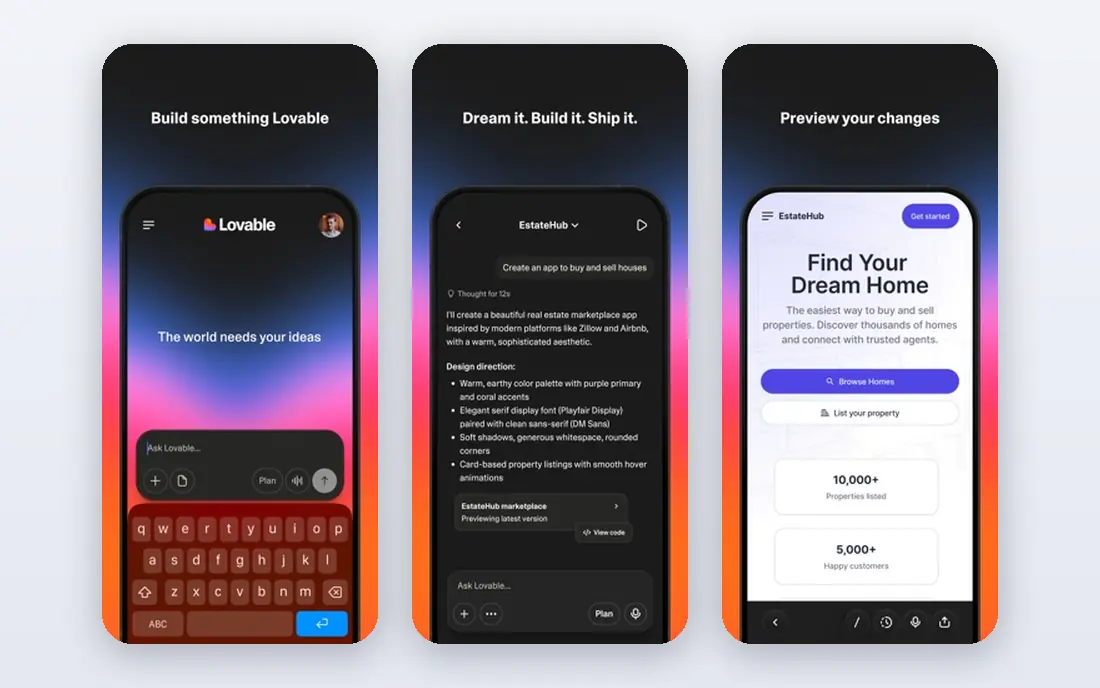
Lovable turns a written description into a hosted app with a front end, database, and login flow, which is why founders use it for MVPs and demos. The design output tends to look polished, so a landing page or prototype can be shared with users or investors without extra design work. GitHub sync also gives technical teams a path to keep and edit the code.
Credits are the real budget line. Each revision uses credits, and the free plan caps daily use, so long build sessions can stall. Complex logic still needs careful prompting and fixes. For a fast, presentable MVP, Lovable is our pick for most people.
- Prompt-to-app workflow with hosting
- Strong design output
- GitHub sync for code control
- Credits limit heavy revision
- Complex back-end logic may need manual fixes

Bolt is built for speed, producing a working app in the browser from a prompt and deploying it quickly. Builders who want to validate an idea, run a demo, or test a landing page will appreciate how little setup is involved. Because you can see and edit the code, technical founders keep more control than with a closed no-code tool.
The catch is scale. Token budgets and revision cycles add up, and a prototype that looks finished may still need cleanup before real users rely on it. Bolt suits validation and demos best, with a plan to harden the code before launch.
- Very fast to a live URL
- Browser-based building
- Code you can inspect and export
- Token limits shape longer projects
- Generated code can need cleanup for production

Replit differs from pure prompt builders because it gives you a real development environment, terminal, and hosting in one place. That matters when an app needs server-side code, scheduled jobs, or custom logic that a front-end generator cannot handle alone. Its AI agent can scaffold a project, and a developer can then edit, test, and deploy the result.
Non-technical builders may find the environment more complex than Lovable or Base44. Costs also include usage beyond the base plan, so budget for compute as well as the subscription. For developer-led builds, Replit offers the most room to grow.
- Real code environment and hosting
- Supports many languages
- Agent help plus manual editing
- Credit and compute costs can grow
- Interface can feel busy for non-developers
v0, by Vercel, excels at turning a description into a polished interface, with layouts, components, and styling that look close to a finished product. Designers and front-end developers use it to move from idea to a clickable interface in hours rather than days. It pairs naturally with Vercel hosting and modern web workflows.
It is not a full product builder on its own. You will still need a database, authentication, and hosting logic for a complete app, which adds steps and cost. If the interface is the hard part and your team can handle the back end, v0 is a strong choice.
- High-quality interface generation
- Works well with Vercel hosting
- Good for design-led teams
- Front-end focus means back-end work is separate
- Per-user pricing on paid plans
Base44 targets people who want a complete app without learning to code or managing infrastructure. Describe the app, and it generates the interface, data model, and hosting together, so you can share a working product quickly. That all-in-one approach suits internal tools, small business apps, and early product tests.
Technical teams may want more control over code, integrations, and scaling than Base44 offers. It is best judged as a product builder for non-technical founders, not as a replacement for a custom engineering stack. For that audience, its simplicity is the point.
- Builds a full app from a prompt
- Includes data and hosting
- Easier for non-developers
- Less code control than Replit or Bolt
- Complex logic may hit limits
Bubble remains the most capable no-code platform for web apps with real business logic. You can build user accounts, roles, workflows, payments, and databases visually, without writing code, and scale to a real product used by paying customers. Its plugin range extends what the core platform can do.
That power comes with a learning curve. New builders need time to understand data types, workflows, and workload pricing, and a poorly planned app can cost more than expected. If you want a complex web app and are willing to learn the platform, Bubble offers depth the prompt builders do not.
- Deep visual workflows and data logic
- User roles and permissions
- Large plugin range
- Learning curve is steep
- Performance and pricing depend on workload units
Glide is the fastest way to turn a spreadsheet into an app your team can actually use. Operations teams build inventory trackers, field tools, directories, and dashboards without a database project, and updates flow from the sheet to the app. The mobile layouts are clean, which helps for staff who work on phones.
Public apps with complex logic, payments, or large user bases will outgrow Glide sooner than Bubble. It shines for internal and operations apps where the data already lives in a sheet. If that describes your need, Glide saves weeks of work.
- Turns spreadsheets into usable apps fast
- Good for internal tools
- Clean mobile layouts
- Less suited to public consumer apps
- Advanced logic is limited
Softr builds client portals, member directories, and internal dashboards on top of Airtable or Google Sheets data. Permissions let you control who sees each record, which matters for client work and team portals. Setup is fast, and the result looks professional without custom development.
The trade-off is lock-in. Softr hosts the app and does not export code, so you are tied to the platform and its data sources. For portals and directories, that is often acceptable. For a product you plan to rebuild as custom software later, weigh that limit carefully.
- Portals, directories, and membership apps
- Granular permissions
- Connects to Airtable and Google Sheets
- No code export
- Less suited to custom consumer products
Emergent aims at production-ready apps rather than simple demos, generating web and mobile output from prompts with database and authentication included. Its free tier lets you test the workflow before paying, and its paid plans start at a competitive price. Builders who want both web and mobile from one prompt should try it.
Because it is newer than Lovable or Bubble, community resources and integrations are thinner. Credit use also matters, as with other prompt builders. Emergent is a good option for builders willing to test a newer platform for a broader output range.
- Full-stack builds from prompts
- Web and mobile output
- Free tier for testing
- Newer platform with a smaller community
- Credit limits shape longer builds
How we picked these
We compared official pricing pages, feature documentation, and public comparisons from October 2026, focusing on tools that produce a working app rather than only code snippets or designs. We favored a mix of prompt builders, code environments, and no-code platforms, so readers with different skills can find a fit. We did not claim hands-on testing, and we treated vendor pricing as a starting point that can change.
We also weighed hosting, data handling, and exit options, since a builder that is cheap to start can become costly to leave. That is why code export and platform lock-in appear in several write-ups above.
How to choose the right builder
Start with who will build and maintain the app. A non-technical founder needs a guided builder with hosting included, while a developer needs code access, a real environment, and deployment control. A team building an internal tool has different needs from a founder launching a consumer product, so match the tool to the maintainer, not just to the demo.
Credits, hosting, and ownership
Read the credit or token policy before you commit to a prompt builder, and estimate how many revisions a real project needs. Check whether hosting, a custom domain, authentication, and a database are included or billed separately. Finally, confirm how you export code or data if you leave, since that exit path protects your work if the platform changes price or closes.
When to skip an AI builder
Skip a prompt builder if you need strict compliance controls, complex integrations, or a product that must scale to many users on day one. In those cases, a traditional development team or a mature no-code platform with clear scaling rules may serve you better. AI builders are best for validation, MVPs, internal tools, and early products.
FAQ
Which AI app builder is best for beginners?
Lovable and Base44 are the easiest starting points for beginners, because both turn a prompt into a hosted app with little setup. Glide is also easy if your data already lives in a spreadsheet.
What is the best AI app builder for a startup MVP?
Lovable is a strong MVP pick for its design quality and hosting, while Bolt suits a fast demo and Replit suits a technical team that wants code control. Choose based on whether design speed or code ownership matters more.
Do AI app builders produce code I own?
It depends on the tool. Bolt and Replit give you code you can inspect and move, Lovable offers GitHub sync, and Softr and Glide host apps without code export. Check export options before you build a product you plan to keep long term.
Are free AI app builders enough to launch a product?
Free plans are usually enough to test an idea and share a prototype, but they limit credits, users, or hosting. Most real launches need a paid plan for a custom domain, more credits, and reliable hosting.
What is the best AI app builder software for complex apps?
Bubble suits complex web apps with workflows, roles, and databases, while Replit suits complex custom logic that needs real code. Prompt-only builders can start complex ideas, but they often need manual work to finish them.