Best AI Room Design Apps in 2026: 9 Apps Compared
Discover the best AI room design apps in 2026, including Planner 5D, Homestyler, Roomstyler and Interior AI, for free room redesign and 3D planning today.
- Editor's choice
 Planner 5D
Full room planning in 2D and 3D
Starts atFreeVisit planner5d.comFull review - Great alternative
 Homestyler
Easy 3D home design
Starts atFreeVisit homestyler.comFull review - Also consider
 Roomstyler
Quick browser room layouts
Starts atFreeVisit roomstyler.comFull review
TL;DR:
- Planner 5D and Homestyler are our picks for most people, because they combine room planning, 3D views and a large furniture catalog in one app.
- Interior AI and REimagineHome are best for fast redesign ideas from a photo, while Roomstyler suits quick browser based room layouts.
- Free plans are useful for testing a style or layout, but high resolution renders, full catalogs and commercial use usually need a paid plan.
- AI renders are starting points for ideas, not construction plans, so check measurements and product availability before you buy furniture.
Quick comparison
| Tool | Best for | Starts at | Free plan? | |
|---|---|---|---|---|
| Planner 5D | Full room planning in 2D and 3D | Free | Yes | Visit |
| Homestyler | Easy 3D home design | Free | Yes | Visit |
| Roomstyler | Quick browser room layouts | Free | Yes | Visit |
 Interior AI | Fast photo based redesign | See website | Free trial | Visit |
 REimagineHome | Photo redesign in many styles | See website | Free trial | Visit |
 DecorMatters | Community design ideas | Free | Yes | Visit |
 Houzz | Real products and pros | Free | Yes | Visit |
 Foyr Neo | Professional 3D interiors | See website | Free trial (14 days) | Visit |
 RoomGPT | Quick AI redesign from a photo | See website | Free trial | Visit |
The best AI room design apps
AI room design apps fall into two groups: planners that let you draw a room and furnish it in 2D and 3D, and photo tools that redesign a photo of your room in a new style. The nine apps below cover both groups, plus community ideas and real product shopping, so you can test a style before you spend on furniture or paint.
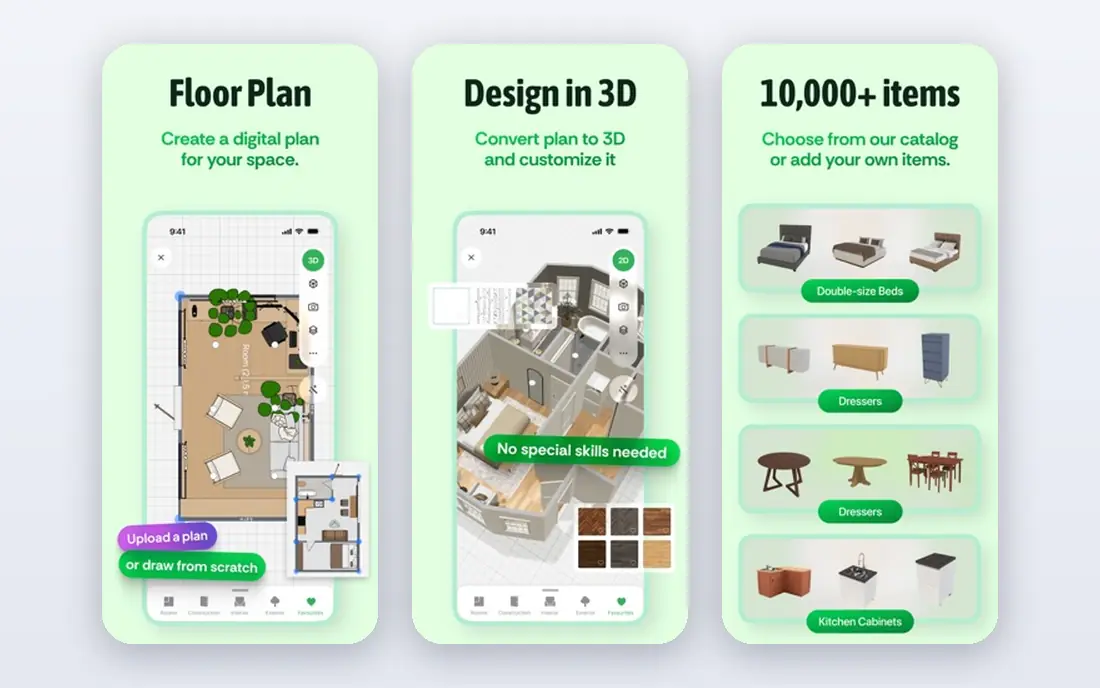
Planner 5D is our pick for most people who want to plan a real room, not just see a pretty render. You can draw a floor plan, add walls, doors and windows, furnish it from a large catalog, and switch between 2D and 3D views. That helps you test whether a sofa fits, whether a walkway is wide enough, and how light falls at different times.
The free plan covers basic planning well, while the full catalog and high resolution renders sit on a paid plan. Start free with one room, measure your real walls first, and use the 3D view to check sight lines before you buy. For a serious redesign, Planner 5D gives the most useful mix of planning and visualization.
- Draw rooms in 2D and view in 3D
- Large furniture catalog
- Works on phone, web and desktop
- Full catalog and high resolution renders need a paid plan
- Learning curve for detailed plans
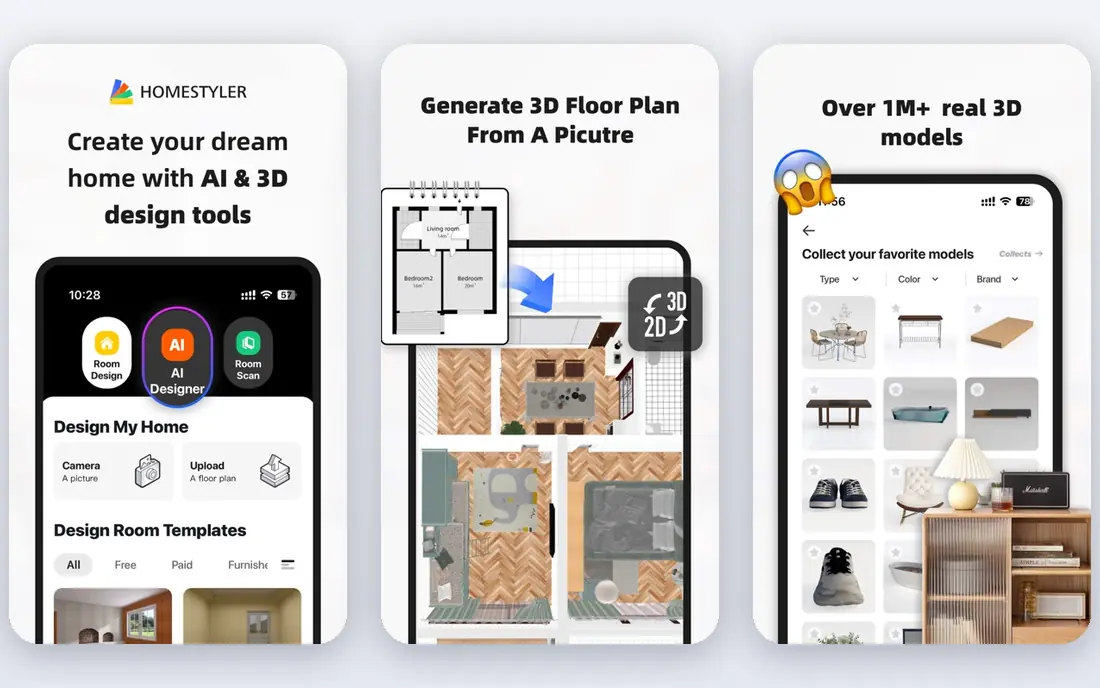
Homestyler suits people who want a polished 3D result without learning professional software. You can create a floor plan, furnish a room, and render photos or a short video tour. The catalog includes many real products alongside generic items, which helps you move from an idea to a shopping list.
Premium furniture, high quality renders and some export options need payment, so check what the free plan includes for your project. Homestyler is a good second test after Planner 5D: if you find one easier to use, stick with it for the whole project rather than splitting a plan across two apps.
- Easy floor plan and 3D tools
- Large catalog of real and generic furniture
- Photo and video renders
- Some premium furniture and renders need payment
- Web and mobile features vary
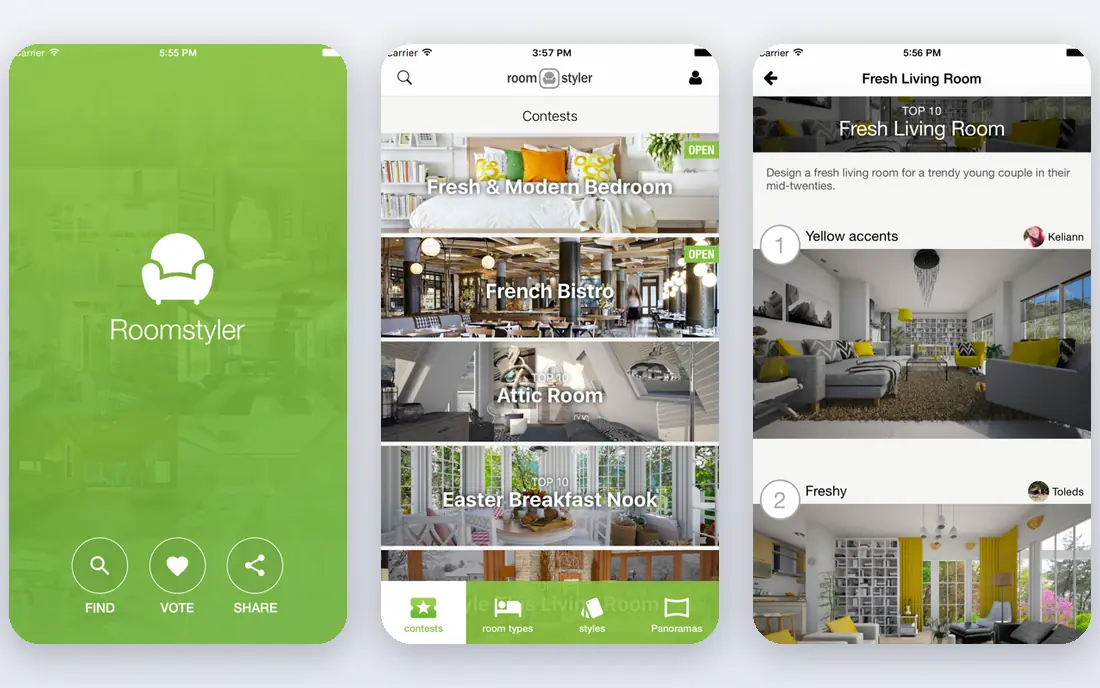
Roomstyler is a free browser planner that is easy to start. Drag furniture into a room, change colors and materials, and view the result in 3D without installing an app. Community rooms offer inspiration, and you can remix a layout that is close to your own room.
The AI features are lighter than in Interior AI or REimagineHome, and render quality is more basic than in Planner 5D or Homestyler. For a quick layout test, such as whether a bed fits on a different wall, Roomstyler is fast and free. For a photorealistic redesign, pair it with a photo tool.
- Free browser based 3D planner
- Easy drag and drop furniture
- Community rooms for inspiration
- Fewer AI features than newer tools
- Catalog and render quality are more basic
Interior AI is the fastest way to see a new look for a room you already have. Upload a photo, choose a style such as modern, minimalist or coastal, and the tool returns a redesigned version. That speed helps you test several styles in an evening without drawing a floor plan.
The catch is realism. AI renders can change window positions, furniture sizes or room proportions in ways that would not work in real life. Treat each render as an idea, not a plan, and check measurements before you buy. Credits limit how many renders you get, so use a clear photo and a specific style for the best first result.
- Redesigns a photo in many styles quickly
- Good for testing a new look
- Simple upload and render flow
- Renders may change room structure or furniture unrealistically
- Credits limit renders on lower plans
REimagineHome covers a wide range of styles and room types, from living rooms and bedrooms to kitchens and outdoor spaces. Virtual staging is a particular strength: an empty room can be furnished virtually, which helps sellers, renters and buyers picture a space. Before and after views make it easy to compare options.
Results depend heavily on photo quality. A bright, straight photo with a clear view of the room gives a better render than a dark or angled shot. Paid credits are needed for many renders, so start with your best photo and one or two styles. For staging and style testing, REimagineHome is a flexible photo tool.
- Many styles and room types
- Virtual staging for empty rooms
- Easy before and after comparison
- Results vary with photo quality
- Paid credits needed for many renders
DecorMatters combines design ideas, community challenges and shopping in one app. You can browse rooms designed by other users, try a style in your own space with AR on supported devices, and find products similar to those in a design. That community angle helps when you like a look but do not know where to start.
AR and AI features vary by device, and community designs vary in quality, so use the app for ideas rather than as a sole planning tool. For a renter or first time decorator who wants inspiration and a low cost start, DecorMatters is fun and useful.
- Community challenges and design ideas
- AR view for some furniture
- Shopping links for products
- AI and AR features vary by device
- Community content quality varies
Houzz is less an AI redesign tool and more a bridge from idea to reality. Its photo library shows real rooms by real designers, product pages let you buy furniture and fixtures, and a directory helps you find local architects, designers and contractors. Sketch and visualizer tools let you test paint and flooring in some cases.
AI redesign is lighter than in Interior AI, so use Houzz after you have a style idea, not as the first render tool. Its strength is grounding an AI idea in real products and real pros. If you plan to hire help or buy specific items, Houzz makes the next step concrete.
- Huge photo library of real rooms
- Product shopping
- Directory of local design pros
- Less AI redesign than dedicated photo tools
- Shopping and pro features are US focused in part
Foyr Neo is aimed at interior designers and property professionals who need client ready plans and renders. You can draw detailed floor plans, furnish with a large catalog, render in high quality, and present a project to a client. That professional focus shows in the precision of plans and the quality of renders.
The price and learning curve are higher than for casual apps, and the trial is time limited. A homeowner with one room may find Planner 5D or Homestyler simpler. A designer, stager or property developer who presents work to clients will get more value from Foyr Neo.
- Professional floor plans and 3D renders
- Large product catalog
- Client presentation tools
- Price and learning curve suit professionals more than casual users
- Free trial is time limited
RoomGPT is one of the simplest photo redesign tools. Upload a room photo, pick a style, and get a redesigned image in a short time. That simplicity makes it good for brainstorming, sharing ideas with a partner, or testing a bold style you would not try in a full planner.
RoomGPT does not offer full floor planning, measurement tools or product shopping, so it works best as a first step. Use it to find a style you like, then move to Planner 5D or Homestyler to test whether that style fits your real room dimensions and budget.
- Very simple photo redesign flow
- Multiple styles
- Quick results for social sharing or brainstorming
- Limited planning tools
- Renders are ideas, not measured plans
How we picked these
We compared official feature pages, pricing pages, free plan limits and public reviews, and we favored apps that are actively available in October 2026 and that truly design or redesign rooms, not just show photos. We included planners, photo redesign tools, community apps and professional tools, and we noted where renders, catalogs and commercial use need a paid plan. Our comparison rests on vendor pages and reviewer findings, not on hands-on construction testing.
What to check before you pay
Start with measurements. Measure your room, doors, windows and large furniture before you open any app, because a render that ignores a radiator or a door swing can mislead you. Enter those measurements into a planner, then use a photo tool only to test style, not to judge fit.
Next, check render limits and export options. Count how many renders or high resolution exports you get on a plan, and check whether you can save, share or print your plan. A tool that locks your design behind a paywall after you have built it can be frustrating.
Finally, check product availability. An AI render may show a sofa, lamp or paint color that is hard to buy or far over budget. Use Houzz or a retailer to find a close real product, check dimensions and price, and adjust the plan before you commit to a purchase.
FAQ
What is the best AI room design app?
Planner 5D is best for full room planning in 2D and 3D, Homestyler is best for easy 3D design, and Interior AI is best for fast photo based redesign. The best choice depends on whether you want to plan a measured room or simply see a new style for a photo.
What is the best free AI interior design app?
Planner 5D, Homestyler, Roomstyler and DecorMatters all offer useful free plans for planning and ideas. Free plans usually limit the furniture catalog, render quality or number of renders, so test one room free before you pay for a full project.
Can AI design my room from a photo?
Yes. Interior AI, REimagineHome and RoomGPT can redesign a photo of your room in a new style. Results are ideas, not measured plans, so check furniture sizes, room proportions and product availability before you buy anything shown in a render.
Is Planner 5D free?
Planner 5D offers a free plan for basic room planning, with a paid plan for the full catalog, high resolution renders and extra features. Start free with one room to test whether the planning tools fit your project.
What is the best app to design a room for free?
For a free room design, start with Roomstyler for a quick browser layout, or Planner 5D for a more detailed 2D and 3D plan. Both let you test a layout without a subscription, and you can add a photo tool later for style ideas.