Best AI-Powered Presentation Tools No Coding in 2026: 8 Tools Compared
Compare the best ai-powered presentation tools no coding, with prompt-to-deck creation, templates, exports, pricing and free plans today for teams in 2026.
- Editor's choice
 Gamma
Fast prompt-to-deck
Starts at$10 per monthVisit gamma.appFull review - Great alternative
 Beautiful.ai
Design consistent business decks
Starts at$14.50 per monthVisit beautiful.aiFull review - Also consider
 Pitch
Team decks by link
Starts at$13 per monthVisit pitch.comFull review
TL;DR:
- Prompt-to-deck tools can create a usable first draft in minutes, but they still need human editing for accuracy, story and brand.
- Export quality matters, so check PowerPoint and PDF output before committing, especially if clients or colleagues expect editable slides.
- Free plans are useful for testing, but most limit credits, slides or exports, so paid plans are needed for regular use.
- Tools that work inside PowerPoint or Google Slides suit teams that must deliver standard slide files, while web-native tools suit sharing by link.
- Brand control varies widely, so check templates, fonts, colours and logo options if consistency matters across a team.
Quick comparison
| Tool | Best for | Starts at | Free plan? | |
|---|---|---|---|---|
| Gamma | Fast prompt-to-deck | $10 per month | Yes | Visit |
| Beautiful.ai | Design consistent business decks | $14.50 per month | Free trial | Visit |
| Pitch | Team decks by link | $13 per month | Yes | Visit |
 Canva | Templates and all-round design | $15 per month | Yes | Visit |
 Plus AI | Editing inside PowerPoint and Slides | $10 per user per month | Free trial | Visit |
 SlidesAI | Text to slides in Google Slides | $10 per month | Yes | Visit |
 Prezi | Non-linear, visual presentations | $7 per month | Yes | Visit |
 Presentations.AI | Quick decks with brand control | $20 per month | Yes | Visit |
The best AI-powered presentation tools no coding
We compared AI presentation tools that require no coding, focusing on prompt-to-deck quality, editing ease, exports and pricing.
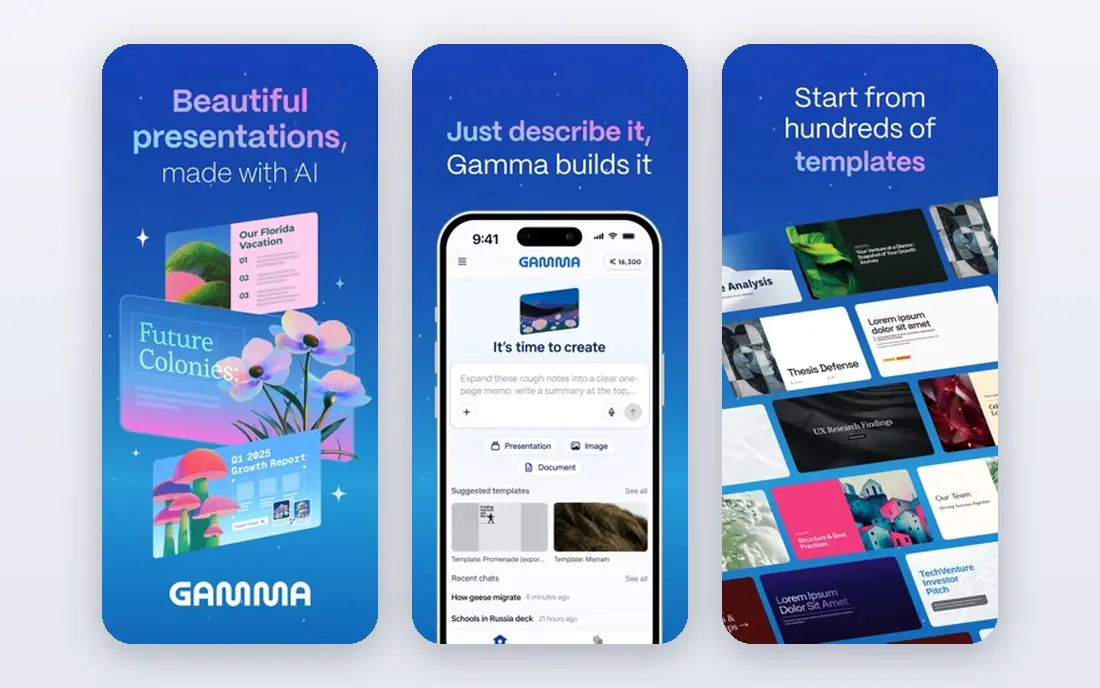
Gamma is the fastest prompt-to-deck tool in this list for many users. Type a topic or paste an outline, and Gamma creates a complete deck with layouts, text and images in under a minute in many cases. The free plan starts with 400 one-time credits, with up to 10 slides per prompt, while Plus starts around 9 dollars per seat per month on annual billing, or 10 dollars month to month.
The honest catch is credits and exports. Free credits do not refill, so regular users need a paid plan, and PowerPoint export can lose some formatting, which means extra fixes if a client expects an editable file. Gamma also controls layout more than a freeform editor, so users who want pixel perfect control may feel limited. For fast internal decks, pitches and web sharing, Gamma is our pick for most people.
- Fast prompt-to-deck creation
- Web sharing
- Images and layouts generated automatically
- Free credits do not refill
- PowerPoint export can need layout fixes

Beautiful.ai uses Smart Slides that adjust layout automatically as you add or edit content, which helps non-designers keep decks looking balanced. Pro starts at 14.50 dollars per month on annual billing, or 45 dollars month to month in recent comparisons, while Team starts at 40 dollars per user per month on annual billing and adds brand controls. AI content generation is unlimited on paid seats, which suits teams that create decks often.
The drawback is that there is no free plan, only a 14 day trial that requires a card in recent reports. Freeform design control is also lower than in Canva or PowerPoint, since the tool protects layout consistency. For corporate teams and consultants who need polished, on-brand decks without a designer, Beautiful.ai consistency is worth that trade-off.
- Smart Slides that rebalance layouts
- Brand controls on Team
- Unlimited AI content on paid seats
- No free plan, trial only
- Less freeform control than Canva or PowerPoint

Pitch is a collaborative presentation tool with AI generation, link sharing, analytics and team templates. The free plan includes 100 one-time AI credits and unlimited presentations, while Plus starts around 13 dollars per month, Team around 19 dollars and Business around 25 dollars per month in recent comparisons. Teams can share decks by link, track views and keep templates consistent.
The catch is AI credit limits. Plus and Team include 500 credits per month, with Business at 750, so heavy AI users need to watch usage. Pitch also suits link sharing more than traditional slide file workflows, although PDF and PowerPoint exports are available. For teams that collaborate on decks and share them by link, Pitch is a clean, modern choice.
- Free plan with AI credits
- Link sharing and analytics
- Team templates
- AI credits are limited on lower plans
- Advanced features need Team or Business
Canva is not only a presentation tool, and that breadth is its strength for many users. Magic Design and other AI features help turn a prompt or outline into slides, while the template library, stock images and video tools cover far more than decks. Pro starts around 15 dollars per month in recent comparisons, or 144 dollars per year for one person, with a generous free plan for basic use.
The drawback is focus. Canva presentation AI is good, but it is one feature inside a large design platform, and full brand controls sit on Business plans. Users who only want prompt-to-deck speed may prefer Gamma, while users who already design social posts, documents and decks in Canva will find it the best value. For all-round design plus presentations, Canva is hard to beat.
- Huge template library
- Magic Design AI
- PowerPoint export on free and paid plans
- Presentation AI is part of a wider design tool
- Brand controls need Business
Plus AI is the pick for users who must deliver standard PowerPoint or Google Slides files. It works as an add-on inside those tools, generating decks from prompts or documents and helping rewrite, expand or redesign existing slides. Basic starts at 10 dollars per user per month on annual billing, or 15 dollars month to month, with a 7 day trial.
The limitation is that there is no free plan, only a trial, and AI output still needs human checking for facts, tone and slide fit. Plus AI also inherits the design limits of PowerPoint and Slides, so it will not create the web-native, interactive decks that Gamma does. For corporate users who live in PowerPoint or Slides, Plus AI is the most practical AI upgrade.
- Works inside PowerPoint and Google Slides
- Prompt-to-deck and editing
- Familiar files
- No free plan, trial only
- AI output still needs editing for accuracy
SlidesAI turns text into Google Slides presentations, which suits teachers, students and teams that already use Google Workspace. The free plan allows 12 presentations per year in recent comparisons, while Pro starts at 10 dollars per month on annual billing, or 12 dollars month to month. Users paste text, choose a theme and get editable slides in Google Slides.
The catch is scope. SlidesAI works inside Google Slides only, so PowerPoint users should look at Plus AI or Gamma with export. Design options are also simpler than Canva or Gamma, with less control over images and layouts. For a Google Slides user who wants fast text-to-deck conversion at a low price, SlidesAI is a simple, effective tool.
- Works inside Google Slides
- Free plan with presentations per year
- Simple text to slides
- Google Slides only
- Design options are simpler than Gamma or Canva
Prezi offers a different presentation style, with zooming, non-linear navigation and visual storytelling rather than a linear slide sequence. The free Basic plan includes credit capped AI, while Standard starts at 7 dollars per month with 500 credits, and higher plans add unlimited AI on Plus and above in recent comparisons. That format can make a talk more memorable when the story benefits from showing connections.
The drawback is fit. Prezi style suits pitches, lessons and visual talks better than formal board reports or dense data decks, where linear slides are clearer. AI credits on Standard are also capped, so heavy users need Plus. For presenters who want to stand out and tell a visual story, Prezi is a distinctive, low cost option.
- Distinctive zooming, non-linear format
- Free Basic plan
- AI credits on paid plans
- Format suits some talks better than formal reports
- AI is credit capped on Standard
Presentations.AI generates decks from prompts and documents, with brand templates that help teams keep colours, fonts and logos consistent. The free Starter plan includes 200 credits and up to 20 slides, while Pro starts at 20 dollars per month on annual billing with 5,000 credits, and Gold at 100 dollars per month with 50,000 credits in recent comparisons. Exports to PowerPoint and PDF suit teams that need standard files.
The limitation is team pricing structure. There is no per-seat team tier in some comparisons, so larger teams should check how seats, sharing and brand controls work before buying. Presentations.AI also needs human editing for accuracy, as with every tool here. For a team that wants quick generation with stronger brand control than a basic prompt tool, Presentations.AI is a solid choice.
- Brand templates and controls
- Quick generation
- PowerPoint and PDF exports
- No per-seat team tier in some comparisons
- Gold plan is $100 per month for higher usage
How we picked these
We compared official pricing pages and independent pricing comparisons from October 2026, and we favoured tools that generate decks from a prompt or document without coding, offer editable output and have a free plan or trial. We excluded Tome, which shut down in April 2025, and we left out tools that only offer templates without AI generation. Prices shown are starting rates on annual billing where vendors publish them, so check the vendor page for current credit limits and export rules before buying.
How to get a good deck from an AI tool without coding
AI tools save time on layout and first drafts, but a good presentation still needs a clear story and accurate content.
Start with an outline, not a vague prompt
Write a short outline with the main message, three to five key points, and the action you want from the audience. Paste that outline into the tool rather than a single vague topic, and ask for a specific slide count. A clear outline produces a clearer deck, with less time spent fixing structure after generation.
Edit for accuracy, story and brand
Check every fact, number and claim in the draft, since AI tools can invent details or use outdated information. Cut slides that repeat the same point, add your own examples, and apply brand colours, fonts and logos consistently. Read the deck aloud as if presenting it, and remove any slide that does not help the audience understand or act.
Test exports and presenting conditions
Export to PowerPoint or PDF if that is how you will present, and check fonts, images and layout on the actual screen or projector you will use. Test link sharing if you will present from the web, and download a backup file in case of internet problems. A deck that looks good in the editor but breaks on export will undermine an otherwise strong talk.
FAQ
Do AI presentation tools really need no coding?
Yes, for the tools in this list. You write a prompt or paste text, choose a theme, and edit slides in a visual editor. No code, HTML or design software skills are needed. You will still need to edit text, check facts and adjust layout, but that work happens in the same visual editor.
Can AI decks replace a designer?
For internal decks, pitches and routine presentations, AI tools often produce good enough results with editing. For high stakes brand work, complex data visualisations or distinctive design, a human designer still adds value. Many teams use AI tools for first drafts and speed, then use a designer for final polish on important decks.
Which AI presentation tool is best for PowerPoint files?
Plus AI is the most direct choice, since it works inside PowerPoint itself. Gamma and Presentations.AI also export to PowerPoint, but exports may need layout fixes. If PowerPoint files are a hard requirement, test exports on a real deck before buying, and check whether your team needs editable text, charts and images or just a static file.
Are free plans enough for regular use?
Usually not. Free plans limit credits, slides or exports, and credits often do not refill. A free plan is good for testing a tool and for occasional decks, but regular users should budget for a paid plan. Compare credit limits and export rules, not just the headline monthly price, when choosing a plan.
How do I avoid AI decks looking generic?
Use your own outline, examples, data and brand assets, and edit the draft heavily rather than accepting it as finished. Change images, rewrite headlines in your own voice, and remove generic filler slides. A deck that starts from your story and uses AI for layout will look far less generic than a deck generated from a single vague prompt.