Best AI Photo Colorization Tools in 2026: 9 Tools Compared
We compared the best ai photo colorization tools for old black and white photos, with current free plans, batch options and honest limits on color accuracy.

- Editor's choice
 Palette.fm
Most users and style control
Starts at$9 per monthVisit palette.fmFull review - Great alternative
 MyHeritage In Color
Family historians
Starts atSee websiteVisit myheritage.comFull review - Also consider
 Hotpot AI Photo Colorizer
Content creators
Starts at$10 per monthVisit hotpot.aiFull review
TL;DR:
- Palette.fm is our top pick for most people, thanks to simple controls, style filters and a free tier for trying a few photos.
- No AI colorizer can recover true original colors, since it predicts plausible colors from training data, so treat results as interpretation, not restoration of fact.
- ImageColorizer and VanceAI suit people restoring many photos, with batch processing and credit plans that scale better than pay-per-photo tools.
- MyHeritage In Color is the best fit for family historians already using MyHeritage, since colorized photos stay inside a family archive.
- Free tiers are generous enough to test quality on your own photos, so compare results on the same image before paying.
Quick comparison
| Tool | Best for | Starts at | Free plan? | |
|---|---|---|---|---|
| Palette.fm | Most users and style control | $9 per month | Yes | Visit |
| MyHeritage In Color | Family historians | See website | Yes | Visit |
| Hotpot AI Photo Colorizer | Content creators | $10 per month | Yes | Visit |
 ImageColorizer | Batch restoration | See website | Yes | Visit |
 VanceAI Photo Colorizer | Affordable batch work | See website | Yes | Visit |
 Fotor AI Photo Colorizer | Quick edits plus design | See website | Yes | Visit |
 Cutout.pro | Colorizing plus enhancement | See website | Yes | Visit |
 DeepAI Colorizer | Free and developer friendly | Free | Yes | Visit |
 Colorize.cc | Simple one-off colorizing | See website | Yes | Visit |
The best ai photo colorization tools
The best ai photo colorization tools turn black and white photos into color in seconds, using models trained on color images. We compared official feature pages, pricing pages and public reviews, and we only listed tools that are actively available in October 2026. The best ai tool for photo colorization depends on how many photos you have, how much control you want over the result, and whether you also need repair or enhancement.

Palette.fm is our pick for most people because it keeps the process simple and gives you some say in the result. Upload a black and white photo, get a color version in seconds, and try different color filters if the first result looks off. That control matters, because colorization is prediction: the model guesses plausible colors, and a filter that suits a portrait may look wrong on a street scene.
The free tier lets you test quality on your own photos before paying, and paid plans add faster processing, bulk colorization and API access. The honest limit applies to every tool here: Palette.fm cannot know the true color of a dress or a car from a grey image, so keep the original alongside the color version and label colorized photos as colorized when you share them.
- Simple upload and colorize flow
- Style filters let you steer the result
- Bulk and API options on paid plans
- Predicted colors are not historically exact
- HD downloads and bulk work need a paid plan
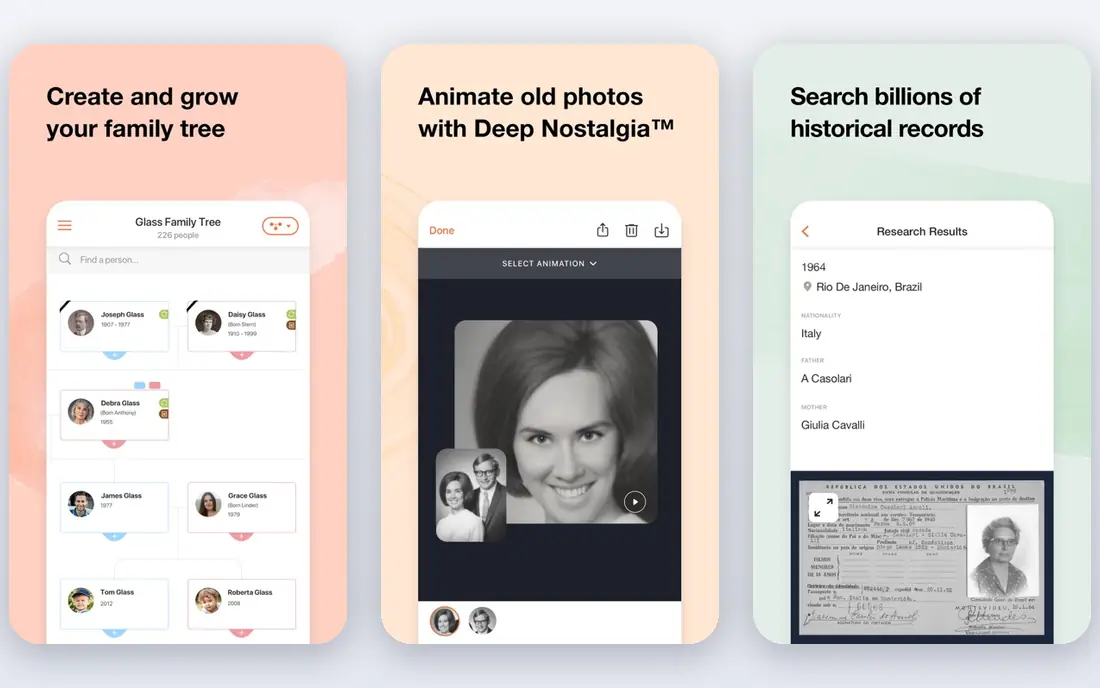
MyHeritage In Color fits people who already collect family photos and records in MyHeritage. Colorization sits inside the same archive as your tree, so a colorized photo of a grandparent stays linked to that person and easy to share with relatives. The tool preserves the original photo and creates a colorized copy, which is the right way to handle old images.
Several photos can be colorized free, while continued use depends on your MyHeritage plan, including its photo subscription options. Check which photo features your plan includes before buying another subscription. As with every tool here, MyHeritage states that generated colors may differ from the real ones, so treat color versions as a way to feel closer to the past, not as historical evidence.
- Colorized photos stay inside a family tree archive
- Preserves the original alongside the color copy
- Easy sharing with relatives
- Best value only inside a MyHeritage subscription
- Color accuracy is predicted, not verified
Hotpot AI is a good fit for creators who colorize photos as part of broader content work. The colorizer sits alongside other image tools on the same site, so you can colorize, touch up and prepare an image for a post without switching services. The web workflow is quick, with no software to install, and the free tier lets you test results first.
The catch is credit pricing, which means you should check how many credits a colorized download costs before a big batch. Hotpot starts around $10 per month on paid plans in recent comparisons, but confirm the current credit allowance on the vendor page. For a creator doing a handful of images a week, it is a handy all-rounder. For a large archive, a batch specialist such as ImageColorizer may cost less per photo.
- Sits inside a wider creative suite
- Fast web workflow with no install
- Useful for social and blog images
- Credit-based pricing needs watching
- Colorization is one tool among many, not a specialist archive
ImageColorizer is the pick when color is only one part of preparing an old scan. It combines colorization with enhancement, portrait retouching, scratch repair and upscaling, so a damaged photo can go through several fixes in one place. Paid plans include batch processing, which matters a lot when you have dozens or hundreds of images.
The free plan offers monthly credits for single processing, which is enough to judge quality. Read the credit rules carefully, since the vendor FAQ notes that batch processing or downloading an image costs a credit, and repeated downloads can consume more credits. Plan prices have varied across sources, so we mark pricing as See website and suggest confirming the current Starter and Premium credit allowances before subscribing.
- Colorization plus repair, retouching and upscaling
- Batch processing on paid plans
- Monthly free credits
- Credit rules mean downloads can consume extra credits
- Plan prices have varied, so confirm before buying
VanceAI suits people who restore photos regularly and want one suite for colorization, upscaling, sharpening, noise removal and background removal. The colorizer itself is straightforward, and paid plans support batch work, so a folder of scans can be processed without uploading one image at a time. Recent comparisons put paid entry around $4.95 per month on some billing options, with annual plans also listed, so confirm the current figure on the vendor page.
The honest catch is that a single colorization pass is rarely the final step for a damaged scan. Pairing color with enhancement usually gives a cleaner result, which means learning two tools inside the suite. For regular restorers, that extra step is worth it. For a one-off photo, Palette.fm or a free tier elsewhere is simpler.
- Part of a wide photo enhancement suite
- Batch processing on paid plans
- Competitive pricing for regular use
- Credit and plan details vary by billing period
- Results benefit from a second pass with enhancement tools
Fotor is a general photo editor with an AI colorizer built in, which makes it a good choice when you want to colorize and then design around the result. You can crop, adjust, add text and prepare a social post or print layout without exporting to another app. Beginners will find the interface friendly, and the free tier covers basic use.
The trade-off is specialization. Fotor does not focus only on colorization, so its controls are simpler than Palette.fm filters or ImageColorizer repair tools. Check the current plan details on the vendor site, since full-resolution output and batch features sit on paid plans. Pick Fotor when colorizing is one step in a design job, not when you are restoring a whole archive.
- Full photo editor around the colorizer
- Templates and design tools for sharing
- Easy for beginners
- Colorization is a feature, not the whole product
- Higher plans are needed for full-resolution and batch use
Cutout.pro is another suite-style pick, pairing photo colorization with enhancement, upscaling and background removal. That combination suits portraits and product-style images, where a colorized photo often also needs sharpening or a cleaner background. The web workflow is simple, and a free tier lets you test it on your own images.
Pricing is credit-based, so check how many credits each operation costs before a large job. Color results vary by photo type, as with every tool here, so test the same image across two or three tools before committing to one for a whole collection. Cutout.pro earns its place for people who want color plus enhancement in one subscription.
- Colorization alongside upscaling and background removal
- Clean web workflow
- Useful for product and portrait photos
- Credit-based pricing
- Color accuracy varies by photo type
DeepAI Colorizer is the simplest free option on this list. Upload a black and white image and get a color version without a subscription, and developers can use the DeepAI API to add colorization to their own apps. For a student, a hobbyist or a developer prototyping a feature, that free access is hard to beat.
The limits are control and consistency. You get fewer ways to steer the result than with Palette.fm, and tricky photos with complex lighting can come out less natural. For casual use and testing, DeepAI is a fine first stop. For a family archive you plan to print or share widely, compare its output with Palette.fm or MyHeritage before settling.
- Free to use on the web
- API available for developers
- No subscription needed for casual use
- Fewer style controls than Palette.fm
- Output quality varies more on tricky photos
Colorize.cc keeps the job as simple as possible: upload, colorize, download. It supports batch processing, which helps when you have a small set of photos to run through at once, and comparisons have listed low one-time pricing options alongside a free tier. That simplicity is its main appeal.
The trade-off is a smaller feature set. You will not find the repair tools of ImageColorizer or the archive features of MyHeritage here. For a handful of photos where you just want color quickly, Colorize.cc is a solid budget pick. For a restoration project with damage, fading or tears, start with a repair-focused tool instead.
- Very simple web tool
- Batch processing available
- Low one-time pricing options reported in comparisons
- Smaller feature set than suite tools
- Confirm current pricing, since plans have varied
How we picked these
We compared official feature pages, pricing pages and public reviews for each tool, and we only listed products that are actively available in October 2026. We favored tools that colorize real photos, not just line art, and that offer a free tier or trial so readers can test quality on their own images. We checked whether each tool also offers batch processing, repair or enhancement, since those features change the true cost of a large project. Prices are marked See website where vendor plans or credit rules have varied across sources, so readers can confirm the current figure before paying.
How to get the best colorization results
Start with the best scan you can make. A high-resolution scan at 300 dots per inch or higher, saved without heavy compression, gives the model more detail to work with, and a clean scan beats any amount of post-processing. If a photo is torn, faded or scratched, run repair or enhancement before or alongside colorization, since color on top of damage still looks damaged.
Always test two or three tools on the same photo before a big project. Color models differ in how they handle skin tones, skies and indoor light, and the best tool for a portrait may not be the best tool for a street scene. Keep the original file, label colorized versions as colorized when you share them, and remember that the colors are plausible predictions, not recovered facts. For prints, check the output resolution on your chosen plan before you pay.
FAQ
What is the best ai photo colorization tool overall?
Palette.fm is our top pick for most people, thanks to its simple workflow, style filters and free tier. MyHeritage In Color is better for family historians, while ImageColorizer and VanceAI suit larger restoration projects with batch needs. Test the same photo on two tools before paying, since results vary by image.
What is the best ai tool for photo colorization that is free?
DeepAI Colorizer is free on the web and needs no subscription for casual use. Palette.fm, ImageColorizer, VanceAI, Hotpot and Colorize.cc also offer free tiers or free credits. Free tiers usually limit resolution, batch use or monthly credits, so they are best for testing and small jobs.
Are AI colorized photos historically accurate?
No. AI colorization predicts colors that look plausible based on training images, but it cannot know the true color of clothing, paint or scenery in a black and white photo. Treat colorized images as interpretation, keep the original, and label colorized versions when you share them in a family or historical context.
Can these tools colorize videos too?
Some vendors, including Palette.fm on paid plans, offer video colorization, but most tools on this list focus on still photos. Video colorization needs more processing and often produces flicker between frames. Check the vendor page for video support and pricing before assuming a photo plan covers video.
How many photos can I colorize for free?
It depends on the tool. ImageColorizer lists monthly free credits, while other tools offer a set number of free images or limited free processing. Read the free tier terms on the vendor site, since downloads and batch jobs can consume credits faster than a single preview suggests.
Should I repair a photo before colorizing it?
Yes, when the photo is damaged. Scratches, tears and fading stay visible under color, so repair, enhancement or upscaling first usually gives a cleaner result. Tools such as ImageColorizer, VanceAI and Cutout.pro combine repair and color in one place, which saves switching between apps.