Best AI Interior Design App in 2026: 9 Apps Compared
We compared the best AI interior design app options for photo restyling, floor plans, 3D renders, and virtual staging, covering cost, styles, and limits.

- Editor's choice
 Planner 5D
Floor plans plus AI design help
Starts atSee websiteVisit planner5d.comFull review - Great alternative
 Homestyler
Free 3D design with AI decorator
Starts atSee websiteVisit homestyler.comFull review - Also consider
 Interior AI
Fast photo restyling at volume
Starts atSee websiteVisit interiorai.comFull review
TL;DR:
- Planner 5D and Homestyler suit full room planning with floor plans and 3D models, while Interior AI and RoomGPT suit fast photo restyling.
- HomeDesigns AI offers the widest style range for photo redesigns, while Spacely AI and Collov AI suit real estate staging at volume.
- Free tiers usually cover a few renders or basic plans, so check render limits, watermarks, and commercial use before you pay.
- AI renders show ideas, not exact furniture or measurements, so confirm sizes, colors, and products before you buy or renovate.
- Foyr Neo suits professionals who need detailed 3D work, while simpler photo tools suit homeowners who only need inspiration.
Quick comparison
| Tool | Best for | Starts at | Free plan? | |
|---|---|---|---|---|
| Planner 5D | Floor plans plus AI design help | See website | Yes | Visit |
| Homestyler | Free 3D design with AI decorator | See website | Yes | Visit |
| Interior AI | Fast photo restyling at volume | See website | No | Visit |
 RoomGPT | Cheapest quick photo redesigns | See website | Yes | Visit |
 HomeDesigns AI | Widest photo redesign styles | See website | Yes | Visit |
 REimagineHome | Interior, exterior, and staging | See website | Yes | Visit |
 Spacely AI | Photorealistic staging renders | See website | Yes | Visit |
 Collov AI | Virtual staging and redesign | See website | Yes | Visit |
 Foyr Neo | Professional 3D interior design | See website | Free trial | Visit |
The best AI interior design apps
We compared official pricing pages, feature pages, and app store listings for each tool. We checked AI features specifically, not just general 3D planning, and we noted render limits, watermarks, and whether results show real products or AI-generated furniture. We did not count a static template as AI design, and we favored tools that still offer AI restyling or AI planning in 2026.

Planner 5D is the best all-round pick if you want a real floor plan, not just a pretty photo. You draw a plan, furnish it from a large catalog, and view it in 3D, with AI tools helping with floor plan recognition and style suggestions. That makes it useful for renovations, rentals, and small commercial spaces where measurements matter.
AI photo restyling is not its main strength. If you only want to upload a photo and see ten new styles in seconds, Interior AI or HomeDesigns AI will be faster. Planner 5D rewards more effort with a plan you can actually build from. For readers weighing this option, the question is simple: does the strength above outweigh the limit, and does the price fit how often you will use it? If both answers are yes, it belongs on your shortlist.
- Large furniture catalog
- 2D and 3D floor plans
- AI floor plan recognition
- AI restyling is limited compared with photo tools
- Best renders need paid plans

Homestyler suits homeowners who want realistic 3D rooms without paying at first. The free tier covers basic 3D design and renders, the model library is large, and the AI decorator can suggest layouts and styles. That mix makes it easy to test ideas for a living room, kitchen, or bedroom before you commit to furniture.
High-resolution renders and some pro tools sit behind paid plans, and the editor takes time to learn. Photo-only users may also find it heavier than a simple restyling app, since it is built for full room design. For readers weighing this option, the question is simple: does the strength above outweigh the limit, and does the price fit how often you will use it? If both answers are yes, it belongs on your shortlist.
- Large 3D model library
- Realistic renders
- AI decorator for quick ideas
- High-resolution renders need paid plans
- Learning curve is moderate
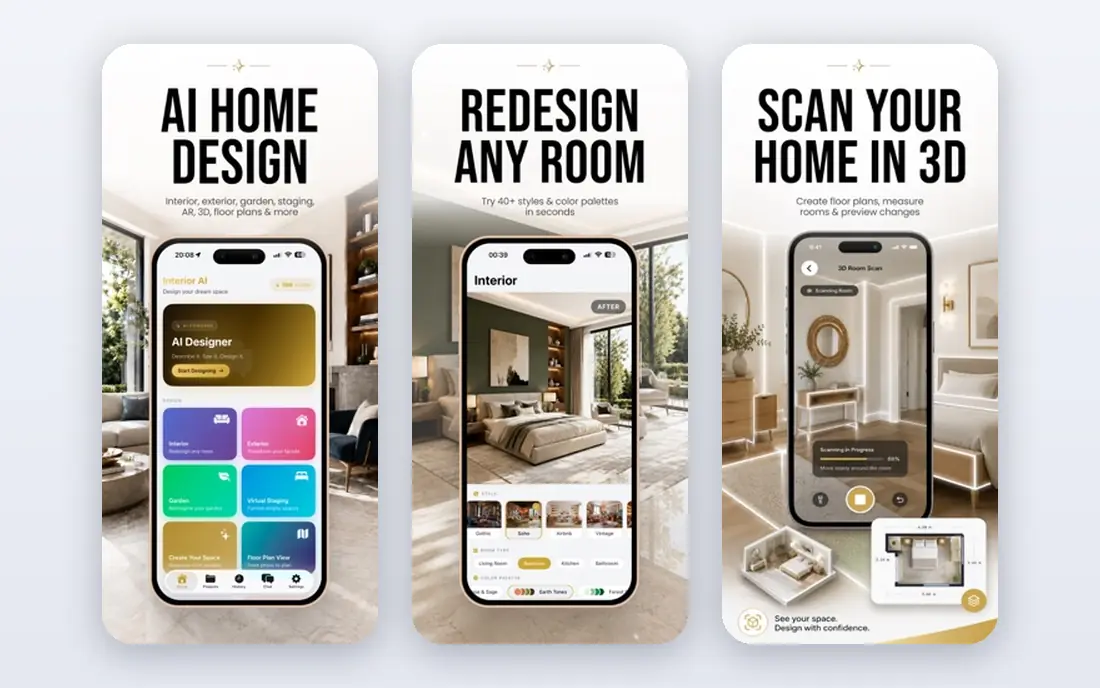
Interior AI is for users who want many photo restyles fast and are willing to pay for them. You upload a room photo, pick a style, and get restyled versions in seconds, with dozens of styles to compare. That speed suits real estate agents, landlords, and homeowners who need many ideas before a listing or a renovation.
Recent pricing removed a free tier, so you should budget for a subscription before you start. Virtual staging also sits on higher tiers, which raises the cost for agents who need that feature regularly. For readers weighing this option, the question is simple: does the strength above outweigh the limit, and does the price fit how often you will use it? If both answers are yes, it belongs on your shortlist.
- Many styles
- Fast photo restyling
- Virtual staging options on higher tiers
- No free tier in recent pricing
- Staging needs higher plans
RoomGPT suits anyone who wants a quick spark of inspiration from a single photo. Upload a photo, choose a style, and get a redesigned room in seconds. The interface is simple, and credit packs suit occasional users who do not want a monthly subscription for a one-off project.
The results show AI-generated furniture, not products you can buy directly, so you still need to source similar items yourself. Pricing can also be harder to see before sign-in, so check the current credit price before you buy a pack. For readers weighing this option, the question is simple: does the strength above outweigh the limit, and does the price fit how often you will use it? If both answers are yes, it belongs on your shortlist.
- Very fast photo restyles
- Simple interface
- Credit packs for occasional use
- Prices sit behind sign-in in some cases
- Results are AI furniture, not shoppable products
HomeDesigns AI is our pick for photo redesigns when style variety matters most. It covers a very wide range of styles, room types, and even exteriors, and some plans link renders to products you can shop. That makes it useful for homeowners who want to compare modern, farmhouse, coastal, and many other looks for the same room.
Credit limits shape the real cost. Free credits are limited, and heavy users will need a paid plan. Results are still AI ideas, so confirm furniture sizes and colors before you order anything based on a render. For readers weighing this option, the question is simple: does the strength above outweigh the limit, and does the price fit how often you will use it? If both answers are yes, it belongs on your shortlist.
- Very wide style range
- Interior and exterior redesigns
- Shoppable results on some plans
- Credit limits matter
- Best features need paid plans
REimagineHome suits agents and homeowners who need interiors, exteriors, and staging in one tool. One account can restyle a living room, redesign a garden, and stage an empty home for a listing. That breadth saves time for real estate work, where a single property needs many kinds of images.
Free designs are few, and real product discovery sits on higher plans. Budget users who only need a few interior ideas may find a cheaper photo tool enough, while agents who use all three features will get more value. For readers weighing this option, the question is simple: does the strength above outweigh the limit, and does the price fit how often you will use it? If both answers are yes, it belongs on your shortlist.
- Interior and exterior redesigns
- Virtual staging
- Real product discovery on higher plans
- Free designs are limited
- Real products need higher plans
Spacely AI suits real estate professionals who need clean, photorealistic listing images. Renders look polished and listing-ready, and the staging focus helps empty rooms feel lived in. Trial credits let you test quality on your own photos before you commit to a monthly plan.
Volume pricing is the catch. Agents with many listings will need a higher plan, and the furniture in renders is AI-generated, so buyers should not expect the exact pieces to be in the home. Use it for presentation, not as a furniture catalog. For readers weighing this option, the question is simple: does the strength above outweigh the limit, and does the price fit how often you will use it? If both answers are yes, it belongs on your shortlist.
- Photorealistic renders
- Staging focus
- Trial credits for testing
- Paid plans rise with volume
- Results are AI-generated, not real furniture
Collov AI is a practical staging tool for agents and landlords who list often. It restyles and stages rooms for listings, with styles that suit rental and sales photos. The workflow is simple: upload, pick a style, and download a staged image for a listing page.
Trial renders can carry watermarks, and clean, high-volume use needs a paid plan. Homeowners who only need one room idea may prefer a cheaper photo tool, while listing professionals will value the staging focus. For readers weighing this option, the question is simple: does the strength above outweigh the limit, and does the price fit how often you will use it? If both answers are yes, it belongs on your shortlist.
- Virtual staging focus
- Redesign styles
- Useful for listings
- Trial renders carry watermarks in some cases
- Paid plans needed for clean volume use
Foyr Neo is the professional pick when a client presentation must be precise. It offers detailed floor plans, 3D renders, and presentation tools that suit interior designers and studios. The catalog and lighting controls help you show a client a room that is close to the final design, not just a mood image.
Casual homeowners will find it heavy and pricey. The learning curve is real, and the subscription suits professionals who use it weekly. For a single room idea, a photo restyling app will be faster and cheaper. For readers weighing this option, the question is simple: does the strength above outweigh the limit, and does the price fit how often you will use it? If both answers are yes, it belongs on your shortlist.
- Detailed 3D floor plans and renders
- Large catalog
- Professional presentation tools
- Price and learning curve suit professionals, not casual users
How we picked these
We compared official pricing, feature, and AI pages, and we checked render limits, watermarks, and commercial-use terms where they affect value. We treated AI-generated furniture as inspiration, not as a shopping list, and we noted where a tool links to real products. We favored tools that state render counts and limits clearly, rather than hiding them behind sign-in.
How to choose an AI interior design app
Decide between a photo idea and a buildable plan
Photo tools such as Interior AI, RoomGPT, and HomeDesigns AI give fast style ideas. Planner 5D, Homestyler, and Foyr Neo give floor plans and 3D rooms you can measure and furnish. Pick the photo tool for inspiration and the planning tool for a renovation.
Check renders, watermarks, and commercial use
Free tiers often limit renders, add watermarks, or block commercial use. Agents and designers should check those terms before using a render in a listing or a client deck. Homeowners can often stay on a free or credit plan for a single project.
Treat renders as ideas, then verify before you buy
AI can change wall colors, furniture scale, and light in ways that look good but do not match real products. Measure your room, check furniture dimensions, and order samples for paint and fabric before you commit to a full purchase.
The best AI interior design tools differ in whether they give you a quick idea or a plan you can build from. We weighed style range, render quality, honest limits, and price above demo polish, because a beautiful render that hides its limits wastes time. Start with a free tier on your own room photo, compare two tools on the same room, and only then pay for the one that matches your project.
FAQ
What is the best AI interior design app?
Planner 5D is the best all-round pick for planning, while HomeDesigns AI is the best photo restyling pick for style variety. Interior AI suits fast volume restyling, and Foyr Neo suits professionals. Your project type decides the winner.
What is the best AI app for interior design free?
Planner 5D and Homestyler offer useful free tiers for 3D planning, while RoomGPT and HomeDesigns AI offer limited free credits for photo restyling. Free tiers usually cover a few renders or basic plans, so check limits before you start a large project.
Can AI design my room from a photo?
Yes, for style ideas. Upload a photo to Interior AI, RoomGPT, HomeDesigns AI, or REimagineHome and you get restyled versions in seconds. The results show AI furniture and colors, so measure your room and source similar real products before you buy.
What is the best AI tool for interior design for real estate?
Spacely AI and Collov AI suit virtual staging for listings, while REimagineHome covers interiors, exteriors, and staging in one tool. Check render limits, watermarks, and commercial-use terms before you use renders in a paid listing.
Is Planner 5D better than Homestyler?
Planner 5D is better for floor plans and AI floor plan recognition, while Homestyler is better for realistic 3D renders and a large model library at no initial cost. Both offer free tiers, so try the same room in both before you pay.