Best AI Apps for Landscape Design in 2026: 9 Apps Compared
Best AI app for landscape design picks for 2026: we compare 9 apps for yard concepts, plans and plant ideas, with prices, so you can plan your outdoor space.

- Editor's choice
 Neighborbrite
Fast photo-based yard concepts
Starts atFreeVisit neighborbrite.comFull review - Great alternative
 iScape
On-site design and proposals
Starts at$29.99 per monthVisit iscapeit.comFull review - Also consider
 Planner 5D
Measured 2D and 3D outdoor layouts
Starts at$59.99 per yearVisit planner5d.comFull review
TL;DR:
- Neighborbrite and Reimagine Home give the fastest photo-based concepts, with a free start and paid tiers for more control.
- iScape suits on-site design and client proposals, while Planner 5D suits measured 2D and 3D layouts.
- Yardzen offers a human-led design service, which suits larger projects that need a buildable plan.
- AI concepts are starting points, not construction plans, so check plants, levels, drainage and local rules before building.
Quick comparison
| Tool | Best for | Starts at | Free plan? | |
|---|---|---|---|---|
| Neighborbrite | Fast photo-based yard concepts | Free | Yes | Visit |
| iScape | On-site design and proposals | $29.99 per month | Yes | Visit |
| Planner 5D | Measured 2D and 3D outdoor layouts | $59.99 per year | Yes | Visit |
 Reimagine Home | Photo restyles for yards and exteriors | $14 per month | Free trial | Visit |
 Yardzen | Human-led outdoor design service | See website | No | Visit |
 GardenPlan by AI | AI garden plans and plant ideas | See website | Yes | Visit |
 DreamPlan | Simple home and garden design | See website | Yes | Visit |
 SketchUp | Flexible 3D modeling for outdoor spaces | Free | Yes | Visit |
 RoomSketcher | Easy floor and garden plans | See website | Yes | Visit |
The best AI apps for yard design
AI yard design apps fall into two groups: photo tools that restyle a picture of your yard, and planners that let you draw a measured layout in 2D or 3D. The nine apps below cover both, plus one human-led service for larger projects, so match the tool to whether you want quick ideas or a plan you can hand to a contractor.
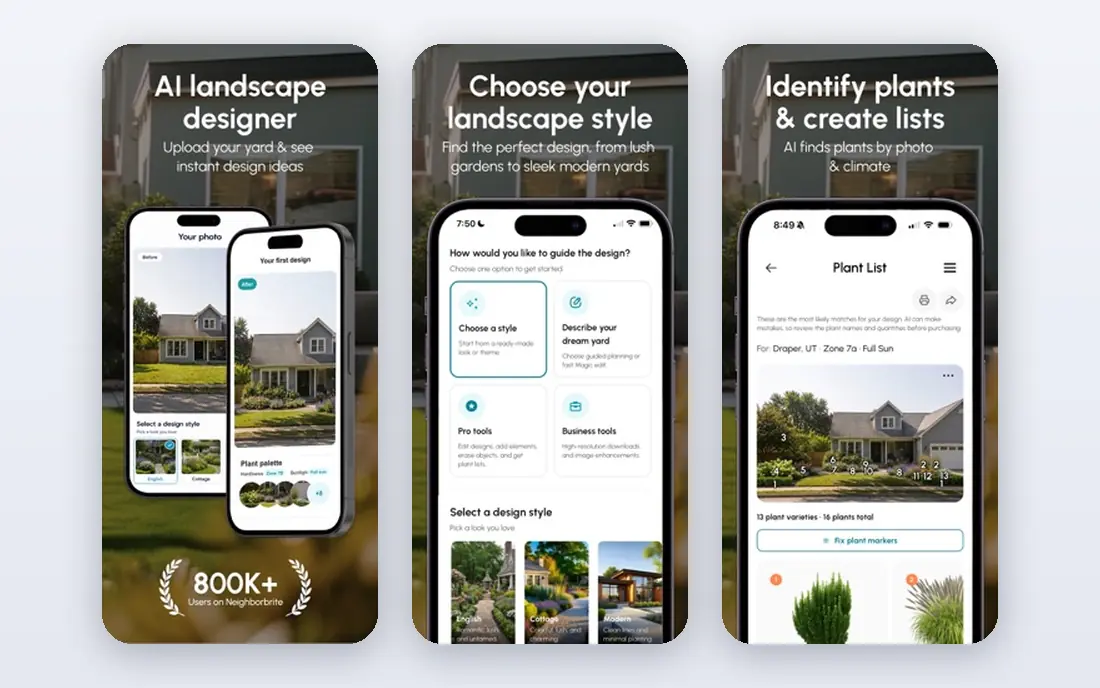
Neighborbrite is a fast way to see what your yard could look like. Upload a photo, pick a style, and the AI generates a concept, with plant suggestions checked against your location and climate. Paid tiers add editing tools for specific areas, plant identification and higher-resolution output, with Business at $49 per month and a pro tier at $149 per month.
The free tier is useful for comparing styles, but it limits generations and editing control. Treat the output as inspiration, then check each plant for your soil, light and local climate. If you want quick concepts to discuss with a partner or contractor, Neighborbrite is the easiest place to start.
- Fast photo concepts
- Location-based plant lists
- Editing tools on paid tiers
- Free tier limits generations
- High-resolution output sits in higher tiers

iScape lets you design on a photo of your own yard, placing plants, pavers and hardscape by hand, then preview the result in augmented reality on site. That control suits people who already know what they want and want to see it at scale, as well as pros who need a proposal tool on a phone. Pro costs $29.99 per month or $299.99 per year.
Manual placement is slower than one-click AI generation, and Android support is limited compared with iOS. The free plan allows a small number of saved designs. If you want a document a contractor can price, iScape's proposal and material tracking features give it an edge over pure concept tools.
- Photo-based design with AR preview
- Large plant and hardscape library
- Proposal tools for pros
- IOS-first with limited Android support
- Manual placement takes time

Planner 5D suits people who care about layout more than a fast photo restyle. Draw the site, add paths, seating, fences and planting zones, then inspect the arrangement in 2D or 3D. You can move a patio or narrow a bed without regenerating a whole image, which helps when comparing spatial options.
The free plan supports basic projects with a limited catalog, while Premium costs $59.99 per year and includes the AI design generator. The model is only as accurate as the dimensions you enter, so measure the site before you start. For planning patios, paths and planting zones, Planner 5D is the most practical planner here.
- Editable 2D and 3D layouts
- AI design generator on Premium
- Large catalog
- Needs accurate dimensions
- AI renders use separate allowances in some cases
Reimagine Home restyles photos of yards, exteriors and rooms, with a conversational design flow and options to place real products you can buy into the image. New users get a small number of free designs, with paid plans from $14 per month for 30 credits, rising to higher tiers for more credits. One design costs one credit, or two when it includes real products.
That credit model suits occasional projects, but regular users will need a higher tier. The output is a concept image, not a measured plan, so check boundaries, levels and plant suitability before building. If you want many style ideas from one photo, Reimagine Home is a strong, affordable choice.
- Fast photo restyles
- Real products placed in designs
- Batch processing for listings
- Trial limits designs
- Subscription needed for regular use
Yardzen is a design service rather than a pure app, which matters for larger projects. You share photos, measurements and goals, then a designer creates a plan with planting, hardscape and layout details, often with a 3D view. That human review catches issues AI tools miss, such as drainage, access and plant spacing.
The service costs more than a monthly app subscription, with pricing from around $295 in past listings, so check the current fee for your project size. Turnaround also takes longer than an instant AI concept. If you plan a full yard renovation and want a plan you can build from, Yardzen is worth the higher cost.
- Human designers review your project
- Buildable plans and plant lists
- Contractor matching in some areas
- Service fee is higher than app subscriptions
- Turnaround takes longer than AI concepts
GardenPlan by AI focuses on garden planning, with AI-generated layouts and plant ideas for home gardeners. The freemium model lets you test concepts before paying, with premium subscriptions reported in the $40 to $60 per year range for added features such as higher-resolution renders and more redesigns.
As with all AI garden tools, the plant suggestions need checking against your climate, soil and sun, since a pretty concept does not guarantee a plant will thrive. Use it for layout and planting ideas, then confirm choices with a local nursery or extension service. For garden beds and planting plans, it is a focused, low-cost option.
- Freemium plans for testing ideas
- Garden-focused plant suggestions
- Simple workflow
- Pricing and feature limits vary
- Concepts need local plant checks
DreamPlan from NCH Software offers simple 2D and 3D design for home and garden projects, with a free version for basic use. You can draw rooms, outdoor areas, decks and planting zones, then view the result in 3D. That simplicity suits beginners who want a basic plan without learning a complex modeling tool.
It lacks the AI generation depth of Neighborbrite or Reimagine Home, and the interface feels less polished than Planner 5D. Still, for a straightforward layout and a 3D view to share with family or a contractor, DreamPlan covers the basics at low cost. Check the current paid tiers if you need more features.
- Simple 2D and 3D design
- Home and garden projects in one tool
- Free version available
- Less polished than specialist design apps
- AI features are limited
SketchUp is a general 3D modeling tool that many designers use for outdoor spaces, decks, pergolas and planting layouts. The free web version suits personal projects, with a large library of models and extensions for more advanced work. You can build a precise 3D model from your own measurements, which helps for structures and levels.
The learning curve is steeper than Planner 5D or DreamPlan, and SketchUp does not generate AI concepts from a photo. It earns its place for users who want a precise, editable 3D model rather than a quick image. If you enjoy modeling and need accuracy for structures, SketchUp is the most flexible tool here.
- Free web version for personal use
- Flexible 3D modeling
- Large model library
- Learning curve is steeper
- AI design features are limited
RoomSketcher is known for floor plans, but it also handles outdoor areas, patios and garden layouts with drag-and-drop tools. You can draw a plan, furnish it, view it in 2D and 3D, and share it with family or a contractor. The free plan covers basic projects, with paid tiers for more features and higher-quality output.
Garden-specific features such as plant libraries and climate checks are thinner than in Neighborbrite or GardenPlan by AI. RoomSketcher suits people who already plan a home project and want the yard in the same plan. For a simple, shareable layout, it is easy to learn and quick to use.
- Easy drag-and-drop plans
- 2D and 3D views
- Good for sharing plans with others
- Garden features are less deep than specialist tools
- Paid tiers needed for full features
How we picked these
We compared official feature pages, pricing pages and public reviews, with weight on photo concept quality, measured planning, plant guidance, ease of use and pricing transparency. We favored tools that exist and work today, and we flagged where output is a concept rather than a buildable plan. Prices change, so check the vendor page before paying.
What to check before you build
Start with good photos and real measurements. For photo tools, shoot from eye level in daylight, include the full boundary, and check that fences, trees and slopes did not move in the generated image. For planners, measure the site, note sun, shade, drainage and access, and check local rules for fences, setbacks and trees.
Check every plant against your climate zone, soil and light, since AI tools can suggest plants that will not thrive where you live. A local nursery or extension service can confirm choices quickly. For structural work, drainage, retaining walls or electrical work, get a professional review before building, since an AI concept does not replace engineering or local code checks.
FAQ
What is the best AI app for yard design for beginners?
Neighborbrite is the easiest start for photo-based concepts, while Planner 5D suits beginners who want a measured layout. Try a free tier first, and use the concept to discuss ideas before spending on plants or materials.
Can AI yard design apps replace a professional designer?
AI tools give fast concepts and layouts, but they do not replace a designer for complex sites, drainage, levels or structural work. Yardzen offers a human-led service for larger projects, and a local designer can review any AI plan before building.
Are AI yard design apps free?
Several apps offer free tiers, including Neighborbrite, iScape, Planner 5D, GardenPlan by AI, DreamPlan, SketchUp and RoomSketcher, with paid tiers for more generations, editing and output quality. Check free limits before starting a large project.
How accurate are AI yard design concepts?
Photo concepts can change boundaries, slopes and existing features, so compare the output with your original photo carefully. Measured planners are more accurate when you enter correct dimensions, but they still need a site check before construction.
What should I check before planting from an AI plan?
Check each plant for your climate zone, soil type, sun exposure and mature size, and confirm water needs and local rules. A local nursery or extension service can verify choices, and a professional can advise on drainage and structural elements.