9 Best Accounting Software for Data Capture in 2026
We compared the best accounting software for data capture, from receipt OCR and invoice line items to bank feeds and auto categorisation for small firms.

- Editor's choice
 Dext
Accounting firms with many clients
Starts atSee websiteVisit dext.comFull review - Great alternative
 Hubdoc
Xero users wanting automated fetching
Starts atSee websiteVisit hubdoc.comFull review - Also consider
 QuickBooks Online
Small businesses needing full accounting plus capture
Starts atSee websiteVisit quickbooks.intuit.comFull review
TL;DR:
- Dext and DocuClipper lead for firms that process many client documents, while Hubdoc suits Xero users who want automated fetching at a low cost.
- QuickBooks and Xero include useful built in capture, but specialist tools capture more line item detail from complex invoices.
- Line item capture matters more than header capture for inventory, job costing and bill entry, so check that detail before you buy.
- Automatic categorisation speeds up routine bookkeeping, but human review is still needed for new vendors and unusual documents.
- Price models differ sharply, from per client and per page pricing to bundled plans, so compare cost at your real monthly volume.
Quick comparison
| Tool | Best for | Starts at | Free plan? | |
|---|---|---|---|---|
| Dext | Accounting firms with many clients | See website | Free trial | Visit |
| Hubdoc | Xero users wanting automated fetching | See website | No | Visit |
| QuickBooks Online | Small businesses needing full accounting plus capture | See website | Free trial | Visit |
 Xero | Small businesses with built in capture and Hubdoc | See website | Free trial | Visit |
 DocuClipper | Bulk invoice, receipt and statement capture | $29 per month | Free trial | Visit |
 AutoEntry | Credit based capture for variable volume | See website | Free trial | Visit |
 Sage Accounting | Businesses already using Sage products | See website | Free trial | Visit |
 Expensify | Employee expense capture and reimbursement | See website | Yes | Visit |
 Rossum | High volume enterprise accounts payable capture | See website | Free trial | Visit |
The best accounting software for data capture
We compared official feature pages, pricing pages, app listings and public reviews for tools that capture data from receipts, invoices, bills and bank statements and move it into accounting records. The list below mixes full accounting platforms with specialist capture tools, since the best fit depends on whether you need a ledger, a capture layer, or both.

Dext, formerly Receipt Bank, is built for firms that collect documents from many clients. Each client gets a separate workspace, staff can capture receipts by mobile app or email, and extracted data flows into the ledger with vendor, date, total and tax fields. That structure reduces inbox chasing and keeps client documents in one place. The cost model is the main watch point. Per client pricing suits a small firm, but a growing practice should model the total at its real client count, not just the entry price. Dext also handles header fields well and some line items, but unusual layouts still need a human check before posting. For a firm that lives in Xero or QuickBooks, Dext is a strong default capture layer.
- Multi client organisation
- Mobile receipt capture
- Integrations with QuickBooks, Xero and other ledgers
- Per client pricing can rise with firm size
- Complex invoices still need review

Hubdoc does one job well: it fetches bills, receipts and statements from connected vendors and banks, then files each document by vendor name. Users can also forward receipts by email or snap them with a phone app. For a Xero firm, the fact that Hubdoc is included with many Xero plans makes it a low cost way to cut manual downloads. The limit is extraction depth. Hubdoc reads vendor, date, total and tax in most cases, but it struggles with complex multi line invoices where line item detail matters. If your bookkeeping needs line items for inventory or job costing, pair Hubdoc with a specialist tool or choose Dext or DocuClipper instead. For simple receipt and statement capture, Hubdoc is hard to beat on value.
- Automatic fetching from vendors and banks
- Simple filing by vendor
- Included with many Xero plans
- Header level capture only in most cases
- Weaker on complex multi line invoices
QuickBooks Online
Best for: Small businesses needing full accounting plus capture
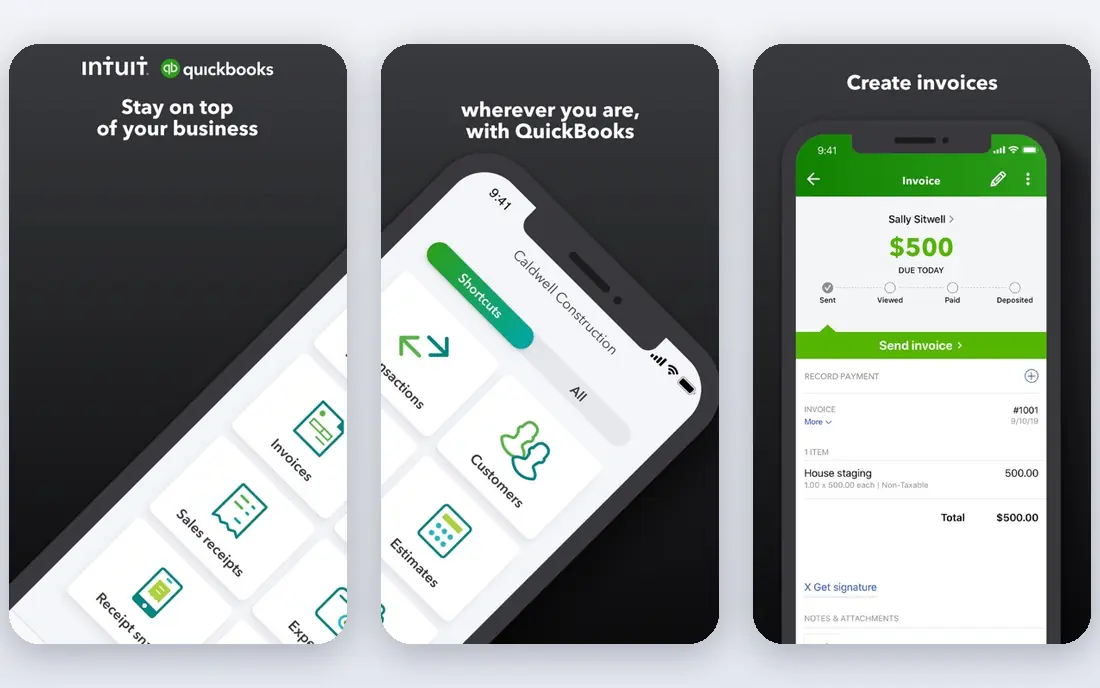
QuickBooks Online suits a small business that wants one system for invoicing, expenses, payroll and reports, with capture included. The mobile app captures receipts and attaches them to expense entries, bank feeds bring in transactions automatically, and category suggestions speed up reconciliation. For a business with simple documents, that built in capture may be enough on its own. The drawback is depth. Compared with Dext or DocuClipper, QuickBooks capture is less detailed on complex invoices and bulk batches. Firms that process hundreds of documents a month will still benefit from a specialist capture layer feeding into QuickBooks. For an owner operator with modest volume, QuickBooks alone keeps the workflow simple.
- Built in receipt capture
- Automatic bank feeds
- AI category suggestions
- Broad app integrations
- Capture is a side feature, not a specialist tool
- Costs rise as features and users grow
Xero is a strong ledger choice for small businesses, and its link to Hubdoc gives it a practical capture story. Receipts captured through Hubdoc flow into Xero, bank feeds support reconciliation, and the app marketplace adds specialist capture tools where needed. The interface is clear, and multi currency and project features suit growing service businesses. Built in capture alone is basic, so businesses with complex invoices should add Dext, AutoEntry or DocuClipper rather than relying on Xero alone. Pricing also rises with tier, so check which features sit in the plan you need. For a Xero based business that wants a tidy ledger plus low cost fetching, this combination is a sensible starting point.
- Clean ledger and bank reconciliation
- Hubdoc included in many plans
- Strong app marketplace
- Built in capture is basic
- Higher tiers needed for some features
DocuClipper stands out for line item detail. Where many capture tools read only the header total, DocuClipper captures description, quantity and price per line, and checks totals against line sums. That detail matters for inventory, cost tracking and bill entry, and it reduces retyping for firms that handle varied vendor layouts without templates. Pricing is page based with unlimited users on published plans, which suits a firm where several staff share the workload. Bulk upload by drag and drop helps with large batches, and direct posting to QuickBooks or Xero avoids a manual import step. For accountants who process bank statements and invoices in volume, DocuClipper is one of the strongest specialist picks.
- Full line item capture
- Template free extraction
- Direct push to QuickBooks and Xero
- Excel and CSV export
- Page based pricing needs volume planning
- Approval workflow is simpler than full AP suites
AutoEntry, now part of Sage, uses a credit model that suits firms with uneven monthly volume. You buy credits and spend them per document, which avoids paying a high flat fee in a quiet month. The tool captures invoices, receipts and statements, with line item detail on many invoice types, and posts to QuickBooks, Xero and Sage. The credit system is also the drawback, since new users need to learn how many credits each document type uses. Model a typical month, including statement pages and complex invoices, before choosing a credit pack. For a firm with seasonal peaks, AutoEntry offers flexibility that flat per client pricing does not.
- Line item capture
- Credit system suits uneven months
- Integrations with QuickBooks, Xero and Sage
- Credit system can confuse new users
- Costs vary with document type and volume
Sage Accounting suits businesses that already run Sage payroll, stock or practice tools, since data stays in one family of products. Bank feeds, invoicing and reporting are integrated, and AutoEntry provides a capture route for receipts and invoices. That combination works well for firms that value a single vendor relationship. Capture is not as deep as a standalone specialist tool unless AutoEntry is added, so check the plan and add on costs together. The interface is functional rather than modern, which may matter for teams that value a polished mobile experience. For a Sage household, the integrated route is usually simpler than mixing vendors.
- Integrated ledger, invoicing and bank feeds
- AutoEntry link for capture
- Established support network
- Capture depth depends on plan and add on
- Interface feels dated in places
Expensify is the best fit when the capture problem is employees submitting expenses, rather than a firm processing client invoices. Staff snap receipts, SmartScan reads the merchant, date and total, and expenses flow into reports with approvals and reimbursement. Integrations with QuickBooks, Xero and other ledgers keep the ledger in sync. For bulk AP work, Expensify is less suitable, since it captures header fields and processes one receipt at a time in the mobile flow. Firms should choose Dext or DocuClipper for that job. For a business with travelling staff, Expensify reduces chasing, lost receipts and manual report building.
- SmartScan receipt capture
- Expense reports and approvals
- Integrations with QuickBooks, Xero and other ledgers
- Built for employee expenses, not bulk AP capture
- Header fields only in most cases
Rossum targets teams that process invoices at scale, where manual entry and template maintenance become a bottleneck. The platform extracts data from varied layouts without per vendor templates, validates fields against rules, and routes documents for approval before posting to an ERP or accounting system. That workflow suits shared service centres and large AP teams. The trade off is scale and cost. Rossum is priced and set up for enterprise volume, with implementation and integration work that a small business does not need. For a large AP team, that investment can pay back through fewer errors and faster cycle times. For a small firm, Dext, Hubdoc or DocuClipper will be simpler and cheaper.
- AI extraction for varied layouts
- Validation and approval workflows
- API and ERP integrations
- Enterprise pricing and setup
- More than a small business needs
How we picked these
We compared official feature pages, pricing pages, app listings, privacy policies and public reviews for tools still offered in October 2026. We looked for clear capture features, such as OCR, vendor fetching, bank feeds or line item extraction, plus a working route into a ledger, whether by native integration, API or CSV export. We favoured tools with a trial or free tier where possible, so readers can test extraction on their own documents. We did not claim hands on testing that did not happen. Our notes reflect documented features and consistent patterns in public reviews, including where tools capture header fields only. Prices and credit rates change, so confirm current pricing on the vendor page at your real monthly volume.
Buying guide for data capture tools
Match capture depth to your documents
Start with a sample of your hardest documents, not your easiest ones. If you handle simple retail receipts, header capture is enough. If you handle multi line supplier invoices, inventory bills or bank statements, you need line item capture and statement conversion, which points to DocuClipper, AutoEntry or Rossum.
Check the route into your ledger
A capture tool that exports only CSV adds a manual import step, while native posting to QuickBooks or Xero saves time and reduces errors. Confirm the integration supports your ledger edition and that extracted fields map to the right vendor, account and tax codes before you commit.
Model total cost at real volume
Compare per client, per page, per credit and bundled pricing at your actual monthly document count. A low entry price can become expensive at scale, while a higher flat price can be cheaper for a busy firm. Run a one month trial with real documents and count the documents that still need manual correction.
FAQ
Which accounting software captures data best for a firm?
Dext is the strongest firm pick for multi client capture, while DocuClipper leads on line item detail for bulk invoices. Hubdoc is the best low cost option for Xero firms with simple documents, and Rossum leads for enterprise AP volume.
Is Hubdoc free?
Hubdoc is included with many Xero plans, so Xero subscribers often get it at no extra charge. Standalone pricing and plan inclusion vary, so check the current Xero plan page for your region before assuming it is included.
Can OCR replace manual data entry completely?
For standard invoices, clear receipts and digital statements, modern OCR removes most manual entry, but human review is still needed for complex layouts, new vendors and unusual tax treatment. Treat OCR as extraction plus validation, not as fully automatic posting.
What is the difference between header capture and line item capture?
Header capture reads vendor, date, total and tax from the top of a document. Line item capture also reads each product or service line, with quantity and price, which matters for inventory, job costing and detailed bill entry.
Do I need a specialist tool if I use QuickBooks or Xero?
Not always. Built in capture suits simple, low volume work. A specialist tool becomes worthwhile when volume is high, layouts vary widely, or line item detail is needed for reporting and stock control.
How should I test a capture tool?
Upload a sample set that includes your hardest invoices, a bank statement and a faded receipt. Check field accuracy, line item completeness, ledger mapping and how long correction takes, since correction time is the real cost after purchase.